

If you’re building a WordPress website in 2025, chances are you’ve already heard about Elementor. Known as one of the most powerful drag-and-drop page builders, Elementor has become the go-to solution for millions of website owners worldwide. But is it still the best option today? In this Elementor Review, we’ll take a deep dive into its features, pricing, performance, pros, cons, and even alternatives—so you can decide whether it’s the right tool for your website.
Elementor isn’t just another page builder; it has reshaped how people design WordPress websites. Launched in 2016, it quickly became popular for its no-code visual editing experience. As of 2025, Elementor powers over 12 million websites globally, making it one of the most widely used WordPress plugins. According to WordPress.org, it has more than 5 million active installations, maintaining a consistent 4.7-star rating from users.

In fact, surveys show that 47% of WordPress professionals use Elementor as their primary design tool, and it holds nearly 20% of the total market share among WordPress page builders. Its popularity stems from the ability to design pixel-perfect websites without touching a single line of code—something that appeals to both beginners and professional developers.
But with increasing competition from other page builders and WordPress’s own Block Editor (Gutenberg) improving rapidly, many website owners are now asking: Does Elementor still hold the crown in 2025? Or should you consider alternatives that may offer faster performance or lower costs?
Quick Links
What is Elementor?
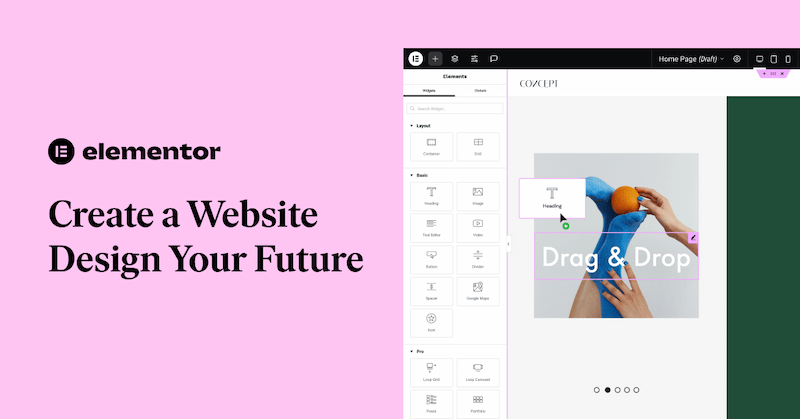
Elementor is a WordPress page builder plugin that allows you to create stunning websites without coding. Launched in 2016, it quickly gained popularity due to its easy drag-and-drop interface, real-time design preview, and rich library of pre-built templates.
Whether you’re a blogger, small business owner, or a full-fledged web agency, Elementor simplifies the design process, helping you build professional websites faster.
What’s New in Elementor 2025?
The world of website design evolves quickly, and Elementor continues to keep up. Here’s what’s new in Elementor 2025:
1. AI Website Builder
Elementor’s new AI Website Builder generates layouts, text, and design ideas with simple prompts. It can suggest SEO-friendly headings, page structures, and even copy—saving hours of manual work.
This feature is especially useful for beginners who want professional results quickly, while still giving pros a strong starting point to refine.
2. Performance Boosts
The 2025 update focuses on faster load times with optimized code and lighter CSS. Sites now load up to 25–30% quicker, improving Core Web Vitals and boosting SEO rankings.
Better performance not only helps with user experience but also directly supports higher conversion rates and longer visitor engagement.
3. Advanced Loop Builder
With the Loop Builder, you can design custom blog feeds, product grids, and portfolio layouts—without coding. It gives full control over how dynamic content appears across your site.
This opens the door for unique, branded designs that stand out from standard WordPress templates.
4. Flexbox & Grid Containers
New Flexbox and Grid containers make responsive design easier and cleaner. They reduce code bloat and allow complex layouts with better performance.
Designers gain more freedom with precise alignment, spacing, and mobile responsiveness.
5. Global Style Presets
Maintain brand consistency by setting global typography, colors, and spacing. Any change updates across the entire site instantly—ideal for agencies and large projects.
This also makes client handovers easier since style changes don’t require editing multiple pages.
6. New WooCommerce Widgets
Elementor adds advanced WooCommerce widgets for custom product pages, streamlined checkout, and dynamic pricing. These tools improve both design flexibility and conversions.
Shop owners can now create unique product displays and smooth checkout flows that reduce cart abandonment.
What Makes Elementor Stand Out
Here’s a detailed breakdown of the core features of Elementor that make it a leading WordPress page builder in 2025:
1. Drag-and-Drop Editor
Elementor’s drag-and-drop editor is its signature feature, making web design accessible to everyone. You don’t need coding skills—simply drag elements like text, images, buttons, and forms onto the canvas.
The real-time editing system means you see changes instantly, without refreshing or switching between back-end and front-end views. You can also customize spacing, padding, margins, and even advanced motion effects with just a few clicks.
This speed and flexibility are why beginners love Elementor, while professionals use it for rapid prototyping and client work.
2. Responsive Design Controls
A modern website must work flawlessly on all devices, and Elementor delivers with responsive design controls. You can preview and edit designs for mobile, tablet, and desktop directly inside the editor, ensuring layouts look perfect everywhere.
Custom breakpoints allow fine-tuned control for different screen sizes beyond the defaults, which is a major advantage over many other page builders.
3. Pre-Built Templates & Blocks
Elementor’s library offers 300+ pre-designed templates and blocks, covering everything from landing pages to full business websites. You can import these with one click, then customize them to match your brand—perfect for speeding up projects.
The newer website kits include complete site designs with multiple pages, headers, and footers, saving hours of work.
4. Theme Builder
With Elementor’s Theme Builder, you’re no longer limited by your WordPress theme’s design restrictions. You can create custom headers, footers, single post templates, archive layouts, and even 404 pages—all visually.
Dynamic content integration means you can pull in data from WordPress fields, ACF, or WooCommerce, and design templates that apply site-wide.
5. WooCommerce Builder
Elementor includes a dedicated WooCommerce Builder, making it one of the most powerful tools for online stores. It comes with specialized widgets like product title, price, add-to-cart, product image gallery, and checkout customization.
Instead of relying on WooCommerce’s default, rigid layouts, you can design unique shopping experiences that reflect your brand identity.
6. Popup Builder
The built-in Popup Builder allows you to create marketing-focused elements like email opt-ins, promotions, discount banners, and announcements.
It includes advanced targeting rules—for example, show a pop-up after scrolling 50%, exiting the page, or when a user visits a specific URL.
7. Integrations
Elementor works seamlessly with popular marketing and CRM tools such as Mailchimp, HubSpot, ActiveCampaign, ConvertKit, and Zapier.
These integrations enable automation, email marketing, and lead capture directly from your site.
8. Global Design Settings
Elementor’s Global Design Settings help you maintain consistency across your entire website.
You can set global typography (fonts, sizes, line spacing), colors (brand palettes), and layout structures once and apply them site-wide.
Elementor Free vs Pro (2025 Edition)
| Feature | Elementor Free | Elementor Pro |
|---|---|---|
| Drag-and-drop editor | Yes | Yes |
| Basic widgets | Yes | Yes |
| Templates library | Limited | Full access |
| Theme Builder | No | Yes |
| WooCommerce Builder | No | Yes |
| Popup Builder | No | Yes |
| Custom CSS | No | Yes |
| Price | Free | From $59/year |
If you’re just starting, the free version works well. But for serious businesses, Elementor Pro unlocks everything you need.
How Much Does Elementor Cost in 2025?
Elementor offers flexible pricing plans on a yearly subscription model, designed to fit different types of users—from individuals building a single site to large agencies managing hundreds of projects.
1. Essential Plan – $59/year (1 site)
Perfect for freelancers, bloggers, or small business owners who only need Elementor Pro on one website. It includes access to the full Pro feature set, including the Theme Builder, WooCommerce Builder, and Popup Builder.
2. Expert Plan – $199/year (25 sites)
A great choice for web designers, developers, or small agencies handling multiple clients. With support for up to 25 websites, it strikes a balance between affordability and scalability.
3. Agency Plan – $399/year (1000 sites)
Best for established agencies or enterprises that manage dozens—or even hundreds—of websites. It unlocks Elementor Pro for up to 1,000 sites, making it highly cost-effective at scale.
When compared to competitors like Divi ($89/year for unlimited sites) or Beaver Builder ($99/year for unlimited sites), Elementor may look slightly pricier for multi-site usage. However, its advanced features, frequent updates, built-in WooCommerce tools, and AI-powered website builder make it a strong value proposition in 2025.
How Fast Is Elementor in 2025?
One of the most common concerns about page builders is website speed, and Elementor has historically faced criticism for bloated code and slower load times. However, in 2025, Elementor has made significant strides to address these issues and deliver a much faster, more optimized experience.
1. Clean, Lightweight Code Output
The latest versions of Elementor generate cleaner HTML and reduce unnecessary code bloat. This results in lighter pages that load more efficiently across devices.
2. Faster CSS Loading & Reduced DOM Size
Elementor now minimizes CSS files and reduces DOM size by eliminating redundant wrappers. This leads to improved rendering speeds, especially on mobile devices where performance matters most.
3. Optimized for Core Web Vitals
With Google’s ranking signals increasingly tied to performance, Elementor has optimized its structure to perform better in Core Web Vitals tests like Largest Contentful Paint (LCP), First Input Delay (FID), and Cumulative Layout Shift (CLS). Websites built with Elementor now stand a stronger chance of ranking well in search results.
4. Compatibility with Performance Plugins
Elementor works seamlessly with caching and optimization plugins such as WP Rocket, W3 Total Cache, and Autoptimize. Combined with a reliable hosting setup, these enhancements ensure your site performs at a professional standard.
While performance still depends heavily on hosting quality, CDN integration, and overall optimization, Elementor has reached a point where it no longer lags behind competitors like Divi or Beaver Builder.
Pros and Cons of Elementor
Pros of Elementor
1. Intuitive Drag-and-Drop Interface — Elementor’s editor is highly beginner-friendly. You don’t need coding knowledge—just drag, drop, and customize elements visually. This makes it easy for new users and speeds up the workflow for experienced designers.
2. Huge Template & Widget Library — With over 300 templates and 100+ widgets, Elementor offers pre-built designs for almost every industry. From landing pages to eCommerce stores, you can get started quickly without designing everything from scratch.
3. Robust WooCommerce & Theme Builder — Elementor gives you full control over your website’s design, including WooCommerce product pages, headers, footers, and archive layouts. This flexibility eliminates the limitations of traditional WordPress themes.
4. Active Community & Regular Updates — With a massive community of millions of users, Elementor has extensive tutorials, forums, and third-party add-ons. The development team also releases frequent updates, ensuring compatibility and introducing new features.
5. Works for Beginners and Professionals — Beginners benefit from the simplicity of drag-and-drop editing, while advanced users can leverage custom CSS, APIs, and integrations. It’s versatile enough for hobby bloggers and professional developers alike.
Cons of Elementor
1. Can Be Heavy if Not Optimized Properly — While performance has improved in 2025, Elementor sites can still get bloated if not optimized with caching, CDNs, and proper hosting.
2. Too Many Plugins Can Slow Performance — Many users rely on third-party Elementor add-ons. While these extend functionality, installing too many can slow down a website.
3. Pricing May Be High for Multi-Site Freelancers — At $199 for 25 sites, Elementor Pro can be costly for freelancers managing many small projects, especially compared to Divi’s unlimited site license.
Overall, Elementor offers excellent flexibility but does require mindful optimization to maintain speed and cost-effectiveness.
Who Should Use Elementor?
Elementor isn’t for everyone, but it’s perfect for a wide range of users who want both design freedom and ease of use.
1. Bloggers – Those who want visually appealing blog layouts and custom post templates without coding. Elementor makes it simple to design a professional blog with unique styles.
2. Small Businesses – Local shops, consultants, and startups can quickly build an online presence with Elementor’s templates and integrations, even without hiring a developer.
3. Freelancers & Agencies – Web designers handling multiple clients benefit from Elementor’s scalability, template kits, and global style settings, which speed up project delivery.
4. eCommerce Stores – WooCommerce users can design fully customized product, cart, and checkout pages that go far beyond the default WooCommerce look.
In short, Elementor is ideal for anyone who wants control, flexibility, and speed without relying on code. Whether you’re a beginner building your first site or a pro designing for clients, Elementor offers the right balance of power and simplicity.
Elementor Alternatives in 2025
While Elementor is excellent, you may also consider:
- Divi Builder – Lifetime pricing, strong design flexibility.
- Beaver Builder – Lightweight and stable.
- Gutenberg (Block Editor) – Free and built into WordPress.
Still, Elementor stands out for ease of use and constant updates.

Is Elementor Worth It in 2025?
After testing its features, updates, and performance, this Elementor Review shows that it remains one of the best page builders for WordPress in 2025. It combines power, flexibility, and ease of use, making it suitable for everyone—from beginners to web agencies.
If you’re serious about web design, Elementor Pro is definitely worth the investment.
FAQs
-
Q1. Is Elementor free in 2025?
- Yes, Elementor still offers a free version with essential features.
-
Q2. Does Elementor slow down websites?
- Not if optimized properly with good hosting and caching plugins.
-
Q3. Can I use Elementor with any theme?
- Yes, it works with most WordPress themes, though Elementor-compatible themes like BuddyX or Astra work best.
-
Q4. Is Elementor better than Divi in 2025?
- Elementor is more beginner-friendly, while Divi offers lifetime pricing. Both are strong choices.
-
Q5. Should I upgrade to Elementor Pro?
- Yes, if you want advanced design freedom, WooCommerce tools, and professional templates.
Interesting Reads
15 Best Hour Tracking Software in 2025
BuddyBoss Review: Transforming WordPress into a Social Network in 2025
15 Best Tools to Understand What Is Team Software Process in 2025

