How to Use Advanced Product Fields to Add Custom Product Options in WooCommerce


Running a WooCommerce store often means catering to customers who want more than just a standard product. Shoppers today expect personalization—whether it’s adding a name to a t-shirt, choosing toppings for a pizza, or selecting a special gift wrap. They also value flexibility in how they configure and interact with products, because it gives them a sense of ownership over their purchase.
Unfortunately, WooCommerce’s default functionality is limited when it comes to offering these kinds of extra product options. That’s where the Advanced Product Fields (Product Addons) for WooCommerce plugin comes in, providing a practical, modern way to meet those expectations while boosting sales and customer satisfaction.
Why You Need to Add Custom Product Options in WooCommerce
By default, WooCommerce allows you to create product variations through attributes like size, color, or material. While useful, this approach is restrictive for businesses selling customizable or made-to-order products.
For example, a custom t-shirt store may want buyers to enter their name or upload a logo, while a pizza restaurant might give customers the freedom to choose toppings, crust types, and sauces. Similarly, a gift shop may want to offer engraving, gift wrapping, or personalized messages to make each purchase feel unique.
Without advanced product fields, creating these customizations is either impossible or overly complicated. That’s where the Advanced Product Fields for WooCommerce plugin makes the process simple and user-friendly.
Introducing Advanced Product Fields for WooCommerce
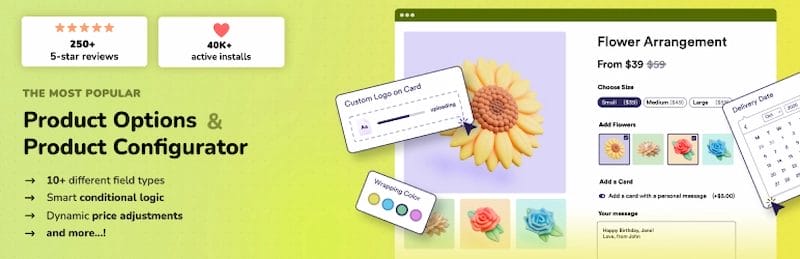
Advanced Product Fields (Product Addons) for WooCommerce is a powerful plugin that enables you to add extra form fields to your product pages. Think of it as giving customers the ability to interact with products in a more personal way.
Setting up custom product options in WooCommerce is simple with the Advanced Product Fields plugin. By following a few easy steps, you can add extra fields such as text inputs, dropdowns, and checkboxes to your product pages, giving customers more ways to personalize their orders.
These options can also be linked to dynamic pricing, ensuring accurate costs based on the customer’s selections. Once configured, the fields can be applied to specific products or categories, and you’ll see the chosen options reflected seamlessly at checkout and in the order details.
Key Features of Advanced Product Fields
Free Version Highlights
- Beautiful backend builder – clean, intuitive, and similar to ACF.
- 10 field types including text, number, dropdown, checkboxes, radio buttons, true/false, and more.
- Conditional logic to display fields based on other selections.
- Dynamic pricing – add flat fees or price adjustments based on field values.
- Supports simple and variable products.
- Optimized for speed with minimal impact on performance.
- Multilingual support (English, French, German, Spanish, Dutch).
Premium Features
- Additional field types: file upload, color swatches, date pickers, calculation fields, image swatches with quantities, and more.
- Complex pricing rules: formula-based, percentage-based, or character-length-based pricing.
- Integration with page builders like Elementor, Oxygen, Divi, and Beaver Builder.
- Advanced options for product configurators (like pizza builders, donation products, or multi-step forms).
- Repeatable fields and quantity-based options.
- Multi-currency and multilingual integrations (with WPML, Polylang, and WOOCS).
When to Use Custom Product Options
If you’re wondering whether to use WooCommerce’s built-in variations or Advanced Product Fields, the distinction is fairly simple. WooCommerce variations are best suited for straightforward differences such as size or color, where customers only need to pick from a few predefined attributes. On the other hand, Advanced Product Fields shines when your product requires deeper personalization, such as file uploads, conditional selections, or custom pricing rules that go beyond the basics.
Example Use Cases:
- Personalized jewelry with engraved text.
- Custom cakes with selectable flavors, icing, and decorations.
- Furniture stores offering custom measurements.
- Gift shops with gift wrapping and message options.
- Print-on-demand shops with file upload fields.
Step-by-Step Guide: How to Add Custom Product Options in WooCommerce
Follow these steps to add extra product fields—like text inputs, checkboxes, and file uploads—using the Advanced Product Fields plugin for WooCommerce.
This quick guide helps you configure pricing, apply fields to specific products or categories, and verify selections on the cart, checkout, and order pages.
Step 1: Install the Plugin

- Go to your WordPress Dashboard.
- Navigate to Plugins > Add New.
- Search for “Advanced Product Fields for WooCommerce”.
- Click Install Now, then Activate.
Step 2: Create a Field Group
- In your WordPress dashboard, go to WooCommerce > Product Fields.
- Click Add New to create a new field group.
- Give your group a name (e.g., “T-Shirt Customization Fields”).
Step 3: Add Fields
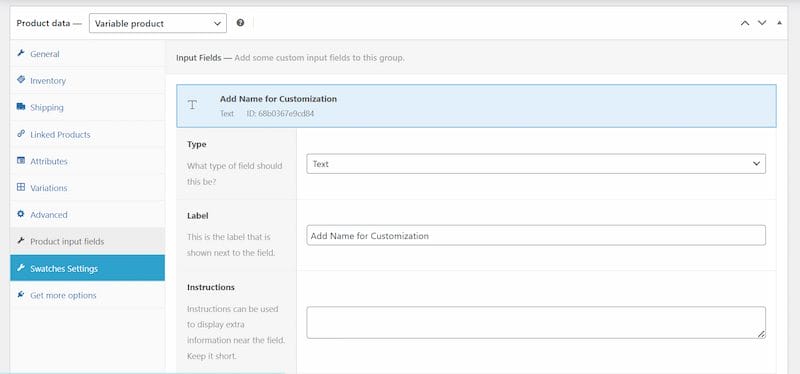
- Click Add Field.
- Choose your field type (text, number, checkbox, etc.).
- Examples:
- Add a Text Field for customers to enter their name.
- Add a Checkbox field for “Gift Wrapping”.
- Add a Select Dropdown for pizza toppings.
Step 4: Configure Pricing (Optional)
- If certain options should increase the price, configure pricing under the field settings.
- Example: Add $5 for “Gift Wrapping”.
- Example: Add $2 per pizza topping.
Step 5: Apply Field Group to Products
- Under Location Rules, select where the field group should appear.
- Options include all products, specific categories, or selected products.
Step 6: Test Your Product Page
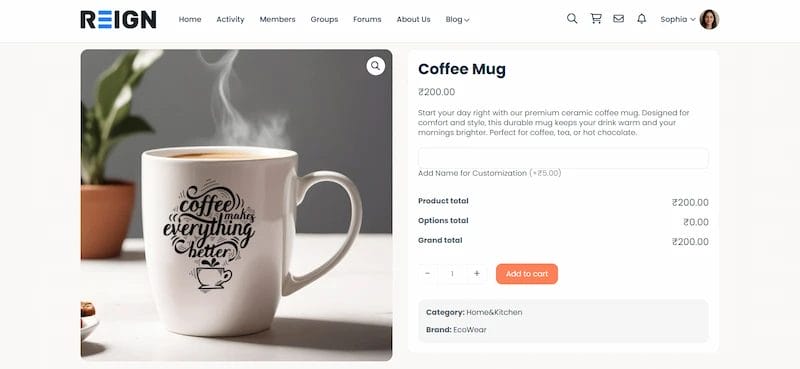
- Visit the frontend product page.
- Fill out the custom fields.
- Add the product to the cart and verify that options appear correctly in the cart, checkout, and order details.
Pro Tips for Using Advanced Product Fields
- Keep it simple: Avoid overwhelming customers with too many options. Stick to the essentials.
- Use conditional logic: Only display relevant fields to streamline the shopping experience.
- Make pricing clear: Display price adjustments clearly so customers know what they’re paying for.
- Mobile test: Ensure fields display properly on all devices.
- Track performance: Use Google Analytics or WooCommerce reports to see if custom options increase sales.
Advantages of Using This Plugin
- Increased sales potential – Customers are more likely to buy when they can personalize products.
- Customer satisfaction – Buyers feel special when products are tailored to them.
- Operational efficiency – Custom options are automatically stored in the order, saving time on manual input.
- Lightweight and fast – Unlike older plugins, this one doesn’t slow down your store.
Limitations of the Free Version
- Doesn’t work with some AJAX-based themes.
- Limited to flat fee pricing (no percentage or advanced pricing).
- Doesn’t support variation-specific fields.
- Limited integration with third-party plugins.
For businesses with complex needs, upgrading to premium is worth the investment.
Why Choose Advanced Product Fields Over Competitors?
There are other product addon plugins available, but Advanced Product Fields stands out because it brings together performance, simplicity, and trust in one package. It is modern, lightweight, and optimized for speed, while the backend is intuitive and modeled after ACF, so you can create fields without a steep learning curve.
Unlike many competitors, it avoids cluttering your admin area with ads or pop-ups, keeping your workspace clean. It also comes from Studio Wombat, a trusted team with over 50,000 happy customers, and receives regular updates to ensure compatibility with the latest WooCommerce versions.
Enhance WooCommerce with Advanced Product Fields
If you want to Add Custom Product Options in WooCommerce, the Advanced Product Fields plugin is one of the best solutions available. Whether you’re building a pizza configurator, offering personalized gifts, or creating a complex product builder, this plugin provides flexibility, speed, and ease of use.
With its free version, you can start small and see the results. As your business grows, the premium version unlocks even more advanced features, helping you deliver an outstanding shopping experience to your customers.
Need Custom WooCommerce Development? At Wbcom Designs, we specialize in building tailored WooCommerce solutions that match your business needs. From custom product builders to full store optimization, our team ensures your store performs at its best.
Interesting Reads
How to Automatically Convert Product Prices to Local Currency in WooCommerce

Shashank is a seasoned digital marketing and WordPress expert who specializes in SEO, software tools reviews, and cutting-edge strategies for boosting online presence. With a passion for simplifying complex topics, Goutham crafts engaging blog posts that help readers optimize their websites, improve search engine rankings, and stay ahead in the ever-evolving digital landscape.