

Capturing your baby’s milestones is an essential part of parenting. Baby milestone cards help document those precious moments and create lasting memories. Thankfully, several free tools can help you design beautiful and personalized milestone cards. In this blog post, we will explore the ten best free baby milestones card makers, highlighting their key features, pros, and cons.

Quick Links
How to Choose the Best Baby Milestones Card Maker?
Choosing the best baby milestone card maker can enhance your experience of documenting your baby’s growth and achievements. Here are some key factors to consider when selecting a card maker that suits your needs:
1. Ease of Use
- User-Friendly Interface: Look for a tool with a simple and intuitive interface, especially if you’re a beginner. Drag-and-drop functionality can make designing much easier.
- Learning Curve: Consider how quickly you can learn to use the tool. Some programs may require tutorials, while others are straightforward.
2. Customization Options
- Templates: Check the variety of templates available for baby milestone cards. The more options you have, the easier it will be to find a design that matches your style.
- Design Flexibility: Look for tools that allow you to customize colors, fonts, and images. This flexibility enables you to create cards that reflect your personal touch.
3. Features and Tools
- Editing Features: Some tools offer advanced editing features like photo enhancement, text overlays, and graphic elements. Determine what features are important for your design process.
- Print and Share Options: Ensure the card maker allows you to download your designs in high quality for printing. Some tools also offer options to share your creations on social media directly.
4. Access to Assets
- Stock Images and Graphics: A good card maker should provide access to a library of stock photos, illustrations, and design elements that you can use to enhance your cards.
- Fonts and Styles: The availability of various fonts and styles can significantly impact your card’s appearance, so choose a tool that offers diverse typography options.
5. Cost and Subscription Models
- Free vs. Paid Options: Evaluate what features are available for free and what requires a subscription. Some tools may offer a free version with limited capabilities, while others provide full functionality for a fee.
- Value for Money: If considering a paid option, assess whether the extra features justify the cost. Look for trials or monthly subscriptions that allow you to test the service before committing long-term.
6. Collaboration Features
- Sharing Capabilities: If you want to involve family members or friends in the design process, look for tools that allow for collaboration and sharing.
- Feedback and Comments: Some platforms enable users to leave comments or suggestions, which can be beneficial if you’re working with others.
Best Baby Milestones Card Makers
1. Canva

Canva is a versatile graphic design tool that offers a range of templates, including baby milestone cards. With an intuitive drag-and-drop interface, it’s perfect for beginners and experienced designers alike.
Key Features:
- Hundreds of customizable templates.
- Extensive library of images, stickers, and fonts.
- Collaborative features for sharing and editing.
- Print-ready designs.
Pros:
- User-friendly interface.
- Access to a vast library of design elements.
- Free version offers a wide range of features.
Cons:
- Some premium features and elements require a subscription.
- Requires internet access.
2. Adobe Express
Formerly known as Adobe Spark, Adobe Express allows users to create stunning graphics, including milestone cards, with ease.
Key Features:
- High-quality templates and design assets.
- Integration with Adobe Creative Cloud.
- Animation features for social media sharing.
Pros:
- Professional-grade design tools.
- Simple and intuitive interface.
- Free plan available.
Cons:
- Some features are limited in the free version.
- Learning curve for advanced features.
3. Fotor
Fotor is a powerful online photo editing and graphic design tool that offers templates for milestone cards.
Key Features:
- User-friendly design interface.
- Photo editing tools integrated with card-making features.
- Wide range of templates and design elements.
Pros:
- Excellent for photo editing.
- Easy to use with drag-and-drop functionality.
- Free version available.
Cons:
- Limited features in the free version.
- Ads can be intrusive.
4. Greeting Island
Greeting Island specializes in creating greeting cards and milestone cards. It offers a simple and straightforward way to create personalized cards.
Key Features:
- A wide variety of milestone card templates.
- Customizable text and images.
- Option to print or send digitally.
Pros:
- No registration required for basic features.
- Easy to navigate and use.
- Printable designs available.
Cons:
- Limited design elements compared to other platforms.
- Fewer customization options.
5. Snappa
Snappa is an online design tool that caters to both beginners and professionals, offering a range of templates for milestone cards.
Key Features:
- Thousands of stock photos and graphics.
- Pre-sized templates for various uses.
- Drag-and-drop design functionality.
Pros:
- Easy to use for quick designs.
- Good variety of templates.
- Free version available with essential features.
Cons:
- Limited downloads in the free version.
- May lack advanced editing features.
Also Read: 10 Best Free Online Event Video Makers
6. PicMonkey

PicMonkey is primarily a photo editing tool, but it also offers capabilities for designing milestone cards.
Key Features:
- Advanced photo editing tools.
- Variety of templates and design assets.
- Collaboration features for sharing designs.
Pros:
- Great for photo enhancements.
- User-friendly interface.
- Lots of customizable options.
Cons:
- Limited functionality in the free version.
- Requires an account for access.
7. Visme
Visme is a versatile design platform that can be used to create presentations, infographics, and milestone cards.
Key Features:
- Hundreds of templates and design assets.
- Interactive design options for digital sharing.
- Analytics features for tracking engagement.
Pros:
- Great for creating visually appealing cards.
- Customization options are extensive.
- Free version available.
Cons:
- Can be overwhelming for beginners.
- Limited templates in the free version.
8. Crello (now VistaCreate)
Crello, now known as VistaCreate, is a graphic design tool that offers a plethora of templates, including baby milestone cards.
Key Features:
- Animated designs and templates.
- Large library of stock images and videos.
- User-friendly interface.
Pros:
- Excellent for creating engaging social media content.
- Easy drag-and-drop functionality.
- Free version with many features.
Cons:
- Limited features in the free version.
- Some advanced features require a subscription.
9. Kapwing
Kapwing is primarily a video editing tool, but it offers features for creating images and graphics, including milestone cards.
Key Features:
- Video editing capabilities alongside graphic design.
- Collaboration features for team projects.
- Cloud-based editing.
Pros:
- Unique combination of video and image editing.
- User-friendly interface.
- Free version available.
Cons:
- Limited features in the free version.
- Some functionality is more suited for video than cards.
10. DesignCap
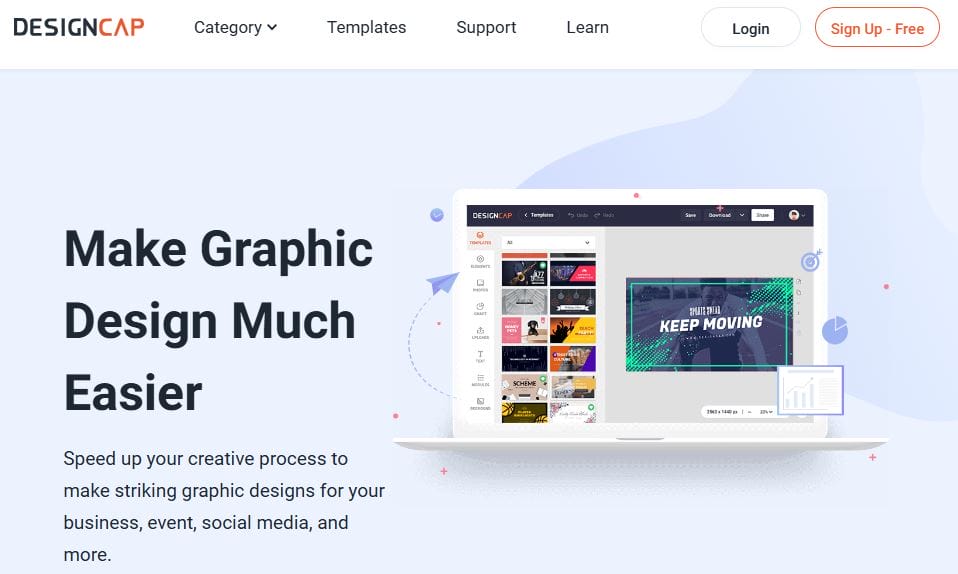
DesignCap is an online graphic design tool that provides various templates, including options for milestone cards.
Key Features:
- Pre-made templates for quick designs.
- Customizable fonts and colors.
- Easy-to-use editing tools.
Pros:
- Quick and efficient design process.
- Good variety of templates.
- Free version available.
Cons:
- Some features are locked behind a paywall.
- Limited storage for projects in the free version.
Comparison Table
| Tool | Key Features | Pros | Cons |
|---|---|---|---|
| Canva | Customizable templates, extensive library | User-friendly, vast design elements | Premium features require subscription |
| Adobe Express | High-quality templates, animation features | Professional tools, intuitive interface | Learning curve for advanced features |
| Fotor | Photo editing tools, customizable templates | Excellent editing, drag-and-drop | Limited free features, intrusive ads |
| Greeting Island | Variety of templates, no registration required | Easy to use, printable designs | Limited design elements |
| Snappa | Thousands of stock photos, pre-sized templates | Quick designs, good variety | Limited downloads in free version |
| PicMonkey | Advanced photo editing, collaboration features | Great for photo enhancements | Limited functionality in free version |
| Visme | Interactive options, analytics features | Visually appealing cards | Overwhelming for beginners |
| Crello | Animated designs, large asset library | Engaging social media content | Limited features in free version |
| Kapwing | Video editing and graphic design | Unique combo of tools | Limited free features |
| DesignCap | Pre-made templates, customizable options | Quick design process | Features locked behind paywall |

Final Thoughts on Baby Milestones Card Maker
Choosing the right baby milestone card maker depends on your design needs and preferences. Each of the tools mentioned above offers unique features, pros, and cons. Whether you are looking for extensive customization, user-friendly interfaces, or specific design elements, these options provide excellent solutions for creating beautiful milestone cards that will help you cherish and celebrate your baby’s growth.
Interesting Reads
10 Best Free Photo Collage Makers Online

