

If you want to share videos on your website, having a good video plugin can make a big difference. Whether you’re a blogger, teacher, business owner, or content creator, video helps grab attention and keep visitors interested. Here, we’ll go through the best video embed and streaming plugins, how to choose the right one, and some simple tips for setting them up.

Quick Links
Why Use a Video Embed or Streaming Plugin?
A video plugin lets you add videos to your site without slowing it down or dealing with messy code. It makes video sharing easier and more organized. Some plugins also help you stream videos live, which is great for webinars, events, or online classes.
Using the right plugin can also improve how your videos look on your site. Some give you nice video players with controls, fullscreen options, or even playlists. This helps create a better experience for your visitors and keeps them watching longer.
Also, video plugins often come with helpful features like automatic resizing, lazy loading (which helps with site speed), and support for different video platforms like YouTube, Vimeo, or self-hosted files.
Top 10 Video Embeds & Streaming Plugins
1. WP Video Lightbox

WP Video Lightbox lets you play videos in a pop-up window instead of embedding them directly on the page. This helps keep your page clean and less crowded. When someone clicks on a video thumbnail or link, the video opens in a small overlay on the screen.
It works with YouTube, Vimeo, and even your own video files (like MP4). You don’t need to mess with any complicated code—just use a simple shortcode, and your video will appear exactly where you want it. It also adjusts well to mobile screens.
This plugin is perfect if you want to keep things simple but still give your visitors a smooth video experience. It’s light, fast, and doesn’t slow down your website. If you’re just starting out with video, this is a great choice.
2. FV Flowplayer Video Player
FV Flowplayer is a strong video plugin that gives you more control over how your videos behave. It works with most video formats and offers useful features like subtitles, different video quality options, and playback speed controls.
One helpful feature is video tracking. You can see how long people watch your videos and where they stop. This can help you understand what content your viewers like most. It also supports HTML5, which means it works well on both computers and mobile devices.
Although it comes with a few extra settings, it’s still easy to use once you get the hang of it. If you want more features than a basic player and care about how your videos are performing, FV Flowplayer is a solid pick.
3. Presto Player
Presto Player is made for people who want modern, clean-looking videos on their site. It works well with WordPress’s block editor (Gutenberg) and other popular page builders. You can add videos anywhere on your site without dealing with complex code.
This plugin is perfect for online teachers or marketers. It lets you create private videos, add branding, and even display videos in a floating window that stays on screen as you scroll. It’s also good at tracking how much of a video someone has watched.
Presto Player is a little newer than some other plugins, but it’s quickly becoming popular. If you want your site to look fresh and professional, this one is worth trying.
4. Embed Plus for YouTube
Embed Plus is made for people who mainly use YouTube videos on their site. It adds more features than the normal YouTube embed, like autoplay, hiding ads or logos, and even showing live chats during a livestream.
You can build playlists, video grids, or even full channels inside your website. It’s great for YouTubers or businesses that share a lot of videos regularly. It also supports lazy loading, which helps keep your site running fast.
This plugin makes your YouTube videos look cleaner and gives you more control over how they appear. If most of your videos come from YouTube, this is one of the best plugins to use.
5. Video.js – HTML5 Video Player
Video.js is a free and open-source video player that works with most modern video formats. It’s simple to set up, and it works on phones, tablets, and desktops without any problems. It doesn’t come with a lot of extra features, but it’s clean and dependable.
One nice thing about Video.js is that developers can customize it a lot, but it still works well for people who just want to upload a video and press play. It uses HTML5, so it doesn’t need Flash or other outdated tech.
If you want a no-fuss video player that works smoothly across all devices, Video.js is a safe and easy choice.
6. All-in-One Video Gallery
All-in-One Video Gallery helps you build an organized video library on your website. Instead of just adding a video here and there, this plugin lets you create categories and tags for your videos, just like blog posts.
It comes with a clean built-in player, and you can add thumbnails, titles, and descriptions. Visitors can search for videos or browse by category, which is great if you have lots of content.
This plugin is perfect for schools, tutorial sites, or any project that involves a large number of videos. It’s easy to use and makes your site feel more like a real video platform.
7. YouTube Showcase
YouTube Showcase is perfect for anyone who wants to turn their website into a mini YouTube gallery. It lets you display your YouTube videos in a grid or carousel format, making everything look neat and professional.
This plugin is especially useful for vloggers, artists, or brands that post often on YouTube. You don’t need to upload videos twice—just paste the link, and it handles the rest.
It also comes with options to show video titles and descriptions. This helps visitors know what each video is about before clicking. If you want to highlight your YouTube channel in a stylish way, this plugin does the job well.
8. Elite Video Player
Elite Video Player is a paid plugin, but it offers some powerful features. It supports videos from many sources, including YouTube, Vimeo, Google Drive, Dropbox, and your own files. It also works with livestreaming.
This plugin looks very modern. You can change how the player looks, add your own logo, and even create playlists. It also supports subtitles and different languages, which is great for international viewers.
If you want a premium video experience with advanced settings and a beautiful design, Elite Video Player is worth considering. It’s great for businesses, e-learning sites, and creative projects.
9. Video Gallery – YotuWP
YotuWP is a free and easy-to-use plugin that lets you create galleries from YouTube videos. You can show single videos, playlists, or entire channels in a nice layout on your website.
You don’t need any special skills to use it. Just copy and paste your video link, and the plugin will take care of the layout. It’s light, fast, and doesn’t come with any unnecessary features.
If you just want a clean, simple way to share a bunch of YouTube videos, this plugin gets the job done without making things complicated.
10. Broadcast Live Video
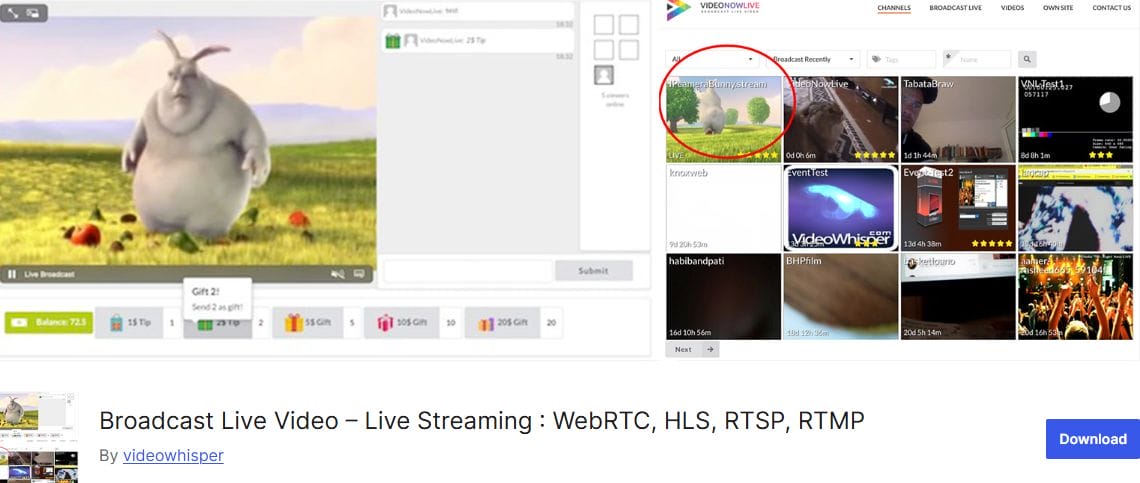
Broadcast Live Video is built for livestreaming. It lets you go live directly from your webcam or phone camera and stream on your website. It supports multiple streaming methods like WebRTC, HLS, and RTMP.
This plugin is great for churches, schools, online events, and anyone who needs to broadcast live. It’s more technical than other plugins, so it may take a little time to set up, but it’s very powerful once it’s working.
You can even allow viewers to chat while watching. If going live is a big part of your site, this plugin gives you the tools you need to stream directly to your audience.
Benefits of Using a Good Video Plugin
Using a solid video plugin keeps your site running smoothly. It helps prevent issues like slow loading, broken videos, or poor playback on mobile devices. Many plugins also let you track how users interact with your videos, which can help improve your content over time.
They also help you make your videos look better. With player skins, control buttons, and layouts, you can match your site’s design without any coding. That gives your website a more polished and professional feel.
Finally, plugins can make it easier to handle a large number of videos. Whether you’re organizing tutorials, showcasing products, or teaching online, these tools save time and reduce the hassle.
How to Choose the Right Plugin for Your Needs
Start by thinking about the kind of videos you want to share. Are they YouTube videos, your own files, or live streams? Some plugins work better for YouTube, while others are best for self-hosted content.
Next, look at the features you really need. Do you want a simple video player, or are you building a full gallery? Maybe you want tracking tools or password protection. Try not to pay for features you won’t use.
Also, check if the plugin works with your theme or page builder. Most good plugins say which ones they support. It’s a good idea to read reviews or test the free version before going all in.
Installation and Setup Tips
Installing a video plugin is usually quick. In WordPress, go to the Plugins section, click Add New, search for the plugin name, and click Install and then Activate.
After that, most plugins will have a settings page or block in your editor. Some let you paste video links directly, while others use shortcodes or widgets. Start with one or two videos to test how it looks and works.
Make sure you test your videos on mobile phones and different browsers. A good plugin should adjust video size and player style automatically, but it’s always smart to double-check.

Final Thoughts
Using the right video plugin makes your site better and your videos more enjoyable to watch. Whether you’re sharing YouTube clips, teaching classes, or showing off your brand, a plugin helps you do it right. Try a few, test how they work with your content, and go with the one that fits your goals best.
If you’re just getting started, try the free ones first. Once you see how useful they are, you might decide to upgrade to a paid version for more features.
Interesting Reads:
Janitor AI Alternatives and Competitors
Best WooCommerce Payment Gateway Plugins
Free Quizlet Alternative Tools for Flashcards and Study Games

