BuddyPress Review 2026: Why WordPress Users Love It for Communities

Online communities are growing rapidly, with more than 76% of internet users active in at least one community platform. At the same time, WordPress powers over 40% of all websites worldwide. This combination has made BuddyPress one of the most reliable solutions for building communities directly within WordPress.
In this BuddyPress review, we’ll take a closer look at what BuddyPress is, the features it offers, pricing details, pros and cons, setup process, tips for improving performance, and how it compares with competitors. We’ll also explore how BuddyX complements BuddyPress by enhancing design and engagement.
What Is BuddyPress?
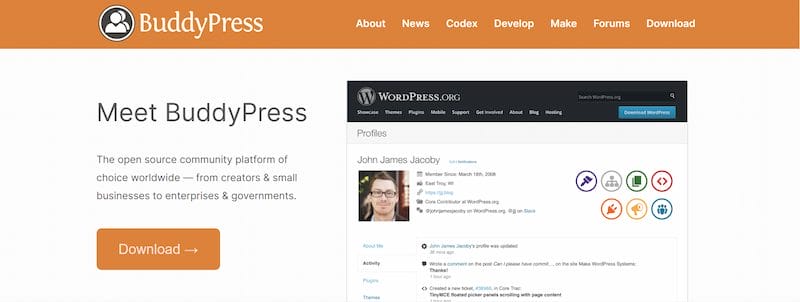
BuddyPress is a free, open-source WordPress plugin that adds social networking functionality to a website. It allows users to register, create profiles, join groups, send private messages, and interact through activity feeds—all within a familiar WordPress environment.
Because it integrates seamlessly with WordPress, BuddyPress benefits from a large developer community that regularly contributes updates and improvements. It’s a versatile option for:
- Small businesses building brand-focused communities
- Niche groups such as fitness clubs, book clubs, or gaming hubs
- Educational platforms connecting students and teachers
- Organizations looking for private collaboration spaces
Key Features of BuddyPress
1. Member Profiles
Members can personalize their profiles with avatars, bios, and custom fields. Administrators can tailor profile fields to fit the unique needs of their communities.
2. Activity Streams
Activity streams function as dynamic community newsfeeds. They deliver real-time updates on posts, comments, and group activity. These streams can be public, private, or group-specific depending on the setup.
3. User Groups
Groups enable members to form smaller communities within the larger network. Both public and private groups allow users to connect around specific projects, teams, or shared interests.
4. Messaging and Notifications
BuddyPress includes private messaging for direct member communication. Notifications and email alerts help members stay informed about updates and interactions.
5. Integration with Other Plugins
The plugin works seamlessly with popular WordPress tools like WooCommerce for online shops, LearnDash for e-learning, bbPress for forums, and BuddyBoss for extended features.
BuddyPress Pricing
The BuddyPress plugin itself is free, which makes it accessible to almost anyone. However, additional costs may arise, such as:
- Themes: A BuddyPress-compatible theme, such as BuddyX, for improved design and usability
- Hosting: Reliable WordPress hosting to ensure performance
- Premium Add-ons: Paid extensions for advanced features like gamification, custom search, or design tools
- BuddyBoss: A premium platform based on BuddyPress, starting at around $228 per year
This flexibility allows users to begin at no cost and expand their investment as their community grows.
Pros and Cons of BuddyPress
Pros
1. Free and Open Source
The plugin is completely free, making it an attractive choice for startups, nonprofits, and projects with limited budgets. Being open source, anyone can contribute to its development, ensuring continuous improvements.
This also gives you the freedom to modify the code to suit your unique community needs without extra cost.
2. WordPress Integration
BuddyPress is built for WordPress, ensuring smooth compatibility with existing themes and plugins.
You don’t need to worry about learning a new system—it fits right into your WordPress dashboard.
This deep integration makes it easy to combine BuddyPress with other popular tools for seamless functionality.
3. Customization
It can be customized extensively with add-ons and community-focused themes like BuddyX.
Admins can choose from hundreds of plugins to extend features like gamification, learning, or e-commerce.
This flexibility allows you to tailor your community’s design and functionality for any niche or business type.
4. Community Support
A broad support network exists, with forums, tutorials, and active developer contributions available.
Since it’s widely used, answers to common issues can usually be found quickly in community forums.
New users also benefit from guides, documentation, and an active ecosystem of third-party developers.
5. Scalability
From small niche groups to large social platforms, BuddyPress can scale effectively with the right hosting setup. You can start with a small private group and expand into a large network as your audience grows.
With proper optimization, BuddyPress can handle thousands of members without sacrificing performance.
6. Regular Updates
As an open-source project, BuddyPress receives ongoing updates and improvements. These updates keep the plugin secure, compatible with the latest WordPress versions, and full of new features.
Users benefit from community-driven development that evolves with changing online trends.
7. Extensibility
The plugin integrates well with other tools, enabling forums, online shops, or e-learning systems.
This means you can create a multi-functional platform where members shop, learn, and collaborate.
It also ensures that BuddyPress works as a central hub for all types of community-driven activity.
Cons
1. Beginner Challenges
New users may find the setup process a bit complex at first. It often requires trial and error to configure features in a way that matches community goals. Some technical knowledge or guidance may be necessary to unlock its full potential.
2. Theme Compatibility
Not all WordPress themes support BuddyPress, so a compatible option like BuddyX is often necessary.
Choosing the wrong theme can lead to broken layouts or missing community features.
A BuddyPress-ready theme ensures your site looks modern and functions smoothly across devices.
3. Advanced Features
Certain advanced functionalities, such as mobile apps and detailed analytics, require premium add-ons or BuddyBoss.
This may add to the overall cost if you need features beyond the core plugin.
While BuddyPress is powerful, some users may prefer an all-in-one premium alternative for simplicity.
4. Performance Needs
Larger communities can place heavy demands on hosting resources, which may require optimization.
Slow load times or lag can negatively impact the user experience if servers aren’t optimized.
Investing in managed WordPress hosting or caching solutions often becomes necessary.
5. Documentation
Documentation exists but can feel fragmented, which may be a hurdle for beginners.
Users sometimes need to rely on community forums to get detailed guidance. Improved centralized resources could make learning and troubleshooting easier for new site owners.
How to Install and Set Up BuddyPress (Step-by-Step)
1. Install the Plugin
- From the WordPress dashboard, go to Plugins → Add New, search for “BuddyPress,” then install and activate it.
- Once installed, BuddyPress will appear in your dashboard, giving you access to community settings.
- This step is quick and beginner-friendly, taking just a couple of minutes to get started.
2. Configure Settings
- Choose which features to enable, such as profiles, groups, and activity streams.
- BuddyPress offers modular control, so you can activate only the features you need.
- For example, if your community doesn’t require private messaging, you can leave it disabled to keep things simple.
3. Set Up Pages
- Assign pages for member directories, registration, and activity feeds.
- BuddyPress will usually create default pages automatically, but you can also assign your own.
- Organizing these pages ensures your members know where to find profiles, activity streams, and signup forms.
4. Choose a Theme
- Select a BuddyPress-compatible theme to make your community visually appealing and easy to use.
- BuddyX is recommended because it’s lightweight, mobile-responsive, and designed specifically for online communities.
- The right theme improves user engagement by offering clean layouts and smooth navigation.
5. Test Features
- Create groups, post updates, and send messages to confirm everything is working properly.
- Testing allows you to experience your site as a member would, spotting issues early.
- It also helps you fine-tune your community setup before inviting members to join.
Tips to Make the Most of BuddyPress
- Use bbPress alongside BuddyPress for forum functionality.
- Add gamification plugins for badges, achievements, and leaderboards to improve engagement.
- Keep BuddyPress, WordPress, and extensions updated for better performance and security.
- Track activity with analytics tools to gain insights into member behavior.
BuddyPress vs Competitors
1. PeepSo: Feature-rich and modern, but premium-only.
2. Ultimate Member: Good for user profiles but less focused on community interaction.
3. BuddyBoss: Extends BuddyPress with advanced features, though it requires a paid license.
BuddyPress remains a popular choice because of its free access, flexibility, and WordPress integration.
Who Should Use BuddyPress
BuddyPress is a versatile WordPress plugin that caters to a wide range of users who want to build and manage their own online communities. Its flexibility, open-source nature, and deep WordPress integration make it suitable for various types of websites and user needs.
1. Small Businesses Wanting to Build Customer Communities
Small businesses can use BuddyPress to create dedicated spaces where customers engage, share feedback, and connect with the brand. Features like member profiles, private messaging, and activity streams help businesses foster loyalty and build strong relationships with their audience.
2. Niche Communities Focused on Shared Interests
Whether it’s hobby groups, fan clubs, or professional networks, BuddyPress allows niche communities to thrive. Members can join groups, participate in forums, and interact through activity feeds, making it easy to maintain engagement around a shared passion or interest.
3. Educational Platforms Seeking Collaboration Tools
Educators and institutions can leverage BuddyPress to facilitate learning communities. Students and teachers can create profiles, form study groups, discuss topics, and collaborate on projects, turning a WordPress site into a dynamic e-learning environment.
4. WordPress Site Owners Who Want Full Control
Unlike hosted social platforms, BuddyPress gives website owners complete control over their community. You can customize designs, integrate with other plugins, manage data, and ensure the platform scales according to your needs without relying on third-party services.
5. Anyone Who Values Freedom, Scalability, and Affordability
BuddyPress is free, open-source, and highly extensible, making it an excellent choice for users who want a powerful, cost-effective way to create online communities. Whether your audience is small or large, the plugin can grow with your needs.
BuddyPress is perfect for anyone looking to combine flexibility, customization, and community engagement in one powerful WordPress solution. When paired with tools like BuddyX, you can elevate your community experience further, offering a polished, interactive platform that keeps members coming back.
Why Use BuddyX with BuddyPress?
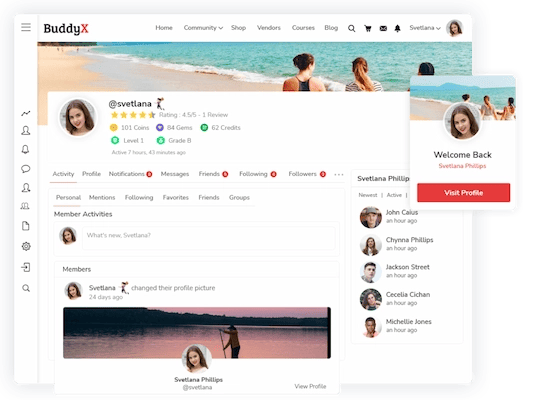
BuddyPress provides the functionality, while BuddyX refines the presentation and experience. With BuddyX, building your BuddyPress community is a breeze. Your site will look modern, work smoothly on any device, and keep your members coming back for more.
You get cool features like enhanced profiles, badges, achievements, and other social tools that make interacting fun and meaningful. Plus, it’s fast, SEO-friendly, and works perfectly with plugins like WooCommerce, LearnDash, and Elementor, so you can easily add online stores, courses, or custom layouts.
Basically, BuddyX helps you create a community that’s not just functional but also engaging, professional, and ready to grow.
Community Benefits
- Better engagement through gamification
- Easy customization using drag-and-drop builders
- Flexibility to grow from small groups to large networks
Build Thriving Communities with BuddyPress and BuddyX
BuddyPress continues to be a reliable choice for building online communities with WordPress. It’s free, open-source foundation, scalability, and integration options make it a strong option in 2025. Combined with BuddyX, it offers a polished design and features that boost user engagement.
For anyone planning to launch a community site, BuddyPress is a practical starting point. Install it, explore its features, and enhance it with BuddyX when you are ready to take your community to the next level.
Frequently Asked Questions (FAQs)
1. What is BuddyPress used for?
BuddyPress is used to add social networking features to WordPress websites. It allows you to create member profiles, activity streams, user groups, private messaging, and more—essentially turning your WordPress site into a community platform.
Businesses, educators, nonprofits, and niche groups use BuddyPress to build engaging online spaces where members can connect and interact.
2. What is the difference between BuddyPress and BuddyBoss?
BuddyPress is a free, open-source plugin that provides the foundation for building WordPress communities. BuddyBoss, on the other hand, is a premium platform built on top of BuddyPress that includes extra features like advanced design, mobile app support, and built-in integrations.
In short, BuddyPress is the free starting point, while BuddyBoss is a paid, polished solution with extended functionality.
3. How much does BuddyPress cost?
BuddyPress itself is completely free to download and use. However, costs may arise depending on your needs, such as purchasing a BuddyPress-compatible theme like BuddyX, paying for hosting, or adding premium plugins for advanced features like gamification or analytics. If you opt for BuddyBoss, pricing starts at around $228 per year.
4. What are the requirements for BuddyPress?
BuddyPress requires a self-hosted WordPress site or a hosting plan that supports WordPress installations. You’ll need:
- The latest version of WordPress is installed
- PHP 7.4 or higher (recommended for best performance and security)
- A BuddyPress-compatible theme, such as BuddyX, for smooth design integration
- Sufficient hosting resources, especially if you plan to run a large community
With these requirements in place, you can install BuddyPress and begin building your online community right away.
Interesting Reads
WooCommerce Review 2025: Why It’s the #1 WordPress eCommerce Plugin
15 Best Video Conferencing Software in 2025
15 Best Account Management Software to Strengthen Client Relationships in 2025

Shashank is a seasoned digital marketing and WordPress expert who specializes in SEO, software tools reviews, and cutting-edge strategies for boosting online presence. With a passion for simplifying complex topics, Goutham crafts engaging blog posts that help readers optimize their websites, improve search engine rankings, and stay ahead in the ever-evolving digital landscape.