GamiPress Review 2026: Is It Worth Trying for WordPress Gamification?


If you want your WordPress website to stand out, simply posting content isn’t enough. Users expect interaction, rewards, and experiences that make visiting your site fun and meaningful. This is where gamification comes in. By introducing game-like elements such as points, badges, and ranks, you can make everyday actions on your site more engaging and enjoyable for your visitors.
GamiPress review shows that this free WordPress plugin makes it easy to add gamification to your site without any coding skills. Whether you’re running a blog, e-learning platform, membership site, or online store, GamiPress lets you reward users for specific actions, boosting engagement, improving retention, and helping grow your audience.
What Is GamiPress?
Think of GamiPress as a tool to make your website more interactive and rewarding for visitors. At its core, it’s a WordPress plugin that lets you assign rewards for user actions, turning routine interactions into engaging experiences.
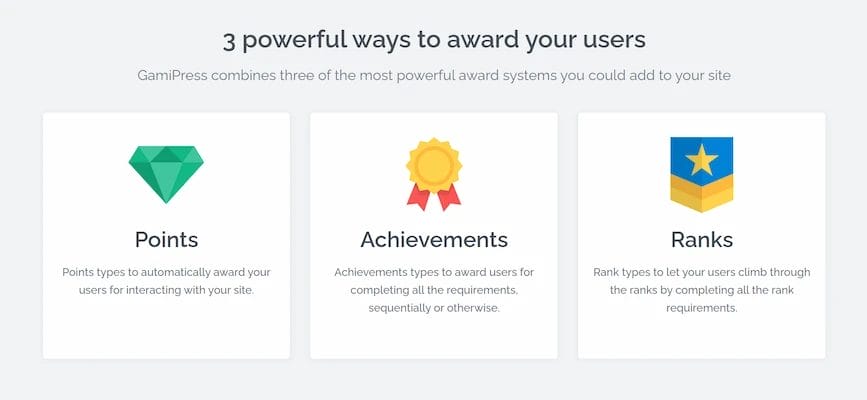
GamiPress organizes rewards into three main categories:
- Points – Digital currency earned by users for completing tasks.
- Achievements – Badges or awards for reaching milestones.
- Ranks – Levels that reflect a user’s progress and status.
Whether your goal is to motivate engagement, build community, or encourage sales, GamiPress provides the tools to make interactions fun and rewarding.
Key Features of GamiPress
1. Multiple Reward Types
GamiPress lets you assign points, achievements, and ranks for user actions. This flexibility ensures every interaction on your site can be recognized and rewarded.
2. Customizable Points System
Create different point types like coins, stars, or credits. Tailor the system to reward specific behaviors and keep users motivated.
3. Achievements and Badges
Set milestones and visually reward users with badges or icons. Achievements make engagement fun and provide clear recognition.
4. Ranks and Progression
Allow users to level up based on points or completed achievements. Ranks encourage long-term participation and friendly competition.
5. Front-End Visibility
Showcase leaderboards, progress bars, and badges using widgets or shortcodes. Visible rewards drive engagement and highlight user accomplishments.
6. Integration-Friendly
Works seamlessly with popular plugins like WooCommerce, LearnDash, BuddyBoss, and BuddyPress. This allows you to link gamification to purchases, courses, or community activity.
7. Add-On Support
Extend GamiPress functionality with official add-ons. Add advanced analytics, notifications, or customized reward rules to enhance user experience.
8. Beginner-Friendly
No coding skills are required. The plugin provides a simple dashboard that makes setup and management straightforward.
9. Flexible Conditions
Reward virtually any user action on your website, from comments and logins to course completions. You can create rules that fit your specific engagement goals.
10. Community Building
Encourage participation, collaboration, and friendly competition. Gamification helps foster an active, thriving community around your website.
Why Use GamiPress?
1. Boost User Engagement
Gamification encourages visitors to interact with your site more frequently. By rewarding actions like reading articles, leaving comments, or completing courses, GamiPress turns ordinary interactions into fun challenges that keep users engaged.
2. Enhance User Retention
Humans love achieving goals. By offering points, badges, or ranks, GamiPress motivates visitors to return regularly to earn rewards. This builds loyalty and helps establish a long-term relationship with your audience.
3. Grow Your Audience and Leads
Gamified incentives can drive valuable actions, like newsletter sign-ups, social shares, or purchases. By rewarding these behaviors, you can expand your reach, generate leads, and create a more active community around your website.
Digital Rewards in GamiPress
1. Points
Points act as a digital currency for your users, rewarding them for a variety of actions on your website. For example, users can earn points for logging in regularly, leaving comments on posts, completing courses or quizzes, and making purchases.
These points can then be redeemed for perks, discounts, or exclusive content, providing tangible incentives for engagement. GamiPress also allows you to create multiple point types, giving you the flexibility to reward different actions in unique ways.
2. Achievements
Achievements recognize users when they reach specific milestones, helping to motivate continued participation. For instance, you can award achievements for completing a set number of lessons, engaging regularly in forums, or reaching certain purchase thresholds.
Achievements are typically displayed as badges or icons on user profiles, giving visible recognition that encourages users to keep interacting with your site and aiming for new goals.
3. Ranks
Ranks provide a sense of progression by showing users how far they’ve come on your website. As users accumulate points or complete achievements, they can move up levels, such as Beginner, Intermediate, and Expert. This not only fosters a sense of accomplishment but also creates friendly competition among users, encouraging them to remain active over the long term.
How to Get Started with GamiPress: A Step-by-Step Guide
Step 1: Install and Activate GamiPress
- Go to WordPress dashboard → Plugins → Add New
- Search for GamiPress, click Install Now, and Activate
- You’ll see new menus for Points, Ranks, and Achievements
Step 2: Create a Points System
- Define different point types (e.g., coins, credits, stars)
- Assign points for actions like logging in, commenting, or completing tasks
- Points motivate users by rewarding daily interactions
Step 3: Add Achievements and Badges
Achievements add a sense of accomplishment for your users. You can award badges for milestones such as completing lessons, posting regularly, or reaching purchase thresholds. By customizing icons and notifications, you make achievements visible, giving users clear recognition and motivating them to continue engaging with your website.
Step 4: Introduce Ranks and Progression
Ranks provide long-term goals for your users. You can create levels like Beginner, Intermediate, and Expert, with progression depending on accumulated points or completed achievements. Displaying ranks encourages friendly competition and helps users track their growth, fostering continued participation and engagement over time.
Step 5: Display Rewards on the Front-End
Make your gamification system visible by using widgets and shortcodes to showcase leaderboards, progress bars, and badges. Front-end visibility allows users to see their progress and accomplishments, which keeps them motivated and encourages interaction within your community.
Step 6: Expand with Integrations
GamiPress integrates seamlessly with plugins like BuddyPress, BuddyBoss, LearnDash, LifterLMS, WooCommerce, and more. These integrations allow you to tie rewards to purchases, course completions, or community engagement, creating a cohesive and interactive experience for your audience without needing to write any code.
Step 7: Launch and Monitor
- Test the system from a user perspective
- Once live, track engagement and tweak rewards as needed
- Adjust the system to keep users motivated over time
Integrations and Compatibility
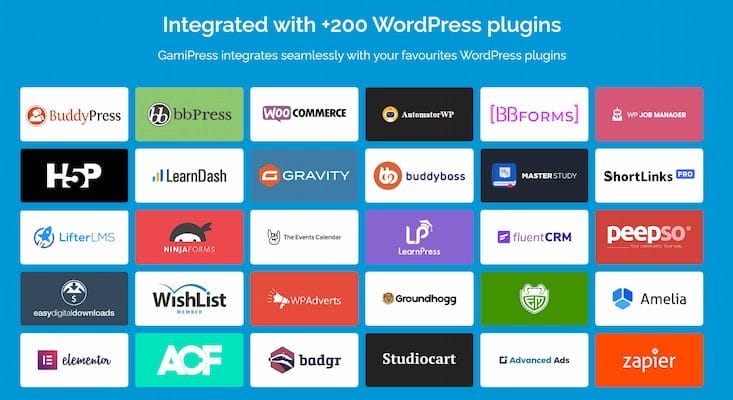
GamiPress is highly versatile and works with a variety of popular WordPress plugins:
- WooCommerce: Reward purchases, reviews, and referrals
- LearnDash & LifterLMS: Reward course completions and quiz participation
- BuddyPress & BuddyBoss: Enhance community interactions
These integrations allow you to build a cohesive, interactive experience for your audience without coding.
Pros and Cons of GamiPress
Pros
1. Free and beginner-friendly: GamiPress is available for free and doesn’t require coding skills, making it accessible for beginners.
2. Highly customizable reward system: You can create multiple point types, achievements, and ranks tailored to your website’s needs.
3. Compatible with major plugins: It works seamlessly with WooCommerce, LearnDash, BuddyPress, and other popular WordPress plugins.
4. Improves engagement, retention, and loyalty: By rewarding user actions, GamiPress encourages repeat visits and long-term participation.
Cons
1. Can get complex with too many reward types: Adding too many points, achievements, or ranks may overwhelm users or complicate management.
2. Planning is required to ensure rewards are meaningful: Rewards need to be strategic to truly motivate user behavior.
3. Limited native analytics: Detailed tracking requires add-ons, as GamiPress’ built-in analytics are basic.
Who Can Benefit from GamiPress?
- Bloggers & Content Creators: Encourage comments, shares, and subscriptions
- Online Learning Platforms: Reward course completion, quizzes, and progress milestones
- Membership & Community Sites: Motivate social engagement with points, badges, and ranks
- E-Commerce Websites: Reward purchases, reviews, and referrals
Tips for Maximizing GamiPress
- Start simple to avoid overwhelming users
- Align rewards with desired user actions
- Track engagement and refine your reward system regularly
- Combine points, achievements, and ranks for a richer experience
How GamiPress Compares to Other Gamification Plugins
1. GamiPress vs. myCred
Both GamiPress and myCred allow you to reward users with points, badges, and achievements. However, myCred often requires paid add-ons to unlock advanced features, while GamiPress provides a flexible points, achievements, and ranks system right out of the box. Beginners also find GamiPress easier to manage when handling multiple reward types and integrations.
2. GamiPress vs. BadgeOS
BadgeOS focuses mainly on achievements and badges, making it suitable for sites that want simple milestone tracking. In contrast, GamiPress offers a full gamification system, including points, achievements, and ranks, along with seamless integration with plugins like WooCommerce, LearnDash, and BuddyPress. This makes GamiPress a more complete solution for websites that want layered gamification features.
3. GamiPress vs. WP Achievements
WP Achievements primarily emphasizes badges and milestones, with fewer options for rank progression or point customization. GamiPress, on the other hand, provides a robust system that combines points, achievements, and ranks, along with front-end features like leaderboards and progress bars. This makes it ideal for bloggers, communities, e-learning sites, and e-commerce platforms looking to increase engagement.
4. GamiPress vs. CubePoints
CubePoints is a simpler plugin that focuses only on point-based rewards. While it can serve basic gamification needs, it lacks advanced features, integrations, and regular updates. GamiPress offers a modern, fully integrated system that supports multiple reward types, provides easy customization options, and is compatible with popular WordPress plugins, making it a more versatile and future-proof choice.
Unlock Engagement with GamiPress
In summary, GamiPress is a powerful yet beginner-friendly tool for enhancing WordPress websites with gamification features. By implementing points, achievements, and ranks, you can increase engagement, retention, and loyalty across blogs, communities, learning platforms, and e-commerce sites.
Its intuitive dashboard, flexible reward types, and plugin compatibility make it an excellent choice for site owners of all skill levels. If you want to make your website more interactive and rewarding, GamiPress is worth trying today.
FAQ
1. Is GamiPress free?
Yes, the core plugin is free. Optional add-ons are available for advanced features.
2. Can I integrate GamiPress with WooCommerce?
Absolutely. Reward users for purchases, reviews, and referrals easily.
3. Do I need coding skills to use GamiPress?
No coding is required. Its dashboard makes setup and management beginner-friendly.
4. Can I create custom reward types in GamiPress?
Yes. You can create multiple custom types of points, achievements, and ranks to suit your site’s specific gamification needs.
5. Does GamiPress work with membership or community plugins?
Yes. It is compatible with popular membership and community plugins like BuddyBoss and LearnDash, allowing you to gamify engagement in online courses, forums, or social communities.
Interesting Reads
Agriculture Web Design with WordPress In 2025
Top Brand Mention Monitoring Tools for Online Reputation in 2025
Why Every Online Store Needs an E-Commerce Proxy for Security?

Shashank is a seasoned digital marketing and WordPress expert who specializes in SEO, software tools reviews, and cutting-edge strategies for boosting online presence. With a passion for simplifying complex topics, Goutham crafts engaging blog posts that help readers optimize their websites, improve search engine rankings, and stay ahead in the ever-evolving digital landscape.