

Staying organized and productive can be a challenge. If you’re using BuddyPress to manage your online community, there’s a powerful tool that can help you and your members achieve more every day: the BuddyPress User Todo List plugin. This plugin is designed to integrate seamlessly with BuddyPress, offering a robust daily planner that can transform how you manage tasks and stay on top of your goals. Let’s learn How to Achieve More with Daily Planner in BuddyPress using the BuddyPress User Todo List plugin.

Quick Links
How to Achieve More with Daily Planner?
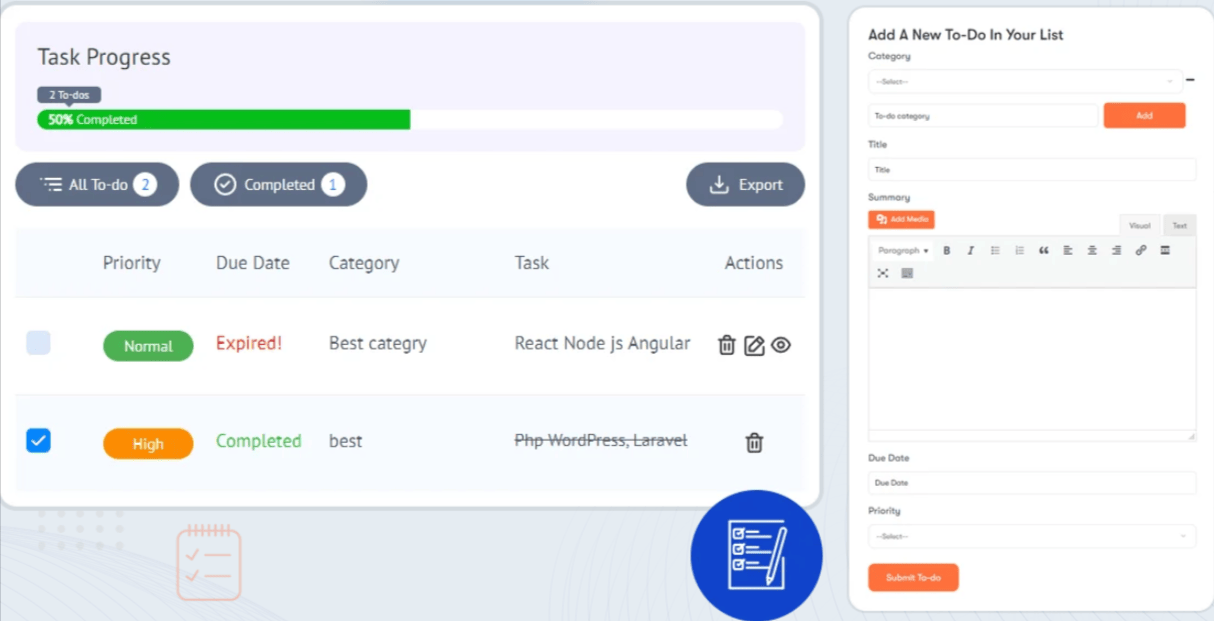
To achieve more with a daily planner WBcom Designs Provides a great plugin called BuddyPress user to-do list plugin. The BuddyPress User Todo List plugin empowers BuddyPress members to efficiently manage their tasks. Members can add tasks to their to-do lists and have the option to edit, delete, and mark tasks as complete. Additionally, members can create categories for their tasks, organizing their to-dos accordingly.
The plugin features a due date reminder system that notifies users of upcoming deadlines via email and BuddyPress notifications. Users also can export all their tasks in CSV format. For convenience, a shortcode can be used to display all to-dos on any page.
Key features
1. User-Friendly Interface: The BuddyPress User Todo List plugin seamlessly integrates into the BuddyPress and BuddyBoss user and Group profile, enabling users to manage their tasks without leaving their community platform. Users can easily add, edit, and mark tasks as complete directly from their profiles.
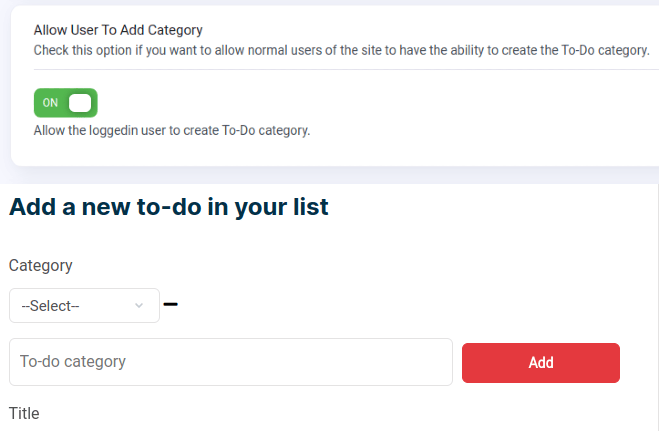
2. Task Organization: Users can keep their to-do lists organized by creating custom categories, allowing them to focus on specific areas such as work, personal life, hobbies, or any other context.
3. Priority Levels: Each task can be assigned a priority level (e.g., high, medium, low), helping users prioritize tasks based on urgency or importance. Priority levels are visually represented, making it easy to identify critical tasks at a glance.
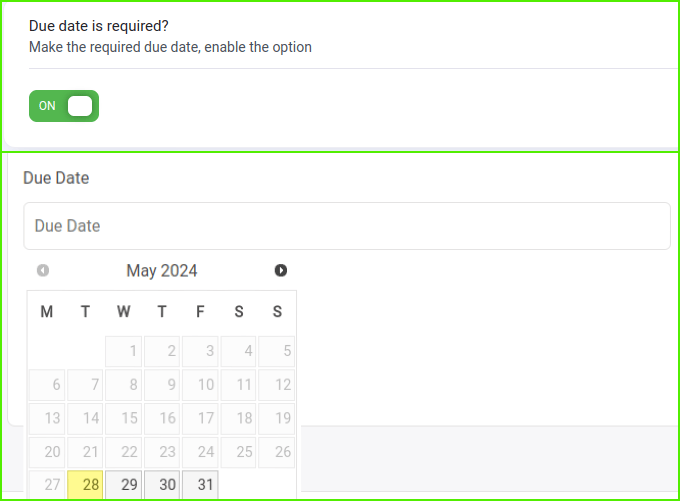
4. Due Dates and Reminders: Users can set due dates for their tasks and manage deadlines effectively with the calendar view. The plugin offers automatic email notifications and in-platform notifications to remind users of upcoming due dates.
5. Progress Tracking: A progress bar on the user’s dashboard provides an overview of completed versus pending tasks, allowing users to visualize their productivity and stay motivated to complete their to-do lists.

5. Export Option: Users can export their entire to-do list, which is useful for backup purposes or sharing tasks with others. The exported data can be saved in various formats, such as CSV or Excel.
6. Group To-Do Lists: Community administrators or moderators can manage group to-do lists, making it easier to coordinate collaborative projects or community-driven initiatives.
7. Customizable Settings: The plugin offers a variety of settings, including email notifications, category management, and permissions. Administrators can customize the plugin to meet the specific needs of their community.
8. Integration with BuddyPress/BuddyBoss: The BuddyPress User Todo List plugin integrates seamlessly with BuddyPress or BuddyBoss-powered websites, allowing users to access their to-do lists directly from their profiles within the community.
9. Shortcode: The shortcode provided by the BP User TO-Do list is used to display category-related shortcodes on any random page.
[bptodo_by_category category=”CATEGORY_ID”]
10. Custom Profile Menu Label: Users can customize the profile menu label for “To-Do” within BuddyPress, enhancing navigation and usability directly from their profiles.
Benefits of using a Daily Planner
Benefits of How to Achieve More with Daily Planner in BuddyPress
1. Time Management: It helps prioritize tasks and allocate time effectively, ensuring important activities are completed.
2. Organization: A planner keeps all tasks, appointments, and deadlines in one place, reducing the likelihood of forgetting important commitments.
3. Productivity: By outlining what needs to be done each day, a planner encourages focus and minimizes procrastination.
4. Stress Reduction: Having a clear plan can reduce anxiety and stress, as it provides a roadmap for the day and helps avoid last-minute rushes.
5. Goal Setting: A daily planner app allows for setting short-term and long-term goals, breaking them down into manageable steps.
6. Accountability: Writing down tasks and checking them off as they are completed provides a sense of accomplishment and accountability.
7. Work-Life Balance: It helps in scheduling both work and personal activities, ensuring a balanced lifestyle.
8. Improved Memory: Regularly writing tasks and appointments can improve memory retention and recall.
9. Flexibility: It allows for adjusting plans as needed, making it easier to adapt to unexpected changes.
10. Tracking Progress: A planner helps track progress over time, providing insights into productivity patterns and areas for improvement.
How to Use the Plugin
After learning the key features and benefits of how to achieve more with a daily planner. Let’s learn How to use the plugin.
1. Navigate to Your User Profile: Access your user profile, typically found under “Your Profile” or similar, then click on “To-Dos” and select “Add” to create a new task.
2. Fill in the following details:
i) Title: Provide a clear and descriptive title for your task.
ii) Summary: Include additional details or instructions related to the task.
iii) Due Date: Set the deadline by which the task should be completed.
iv) Category: Select an appropriate category to organize your tasks (e.g., work, personal, hobbies).
v) Priority: Choose the priority level of the task (e.g., high, medium, low).
3. Submit Your To-Do: Once you have filled in all the necessary information, click on “Submit To-Do.” Your task will then be added to your To-Do list.
4. View and Manage Your Tasks: You can easily view and manage your tasks under the “To-Dos” tab in your profile. Here, you can edit task details, mark tasks as complete, or delete tasks as needed.
By following these steps, you can effectively use the BuddyPress User Todo List plugin to stay organized and productive, ensuring that your tasks are managed efficiently within your BuddyPress community environment.

Final thoughts on How to Achieve More with Daily Planner
The BuddyPress User Todo List plugin exemplifies how to achieve more with a daily planner within the BuddyPress community. This indispensable tool not only streamlines task management by allowing users to seamlessly add, prioritize, and track tasks directly from their profiles but also enhances overall productivity and organization. By integrating efficient task categorization, priority setting, and deadline management, members can effectively navigate their daily responsibilities while fostering collaboration and goal attainment. Embracing these functionalities empowers users to maximize their time, stay focused on key objectives, and cultivate a proactive approach to resolve the problem how to achieve more with daily planner in BuddyPress, ultimately enriching both individual performance and community engagement.
Interesting Reads:
How to add testimonials for members

