

Creating a new WordPress page with a custom design is an essential skill for anyone looking to enhance their website’s appearance and functionality. If you’re building a portfolio, creating a landing page, or simply adding a new section to your site, understanding how to design a WordPress page can help you achieve a professional look that stands out. In this article, we will learn the steps to create and customize a new WordPress page, ensuring that it matches your vision and meets your site’s requirements.

Steps to Add a New WordPress Page with a Design:
1. Login to Your WordPress Dashboard:
-
- Begin by logging into your WordPress admin area.
2. Navigate to the Pages Section:
-
- On the left-hand menu, hover over “Pages” and click on “Add New.”
3. Create a New Page:
-
- You’ll be taken to the WordPress page editor. Start by adding a title for your page.
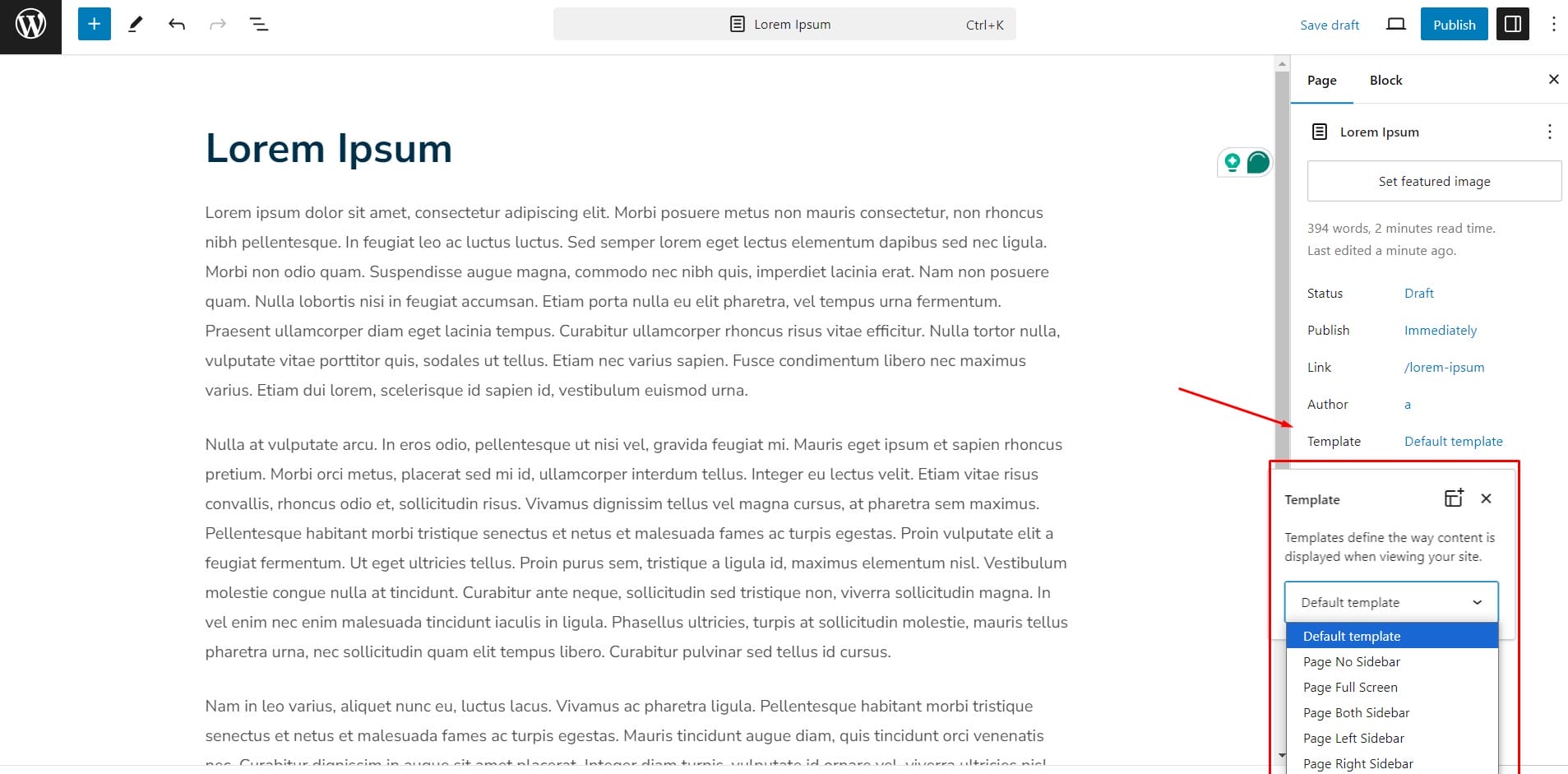
4. Choose a Page Template:
-
- Depending on your theme, you may have different page templates available. Look for the “Page Attributes” box on the right-hand side. From there, you can select a template that suits your design needs (e.g., full-width, landing page, etc.).
5. Use the Block Editor (Gutenberg):
-
- The block editor allows you to add various blocks like text, images, galleries, buttons, and more. You can design your page by adding and customizing these blocks.
6. Add Custom Design Elements:
-
- Using a page builder plugin like Elementor or Beaver Builder, you can design your page with more advanced features. These plugins offer drag-and-drop functionality, making it easier to create complex layouts.
7. Customize with CSS:
-
- For more detailed customization, you can add custom CSS to your page. This is useful if you want to tweak the design beyond what your theme or page builder allows.
8. Preview and Publish:
-
- Once you’re satisfied with your design, preview the page to ensure it looks good on both desktop and mobile devices. After reviewing, click “Publish” to make your page live.
9. Add the Page to Your Menu:
-
- Finally, to make your new page accessible, go to “Appearance” >> “Menus,” and add the new page to your site’s navigation menu.
Adding a new page to your WordPress site with a custom design can significantly enhance the visual appeal and functionality of your website. By following these steps, you can easily create a page that not only aligns with your brand but also provides a seamless experience for your visitors. When you’re using a pre-built template, a page builder, or custom CSS, WordPress offers the flexibility to design pages that truly stand out.
Interesting Reads:
What Is The Best Tool To Scan WordPress Site
How To Change The Background Color Of Your Site Header In WordPress

