

WordPress is a leading Content Management System (CMS) that powers over 40% of all websites on the internet. It is particularly popular for building marketplaces and communities due to its flexibility, ease of use, and extensive range of plugins and themes. To create an online community multivendor marketplace has become a lucrative business model. It allows multiple vendors to sell their products on a single community platform, offering a wide variety of products to customers.
If you’re looking to build such a Multivendor Community marketplace, the Reign Dokan Addon with Reign theme for WordPress is a powerful tool to help you achieve this. Let’s Learn the process of how to create an online community Multivendor Marketplace.

Quick Links
Essential Plugins Rewired to Create an Online Community Multivendor Marketplace
1. BuddyPress: This is the first plugin required. BuddyPress is an open-source social networking software package originally developed by Andy Peatling and acquired by Automattic in 2008. As a WordPress plugin, BuddyPress transforms a WordPress-powered website into a full-featured social networking platform. It enables site owners to create and customize social networks, making it ideal for fostering online communities, teams, and interest-based groups.
2. WooCommerce: You need WooCommerce to create marketplace. WooCommerce is an open-source e-commerce plugin specifically designed for WordPress websites. It provides a robust and customizable platform that enables businesses of all sizes to create and manage online stores efficiently. Built on the foundation of WordPress, which powers a significant portion of the internet, WooCommerce easily integrates with WordPress sites, allowing merchants to leverage its flexibility and scalability.
3. Dokan: Dokan is required to to make it a multivendor marketplace. It is a frontend multi-vendor marketplace builder designed for WordPress and powered by WooCommerce. It enables users to create robust online marketplaces akin to platforms like Amazon, eBay, or Etsy swiftly and efficiently. With Dokan, multiple vendors can converge on a single platform to sell their products or services. The marketplace’s admin oversees all activities and earns a commission from each vendor’s sales.
4. Reign Dokan Addon: This plugin is needed to incorporate the features of Multivendor MarketPlace with BuddyPress. The Reign Dokan Addon is tailored for building robust WooCommerce online businesses, offering seamless integration with the Reign theme. This combination ensures an optimized interface for exceptional user experiences. To use Reign Dokan addon you need Reign theme.
Creating a Professional and User-Friendly Community Marketplace
To incorporate WooCommerce, BuddyPress, Dokan, and the Reign Dokan Addon into your online marketplace, it’s essential to integrate them with a suitable WordPress theme like the Reign. The Reign theme plays a crucial role in providing a professional layout that enhances the functionality and aesthetics of your community marketplace. A well-chosen theme not only makes your marketplace user-friendly but also strengthens its branding, ensuring a cohesive and engaging user experience.
By leveraging the Reign theme, you can customize various aspects of your marketplace’s design, including product listings, vendor profiles, and checkout processes, to align with your unique vision and brand identity. This integration empowers you to create a seamless environment where multiple vendors can effectively showcase and sell their products, while you efficiently manage operations and earn commissions from each transaction.
StoreMate Dokan

StoreMate Dokan is a powerful WordPress theme designed specifically for creating multi-vendor marketplaces, whether you’re establishing a traditional or digital marketplace. It is a combination Reign Dokan Addon and Reign theme. It offers easy setup with dedicated support for Dokan free and pro versions, ensuring a seamless experience that is SEO-optimized and responsive.
The one-click demo import feature accelerates site setup, while extensive customization options—including color schemes, typography, interactive course layouts, reviews, discussions, and suggestions—allow you to tailor your marketplace to your unique vision. Monetization is made easy with options to sell courses as membership plans or subscriptions, and the ability to bundle courses for added value. Supporting multiple payment gateways, StoreMate Dokan provides flexibility in revenue generation.
With an average rating of 4.7 out of 5 stars from over 1500 customer reviews, it has earned praise for optimizing user experience and delivering valuable solutions.
Features of StoreMate Dokan
The StoreMate Dokan enhances your multivendor marketplace by integrating it easily with the BuddyPress community platform and offering a host of personalized features.
1. Mark Products as Favorite: This feature allows users to mark products they like as favorites. It helps users keep track of products they are interested in for future purchases.

2. Favorite Products Listed on Users’ BuddyPress Profiles: When a user marks a product as a favorite, activating this option, it results in the creation of a new navigation tab on that user’s profile. This tab is specifically dedicated to showcasing the user’s favorite products.

3. Display Store Tab on Vendor’s BuddyPress Profile: The plugin adds a dedicated store tab to each vendor’s BuddyPress profile, allowing visitors to view all products offered by that vendor directly from their profile.

4. Create Product Activity: Automatically creates an activity post on the BuddyPress activity stream whenever a new product is added by a vendor.It keeps the community informed about new products.

5. Add Review Activity: The plugin posts an activity update on BuddyPress activity stream whenever a user reviews a product. Encourages other users to leave reviews, enhancing community engagement.

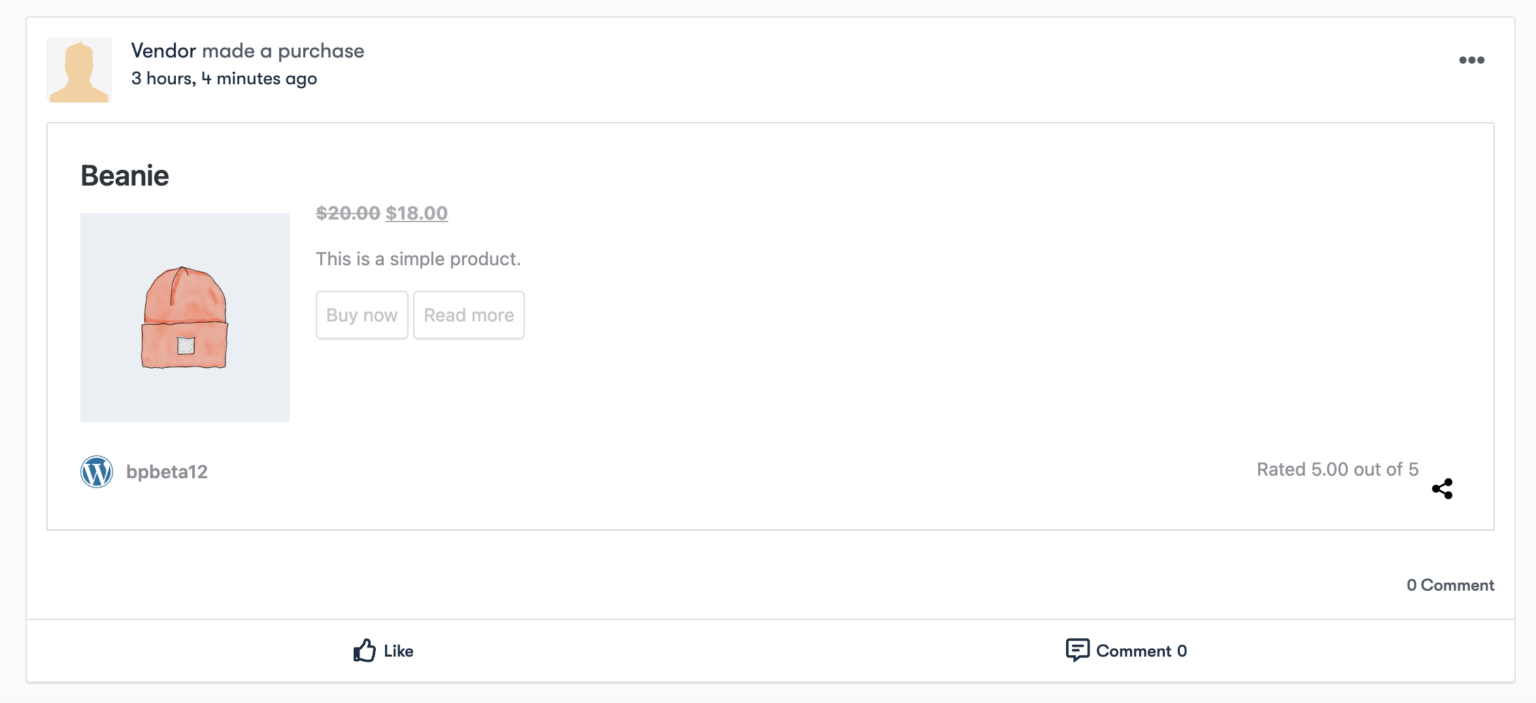
6. Order Activity: When an user makes a purchase of the product, a corresponding activity is automatically created and displayed within the BuddyPress activity feed or timeline.
7. Personalised single product page: User can customize the single product page to match the unique branding and style of your marketplace. It can only be done with the help of Reign Dokan Addon. It Provides a unique and attractive product presentation, and enhances the overall user experience and increases the likelihood of conversions.

8. Personalized single store page: Customize individual store pages to reflect the vendor’s unique branding. Each store page can have a distinct look and feel, making it more personalized.

9. Exclusive Dokan Widget: Reign Dokan Addon provides exclusive widgets that enhance the functionality and appearance of your marketplace. The widget is called as Reign-Vendors and shows the list of vendors.

10. Personalised customization with reign theme: With the help of reign theme you can customize your community to match your multivendor marketplace which will promote enhances user experience by providing a consistent and branded interface.
Learning features of Reign Dokan addon is essential for creating an online community multivendor marketplace.
How to customize your online community Multivendor Marketplace With Reign Theme
1. Color & Typography Options: The Reign Dokan Addon offers extensive color and typography options, allowing you to customize the look and feel of your marketplace. You can choose from a variety of fonts and color schemes to match your brand’s identity, ensuring a cohesive and visually appealing design across all pages.
2. Store Listing with Grid & List Layout: This feature provides flexible store listing options with both grid and list layouts. Vendors can showcase their products in a format that best suits their store’s aesthetic and customer browsing preferences, enhancing the shopping experience.
3. Awesome Dokan Pages Design: The theme includes beautifully designed Dokan pages that integrate easily with your theme. These pages are optimized for usability and aesthetics, ensuring that both vendors and customers have an enjoyable and intuitive experience while navigating the marketplace.
4. Awesome WooCommerce Pages Design: In addition to Dokan pages, the Reign theme also enhances WooCommerce pages with stunning designs. Product, cart, checkout, and account pages are all given a polished and professional look, contributing to a seamless and attractive shopping experience.
Benefits of StoreMate Dokan
Benefits of using StoreMate Dokan for creating an online community multivendor marketplace are as follows:
1. Robust Multivendor Platform: StoreMate Dokan is specifically designed for creating multivendor marketplaces. It provides a solid foundation for managing multiple vendors, products, and orders efficiently.
2. User-Friendly Interface: The theme offers an intuitive and user-friendly interface for both vendors and customers. Vendors can easily manage their products, orders, and profiles from the frontend, while customers enjoy a seamless shopping experience.
3. Flexible Commission System: StoreMate Dokan allows you to set up commission structures based on product categories, individual vendors, or global rates. This flexibility ensures fair revenue distribution among vendors.
4. Vendor Dashboards: Vendors get dedicated dashboards where they can track sales, manage inventory, view earnings, and communicate with customers. This transparency empowers vendors to run their businesses effectively.
5. Product Reviews and Ratings: StoreMate Dokan includes built-in review and rating systems. Positive reviews enhance vendor credibility, while constructive feedback helps vendors improve their offerings.
6. Mobile Responsiveness: In today’s mobile-first world, having a responsive design is crucial. StoreMate Dokan ensures that your marketplace looks great on all devices, boosting user engagement.
7. Integration with WooCommerce: StoreMate Dokan easily integrates with WooCommerce, allowing you to leverage its extensive ecosystem of plugins. You can enhance your marketplace with additional features like advanced shipping, payment gateways, and more.
8. SEO Optimization: The theme is optimized for search engines, helping your marketplace rank higher in search results. Better visibility means more potential customers discovering your platform.
9. One-Click Demo Import: Setting up your marketplace is a breeze with the one-click demo import feature. You can quickly replicate the demo content and customize it to match your brand.
10. Dedicated Support: StoreMate Dokan offers dedicated support for both the free and pro versions. If you encounter any issues, the team behind the theme is there to assist you.
Final Thoughts on How to create an online community Multivendor Marketplace
Creating an online community multivendor marketplace is a profitable business model, and the Reign Dokan Addon with the Reign theme for WordPress provides the perfect tools to build a dynamic and engaging platform. This setup allows multiple vendors to sell their products on a single platform, offering a wide variety of items to your community.
The Reign Dokan Addon integrates with BuddyPress or BuddyBoss, enhancing your marketplace with features like marking products as favorites, displaying vendor stores on profiles, and creating activity posts for new products and reviews. These features improve user experience and boost community engagement.
To create an online community multivendor marketplace, you’ll need essential plugins like WooCommerce, Dokan, BuddyBoss/BuddyPress, and the Reign Dokan Addon. The Reign theme ensures your site is visually appealing and consistent with your brand.
If you’re wondering how to create an online community multivendor marketplace, the Reign Dokan Addon and Reign theme provide everything you need. This powerful combination will help you attract vendors and customers, driving engagement and sales. So, when considering how to create an online community multivendor marketplace, remember the importance of the right tools and a strategic approach.
Interesting Reads:

