

Learning how to set up WooCommerce coupons is one of the easiest ways to encourage repeat purchases, attract new buyers, and increase your store’s average order value. Coupons not only drive excitement and exclusivity but also motivate customers to make faster purchasing decisions. The best part? WooCommerce includes a built-in coupon management system, so you don’t need external plugins to create and customise discounts.
Whether you want to offer percentage-based discounts, fixed-cart reductions, product-specific deals, or limited-time seasonal promotions, WooCommerce gives you the flexibility and control to run campaigns that align perfectly with your business goals.

Quick Links
Why Coupons Matter for Your WooCommerce Store
Shoppers love a good bargain, and discounts often play a decisive role in purchase decisions. Coupons help clear excess stock, boost customer loyalty, and increase cart sizes. When you set up WooCommerce coupons, you can do all this without relying on third-party tools.
By experimenting with seasonal offers, exclusive customer codes, and limited-time discounts, you can create urgency and excitement. Analysing buyer behaviour allows you to refine promotions over time, ensuring higher engagement and better return on investment.
Preparing Your Store to Set Up WooCommerce Coupons
Before creating discounts, you need to ensure your WooCommerce store is properly configured to allow coupon functionality. This only takes a few steps and prepares your site to handle promotions smoothly.
Step 1: Enabling Coupons in WooCommerce
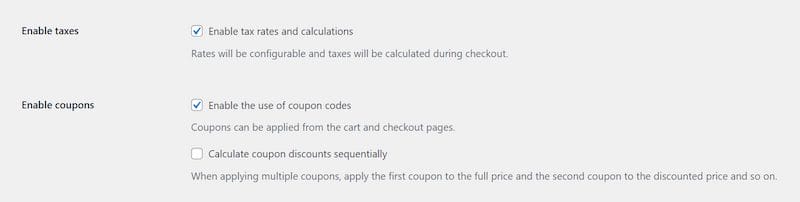
To activate coupons in your store settings:
- Go to your WordPress Dashboard.
- Navigate to WooCommerce > Settings > General.
- Tick the checkbox for Enable coupons.
- Click Save Changes.
Once this is done, your store is ready to accept coupon codes.
Step 2: Creating Your First Coupon
After enabling the feature, you can set up WooCommerce coupons by following these steps:
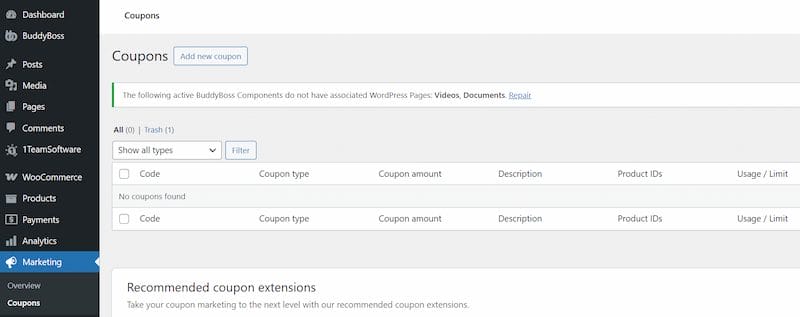
- In your dashboard, go to Marketing > Coupons.
- Click Add new coupon.
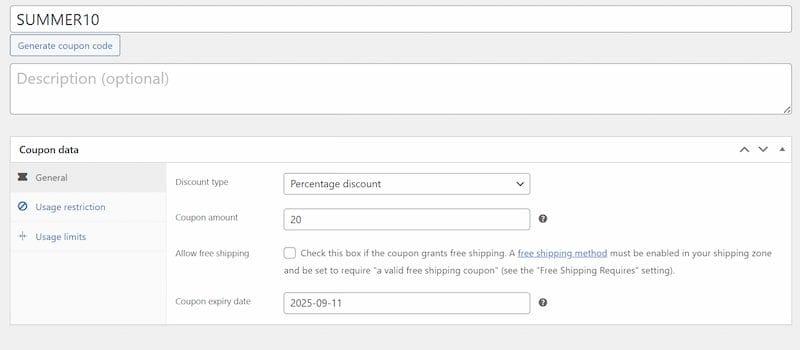
- Enter a Coupon Code (e.g.,
SUMMER10). - Add a description for internal reference.
- Choose a Discount Type:
- Percentage Discount – e.g., 15% off.
- Fixed Cart Discount – e.g., $20 off the total cart value.
- Fixed Product Discount – e.g., $5 off each T-shirt.
- Enter the discount value.
- (Optional) Allow free shipping.
- Set an expiry date if required.
- Click Publish.
Your coupon is now active and ready for customers to use.
Step 3: Setting Usage Restrictions
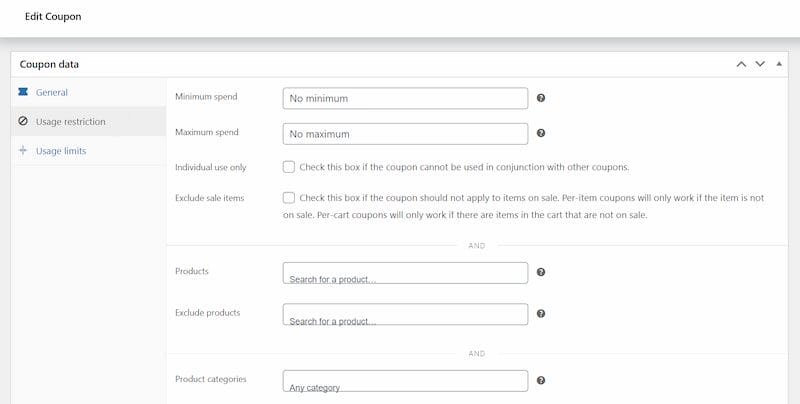
Restrictions help you control how and when coupons can be applied. Options include:
- Minimum/Maximum Spend
- Individual Use Only (prevents stacking)
- Exclude Sale Items
- Include/Exclude Products or Categories
- Allowed Emails for VIP offers
This ensures discounts are targeted and prevent misuse.
Step 4: Defining Usage Limits
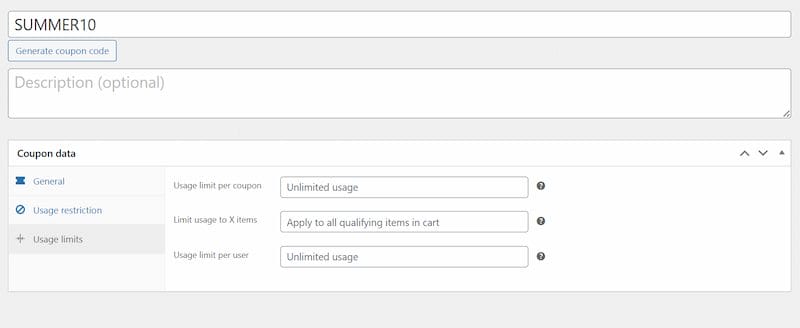
WooCommerce lets you control redemption with:
- Usage Limit per Coupon – total number of redemptions allowed.
- Limit Usage to X Items – restricts the coupon to certain items in a cart.
- Usage Limit per User – caps the number of times a customer can use the coupon.
These settings are ideal for flash sales and exclusive offers.
Step 5: Sharing Coupons with Customers
Coupons must be promoted to be effective. You can share them via:
- Email Marketing
- Social Media Posts
- On-Site Banners
- Manual Orders from the admin panel
Automation tools like AutomateWoo or MailPoet make distribution easier.
Step 6: How Customers Apply Coupons
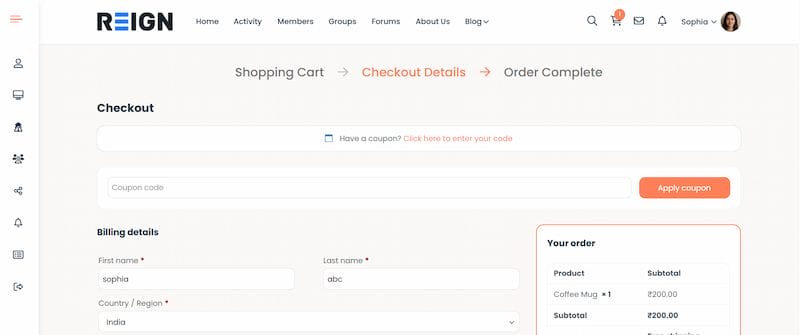
For customers, the process is simple:
- Enter the code in the Cart or Checkout.
- Click Apply Coupon.
- The discount updates the order total instantly.
If an item is expired or invalid, WooCommerce automatically displays an error.
Pro Tips for Maximising Coupon Effectiveness
When it comes to boosting sales with coupons, a few smart strategies can make a big difference. Start by testing percentage-based discounts versus fixed discounts to see which resonates more with your customers. Combining coupons with free shipping is another effective tactic, as shoppers love the added value.
Creating urgency with clear expiry dates encourages faster purchases, while personalising coupons for loyal customers helps build stronger relationships. Finally, make sure to track the results of each promotion so you can refine your strategy and focus on the campaigns that truly drive sales.
Tracking and Measuring Coupon Performance
Once you set up WooCommerce coupons, you can monitor usage through built-in reports. These reports show how often coupons are redeemed, the total discounts applied, and which campaigns convert best. You can also see which customer segments are using coupons most frequently, helping you understand shopper behaviour and preferences.
By analysing trends over time, you can identify your most effective promotions and adjust future campaigns accordingly. Additionally, tracking coupon performance helps you spot potential abuse, optimise discount amounts, and make data-driven decisions to maximise ROI. Regularly reviewing this data ensures that your coupon strategy remains effective, targeted, and profitable.
Also Read: How to Change Coupon Display and Design with Smart Coupons for WooCommerce
Common Mistakes to Avoid with Coupons
Be careful not to overuse discounts, as they may train shoppers to wait for deals instead of buying at full price. Always test codes before launching to ensure they work correctly, and make restrictions clear to avoid customer frustration. Instead of offering blanket discounts, segment your audience for targeted promotions—such as rewarding loyal customers, attracting first-time buyers, or re-engaging cart abandoners.
You can also create urgency with limited-time offers or seasonal campaigns. Another smart approach is to pair coupons with minimum purchase requirements, which helps increase average order value while still giving shoppers a reason to buy. By combining these strategies, you ensure that your coupons drive sales without hurting long-term profitability.

Maximising the Impact of WooCommerce Coupons
With WooCommerce’s built-in features, you can set up WooCommerce coupons that drive sales, reward loyal customers, and improve cart sizes. By experimenting with restrictions, limits, and distribution strategies, you can design campaigns that meet your business goals while protecting profit margins.
When promoted through email, social media, and banners, coupons not only boost conversions but also provide insights into customer behaviour. With smart planning, coupons can strengthen loyalty and improve your marketing ROI.
If you’d like expert help setting up and customising WooCommerce for your business, check out our
Custom WooCommerce Development Services.
Interesting Reads
15 Best Application Lifecycle Management Tools in 2025

