

In 2025, the rise of online memberships and subscription-based businesses shows no signs of slowing down. According to recent reports, the global subscription economy is expected to reach $1.5 trillion by 2025, with online learning, digital communities, and premium content platforms driving massive growth. Creators, coaches, and businesses alike are tapping into membership models to monetize content, foster loyalty, and build recurring revenue streams.
For WordPress site owners, membership plugins play a crucial role in making this possible. They allow you to restrict content, set up subscription tiers, manage members, and even sell online courses—all without complex coding. And among the many options available, MemberPress has consistently ranked as one of the top membership plugins for WordPress.

This MemberPress review will walk you through everything you need to know about the plugin. We’ll cover its features, pricing, setup process, pros, cons, and how it compares to competitors. Whether you’re a creator, educator, or entrepreneur, by the end of this MemberPress review, you’ll know if it’s the right fit for your online business.
Quick Links
What is MemberPress?
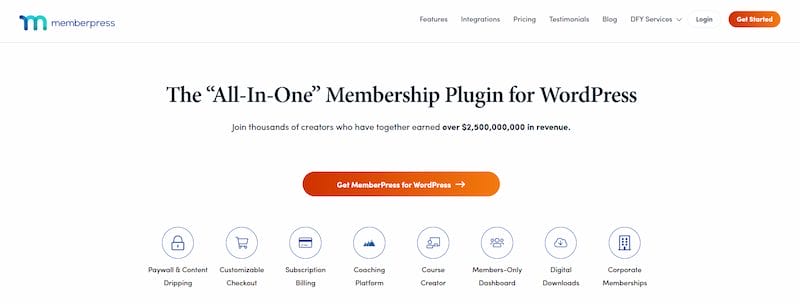
MemberPress is a powerful WordPress membership plugin designed to help creators, businesses, and communities monetize their content. Launched in 2013, it has become one of the most trusted tools in the membership space, thanks to its easy setup, flexibility, and integration with popular WordPress tools.
It’s built for:
- Creators who want to lock premium blog posts, podcasts, or videos behind a paywall.
- Coaches and educators looking to sell structured courses or training programs.
- Entrepreneurs and businesses offering subscription-based services.
- Communities and associations that want to manage members, fees, and exclusive content.
Some key highlights of MemberPress include:
- Robust membership management with flexible tiers.
- Content restriction tools that protect your posts, pages, and files.
- A built-in course builder for online learning.
- Support for recurring payments with top payment gateways.
- Advanced reporting and integrations with marketing platforms.
MemberPress Features
Let’s dive deeper into the features that make MemberPress stand out.
1. Membership Management
Setting up multiple membership tiers is a breeze. You can create custom subscription plans that match your business model—monthly, yearly, or lifetime access. Access rules let you control who sees what, ensuring only paying members get premium content. You can also offer free trials or discounted introductory rates to encourage sign-ups.
Members can easily upgrade, downgrade, or cancel their plans without your manual intervention. This flexibility makes it easier to attract new users while keeping your existing members satisfied.
2. Content Protection
With MemberPress, protecting content is simple yet powerful. You can apply paywalls to posts, pages, categories, or even downloadable files. The drip content feature allows you to release lessons or resources gradually, which keeps members engaged over time. You can also set up teaser content to entice non-members to subscribe.
Rules can be applied universally or customized per membership tier, giving you total control. This ensures your premium resources remain exclusive while still showcasing value to potential members.
3. Course Builder
Unlike many plugins that require add-ons, MemberPress includes a built-in LMS (Learning Management System). You can create, organize, and sell courses directly from your WordPress dashboard. Features like student progress tracking make it easy to manage learners and improve retention.
Quizzes and certificates can be added to boost learner engagement and credibility. The drag-and-drop builder makes course creation user-friendly even for non-technical users. With everything under one roof, you avoid juggling multiple plugins to deliver your training.
4. Payment Integration
MemberPress supports all the major payment gateways, including PayPal, Stripe, and Authorize.net. Recurring billing is fully automated, with invoices and receipts generated instantly. This ensures a seamless payment experience for both you and your members.
You can also accept one-time payments, coupons, or installment plans for added flexibility. Multi-currency support makes it ideal for businesses serving international audiences. Plus, built-in fraud protection and secure checkout keep transactions safe.
5. Reporting & Analytics
The plugin comes with detailed reports that help you track revenue, member engagement, and subscription performance. With insights into churn rate, upgrades, and overall trends, you can optimize your membership strategy effectively. Reports are presented in easy-to-read charts and tables for quick decision-making.
You can filter data by membership level, date range, or product type for deeper analysis. Exportable reports make it simple to share results with your team. This transparency helps you continuously refine your growth strategy.
6. Integrations
MemberPress integrates with popular email marketing platforms like Mailchimp, ConvertKit, and ActiveCampaign. It also works smoothly with WooCommerce, Zapier, and other LMS plugins, making it a versatile choice for different business models. Social media and CRM integrations further enhance your marketing automation workflows.
You can easily connect with webinar tools to host live training sessions. API access allows developers to extend functionality even further. With such flexibility, MemberPress fits seamlessly into any digital ecosystem.
Ease of Use & Setup
MemberPress is designed for WordPress users of all levels.
- Installation takes just a few clicks, similar to any WordPress plugin.
- The dashboard is intuitive and well-organized, making navigation easy even for beginners.
- It offers shortcodes and Gutenberg blocks for embedding membership content seamlessly.
- The learning curve is minimal, though complete beginners may need a short adjustment period.
If you want to take your membership site design even further, the Reign theme is a great companion for MemberPress. It’s built specifically for communities, memberships, and online learning, offering stylish layouts and deep integration with MemberPress to create a polished user experience without coding.
MemberPress Pricing
MemberPress offers three main pricing tiers:
- Basic – Perfect for beginners. Includes unlimited members and core membership features.
- Plus – Adds advanced integrations and marketing tools.
- Pro – Best for large businesses, with advanced features, priority support, and premium add-ons.
While MemberPress doesn’t have a free version, its value lies in being an all-in-one solution—so you don’t need multiple plugins to manage memberships, courses, and payments.
Pros and Cons of MemberPress
Like any plugin, MemberPress has its strengths and limitations.
Pros of MemberPress
1. All-in-one solution for memberships & courses: MemberPress combines memberships, content protection, and a built-in LMS in one plugin. This eliminates the need for multiple add-ons, saving you both money and time.
2. Flexible access control: You can restrict content by posts, pages, categories, or even downloadable files. This makes it simple to deliver tailored experiences to different membership tiers.
3. Reliable recurring payment management: The plugin automates billing, invoicing, and receipts for your members. This ensures smooth, hands-free payment management with fewer errors or manual tasks.
4. Strong integrations & automation: MemberPress connects with leading email marketing and e-commerce platforms. This allows you to build powerful automation workflows for engagement and sales.
Cons of MemberPress
1. Premium pricing (no free version): Unlike some competitors, MemberPress doesn’t offer a free tier. The upfront investment may feel steep for startups or small businesses.
2. Limited design customization without coding: Customizing layouts and designs often requires CSS knowledge. Non-technical users may need extra help to achieve a fully branded look.
3. Some advanced features require higher-tier plans: Features like advanced integrations or reporting are locked behind higher-priced plans. This means you may need to upgrade as your business grows.
Who Should Use MemberPress?
MemberPress is an excellent choice for:
- Content creators – Monetize blogs, podcasts, or premium videos.
- Online coaches and course creators – Sell structured training programs.
- Businesses offering subscription-based services – Manage clients with recurring billing.
- Communities and associations – Provide members-only access to resources or forums.
MemberPress vs Competitors
When comparing membership plugins for WordPress, the top alternatives to MemberPress are Restrict Content Pro, LearnDash, and Paid Memberships Pro. Here’s how they stack up.
1. MemberPress vs Restrict Content Pro
Restrict Content Pro is simple and affordable, great for basic content restriction and subscriptions. However, it lacks advanced tools like a course builder or detailed analytics. MemberPress offers an all-in-one solution, combining memberships, paywalls, and courses—making it more suitable for creators who want to grow long-term.
2. MemberPress vs LearnDash
LearnDash is a dedicated LMS, ideal for online schools with quizzes, certificates, and structured courses. But it has limited membership features. MemberPress is membership-first with a built-in course builder, perfect if you want memberships plus simple courses without extra plugins.
3. MemberPress vs Paid Memberships Pro
Paid Memberships Pro is flexible and affordable, but often requires add-ons to match MemberPress’s features. MemberPress includes drip content, reporting, and LMS tools right out of the box, making it a streamlined, time-saving choice.
Why MemberPress Stands Out
While competitors excel in specific areas, MemberPress combines everything—memberships, content protection, payments, and courses—into one powerful plugin. That’s why it’s a top choice for creators and businesses in 2025.
Comparison Table
| Feature / Plugin | MemberPress | Restrict Content Pro | LearnDash | Paid Memberships Pro |
|---|---|---|---|---|
| Membership Management | Yes | Yes | Limited | Yes |
| Content Protection | Yes | Yes | Basic | Yes |
| Built-in Course Builder | Yes | No | Yes | No |
| Payment Gateways | PayPal, Stripe, Authorize.net | PayPal, Stripe | PayPal, Stripe | PayPal, Stripe, Authorize.net |
| Integrations | Strong (email + WooCommerce) | Good | Strong for education | Good |
| Pricing | Premium | Affordable | Premium | Affordable |
Why MemberPress is Worth It
After exploring its features, pricing, and usability, it’s clear why MemberPress is one of the best membership plugins for WordPress in 2025. It offers a powerful combination of membership management, content protection, course building, and payment automation—all in one package.
For businesses looking to monetize content, sell courses, or run subscription services, MemberPress provides the tools to scale efficiently. While the premium pricing may be a barrier for some, its reliability and robust feature set make it a solid investment for serious creators and entrepreneurs.
If you’re ready to turn your WordPress site into a revenue-generating membership platform, MemberPress is worth every penny.
FAQs
1. Is MemberPress beginner-friendly?
Yes, it has an intuitive setup process and a user-friendly dashboard, making it accessible even for non-tech users.
2. Does MemberPress work with WooCommerce?
Yes, it integrates seamlessly with WooCommerce for selling products alongside memberships.
3. Can I sell courses with MemberPress?
Absolutely. It comes with a built-in course builder that lets you create and sell courses directly.
4. Does it support recurring payments?
Yes, MemberPress supports automated recurring billing with gateways like PayPal, Stripe, and Authorize.net.
5. Is there a free version of MemberPress?
No, MemberPress is a premium plugin. However, its all-in-one nature makes it more cost-effective than piecing together multiple plugins.
Interesting Reads
15 Best Time Logging Software in 2025
WP Job Manager Review 2025: Create a Recruitment Website with Ease

