

User registration is the gateway to building a colossal online community. Using the right tools and strategies, you can streamline the registration process and create a seamless experience for your users. Let’s explore how BuddyPress, a powerful plugin for WordPress, can help you in user registration and unlock the full potential of your online community.

Quick Links
Buddypress User Registration
BuddyPress extends the functionality of WordPress by adding social networking features to your website. One of its core components is user registration, it marks the inaugural step into the world of online communities, granting individuals access to a myriad of interactive features and personalized experiences.
Benefits of User Registration

User registration has several benefits for both the users and the website owners. Here are some of them:
For Users
1. Personalized Experience: Registered users can receive a personalized experience based on their preferences and behavior. This includes personalized recommendations, saved settings, and more.
2. Access to Features: Registration often gives users access to additional features such as commenting, posting, liking, and saving content for later.
3. Updates and Notifications: Registered users can opt-in to receive updates and notifications about new content, promotions, or changes to the service.
For Website Owners
1. User Engagement: Registered users are typically more engaged, contributing to a vibrant online community.
2. Data Collection: User registration allows website owners to collect data about their users, which can be used to improve the service, tailor content, and make informed business decisions.
3. Security: User registration can add an extra layer of security by requiring users to authenticate before accessing certain features.
Setting up Registration Page
Follow these steps to enable registration in your website
1. Enabling Registration: To allow users to register on your site, go to Settings > General in your WordPress dashboard. Check the box next to “Anyone can register” under the Membership section. Don’t forget to save your changes.

2. Configuring BuddyPress Registration Settings: Now, let’s configure the BuddyPress settings. Go to Settings > BuddyPress > Pages. Here, you’ll need to associate WordPress pages with each BuddyPress component. For registration, select the page you want to use for the Register and Activate components. If you haven’t created these pages yet, you can do so by going to Pages > Add New.

3. Customizing Registration Form: BuddyPress allows you to customize the registration form to suit your needs. Navigate to Users > Profile Fields in your WordPress dashboard. Here, you can add new fields to your registration form. For example, you could add a field for users to enter their bio or upload a profile picture.
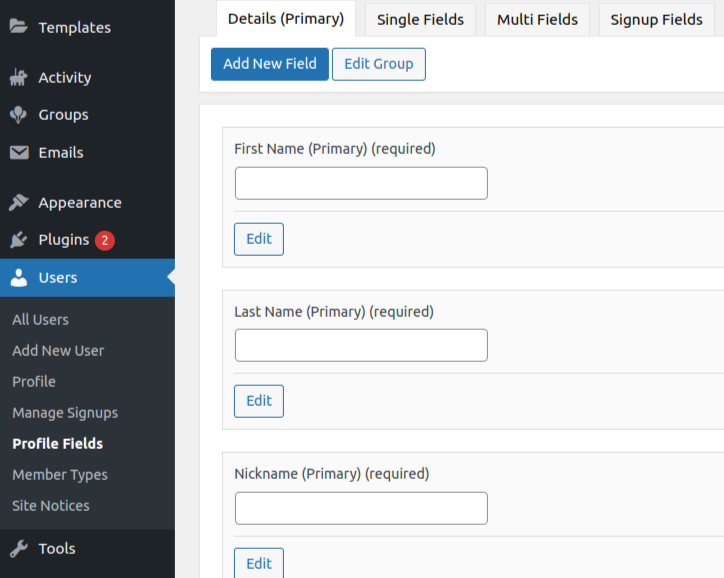
4. Registering as a new user: Register as a new user to test the form and rest of the setting.

5. Email or manual activation: With email activation, users receive an activation link via email after registering and with manual activation, administrators need to manually approve each new user registration before the account becomes active.

Best Practices
1. Streamlined Registration Flows: Keep registration forms concise and intuitive, minimizing friction and optimizing user experience. Strike a delicate balance between gathering essential information and respecting users’ time and attention.
2. Mobile Optimization: In an increasingly mobile-centric landscape, prioritize mobile optimization to ensure seamless registration experiences across devices. Embrace responsive design principles to accommodate users on smartphones and tablets effortlessly.
3. Clear Communication: Provide clear instructions and guidance throughout the registration process, alleviating user confusion and instilling confidence. Leverage tooltips, inline prompts, and contextual help to demystify complex steps and empower users to navigate with ease.
Harnessing the Power of BuddyPress for Effortless User Registration
By enabling user registration, you create a gateway for individuals to join and participate in your online community, fostering engagement and interactivity. The benefits for users include a personalized experience, access to exclusive features, and timely updates, while website owners can enjoy higher engagement, valuable data collection, and improved security.
Setting up and customizing the registration process with BuddyPress is straightforward, involving enabling registration, configuring settings, and customizing the registration form. By following best practices such as streamlining registration flows, optimizing for mobile devices, and providing clear communication, you can ensure a smooth and intuitive registration process.
Interesting Reads:
Best AI Tools For Natural Language Processing (NLP)

