

A slow checkout process is one of the biggest reasons shoppers abandon their carts. In fact, studies show that every extra step or delay at checkout can drastically reduce conversions. If you’re running a WooCommerce store, offering a faster, more convenient payment option is crucial. That’s where a Wallet-Style Payment for WooCommerce comes in.
By letting customers pre-load funds into a wallet on your site, you can simplify the checkout process to just a click. Instead of entering card details every time, buyers can pay instantly with their wallet balance. This not only boosts checkout speed but also improves customer loyalty. It also creates a seamless experience that keeps users engaged from browsing to purchase. Plus, it positions your store as modern and customer-friendly, building long-term trust.

Quick Links
Why Use a Wallet-Style Payment for WooCommerce?
Traditional payment methods require customers to re-enter details, which adds friction. A wallet system removes that barrier by allowing buyers to check out instantly with preloaded funds, avoid failed payments from expired or declined cards, enjoy rewards like bonuses or cashback for topping up, and manage funds easily within their account dashboard.
It also helps increase trust, since users stay on your website rather than being redirected to external gateways. For store owners, this translates into fewer cart abandonments, faster order processing, and happier returning customers.
Get Started with Wallet-Style Payment for WooCommerce

Ready to transform your store’s checkout experience? Installing the Wallet-Style Payment for WooCommerce plugin is quick and beginner-friendly. Once activated, you’ll give your customers the ability to pay faster, enjoy wallet top-ups, and benefit from loyalty rewards. This small change can significantly reduce cart abandonment and boost your conversions.
Step-1: Installing the Wallet for WooCommerce Plugin
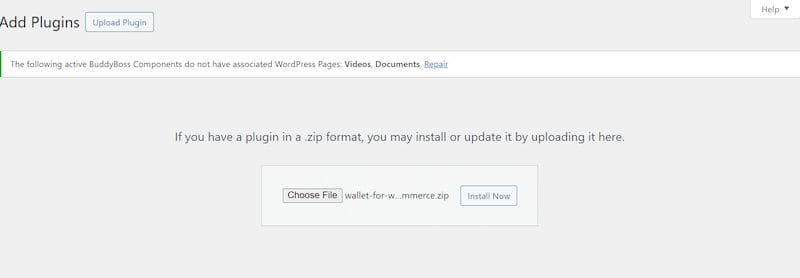
The first step to setting up wallet payments is installing the plugin. Here’s how:
- Download the
.zipfile from your WooCommerce account. - In your WordPress dashboard, go to Plugins > Add New > Upload Plugin.
- Select the file you downloaded and click Install Now.
- Once installed, hit Activate.
When activated, the plugin automatically creates wallet-related pages such as the Wallet Dashboard and Top-up Page for your customers.
Step-2: Configuring General Wallet Settings
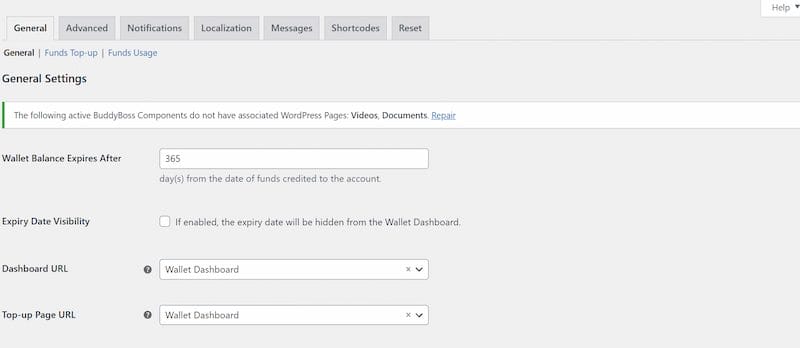
After installation, head over to Dashboard > Wallet > Settings. Here’s what you can do:
- Set Wallet Expiry: By default, wallet balances last for 365 days. You can extend this, shorten it, or make funds never expire.
- Wallet Dashboard & Top-up Pages: The plugin assigns these automatically, but you can customize them anytime.
- Checkout Display Options: Decide whether the wallet should appear alongside other payment gateways, or hide others when the wallet is available.
- User Account Settings: Control whether the wallet menu appears in the My Account section and adjust its position.
Step-3: Customizing Display Options
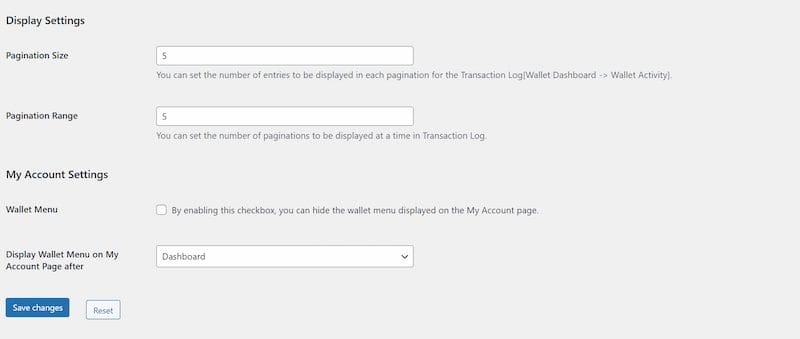
Presentation matters for user experience. In the Display Settings, you can:
- Hide the wallet gateway if a customer has insufficient funds.
- Show or hide the wallet menu in the user dashboard.
- Adjust the number of activity log entries shown per page.
- Choose where the wallet menu appears on the My Account page.
Step-4: Allowing Customers to Top-Up Funds
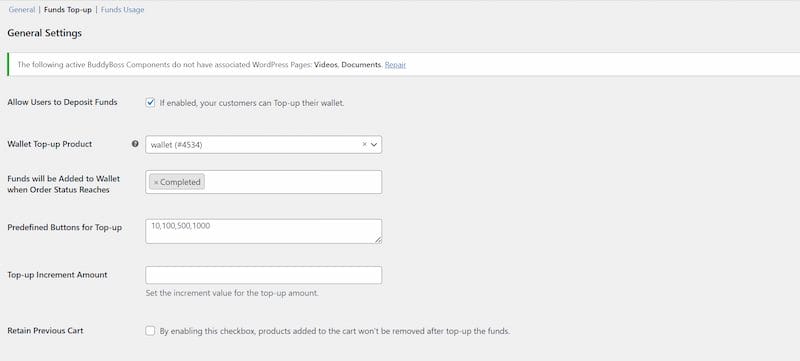
One of the strongest features of the plugin is wallet top-ups. You can enable this in Wallet > Funds Top-up Settings:
- Enable Deposits: Allow users to add funds.
- Top-up Product: The plugin automatically creates a product for this, but you can customize it.
- Top-up Status: Decide when funds become available (e.g., once the order is marked complete).
- Preset Amounts: Offer predefined top-up values for convenience.
- Retain Cart: Ensure customers can top up without losing products in their cart.
Offering Bonuses for Top-Ups
You can incentivize deposits by offering bonus funds. For example:
- Add $5 extra when a user tops up $50.
- Offer a percentage-based bonus for larger deposits.
This encourages customers to keep higher balances, making checkout even smoother.
Step-5: Restricting and Securing Top-Ups
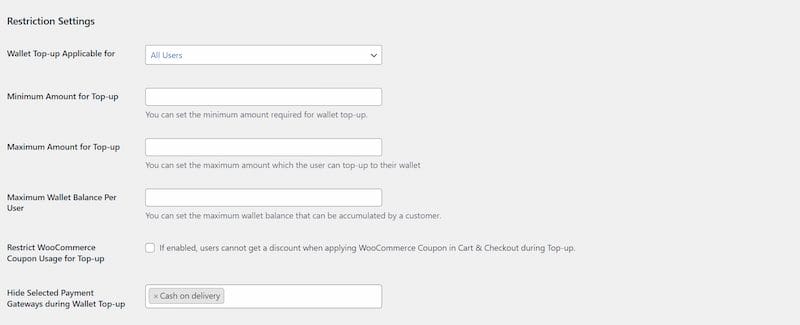
To maintain control, the plugin lets you:
- Limit top-ups to certain users or roles.
- Set minimum and maximum top-up amounts.
- Place a cap on wallet balances.
- Restrict coupon usage during top-ups.
- Limit how many top-ups can be made per day.
These options help prevent misuse and keep the system secure.
Using Wallet Funds at Checkout
When a customer reaches checkout, they can:
- Pay Fully with Wallet: If the balance covers the total.
- Pay Partially: Combine wallet funds with another gateway like PayPal or Stripe.
You can control partial payment rules, such as:
- Allowing it anytime.
- Allowing only when the balance is less than the order total.
- Setting maximum partial usage per order.
Restricting Wallet Usage
To maintain flexibility, you can:
- Set minimum or maximum cart totals for wallet usage.
- Restrict wallet payments to certain days.
- Limit wallet usage to specific products, categories, or user roles.
Also Read: 10 Best WooCommerce Payment Gateway Plugins
Advanced Wallet Features
1. Fund Transfers Between Users
This feature allows customers to send funds directly to other users within your site. It makes peer-to-peer payments seamless, whether for sharing costs or sending gifts. You can also enable OTP authentication to add an extra layer of security and, if desired, apply a small fee for each transfer.
2. Fund Requests
With fund requests, users can easily ask friends, family, or teammates to transfer money into their wallet. Once a request is made, the recipient receives a notification and can either approve or deny it, making it a practical option for group purchases or shared expenses.
3. Auto Top-Up
Auto Top-Up ensures that a wallet never runs out of balance. When a user’s funds drop below a set threshold, the wallet is automatically recharged with a predefined amount. This is especially useful for subscriptions or frequent shoppers who want uninterrupted service.
4. Gift Vouchers
Gift vouchers let store owners generate redeemable codes that customers can use to add funds to their wallets. It’s an excellent way to encourage gifting and promotions, giving buyers a simple way to share store credit with others.
5. Rewards and Incentives
You can use rewards to make the shopping experience more engaging. By offering wallet credits for actions like signing up, logging in daily, writing product reviews, or completing specific purchases, you encourage repeat visits and strengthen customer loyalty.
6. Wallet Withdrawal
This module allows users to withdraw unused funds directly from their wallet. Withdrawals can be processed via Bank Transfer or PayPal, and you can choose to charge a fee for the service if needed. It provides flexibility and builds customer trust by letting them access their funds whenever required.
Managing Wallet Transactions as an Admin
From your dashboard, you can:
- View all wallet balances under Wallet > All Wallets.
- Track deposits, withdrawals, and payments in Wallet > Transactions.
- Reset balances or transaction logs when needed.
- Use custom CSS to adjust the wallet dashboard design.
- Configure notifications and email alerts.
Real-World Benefits of Wallet-Style Payments
Preloaded funds mean no waiting for external gateways, which leads to faster checkouts. Shoppers are less likely to abandon their carts, resulting in higher conversions. Bonuses and rewards encourage customer loyalty, while stored funds often lead to increased order values. Additionally, wallet funds can be flexibly combined with other payment methods, giving customers more control at checkout.
Best Practices for Using Wallet Payments in WooCommerce
- Promote Top-Ups: Offer bonuses or discounts for wallet deposits.
- Encourage Loyalty: Reward daily logins, reviews, or referrals with wallet credits.
- Keep It Transparent: Clearly show wallet balances in the account dashboard.
- Test on Multiple Devices: Ensure the wallet system works smoothly on mobile and desktop.
- Track Performance: Use WooCommerce analytics to monitor how wallet payments affect conversions.

Why Wallet-Style Payment for WooCommerce is a Game-Changer
A Wallet-Style Payment for WooCommerce doesn’t just speed up checkout—it creates a complete ecosystem of convenience, loyalty, and flexibility for your customers. From instant payments to reward-based engagement, it transforms your store into a user-friendly, future-ready platform.
If you’re ready to reduce cart abandonment and boost customer satisfaction, installing the Wallet for WooCommerce plugin is the perfect next step. Give your shoppers the fast, frictionless checkout they deserve—and watch your sales grow.
Interesting Reads
How to Build a Shopify-Like Multi-Step Checkout in WooCommerce
Top 10 Tableau Alternatives and Competitors
Top 25 Fiverr Alternatives for Freelancers and Businesses in 2025

