What Table Is The Admin Info Stored In WordPress


In WordPress, understanding where admin information is stored in the database is crucial for tasks such as troubleshooting, customizing user data, or performing advanced user management. WordPress utilizes a structured database system to store various types of data, including user details, roles, and permissions. This data is organized into specific tables that ensure the secure and efficient management of users, including administrators. By knowing which tables to look at, you can gain deeper insights into how WordPress handles user information and how you might interact with it for various administrative tasks.
In WordPress, the admin information, along with other user details, is stored in the following database tables:
1. wp_users
This table stores the basic user information, including the admin’s username, password (hashed), email address, and other essential details. The most relevant fields are:
-
- ID: The unique identifier for the user.
- user_login: The username used to log in.
- user_pass: The hashed password.
- user_email: The email address associated with the user.
- user_registered: The date and time when the user was registered.
2. wp_usermeta
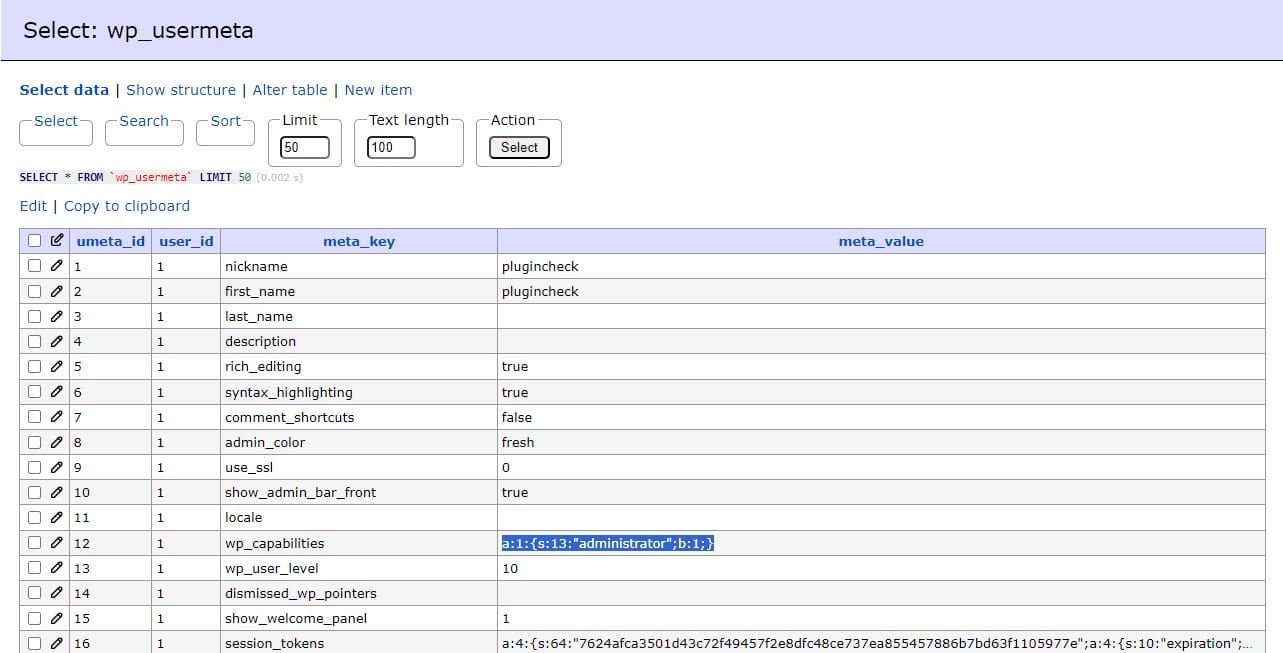
This table stores additional metadata for each user, including the admin. This metadata includes user roles, capabilities, and any other custom information stored about the user. Some of the key fields include:
- user_id: The ID of the user, which links to the ID in the wp_users table.
- meta_key: The name of the meta field.
- meta_value: The value of the meta field.
For example, the admin role is stored in the wp_usermeta table with the meta_key of wp_capabilities, where the meta_value would indicate the role (e.g., a:1:{s:13:”administrator”;b:1;}).
These tables together contain all the necessary information related to WordPress admin accounts and other users.
Interesting Reads:
What Is The HTML For Fonts In WordPress

Shashank is a seasoned digital marketing and WordPress expert who specializes in SEO, software tools reviews, and cutting-edge strategies for boosting online presence. With a passion for simplifying complex topics, Goutham crafts engaging blog posts that help readers optimize their websites, improve search engine rankings, and stay ahead in the ever-evolving digital landscape.