

The demand for flexible and immersive online learning experiences continues to grow. Educational institutions, businesses, and entrepreneurs are constantly seeking innovative ways to engage learners and streamline course management processes. One such solution that has gained popularity is the integration of LearnDash LMS, with The Events Calendar, a powerful event management plugin for WordPress.
Integrating LearnDash with The Events Calendar, educators and businesses can seamlessly combine their online courses with scheduled events, creating a cohesive learning journey for their audience. This integration not only enhances user experience but also streamlines course and event management, offering numerous benefits for both administrators and learners alike.
Let’s Learn the process of integrating LearnDash with The Events Calendar, exploring the steps involved and highlighting the key benefits of this powerful integration. Whether you’re an educator looking to enhance your online courses or a business seeking to streamline event management, this guide will equip you with the knowledge and tools needed to harness the full potential of LearnDash and The Events Calendar integration.

Quick Links
LearnDash and The Events Calendar integration
The Events Calendar add-on simplifies the process of synchronizing courses with events, offering a seamless integration between LearnDash courses and scheduled events on your WordPress website. This integration provides a powerful feature: the automatic enrollment of attendees into courses after they register for events
.When a user registers for an event through The Events Calendar, the integration automatically triggers the enrollment process for the corresponding LearnDash course. This means that attendees are seamlessly signed up for the associated course without any additional manual intervention required from administrators or users.This automation not only saves time and effort but also enhances the user experience by streamlining the registration and enrollment process. Attendees can easily access the course content related to the event they registered for, ensuring a cohesive learning journey that complements their event experience.
The Events Calendar add-on for LearnDash, administrators can effectively manage course enrollment, track event attendance, and provide a seamless learning experience for their audience. Whether you’re organizing workshops, seminars, or training sessions, this integration offers a powerful solution for synchronizing events and courses, maximizing engagement, and driving success in your online learning initiatives.
Key Features
1. Automatic Enrollment: Seamlessly enroll attendees into LearnDash courses after they register for events through The Events Calendar, eliminating the need for manual enrollment processes.
2. Synchronization: Keep course content and event details aligned by synchronizing LearnDash courses with scheduled events, ensuring that attendees have access to relevant course materials.
3. Streamlined Management: Simplify course and event management with integrated tools that allow administrators to oversee registrations, enrollments, and event attendance from a centralized dashboard.
4. Enhanced User Experience: Provide a cohesive learning journey for attendees by seamlessly integrating course content with event registrations, enhancing engagement and participation.
5. Time-saving Automation: Reduce administrative overhead with automated processes that handle course enrollment and event registration, freeing up valuable time for educators and administrators.
6. Customization Options: Customize the integration to suit your specific needs, with options to configure enrollment settings, course visibility, and event-to-course mapping according to your preferences.
7. Reporting and Analytics: Gain insights into attendee engagement and course participation with built-in reporting and analytics features, allowing administrators to track the effectiveness of their online learning initiatives.
8. Scalability: Scale your online learning offerings effortlessly by leveraging the integration’s ability to handle registrations and enrollments for a wide range of events and courses, accommodating growth without sacrificing performance.
How to use The Events Calendar integration
1. Prerequisites
You need to install following plugin in order to use the Events Calendar integration.
1. The Events Calendar (free): For managing events on your WordPress site.
2. Event Tickets (free): For selling tickets to your events.
3. Event Tickets Plus (premium add-on): Enhances ticketing capabilities.
4. Virtual Events (premium add-on, optional): Facilitates virtual event management.
5. WooCommerce: Can be configured with Event Tickets Plus.
6. WooCommerce for LearnDash integration add-on (free): Enables WooCommerce integration with LearnDash.
7. The Events Calendar and LearnDash integration add-on (free)
2. Configuring Settings
1. Changes to Settings
1. WooCommerce Settings: Uncheck the “Guest Checkout” options under Accounts and Privacy to disallow orders without an account and existing account login during checkout.
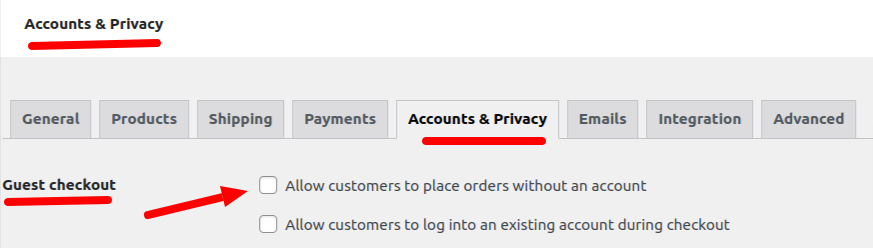
2. Tickets Settings: Enable the options under Login Requirements to mandate user login before RSVP and ticket purchase.
2 . Create a Course
When you create a Learndash Course keep in mind to configure these settings.


i.) Edit the access mode to closed.
ii.) Select course content to only visible to enrollees.
3. Create an event with a ticket
1. Create an event and attach a ticket to it.
2. When you create a ticket with Event Tickets and Event Tickets Plus, the ticket created is actually a WooCommerce product. You can use that ticket URL to add a button to your course page.
4. Add the URL to course

1. Visit your LearnDash course page Settings and add the link to the Button URL under Access Mode > Closed.
2. Then, add the course price that corresponds with the price indicated on your ticket. This is an important step, especially if users visit your course page URL directly.
5. Edit the ticket product
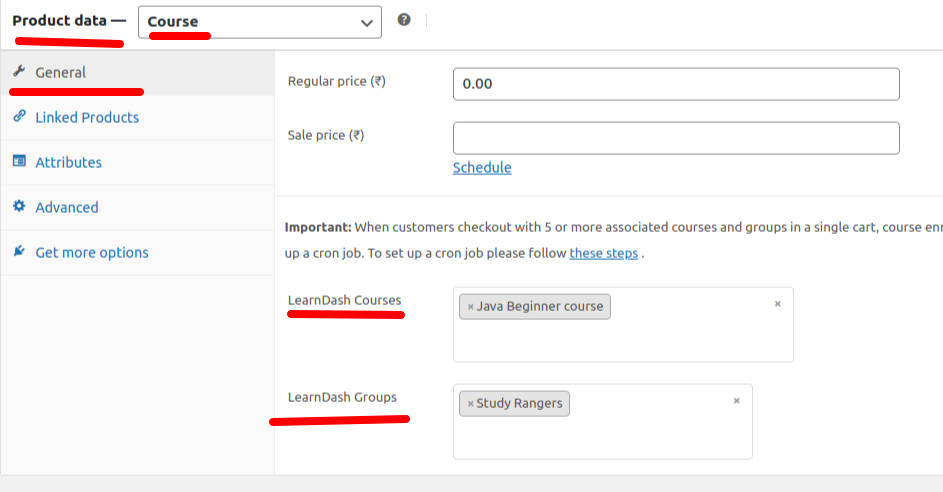
1. Edit the ticket product by going back to Products.
2. Select the LearnDash course(s) that you’d like to associate your ticket with. You can optionally associate the ticket with LearnDash Groups as well.
6. Add the integration to the event
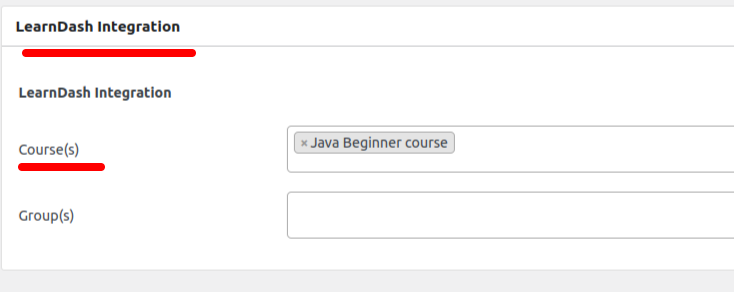
1. Edit Event page under Events .
2. Select the LearnDash course(s) that you’d like to associate with the event.
After the Event is created, It will look something like this.
Conclusion
The integration between LearnDash and The Events Calendar offers a powerful solution for seamlessly combining online courses with scheduled events. By synchronizing course enrollment with event registrations, this integration streamlines the user experience, enhances engagement, and simplifies administrative tasks for educators and businesses.
With features such as automatic enrollment, streamlined management, and customization options, the integration empowers administrators to create a cohesive learning journey that complements their event offerings. You can be more resolute to promote your business, courses and use of Theme, BuddyX Which also seamlessly integrates with Learndash.
Interesting Reads:
Introducing the LearnDash Migration Add-on

