

If you’re in search of top-quality WordPress hosting, Kinsta is a name you’ve likely encountered. Renowned for its fast, secure, stable, and user-friendly hosting, Kinsta should be on your shortlist. But how does it stack up against other major players in the managed WordPress hosting market? Does it truly deserve the top spot? To help you decide if Kinsta is the best choice for your needs, this Kinsta review will delve into its standout features, assess its performance on our independent set-up test sites (using both a basic and a more complex WordPress theme), and evaluate what you get for your money compared to its main competitors.

Quick Links
Overview of Kinsta- Kinsta Review
Kinsta specializes in hosting WordPress sites, focusing solely on optimizing its infrastructure for the best possible WordPress experience. This results in fast load times, high security, a user-friendly interface, and reliable uptime. When you contact support, you’ll be speaking with WordPress experts who handle similar sites daily.
The main drawback of Kinsta is its pricing. While it isn’t much more expensive than other top-tier managed WordPress hosts, its plans are significantly pricier than entry-level shared hosting services. Although Kinsta’s pricing is competitive in the premium managed WordPress hosting market, its main rival, WP Engine, offers slightly cheaper plans for the first year due to a new customer signup promotion and includes a selection of premium WordPress themes at no extra cost.
However, if you’re seeking high-quality managed WordPress hosting, Kinsta offers great value, and you won’t be disappointed with the service it provides.
To understand how I reached this conclusion, read on for an in-depth, hands-on Kinsta review.
Let’s dive in…
Pros:
- Premium managed WordPress hosting
- 35 data centers worldwide
- Edge caching technology
- Hosted on Google Cloud Platform
- Infrastructure powered by Cloudflare
- Server-level full-page caching
- Automatic wildcard SSL certificates
- Includes Kinsta CDN
- Automatic database optimization
- DevKinsta for local development
- 24/7/365 expert WordPress hosting support
- 30-day money-back guarantee
Cons:
- Higher pricing compared to other hosts
- 14-day data restore retention (longer periods available for an additional fee)
There are numerous compelling reasons to opt for Kinsta. However, its premium services come at a cost — priced higher than most entry-level shared hosting services and even many well-known competitors in the managed hosting sector. Therefore, considering Kinsta is only worthwhile if it truly delivers on its promises of speed, user-friendliness, and reliability.
Kinsta Hosting Features- Kinsta Review
Getting acquainted with Kinsta’s features is crucial for determining if this hosting provider aligns with your website needs. This understanding will also clarify why Kinsta’s pricing exceeds that of shared hosting providers and why it’s regarded as a premium service.
Following the exploration of its key features, you’ll encounter detailed results from tests on site speed, load handling, and uptime. These outcomes provide a concrete idea of the loading speed you can expect if you choose Kinsta as your hosting provider.
Kinsta’s WordPress Hosting offers a fast and secure infrastructure for hosting your WordPress site, with a worldwide CDN, edge caching, and the option to host on one of 35 data centres. Choose from the Starter, Pro, Business, or Enterprise plans, tailored to suit your site’s needs.
Key features of WordPress Hosting include:
- Unlimited Free Migrations: Easily migrate your site from any hosting provider with a standard WordPress installation through MyKinsta.
- Kinsta CDN: Powered by Cloudflare, Kinsta’s CDN is free and includes HTTP/3 support, primary domain support, image optimization, and code minification.
- Edge Caching: Included in all plans, this feature distributes cached pages from your site’s data centre to Cloudflare’s global network of 260+ data centres, ensuring faster loading times.
- Kinsta’s Application Performance Monitoring (APM) Tool: Captures information about your site’s PHP processes, MySQL database queries, and more, helping you troubleshoot slow page loads.
- Automatic Backups: Daily backups of your site are created automatically, with system-generated backups for certain events.
- SFTP and SSH Protocols: Included in all plans, providing secure file access and the ability to perform sysadmin tasks and execute commands on the server.
- Site Management Tools: Manage your site’s cache, enable debug mode, perform search and replace operations, set up geolocation, change PHP versions, and more from one location.
- Staging Environments: Test new versions of your site or code changes with Kinsta’s free WordPress staging environment.
- Unlimited Users: Invite as many users as needed to your site with varying levels of access.
- Analytics: Gain insights into your resource usage, CDN usage, website performance, response stats, visitor insights, and more with Kinsta’s Analytics.
Authentic Managed WordPress Hosting- Kinsta Review

Kinsta sets itself apart from cheap shared hosting providers by focusing on delivering a high-performance hosting environment tailored to WordPress.
Understanding the potential limitations of WordPress, such as slow loading times, security vulnerabilities, and caching issues, Kinsta has developed a top-notch hosting environment to address these challenges.
Kinsta has not only optimized its hosting environment for peak performance but has also built its platform on the robust Google Cloud Platform. This allows you to host your site on infrastructure developed by Google, a leading tech company, while Kinsta manages the hosting environment. Moreover, Kinsta offers hosting in one of five main global regions, leveraging Google Cloud Platform’s 35 data centres.
Despite being hosted on Google Cloud Platform, you won’t need to interact with it directly. Everything is managed through Kinsta’s intuitive custom dashboard, seamlessly integrated into your Kinsta account area.
Kinsta has partnered with Cloudflare for its CDN, included in all plans. The Kinsta CDN distributes your site’s files to over 275 worldwide points of presence (PoPs), ensuring that your content is always accessible to your visitors, regardless of their location. Enabling the Kinsta CDN can lead to a significant reduction in page load times, up to 44%, according to Kinsta.
Kinsta also manages caching with its proprietary in-house solution. Instead of searching for and configuring caching plugins, you can rely on Kinsta to handle this aspect for you.
By choosing Kinsta, you gain access to a hosting environment that leverages cutting-edge technology to deliver a premium managed hosting experience.
What does Kinsta handle for you?
In addition to fine-tuning and optimizing its servers and hosting environment for speed and security, Kinsta also handles several essential tasks for you, such as:
- Migrating your current WordPress website to Kinsta
- Automatic and on-demand website backups
- Global CDN and four types of caching (including edge caching)
- Automatic uptime monitoring every two minutes
- DDoS protection and other proactive security measures
- Automatic weekly database optimization.
Kinsta is user-friendly- Kinsta Review
We found Kinsta to be user-friendly, from the signup process to navigating the dashboard. The web host offers an intuitive dashboard that simplifies website hosting. This dashboard allows quick access to all features and settings in one place, making it easy to manage website performance and security.
With Kinsta, you can manage multiple websites from a single account and deploy applications, databases, or static sites without switching between different accounts. This eliminates the need for constant switching when making changes, updating your site, or creating a new web app.
Kinsta also offers several features to facilitate website management, designed for users of all technical levels to easily manage their websites without much difficulty.
What additional value do you receive with your investment?
As previously discussed in this Kinsta review, this hosting provider does not offer budget services at a basic level.
So, what do you receive in return for your investment?
The entry-level Starter plan is quite competitive.
For $30 per month (when paid annually, or $35 monthly), you receive:
- The ability to install one WordPress website
- 10 GB of storage
- Up to 25,000 monthly visits
- 100 GB of CDN bandwidth
- One premium WordPress website migration.
- The higher-tier plans allow you to host more websites, offer more storage, and provide greater monthly visits and CDN bandwidth allocations.
Kinsta also offers custom plans and WordPress hosting tailored for agencies.
Unlike some popular low-cost shared hosting providers, you do not need to upgrade to a higher-priced plan to access better performance levels. With Kinsta, your website should load at the same speed, whether it is hosted on the entry-level Starter plan or the top-tier Enterprise plan.
KINSTA LOAD TIME TEST SUMMARY- Kinsta Review
Conducting thorough testing on your website is a fundamental practice for developers and site owners alike, especially before making it live. However, there can be confusion surrounding the various types of testing and their methodologies. Among the most common are speed testing and load testing.
Speed testing evaluates how quickly your website loads and performs under normal conditions. It provides insights into user experience and helps identify areas for improvement in terms of performance optimization.
Load testing, on the other hand, assesses how well your website performs under heavy traffic or peak loads. It helps ensure that your site can handle a large number of simultaneous users without experiencing slowdowns or crashes.
1. Website Page Speed Testing- Kinsta Review

This form of testing evaluates the size and loading duration of a page on your website, aiming to identify any large or slow requests that could be causing bottlenecks. Popular tools for conducting these tests include Pingdom’s Website Speed Test, GTmetrix, and Google’s Lighthouse.
2. Website Load Testing- Kinsta Review
Load testing is a more intricate process compared to page speed testing and requires careful execution. This form of testing aims to simulate real user conditions, such as high traffic or a large number of concurrent users.
Not all load-testing tools are created equal, and configuring proper tests can be complex. Therefore, we recommend working with a developer if you are not experienced in running load tests.
Due to the potential impact on resources, if you intend to run a load test on our platform, we kindly ask that you inform our Support team beforehand by opening a new chat in MyKinsta.
Uptime Monitoring- Kinsta Review
We continuously monitor the uptime of all WordPress sites on our platform, checking them every 3 minutes. If an issue is detected and a site isn’t loading, our engineers promptly respond to restore service.
Moreover, if WordPress site monitoring notifications are enabled in MyKinsta (User Settings > Notifications), we will send you an email if we detect any of the following errors in 3 consecutive checks on your WordPress site, indicating that your site requires immediate attention:
- Site Errors: Our custom-built monitoring tool alerts us to any errors or issues on your site, prompting us to notify you via email.
- DNS Errors: A correctly configured DNS is crucial for your WordPress site. If we detect any issues with your site’s DNS configuration, we will promptly notify you.
- SSL Errors: If there is a configuration problem with your domain and the SSL certificate expires, we will notify you.
- Domain Expiration: If we detect that your Kinsta site is using an expired domain, we will send you an alert.
Kinsta Pricing- Kinsta Review
Kinsta is renowned for being a top-tier managed WordPress hosting provider, offering comprehensive toolkits across various plan tiers. Let’s compare the hosting costs for Kinsta’s services, which differ based on the type of product hosted: WordPress websites, applications, or databases. Additionally, Kinsta provides a free service for hosting static sites.
1. WordPress Sites- Kinsta Review
It’s worth mentioning that Kinsta’s core infrastructure is consistent across all plans, including:
- Powered by Google Cloud’s Premium Tier network and C2 and C3D machines for optimized performance.
- Isolated container technology.
- Enterprise-level Cloudflare integration with free wildcard SSL, HTTP/3 support, and a CDN network with 260+ PoPs.
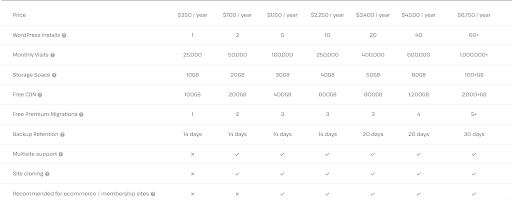
The hosting cost for WordPress websites with Kinsta varies based on:
- Available WordPress installs
- Number of monthly visits
- Storage space
Availability of free CDN
- Quantity of free premium Kinsta migrations (unlimited free basic migrations are provided for simple WP installs)
- Backup retention period (at least 14 days)
- Support for the multi-site option (available from the Pro plan)
- Site cloning option (available from the Pro plan)
2. Web Applications- Kinsta Review

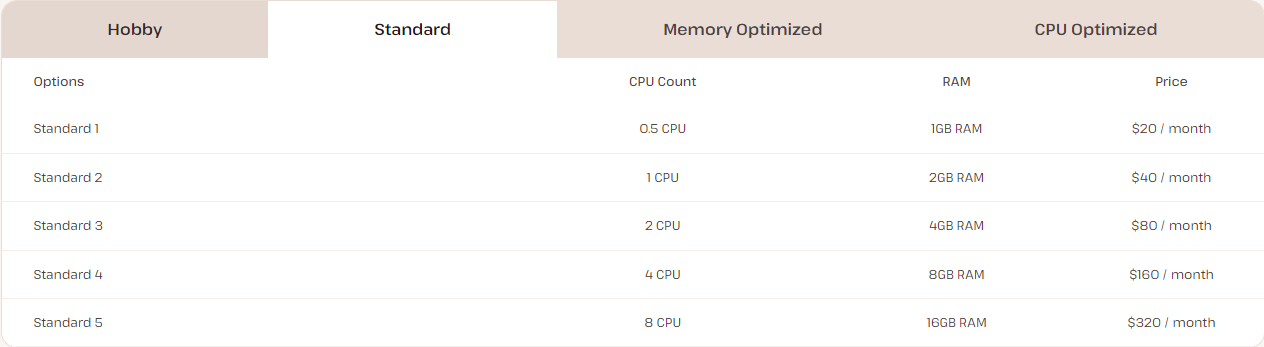
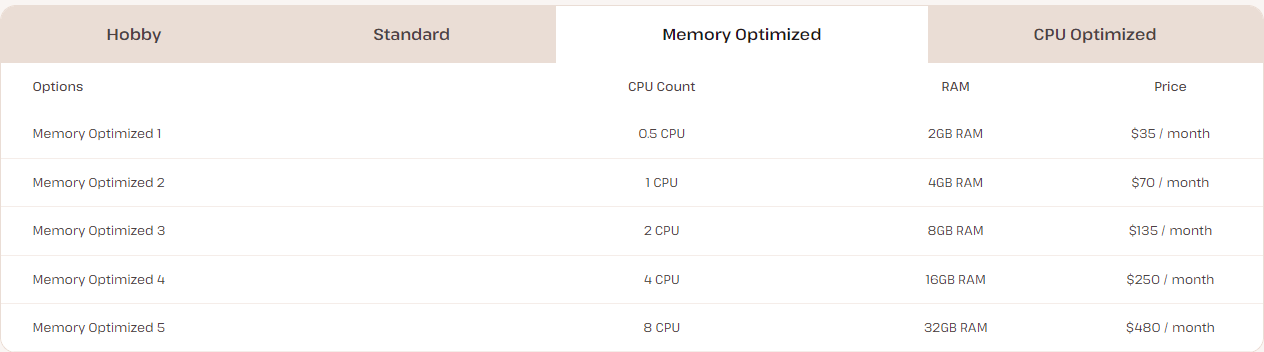
The pricing for web application hosting with Kinsta is based on different pricing schemes:
- Application Pods: Starting at $7 per month.
- Build Machines: Starting at $0.02 per minute.
- Bandwidth Pricing: Starting at $0.14 per GB for external bandwidth.
- Optional Persistent Storage: Starting at $3 per month.
For example, the Application Pods category is further subdivided into several Kinsta plans, as outlined in the table below:
Conclusion on Kinsta Review
To conclude this Kinsta review for 2024, here are the key takeaways:
- Kinsta offers a secure hosting environment characterized by fast performance, robust security features, and expert customer support. It supports hosting for WordPress websites, web applications, databases, and static sites.
- The MyKinsta dashboard, integration with Cloudflare, free migrations, and staging environments make Kinsta an excellent choice for hosting a reliable and efficient website. If the pricing fits your budget, Kinsta could be a great option for your business.
- Have we covered all the features? Is Kinsta suitable for your needs? Share your thoughts and feedback in the comments below!
Interesting Reads:
How to Engage Your Community with Activity Link Preview in BuddyPress
7 Best Copywriting Frameworks

