
BuddyPress is a powerful plugin for WordPress that transforms your site into a fully functional social network. It offers features such as user profiles, activity streams, user groups, and more, making it an excellent choice for building online communities. For those managing a BuddyPress-powered site, monetizing through ads can be an effective way to generate revenue. Displaying ads in BuddyPress can be done by using Buddypress ads plugin, ensuring that you can start earning without additional costs. Let’s learn the process of displaying ads in BuddyPress for free.
BuddyPress Ads
BuddyPress Ads are a great way to monetize your BuddyPress website and generate additional revenue. It is a free plugin by wbcomdesigns. These are advertisements that appear on the pages of your BuddyPress site, usually in the form of banners, text links and images. Display ads at different BuddyPress locations, such as the Activity Page, Group Page, and Member Page. You can also choose the position of the displayed ads according to your requirements. This allows you to maximize your ads’ potential and ensure they reach the right people.
Using ads can make your community sustainable as you wiil be able to earn back the amount spent on creating and managing the community.
Features of BuddyPress Ads
1. Compatibility: It works with both BuddyPress and BuddyBoss platforms without a separate integration step. This means the plugin functions the same way regardless of which of the two you’re running.
2. Versatility: The plugin is ideal for a wide range of site types, including social marketplaces, community sites, membership sites, digital product sites, auction sites, and any other type of blogging website to create ads in BuddyPress. This versatility makes it a powerful tool for any site owner looking to monetize their online community.
3. Ad types: You can choose between different ad formats, such as plain text, rich content, and image ads. This flexibility allows you to tailor your advertising strategy to best fit your audience and content.
4. PHP code embedding: It includes a feature that allows you to embed PHP code inside the ads in BuddyPress. This can be particularly useful for advanced users who want to integrate dynamic content or more complex ad scripts.
5. Activity type selection: The plugin offers the ability to choose the activity type for displaying ads in BuddyPress. You can select to display advertisements within group activities, member activities, or site-wide activities, ensuring your ads are seen in the most relevant contexts.
6.Ad positions: There are multiple positions available for displaying ads. This allows for strategic placement within your site’s layout, increasing the likelihood that users will interact with the ads.
7. User conditions: BuddyPress Ads allows you to set user conditions for displaying advertisements. You can configure ads to show for both logged-in and logged-out users, offering targeted ad delivery based on user status.
8. Device conditions: The plugin provides display conditions for different devices, such as mobile, tablets, and desktops. This ensures that ads in BuddyPress are optimized for the device your visitors are using, improving the overall user experience.
9. Device friendly: It is designed to be device-friendly, meaning your ads in BuddyPress will display correctly on any device, including desktops, mobile phones, and tablets. This adaptability is crucial for maintaining a consistent and professional appearance across all platforms.
10. Shortcodes: You can use the shortcode created at time of ad creation to display ads in BuddyPress specifically on pages.
Installation
1. Log in to your WordPress Dashboard.
2. In the Dashboard, scroll down the left sidebar and click on “Plugins.”
3. On the Installed Plugins page, click “Add New” at the top of the page, or select “Add New” from the drop-down menu under “Plugins” in the sidebar.

4. On the Add Plugins page, type “BuddyPress Ads plugin” in the search box located at the top right.

5. From the search results, find the plugin you want and click “Install Now.” To learn more about the plugin, click the “More Details” link.
6. Once the plugin is installed and unpacked, click “Activate Plugin.”
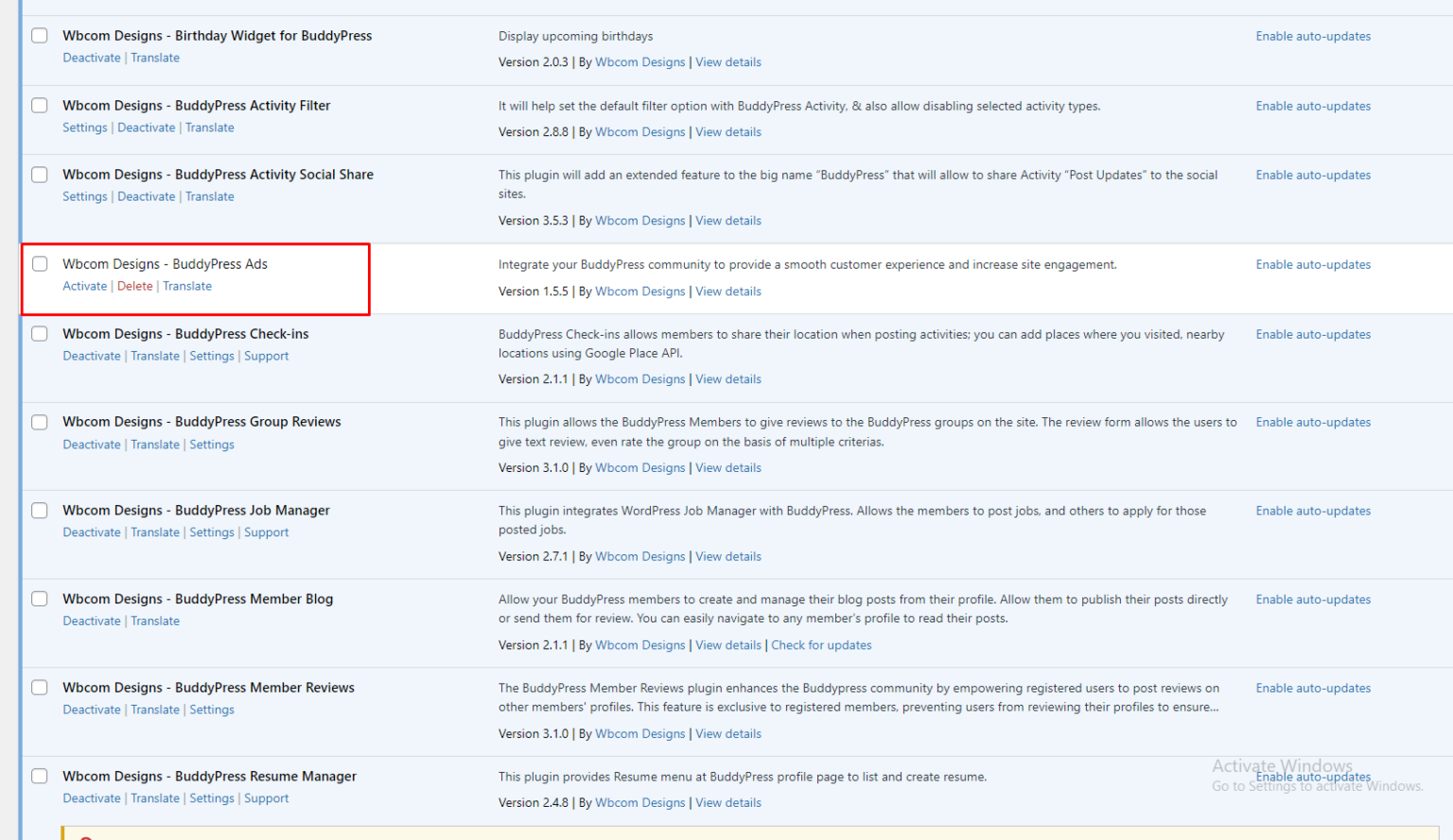
7. After activation, you’ll be redirected to the Installed Plugins page, where you can read all the information about your plugins.
Creating ads in BuddyPress
1. Navigate to WB Ads: Access WB Ads in your WordPress dashboard by going to WB Ads >> Add New WB Ads.
2. Create Your Ad: On this page, you’ll find various settings to create and manage your advertising.
3. Choose Ad Type: Begin by selecting the type of ad you want to create: Plain Text, Rich Content, or Image Ad.

4. Plain Text and Code: You can use this option for any ad network, Amazon ads, custom AdSense codes, shortcodes, as well as JavaScript, HTML, or PHP scripts.
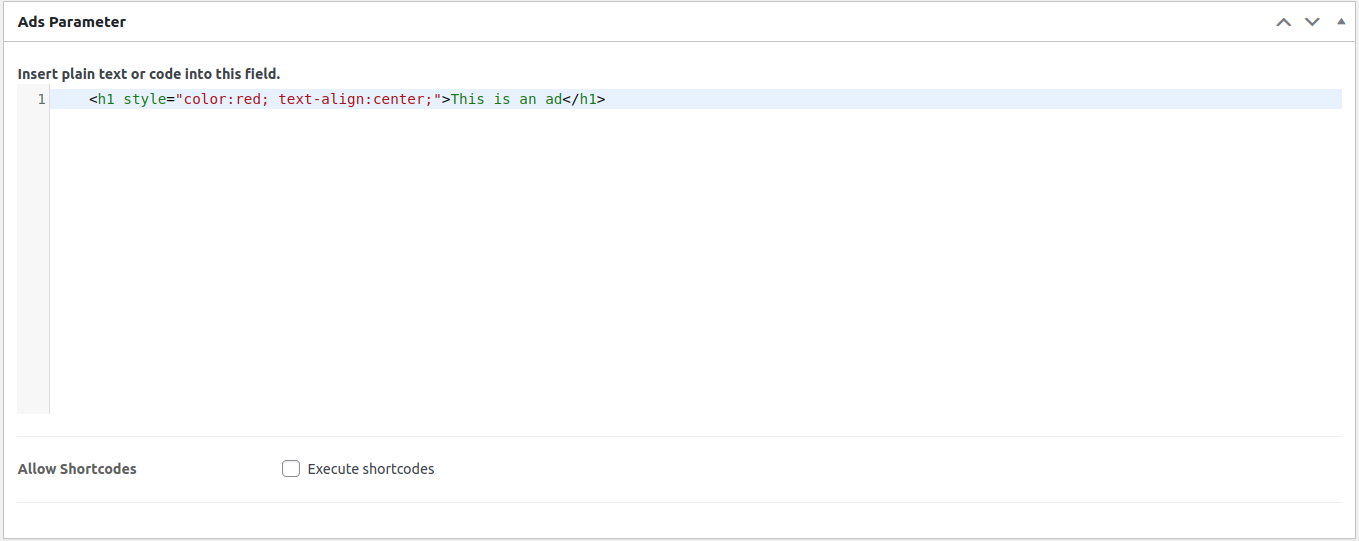
5. Rich Content: Utilize the full WordPress content editor, including features like image uploads, styling options, and support for shortcodes, alongside a simple text/HTML mode for embedding scripts and code.

6. Image Ad: Upload and display ads in various image formats.

7. Set Layout/Output: Customize parameters such as layout and output settings, positioning, margins, container ID, and container classes.
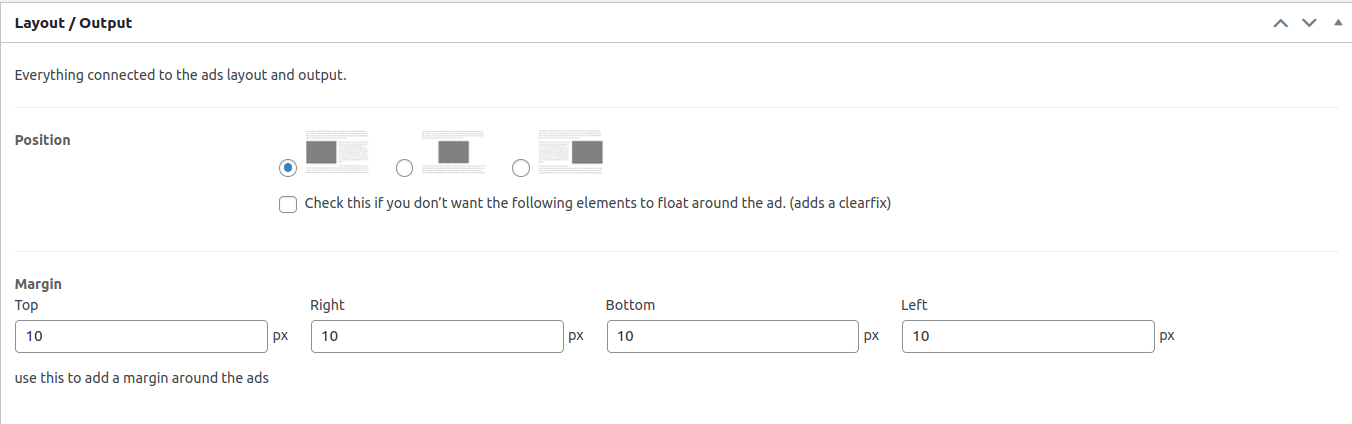
8. Set Display Conditions: Define conditions for when and where the ad should appear, including activity type, position within activities, target audience (logged-in visitors), and device type.

9. Set to whom: Here you can select user and device conditions to display ads in BuddyPress.

10. Publish Your Ad: Once configured, publish your ad. It will then be displayed on your BuddyPress site according to the specified locations and conditions.

Picking Good Ad Positions Without Hurting the Community Feel
Where you place an ad matters as much as how well it’s designed. Ads dropped directly between two activity posts in a busy feed tend to get the most impressions, but they also risk making the community feel like a billboard rather than a place people actually want to spend time. A sidebar placement on the group or member page gets fewer clicks but rarely annoys anyone, which makes it a safer default while you’re still testing what your specific audience tolerates.
A reasonable approach is to start conservative: one ad slot per page, positioned in the sidebar or at a natural break point like after every fifth activity item, rather than saturating every scroll with a new placement. Watch your community’s engagement metrics for a couple of weeks after adding ads. If comment counts or return visits drop noticeably, that’s a signal the placement is too aggressive, and dialing it back usually recovers engagement faster than most site owners expect.
Choosing Between House Ads and Third-Party Networks
BuddyPress Ads doesn’t require you to work with any specific ad network, which is worth understanding before you set anything up. You can run house ads promoting your own products or services, sell direct placements to sponsors relevant to your community’s niche, or plug in codes from a network like Google AdSense or an affiliate program. Each option comes with a different tradeoff between effort and revenue.
House ads and direct sponsor placements typically pay more per impression but require you to actually go out and sell them, which takes ongoing effort. Third-party ad network codes are close to passive once set up, but the revenue per visitor is usually much lower, and the ads themselves are less relevant to your specific niche audience since the network chooses them algorithmically. Many community owners run a blend: a couple of premium house ad or sponsor slots in the highest-visibility positions, filled in with a network code wherever inventory would otherwise sit empty.
Maximize Revenue with BuddyPress Ads
Monetizing your BuddyPress site through ads can significantly enhance its sustainability by generating revenue. BuddyPress Ads plugin is a powerful tool to manage and display ads in BuddyPress, ensuring maximum visibility and relevance. You can choose among plain text, rich content, or image ads, the plugin offers versatility and customization options to fit your advertising strategy. Using features like PHP code embedding, activity type selection, and device-specific display conditions lets you optimize ad placement and targeting for better user engagement and profitability.
Tracking Whether Your Ads Are Actually Working
Turning on an ad and forgetting about it is the most common way BuddyPress site owners leave money on the table. Impressions and clicks only tell part of the story. What actually matters is whether the revenue an ad slot generates is worth the small amount of friction it adds to the browsing experience, and that comparison requires watching engagement metrics before and after you add ads, not just the ad network’s own dashboard.
A practical approach is to note your baseline numbers, average session length, comments per activity post, return visit rate, for the two weeks before you turn ads on, then compare the same numbers two weeks after. If those engagement numbers hold steady or only dip slightly, the ad placement is probably fine. If they drop noticeably, it is worth testing a less intrusive position or a lower ad density before assuming the whole idea of monetizing the community was a mistake. Most of the time the problem is placement, not the presence of ads themselves.
Google Analytics or a similar tool paired with UTM parameters on any house ads or sponsor links lets you see which ad placements actually drive clicks through to a landing page, not just how many times an ad was shown. A sidebar ad with a low click-through rate but high visibility might still be worth keeping for brand awareness among sponsors, but if the goal is direct revenue, tracking actual click-through by position tells you where to concentrate your best-paying placements.
Setting Realistic Revenue Expectations
A common mistake among new community owners is expecting ad revenue to meaningfully offset hosting and plugin costs within the first few months. Display advertising revenue scales with traffic volume and audience specificity, and a young BuddyPress community with a few hundred members rarely generates enough impressions for network ads like AdSense to produce a meaningful number. Direct sponsor placements and house ads promoting your own paid services or products tend to perform better proportionally, even at lower traffic levels, because the audience is small but highly targeted rather than anonymous and broad.
A community in the low thousands of monthly active members is a more realistic point at which network ad revenue starts to feel meaningful rather than symbolic. Before then, treating ads primarily as a way to test what your audience tolerates and to build relationships with potential sponsors, rather than as a significant revenue line, sets expectations that match reality and avoids the disappointment of comparing your numbers to a much larger, unrelated site.
Avoiding Ad Fatigue in an Active Community
Community members who visit daily notice repetitive ads faster than a typical blog visitor who might only see a page once. Running the same static ad in the same position for months without rotation tends to produce banner blindness, where members stop consciously registering the ad at all, which defeats its purpose regardless of how well it was placed initially. Rotating between two or three ad creatives, or refreshing sponsor content on a monthly basis, keeps the placement from fading into background noise for your most engaged, most valuable members.
It also helps to periodically ask a few trusted community members directly whether the ads feel intrusive or reasonable. Members who already trust you enough to give honest feedback are a far more reliable gauge of ad fatigue than analytics alone, since a member can stop clicking on ads without necessarily leaving the community, and that quiet disengagement does not always show up clearly in traffic numbers until it has been happening for a while.
Common Setup Mistakes to Avoid
The most frequent mistake new BuddyPress site owners make is enabling ads on every single page and activity type at once during the initial setup, rather than starting with one or two high-visibility positions and expanding gradually. A sudden wall of ads across the entire community feels jarring to members who were used to an ad-free experience, and the negative reaction to that sudden change is usually stronger than the reaction to a slower rollout of the same total ad density spread over a few weeks.
A second common mistake is neglecting the mobile preview entirely. An ad that looks reasonably sized on a desktop screen can dominate the entire visible viewport on a phone, pushing actual community content below the fold. Since a large share of BuddyPress community traffic comes from mobile devices, checking every new ad’s device conditions and actual rendered size on a phone before publishing it broadly catches this before it becomes a member complaint.
A third mistake is forgetting to periodically audit which ads are still live. Sponsor agreements expire, seasonal promotions end, and an ad running well past its intended flight date looks unprofessional and can even promote an offer that no longer exists. Building a simple recurring calendar reminder to review active ad placements once a month, checking expiration dates and confirming links still resolve correctly, keeps the ad inventory clean without requiring constant manual attention.
Ad Disclosure and Legal Considerations
Running paid placements or affiliate-style ads on a community site carries some baseline legal obligations that are easy to overlook when the focus is entirely on technical setup. In the United States, the FTC expects clear and conspicuous disclosure when content is sponsored or when a link is an affiliate link that earns a commission, and that expectation applies to community sites just as much as to traditional blogs. Labeling sponsored posts or ad blocks clearly, rather than blending them quietly into organic community content so they are hard to distinguish, protects both the site owner and keeps trust with members who might otherwise feel misled about what is paid content versus genuine community discussion.
If ads are served through a third-party network, it is also worth reviewing that network’s own terms for anything that conflicts with your community’s content policies, since some networks reserve the right to serve categories of ads, gambling, certain financial products, that may be inappropriate for your specific audience or that your community’s own guidelines already prohibit in organic posts. Most ad networks, including AdSense, provide category-blocking controls precisely for this reason, and taking the time to configure them before going live avoids an awkward mismatch between what your community stands for and what shows up in the ad slots on the page.
Combining BuddyPress Ads With Other Revenue Streams
Display ads work best as one line in a broader revenue mix rather than the sole monetization strategy for a community. A membership tier that removes ads entirely for paying subscribers gives free members a reason to upgrade beyond the content itself, and it lets the site owner keep some ad revenue from the free tier while still offering an ad-free experience to the members who pay the most. This model is common across community and membership platforms because it turns something members might otherwise tolerate reluctantly into an actual upgrade incentive.
Combining BuddyPress Ads with a services marketplace or a paid events calendar spreads revenue across several sources instead of depending entirely on ad impressions, which fluctuate with traffic and are the first thing to soften during a slow month. A community that treats ads as a supplemental, steady baseline rather than the primary growth lever tends to be more resilient overall, since a dip in ad network payouts does not threaten the platform’s core sustainability the way it would if ads were the only source of income.
A simple starting split worth testing is roughly a quarter of expected revenue from ads, with the rest coming from memberships and marketplace or event fees. Adjust that ratio over the first six months based on which channel actually performs, rather than assuming the initial split is correct just because it looked reasonable on paper before launch. Reviewing the mix quarterly, rather than setting it once and forgetting it entirely, is what keeps the overall revenue strategy matched to how the community is actually behaving as membership grows and changes over time.
Interesting reads:
Create and Manage Member Types in BuddyPress
ERP Software Tools for Resource Planning
Best CRO Tools & Platforms for E-commerce and SaaS