

In the fast-paced world of online retail, transparency plays a vital role in building trust with customers. Shoppers are more informed than ever and often compare prices before making a purchase. They want reassurance that discounts are authentic and not artificially created. Showing Price History for WooCommerce products not only improves customer confidence but also ensures compliance with regulations such as the European Union’s Omnibus Directive.
It also gives your store an edge by helping customers feel secure in their buying decisions. With the right tools, you can turn price history tracking into a sales-boosting feature for your WooCommerce store.

Quick Links
Why Displaying Price History Matters in WooCommerce
Displaying price history in WooCommerce brings several benefits for your store. It builds trust and transparency, since customers feel reassured when they see authentic historical pricing instead of inflated discounts. It also boosts conversion rates, because shoppers are more likely to buy when they notice that today’s price is the lowest in 30 days.
On top of that, it ensures regulatory compliance for European Union sellers who must follow the Omnibus Directive’s price reduction rules. Finally, transparent pricing enhances customer loyalty, encouraging buyers to return to a store they know is honest and fair.
Introducing WC Price History Plugin
The WC Price History plugin is a free and reliable solution to display the lowest product price over a selected timeframe. Designed specifically for WooCommerce stores, it helps online sellers show past pricing data to customers directly on product pages, upsells, related products, and even shop/category pages.
Key Highlights
- Shows the lowest price within the last 30 days (default).
- Works instantly upon installation with minimal setup.
- Fully configurable from the WooCommerce dashboard.
- Provides options for different display styles and locations.
- Ensures compliance with the Omnibus Directive (European Commission Directive 98/6/EC Article 6a).
With this plugin, you don’t need coding knowledge—simply install, activate, and configure to suit your store.
Features of WC Price History Plugin
Here’s what makes the plugin stand out:
- Display Options: Choose where to show price history (single product page, upsells, related products, category pages, or shop page).
- Conditional Display: Show the minimal price always or only when the product is on sale.
- Flexible Timeframe: Set how many days to track when calculating the minimal price (default is 30 days).
- Calculation Method: Decide whether to use the lowest price since the product went on sale or the lowest price within the last 30 days.
- Fallback Options: Configure what happens if the price hasn’t changed during the set timeframe (hide the information, show the current price, or display custom text).
- Omnibus Directive Guidance: Built-in instructions help ensure you configure the plugin legally for European markets.
Step-by-Step Guide to Installing WC Price History Plugin
Follow these simple steps to install and configure the plugin:
Step 1: Install the Plugin

- Go to your WordPress dashboard.
- Navigate to Plugins → Add New.
- Search for WC Price History.
- Click Install Now and then Activate.
Step 2: Configure the Settings
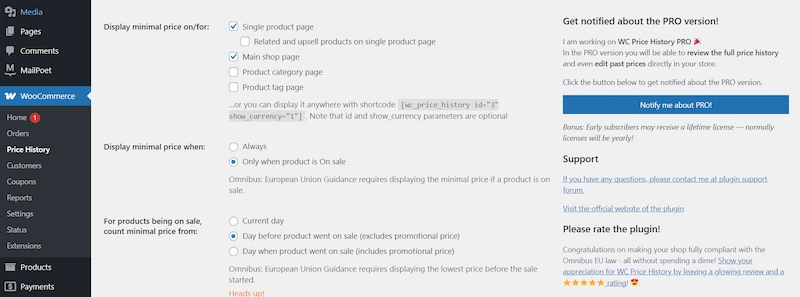
- In the WordPress dashboard, go to WooCommerce → Price History.
- Adjust display settings to choose where price history should appear.
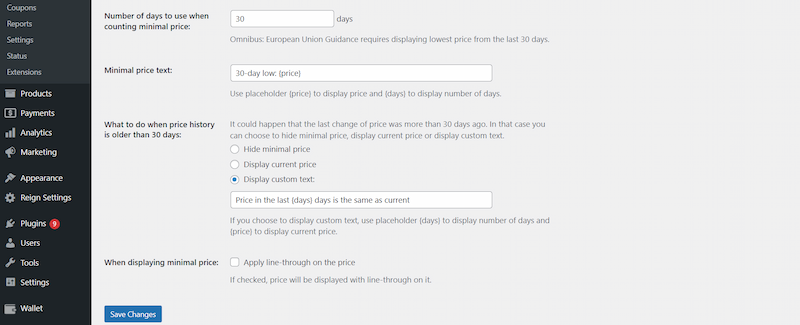
- Set the timeframe (e.g., 30 days) for the lowest price calculation.
- Choose whether to always show the lowest price or only when products are on sale.
- Select what to display if no price change has occurred within the chosen timeframe.
Step 3: Test the Functionality

- Visit your product pages and check how the price history is displayed.
- Adjust styling or positioning as needed.
Benefits of Using Price History for WooCommerce
- Improves Customer Decision-Making: By showing the lowest price in 30 days, buyers feel more confident.
- Prevents Fake Discounts: Transparent pricing protects your brand reputation.
- Boosts Sales During Promotions: Customers who see genuine discounts are more motivated to buy.
- Compliance Without Hassle: Stay aligned with EU regulations easily.
Common Use Cases for Price History
Adding price history to your WooCommerce store is especially useful during:
- Holiday Sales: Build buyer confidence during Black Friday, Cyber Monday, or Christmas sales.
- Clearance Events: Show that the markdown is legitimate and not artificially inflated.
- Seasonal Promotions: Demonstrate real savings during summer, winter, or back-to-school campaigns.
- High-Ticket Items: Reassure customers considering expensive products like electronics or furniture.
How Price History Impacts Customer Psychology
Shoppers often experience “fear of missing out” (FOMO) when they see a product priced lower than it has been in the past 30 days. This subtle nudge encourages faster decision-making and reduces cart abandonment. Transparent pricing also enhances perceived fairness,
making customers feel more positive about your brand.
Best Practices for Using Price History in WooCommerce
- Be Honest: Always display genuine historical data to avoid misleading customers.
- Highlight Deals: Use price history to showcase real savings during seasonal sales.
- Test Placement: Experiment with displaying history on product, category, or checkout pages to see what converts best.
- Keep It Clear: Avoid clutter—make sure the price history text is easy to read.
- Combine with Other Plugins: Pair WC Price History with discount plugins, analytics tools, and loyalty programs for a stronger sales strategy.
Additional Tools to Enhance Your Store
While WC Price History is powerful on its own, you can enhance your WooCommerce store by integrating additional tools. For instance, discount plugins allow you to run special promotions with genuine price drops, while analytics plugins help you track how displaying price history influences customer behavior and sales.
You can also use email marketing tools to notify shoppers when a product’s price is reduced, encouraging repeat visits. On top of that, customer review plugins give buyers confidence by showcasing real feedback, which, when combined with transparent pricing, creates a strong trust factor for your store.
Support and Development
The plugin is actively maintained and has support available through the WordPress plugin repository. Developers can also extend or customize it further to match store needs. If you encounter issues, you can rely on the community and official support forums.
Build Trust with WooCommerce Price History
Displaying Price History for WooCommerce is more than just a compliance requirement—it’s a smart way to build trust and boost sales. With the WC Price History plugin, you can easily show customers the lowest product prices within a set timeframe, enhancing transparency and improving conversions. By combining clear pricing with excellent customer service, your store can stand out in today’s competitive eCommerce space.
Furthermore, adding this feature creates long-term credibility with your audience, as buyers can see that your promotions are authentic and consistently fair. Over time, this transparency builds a loyal customer base that values honesty and returns to your store for repeat purchases.
👉 Ready to take your WooCommerce store to the next level? Explore our Custom WooCommerce Development Services and start building a more transparent and profitable shopping experience for your customers.
Interesting Reads
15 Best Project Management Tools in 2025
How to Use Wallet-Style Payment for WooCommerce to Make Checkout Faster
How to Build a Shopify-Like Multi-Step Checkout in WooCommerce

