

Transparency plays a real role in whether shoppers trust an online store enough to buy. People compare prices before purchasing more than they used to, and they want reassurance that a “sale” price is a genuine discount rather than a number invented for the occasion. Showing price history for WooCommerce products builds that trust directly on the product page, and it also helps with compliance around price reduction rules like the European Union’s Omnibus Directive, which requires showing the lowest price a product was actually sold at in the recent past before it can be advertised as discounted.
Beyond compliance, price history tracking gives your store a real edge by helping customers feel secure in their buying decisions. With the right plugin, you can turn something that started as a legal requirement into a genuine sales-boosting feature.
Why Displaying Price History Matters in WooCommerce
Displaying price history in WooCommerce brings several concrete benefits. It builds trust, since customers feel reassured seeing authentic historical pricing instead of a discount percentage they have no way to verify. It also tends to lift conversion rates, because shoppers are more likely to buy when they can see that today’s price genuinely is the lowest in the last 30 days rather than taking a store’s word for it.
It helps with regulatory compliance for sellers targeting European Union customers, who are legally required to follow the Omnibus Directive’s price reduction rules. And over time, transparent pricing builds customer loyalty, since buyers return to stores they’ve learned are consistently honest about pricing rather than running fake sales.
Introducing the WC Price History Plugin
The WC Price History plugin is a free, actively maintained solution for displaying the lowest product price over a selected timeframe. It’s designed specifically for WooCommerce stores and shows past pricing data directly on product pages, upsells, related products, and shop or category pages. As of this writing, the plugin has over 4,000 active installations, a five-star average rating, and recent changelog updates, so it’s a genuinely maintained option rather than an abandoned one.
Key Highlights
- Shows the lowest price within the last 30 days by default.
- Works right after installation with minimal setup, and the default settings are already Omnibus-compliant.
- Fully configurable from the WooCommerce dashboard.
- Offers multiple display styles and placement locations.
- References European Commission Directive 98/6/EC Article 6a directly in its settings guidance.
With this plugin, you don’t need coding knowledge. Install, activate, and configure it to match your store’s specific needs.
Features of the WC Price History Plugin
Here’s what makes the plugin worth considering over a manual or custom-built solution:
- Display Options: Choose where to show price history (single product page, upsells, related products, category pages, or the shop page).
- Conditional Display: Show the minimum price always, or only when a product is actively on sale.
- Flexible Timeframe: Set how many days to track when calculating the minimum price, with 30 days as the default.
- Calculation Method: Decide whether to use the lowest price since the product went on sale, or the lowest price within the last 30 days specifically.
- Fallback Options: Configure what happens if the price hasn’t changed during the set timeframe, whether that’s hiding the information, showing the current price, or displaying custom text.
- Omnibus Directive Guidance: Built-in instructions help you configure the plugin correctly for European markets without needing to research the regulation yourself.
Step-by-Step Guide to Installing the Plugin
Follow these steps to install and configure it on your own store:
Step 1: Install the Plugin

- Go to your WordPress dashboard.
- Navigate to Plugins → Add New.
- Search for WC Price History.
- Click Install Now and then Activate.
Step 2: Configure the Settings
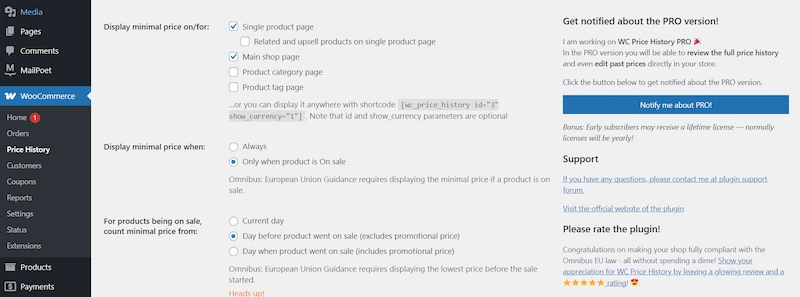
- In the WordPress dashboard, go to WooCommerce → Price History.
- Adjust display settings to choose where price history should appear.
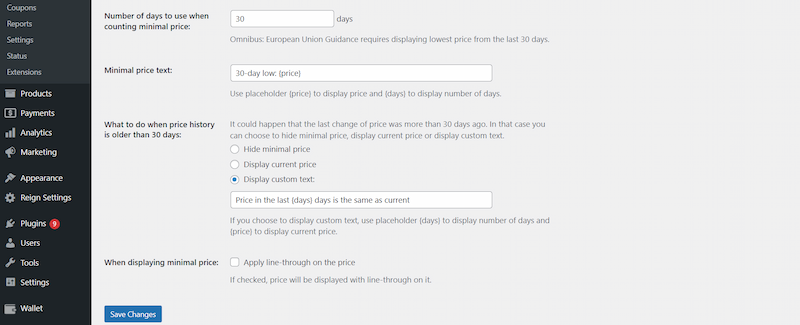
- Set the timeframe (for example, 30 days) for the lowest-price calculation.
- Choose whether to always show the lowest price or only display it when products are on sale.
- Select what to display if no price change has occurred within the chosen timeframe.
Step 3: Test the Functionality

- Visit your product pages and check how the price history displays.
- Adjust styling or positioning as needed for your theme.
Benefits of Using Price History for WooCommerce
- Improves Customer Decision-Making: Showing the lowest price in the last 30 days gives buyers a concrete reference point instead of a vague discount claim.
- Prevents Fake Discounts: Transparent pricing protects your brand’s reputation against the “inflate then discount” pattern that erodes customer trust over time.
- Boosts Sales During Promotions: Customers who can verify a discount is genuine are more motivated to act on it.
- Compliance Without Hassle: Stay aligned with EU regulations without hiring outside legal or compliance help.
Common Use Cases for Price History
Adding price history to your WooCommerce store is especially useful during specific high-stakes selling periods:
- Holiday Sales: Build buyer confidence during Black Friday, Cyber Monday, or Christmas promotions, when shoppers are especially skeptical of inflated “was” prices.
- Clearance Events: Show that a markdown is genuine rather than artificially inflated first.
- Seasonal Promotions: Demonstrate real savings during summer, winter, or back-to-school campaigns.
- High-Ticket Items: Reassure customers considering expensive purchases like electronics or furniture, where price scrutiny tends to be highest.
How Price History Impacts Customer Psychology
Shoppers tend to feel more urgency when they can see a product is priced lower than it has been over the past 30 days. That visible, verifiable comparison nudges faster decisions and reduces cart abandonment more effectively than an unverifiable discount badge does. Transparent pricing also shapes how customers perceive fairness more broadly, making them more positive about the brand even outside the specific product they’re looking at.
Best Practices for Using Price History in WooCommerce
- Be Honest: Always display genuine historical data. The entire value of this feature collapses the moment a customer catches an inconsistency.
- Highlight Real Deals: Use price history specifically to showcase genuine savings during seasonal sales, not as decoration on every product regardless of whether it’s discounted.
- Test Placement: Experiment with showing history on product pages versus category pages to see which placement actually moves conversions for your specific catalog.
- Keep It Clear: Avoid clutter. Make sure the price history text is easy to read at a glance, not buried in fine print.
- Combine with Other Plugins: Pair WC Price History with discount plugins, analytics tools, and loyalty programs for a more complete sales strategy rather than treating it as a standalone fix.
How This Compares to Building Price History Manually
Some store owners consider tracking price history manually through a spreadsheet or a custom database field instead of installing a dedicated plugin. It’s worth being direct about why that approach usually falls short in practice. Manual tracking requires someone to remember to log every price change the moment it happens, and that discipline tends to break down within the first few weeks, especially across a catalog with dozens or hundreds of products. A dedicated plugin logs price changes automatically the moment they happen in WooCommerce, with no manual step to forget.
A custom-built solution, coded specifically for one store, also carries an ongoing maintenance burden: someone has to keep it compatible with WooCommerce core updates, theme changes, and any new page builder the site adopts later. An actively maintained plugin like WC Price History spreads that maintenance cost across thousands of installations instead of falling entirely on one store’s budget, which is generally the more sustainable choice unless your pricing logic has genuinely unusual requirements a general-purpose plugin can’t handle.
What the Omnibus Directive Actually Requires
For stores selling into the European Union, it’s worth understanding the actual regulation this feature exists to support, rather than treating “compliance” as a vague requirement. The Omnibus Directive, specifically Article 6a of Directive 98/6/EC, requires that any announcement of a price reduction show the lowest price the trader applied to that product during at least the 30 days before the reduction was applied. This closes a loophole where a store could briefly raise a price right before a “sale” to make the discount look larger than it actually is.
The rule applies to price reduction announcements specifically, not to every product on a store. If you’re not advertising a discount, you’re not required to show price history for that product. Where it gets practically important is any store running frequent promotional pricing, since the compliance burden scales with how often you discount rather than how large your catalog is. Stores based outside the EU but selling to EU customers are generally still expected to follow this rule for those specific transactions, so don’t assume it only applies to EU-headquartered businesses.
Common Mistakes Stores Make With Discount Pricing
Before installing any price history plugin, it’s worth understanding the specific mistakes that get stores into trouble with both customers and regulators, since the plugin solves the display problem but not the underlying pricing behavior.
Raising the price right before a sale. This is exactly the pattern the Omnibus Directive was written to stop, and customers have gotten better at spotting it too, whether through browser extensions that track price history or simple memory of what a product cost last month.
Running “sales” that never actually end. A discount that’s always active isn’t a discount, it’s just the price, and framing it as urgent or limited-time when it isn’t damages trust once a customer notices the pattern across multiple visits.
Inconsistent pricing across sales channels. If your WooCommerce store shows one price and your Amazon or Instagram shop shows another for the same product, customers who cross-reference will notice, and it undermines confidence in whichever price they encountered first.
Vague discount percentages without a reference price. A banner that says “up to 50% off” without showing what the original price actually was gives a shopper nothing concrete to evaluate. Specific numbers, backed by verifiable price history, convert better than vague claims.
Measuring Whether Price History Display Is Actually Working
Once the plugin is live, it’s worth tracking a few specific metrics rather than assuming the feature is helping just because it’s installed and compliant.
Conversion rate on discounted products before and after. Compare conversion rates on your sale items from before you added price history display to the weeks after, controlling as best you can for seasonality and the size of the discount itself.
Cart abandonment on high-ticket items. Since price history transparency tends to matter most on expensive purchases where scrutiny is highest, watch specifically whether abandonment drops on your higher-priced products after the change.
Customer service inquiries about pricing legitimacy. If you previously fielded questions or complaints about whether a discount was real, track whether those inquiries drop off after adding visible price history.
Return rate on sale items. Some stores see fewer returns on discounted products once customers can verify the deal was genuine, since buyer’s remorse often stems partly from feeling misled about value rather than the product itself. Track this over at least one full return-window cycle before drawing conclusions, since return rates are naturally noisy month to month.
None of these metrics move dramatically overnight, but tracking them over a full sales cycle, including at least one major promotional period, gives you a real signal on whether the feature is paying for the (minimal) setup time it took.
Support and Development
The plugin is actively maintained, with support available through the WordPress plugin repository’s support forum. Developers can also extend or customize it further through standard WordPress hooks if a store’s requirements go beyond the default configuration options.
Styling Price History to Match Your Theme
The default output from most price history plugins is functional but plain, and it’s worth spending a little time making it fit your store’s actual design rather than leaving it looking bolted-on. A few practical adjustments most themes support without custom code:
Font size and weight. The price history text usually renders smaller and lighter than the main price by default, which is often the right call, but check that it’s still legible rather than so faint it looks like a rendering error.
Color coordination. Match the price history text color to your theme’s secondary text color rather than leaving a default gray that might clash with your overall palette.
Placement relative to the discounted price. Test whether the price history reads better directly under the sale price, next to it, or in a tooltip, since different product layouts suit different placements.
Icon or label treatment. A small clock or tag icon next to the price history text can help it read as a trust signal at a glance rather than blending into surrounding copy that a shopper might skim past.
Most of this can be handled through your theme’s customizer or a small custom CSS snippet, without needing to touch the plugin’s core files, which keeps the customization safe across plugin updates.
Handling Price History for Variable Products
Stores selling variable products, items with different sizes, colors, or configurations that carry different prices, need to think through a slightly more complex version of this feature. A price history claim needs to apply to the specific variation a shopper is looking at, not a blended average across all variations, or the displayed information becomes misleading rather than helpful.
Check that whichever plugin you use handles variation-level price tracking specifically, updating the displayed history when a shopper switches between a small and a large size, or between color options priced differently. A plugin that only tracks the parent product’s price and applies it uniformly across variations can end up showing inaccurate history for variants that were priced or discounted differently, which creates exactly the kind of misleading impression this feature is meant to prevent.
What Happens If You Don’t Show Price History
It’s worth being clear about the actual stakes here, separate from the sales benefits. For stores selling into the European Union, failing to comply with the Omnibus Directive’s price reduction transparency requirements can carry real regulatory risk, including fines that vary by member state and enforcement action from consumer protection authorities. Several EU countries have already brought enforcement cases against retailers for exactly this kind of violation, inflating a reference price before a discount announcement. Compliance costs almost nothing once the plugin is installed and configured correctly, which makes skipping it a genuinely poor trade against the downside risk, especially for a store with any meaningful volume of EU customers or frequent promotional pricing.
Even outside a regulatory context, the reputational risk is real. Price tracking browser extensions and comparison tools have made it easy for savvy shoppers to catch a store running a fake discount, and a single viral social media post calling out an inflated “was” price can do more damage to a brand’s trust than the sale itself was worth in revenue. Treating price history transparency as a genuine trust-building feature, not just a legal checkbox, tends to be the more durable long-term position regardless of which market your store primarily serves.
Build Trust with WooCommerce Price History
Displaying price history for WooCommerce is more than a compliance checkbox. It’s a genuinely effective way to build trust and support sales at the same time. With the WC Price History plugin, you can show customers the lowest product price within a set timeframe with almost no setup effort, improving transparency and conversions in the same move. Combined with clear customer service and honest product information elsewhere on the site, this kind of pricing transparency helps a store stand out in a crowded market where shoppers have learned to be skeptical of discount claims.
Over time, that transparency compounds into something harder to build through marketing alone: a customer base that trusts your promotions are real and keeps coming back because of it, rather than a base of one-time buyers who never quite believed the sale price in the first place. Set it up once, verify it’s accurate against your actual pricing history, and let it quietly do its job in the background of every future promotion, from a small seasonal markdown to a full site-wide clearance event.
Interesting Reads
How to Use Wallet-Style Payment for WooCommerce to Make Checkout Faster
How to Build a Shopify-Like Multi-Step Checkout in WooCommerce