

Online community building tools are software platforms that let individuals and organizations create and manage online communities as they grow. The right tool depends on whether you want to own your infrastructure, pay for a hosted platform, or use a communication tool like Slack as a community layer. The list below starts with BuddyX, the strongest self-hosted option for WordPress, then covers the major hosted and SaaS alternatives, including a couple of naming changes worth knowing about before you click through.
What Counts as a Community Building Tool
The term covers more ground than it sounds like at first. On one end are dedicated community platforms built around member profiles, activity feeds, and discussion threads, the closest digital equivalent to a members-only clubhouse. On the other end are general-purpose tools like Slack that were never designed for community specifically but get pressed into service anyway because a Slack workspace is fast to set up and most professional audiences already have an account. Course platforms like Kajabi and Thinkific sit in the middle, treating community as a retention layer wrapped around the actual product, which is usually a paid course or coaching program.
None of these approaches is objectively wrong. A five-person mastermind group doesn’t need the infrastructure of a 50,000-member association, and a nonprofit alumni network doesn’t need the course-selling tools built into Kajabi. The list below is roughly ordered by how much ownership and long-term control each option gives you, starting with the one that hands you the most.
Best Online Community Building Tools
1. BuddyX + BuddyPress - Build a Community You Own
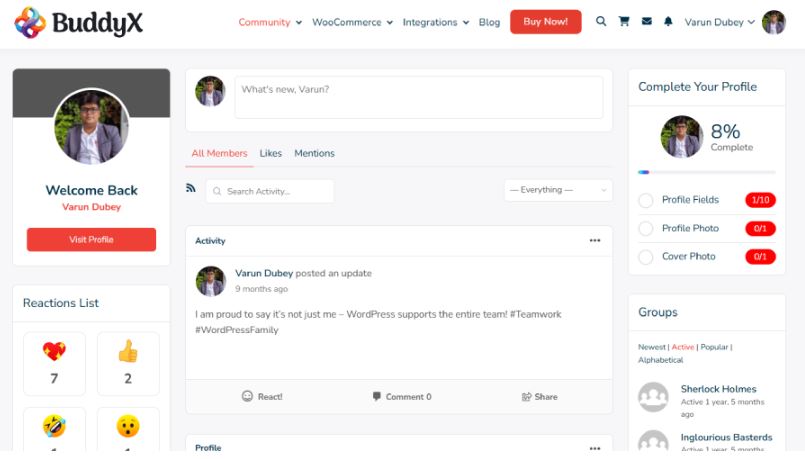
BuddyX (currently v5.1.6) is a WordPress community theme built specifically for BuddyPress-powered communities. It runs on the BuddyNext engine, which delivers member profiles, activity feeds, groups, private messaging, and notifications in a package that doesn’t require the BuddyBoss platform. BuddyPress is the WordPress plugin that powers the social layer, BuddyX is the theme that makes it look and work like a modern community platform.
Together, BuddyX and BuddyPress give you user-owned infrastructure: your domain, your database, your SEO equity, and your member list. Add bbPress for discussion forums, WooCommerce for membership sales, or LearnDash for online courses. Unlike SaaS platforms, there are no per-member fees and no risk of pricing changes locking you out of your own community data.
BuddyX is free to get started. The Pro version adds advanced layouts, Elementor community templates, and deeper WooCommerce and LMS integrations, along with the color presets and block patterns introduced in recent releases. Compare tiers at BuddyX Free vs Pro or browse live community sites at BuddyX Demos.
Test the BuddyPress demo | Get BuddyX Pro
The setup path looks different from every other entry on this list. Instead of signing up for a hosted account, you install WordPress on your own hosting, activate BuddyPress, and apply BuddyX as the theme. That extra step is exactly the tradeoff: a slightly longer initial setup in exchange for a community that lives on infrastructure nobody can shut down, throttle, or reprice out from under you. Because BuddyX runs on standard WordPress hooks and the BuddyNext engine underneath, it also plays reasonably well with the wider WordPress plugin ecosystem, so a membership site built on it isn’t limited to whatever the theme vendor decided to build in natively.
2. Mighty Networks
Mighty Networks is an all-in-one platform for creating and managing online communities. It provides tools for custom websites, discussion forums, events, courses, and paid memberships. Members can participate in discussions, connect with like-minded individuals, and access resources relevant to their interests. The platform includes polls and surveys alongside analytics to help community builders understand their members and drive engagement.
Pricing starts around $950/year on the Launch plan, with a 14-day free trial and no credit card required to start. The platform leans heavily on native mobile apps and a “Community Design” framework meant to structure how members interact rather than leaving engagement to chance, plus an AI Cohost tool for handling routine moderation and member questions. It competes most directly with Circle and Kajabi for creators who want courses and community wrapped around membership billing.
3. Disciple
Disciple (formerly at disciplemedia.com, now at disciple.community) is a white-labeled community app builder that lets individuals and businesses create their own branded mobile and web spaces. It includes discussion feeds, groups, event management, livestreaming, and file sharing, with over 2,000 apps built on the platform across more than a decade. Users get their own iOS and Android apps, plus a web version, rather than a page inside someone else’s platform, and the company positions this as the main advantage over building a presence on Facebook or Instagram instead.
Disciple targets non-profits, wellness brands, professional networks, and training providers who want SSO and CRM integrations, including Salesforce and HubSpot, along with GDPR-compliant data residency options. Pricing is quote-based rather than published, so budget for a sales conversation before you can compare it directly against a self-hosted or flat-rate SaaS option.
4. Circle
Circle is an online community platform for creating and growing communities, built around discussions, courses, events, and membership billing in one workspace. It offers member profiles, live streaming, a website and landing-page builder, and AI-powered agents for routine community tasks. Circle is customizable and flexible, with analytics and insights to help community managers track engagement and growth, and it works across professional networking, education, and customer support. Its official domain is circle.so; circle.com belongs to an unrelated financial technology company, so double-check the address if you’re typing it from memory.
5. Bettermode (formerly Tribe)
Tribe rebranded to Bettermode, and the old tribe.so address now redirects there automatically. The product itself is still a community building platform for businesses and organizations, offering discussion forums, member profiles, user-generated content, and analytics, with integrations for Salesforce, HubSpot, Intercom, and Slack. It’s positioned as a no-code option for customer and marketing teams at companies like IBM, HubSpot, and Lenovo who need a branded community without hiring developers.
Pricing starts at roughly $399/month for the Starter tier, which supports up to 10,000 members, with a 14-day free trial. That starting price puts it well above the SaaS community tools built for individual creators, so it makes more sense for a company budget than a solo course creator’s toolkit.
6. Hivebrite
Hivebrite (now at hivebrite.io after moving off its original .com domain) is an all-in-one community management and engagement platform. Its features include member directories, event management, fundraising tools, mentoring programs, and social media integration. Advanced analytics and reporting help organizations track community engagement and measure the success of their initiatives, and it also offers customizable white-labeled mobile apps for iOS and Android. Hivebrite is aimed squarely at associations, alumni networks, and nonprofits rather than solo creators, and pricing is quote-based to match that enterprise focus.
7. Kajabi
Kajabi is a platform for creating and marketing digital products and services including courses, membership sites, and coaching programs. It offers course creation, website design, email marketing, and analytics tools. Its Community feature provides a discussion forum, user profiles, and messaging. Kajabi is aimed at entrepreneurs and content creators who want a single platform for creating and selling digital products.
Current plans start at the Basic tier, priced around $143 to $179/month depending on billing term, running up to $499/month for the Pro tier with full customization and dedicated support. There’s no permanent free plan, but Kajabi offers a 30-day trial to test the course and community tools together before committing.
8. Slack
Slack is a team communication and collaboration platform widely used by businesses and remote teams. It offers channels, direct messaging, file sharing, video and voice calls, and integrations with other tools and services. Some communities use Slack as a lightweight community layer, particularly in professional and developer contexts, though it lacks the public-facing profile pages, SEO-indexable content, and long-term content structure that a dedicated community platform provides.
The searchability gap is the part people underestimate until it costs them. A dedicated community platform’s discussions get indexed, linked, and found by search engines months or years later, quietly building an archive that answers questions for people who never joined. A Slack workspace’s history effectively disappears the moment a conversation scrolls past, invisible to anyone outside the workspace and largely invisible to search engines even for members inside it. Free tiers also cap message history, which can mean older discussions vanish from view entirely once a workspace grows past the retention window.
9. Facebook Groups
Facebook Groups is a free community building option that lets users create private or public groups to connect around shared interests. Members can share posts, photos, videos, and files, as well as organize events and conduct polls. Facebook Groups includes moderation tools for managing members and approving posts. The tradeoff is ownership: the community lives inside Facebook’s algorithm and terms of service rather than on infrastructure you control, and there’s no way to export the relationship data or SEO value it builds over time.
There’s also a visibility problem baked into the model. Facebook’s feed algorithm decides which posts each member actually sees, which means even an active group can have most of its content quietly buried for a given member on a given day. Group admins have no lever to fix this beyond posting more and hoping engagement picks up the slack, which is a fundamentally different relationship than owning the platform your members log into.
10. Thinkific
Thinkific is a cloud-based course platform that lets anyone create and sell courses on their own branded website. It includes customizable course creation, multimedia support, drip content, quizzes, certificates, and integrations with payment processors and email marketing tools. Detailed analytics and marketing tools help instructors track student progress and sell courses.
Plans start around $40/month billed annually for the Basic tier, rising to $164/month for the Grow tier, which adds API access and removes Thinkific branding from your pages. Rather than a permanent free plan, Thinkific offers a 30-day free trial across the whole platform, including its community and cohort features, before any payment is required.
Quick Comparison
| Tool | Model | Starting Price | Best For |
|---|---|---|---|
| BuddyX + BuddyPress | Self-hosted WordPress | Free | Owning your community infrastructure and SEO |
| Mighty Networks | Hosted SaaS | ~$950/year | Creators combining courses and community with paid events |
| Disciple | Hosted, white-label apps | Quote-based | Branded mobile apps for non-profits and brands |
| Circle | Hosted SaaS | Paid tiers, free trial | All-in-one community plus course sales |
| Bettermode | Hosted, enterprise-focused | ~$399/month | Customer and marketing communities at companies |
| Hivebrite | Hosted, enterprise-focused | Quote-based | Associations, alumni networks, nonprofits |
| Kajabi | Hosted SaaS | ~$143/month | Course-first businesses with community as an add-on |
| Slack | Hosted SaaS | Free tier available | Lightweight professional or developer communities |
| Facebook Groups | Free, platform-hosted | Free | Casual communities with no infrastructure investment |
| Thinkific | Hosted SaaS | ~$40/month | Course creators who want community bundled in |
How to Choose Between Them
The decision usually comes down to one question before any feature comparison matters: do you want to own the infrastructure your community runs on, or are you comfortable renting it? BuddyX with BuddyPress is the only option on this list where your member data, your domain, and your search rankings belong to you outright, with no per-member fee that scales against you as the community grows. Every hosted platform here, from Mighty Networks to Bettermode, trades that ownership for convenience: faster setup, managed infrastructure, and a support team to call when something breaks.
Within the hosted category, the split is mostly about audience size and budget. Slack and Facebook Groups cost nothing and work fine for a few hundred engaged members, but neither was built to be a searchable, brandable destination. Kajabi and Thinkific make sense when courses are the actual product and community is a retention feature bolted on. Mighty Networks and Circle sit in between, built for creators who want community and courses with monetization built in, minus an enterprise budget. Bettermode and Hivebrite target the other end entirely: companies and associations with a real budget for a branded, enterprise-grade deployment.
What Growth Actually Costs on Each Model
The pricing tiers above only tell part of the story, because most hosted platforms charge by member count, and that number rarely stays where it started. A community that launches with 500 members on a starter plan and grows to 5,000 within a year can find itself pushed into a tier several multiples more expensive than what it budgeted for at launch, even though the platform’s feature set hasn’t changed. Enterprise-focused tools like Bettermode and Hivebrite make this explicit with published member caps per tier; consumer-facing tools like Circle and Mighty Networks tend to bundle it into broader plan limits that are easy to miss when comparing sticker prices at signup.
BuddyX with BuddyPress breaks that pattern because your hosting cost is a function of server resources, not member count. A community of 500 and a community of 50,000 run on the same license; the only variable that changes is whether your hosting plan can handle the traffic, which is a server upgrade rather than a new subscription tier. That’s the real argument for self-hosting beyond data ownership: the cost curve stays flat while a SaaS platform’s cost curve climbs with your own success.
Frequently Asked Questions
Is Tribe still a separate product from Bettermode?
No. Tribe rebranded to Bettermode, and the old tribe.so domain now redirects to bettermode.com. Any older article still linking to tribe.so is pointing at a dead brand name rather than a different product.
Is circle.com the same company as the Circle community platform?
No, and this is a common mix-up. The community platform lives at circle.so. The circle.com domain belongs to Circle Internet Financial, the company behind the USDC stablecoin, which is an entirely unrelated business.
Why would someone choose a self-hosted tool like BuddyX over a SaaS platform?
Ownership and cost at scale are the two biggest reasons. A self-hosted WordPress community doesn’t charge per member, doesn’t risk a pricing change locking you out of your own data, and keeps the SEO value of every discussion thread on a domain you control rather than a platform you’re renting space from.
Can I switch platforms later if I start on a SaaS tool?
Usually, but it’s rarely painless. Most hosted platforms allow a data export of members and posts, but formatting and URLs typically don’t transfer cleanly to a new system, and neither does the SEO equity you built up. It’s worth thinking about long-term ownership before launching rather than after the community has grown.
Does a self-hosted community need more technical maintenance than a SaaS platform?
Somewhat, yes. You’re responsible for keeping WordPress core, BuddyPress, and any add-ons updated, along with basic hosting maintenance and backups. Managed WordPress hosts handle most of that automatically for a modest monthly fee, which narrows the maintenance gap considerably compared to running a server from scratch, though it’s still more hands-on than a fully hosted SaaS platform where the vendor owns every layer of the stack.
Owning Your Community Versus Renting It
The best online community building tool depends on how much control you want over your data, your budget, and your long-term growth goals. Platforms like Mighty Networks, Circle, and Disciple are quick to launch and handle hosting for you. Kajabi and Thinkific shine if courses are central to your community. Slack and Facebook Groups work as lightweight options for smaller or transient communities, and Bettermode and Hivebrite fit organizations with an enterprise budget and a need for white-label branding.
Whichever direction you go, revisit the decision periodically rather than treating it as permanent. A community that started as a casual Facebook Group can outgrow that format within a year and justify moving to a dedicated platform; a self-hosted community that never grows past a few hundred members might genuinely not need the extra infrastructure it’s carrying. The naming changes covered above, Tribe to Bettermode, Disciple’s new domain, are also a reminder that even the paid, well-funded platforms in this space keep shifting under their own users. That instability is itself worth weighing against a self-hosted option built on WordPress, which has been stable, extensible, and actively maintained for over two decades.
If you want to own your infrastructure and build something that compounds in SEO value over time, BuddyX with BuddyPress is the strongest answer. Compare what’s included at Free vs Pro and see the theme in action at BuddyX Demos. For related reading: Best WordPress Forum Themes, Best Circle.so Alternatives, and Best Social Media Website Templates.
The Psychology Behind Thriving Online Communities