

Online communities have exploded in popularity over the past few years. From private membership sites to full-fledged learning platforms, businesses and creators are looking for ways to bring people together under one digital roof. While Facebook Groups and LinkedIn Communities are common choices, they don’t give you full control over branding, data, and monetization.
Recent reports show that 76% of internet users now participate in at least one online community, and 64% of businesses say communities improve customer retention. According to a 2024 Global Community Trends Report, nearly 70% of brands plan to increase investment in community-building initiatives, seeing them as a key driver for engagement and long-term growth. Even more impressive, companies with branded communities experience up to a 21% increase in customer loyalty compared to those relying solely on social media groups.

This is where BuddyBoss comes in. In this BuddyBoss review, we’ll explore how it helps transform WordPress into a powerful social network in 2025, covering its features, pricing, pros, cons, hosting options, and who it’s best for.
Quick Links
What is BuddyBoss?
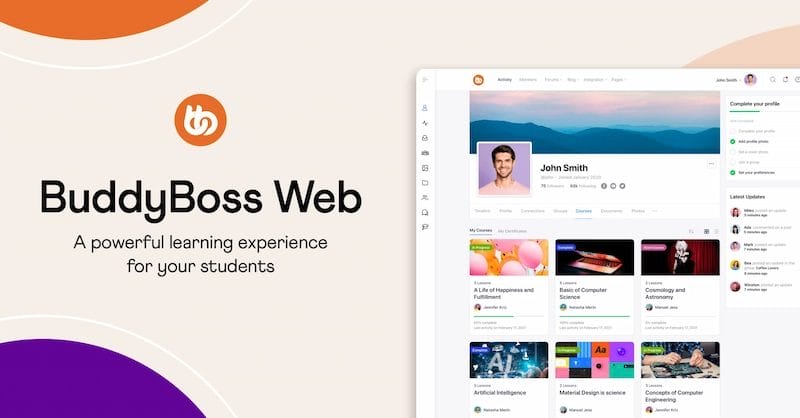
BuddyBoss is a WordPress-based platform designed to build online communities, membership sites, and eLearning platforms—all under your own brand. You can think of it as WordPress’s version of Facebook or Mighty Networks, but with the added benefit of complete control over your data, design, and monetization.
At its core, BuddyBoss offers two main products: the BuddyBoss Platform, a powerful plugin that enables social networking and community features such as user profiles, groups, activity feeds, and messaging; and the BuddyBoss Theme, a modern, fully responsive theme built to integrate seamlessly with the platform, ensuring a polished and professional look for your community site.
It’s widely used by:
- Businesses creating branded communities
- Educators selling courses with LearnDash or LifterLMS
- Membership site owners who want subscriptions and recurring revenue
- Nonprofits building private networks
How Does BuddyBoss Work?
At its core, BuddyBoss works by seamlessly integrating community-driven features directly into your WordPress site. Once installed, it transforms a standard website into an interactive social hub where members can connect, collaborate, and engage—all without needing to rely on multiple third-party tools.
With BuddyBoss, you can create:
- User Profiles – Give members customizable profiles where they can showcase their information, interests, and activity.
- Activity Feeds – Keep your community buzzing with real-time updates, likes, and comments, similar to social media timelines.
- Private Messaging – Allow users to chat one-on-one or in groups without leaving your platform.
- Forums and Groups – Build discussion boards and niche groups to encourage knowledge sharing and networking.
The real power of BuddyBoss lies in how it combines these features into one ecosystem. Instead of piecing together separate plugins for memberships, forums, or chats, BuddyBoss centralizes it all.
For example, if you’re running an eLearning platform with LearnDash, you can let students enroll in courses, track progress, and then extend the experience with social features—like forming study groups, joining course-related forums, or sending direct messages to instructors and peers.
This unified approach makes BuddyBoss more than just a plugin—it’s an all-in-one solution for building thriving online communities where education, networking, and engagement happen in the same space.
Key Features of BuddyBoss in 2025
1. Social Networking Features
BuddyBoss essentially transforms your WordPress site into a fully functional social network, similar to Facebook or LinkedIn—but with complete ownership and branding control. Members can create detailed profiles with customizable fields, profile photos, and cover images, giving a personalized touch to every account.
The platform includes activity feeds where users can post updates, comment, and like posts, creating a familiar social media-like experience. On top of that, members can send private messages, form friendships, and build connections—turning your site into a true networking hub.
2. Community Engagement Tools
A thriving online community requires interactive features, and BuddyBoss delivers with robust engagement tools. You can set up groups and sub-groups, allowing members to connect around shared interests, projects, or courses. Groups can be public, private, or hidden depending on your goals.
Additionally, discussion forums give your community a space for deeper, topic-focused conversations—perfect for Q&A, brainstorming, or structured debates. To keep engagement fun and rewarding, BuddyBoss includes gamification features such as points, badges, and achievement systems. These elements motivate members to participate more actively, increasing retention and loyalty.
3. eLearning Integration
For coaches, educators, and course creators, BuddyBoss stands out as one of the best community platforms because of its deep integration with learning management systems like LearnDash and LifterLMS.
This means you can sell and deliver online courses, while also embedding community features such as course-related discussions, group learning spaces, and peer-to-peer messaging. Students can track their progress, earn certifications, and interact directly with instructors and classmates—all without leaving your site. This combination of education plus community fosters better engagement, accountability, and long-term learning outcomes.
4. Membership & Monetization
Monetization is another area where BuddyBoss shines. Instead of juggling multiple plugins, you can manage paid memberships, recurring subscriptions, and one-time payments directly within the platform.
Integration with WooCommerce makes it easy to sell not only memberships but also digital products, physical merchandise, or event tickets. Whether you’re running a small membership site or a large-scale subscription platform, BuddyBoss gives you the flexibility to design tiered pricing plans, exclusive content access, and gated communities to maximize revenue.
5. Customization and Design
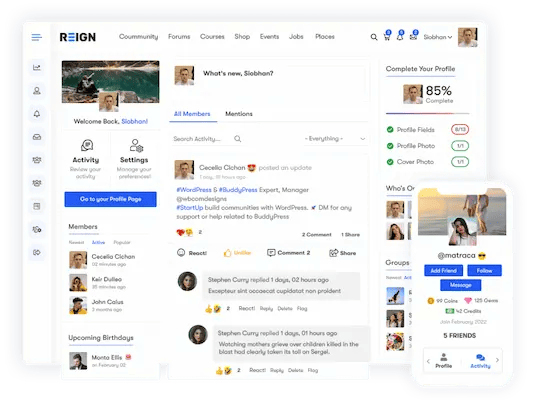
Unlike cookie-cutter platforms, BuddyBoss provides complete control over design and branding. The BuddyBoss Theme is fully responsive, ensuring your community looks great on desktops, tablets, and smartphones.
While BuddyBoss comes with its own theme, many site owners prefer using the BuddyX Theme for its lightweight design, mobile optimization, and seamless compatibility with both BuddyBoss and BuddyPress. It’s a great choice if you want more customization options with Elementor and a faster loading experience.
You can customize layouts and designs using a drag-and-drop builder like Elementor, which means you don’t need advanced coding skills to create a professional-looking site. Plus, with white-label branding options, you can remove the BuddyBoss name and replace it with your own brand identity, ensuring your platform feels 100% yours.
6. Ease of Use & User Experience
When choosing a community platform, ease of setup and smooth user experience are critical. BuddyBoss is built to deliver both—providing a straightforward installation process for admins and an intuitive interface for members.
1. Simple Installation Process
- Install WordPress
- Add the BuddyBoss Platform plugin
- Activate the BuddyX Theme
- Configure features with easy settings
2. Admin-Friendly Controls
- Toggle-based options to enable/disable features (messaging, groups, forums, etc.)
- No need for multiple plugins or coding knowledge
- Seamless integrations with WooCommerce, LearnDash, and LifterLMS
3. User-Friendly Interface
- Clean, modern, and mobile-responsive design
- Familiar social media-like experience (activity feeds, messaging, groups)
- Smooth navigation across desktop, tablet, and smartphone
4. Customization & Branding
- Drag-and-drop design with Elementor for layout flexibility
- White-labeling to remove BuddyBoss branding and use your own
- Fully responsive theme for a consistent brand experience
5. Balanced Experience
- Combines advanced community-building tools with beginner-friendly setup
- Ensures admins can manage with ease while users enjoy a polished, engaging platform
Unlike BuddyPress, which requires multiple add-ons for advanced functionality, BuddyBoss offers these features natively in one package.
BuddyBoss Pricing in 2025
BuddyBoss is positioned as a premium WordPress solution, designed for businesses, educators, and creators who want to build professional online communities without relying on a patchwork of plugins. Unlike free alternatives such as BuddyPress, BuddyBoss offers a polished ecosystem with dedicated support, continuous updates, and an all-in-one approach.
Pricing Plans
- $228/year – 1 Site License
Ideal for solopreneurs, small businesses, and creators who want to launch one branded community or membership site. - $288/year – 5 Site Licenses
Best for agencies, educators, or entrepreneurs running multiple communities, online courses, or client projects. - $328/year – 10 Site Licenses
Suited for larger businesses, universities, or enterprises managing several platforms across different audiences.
Each plan includes access to both the BuddyBoss Platform and the BuddyBoss Theme, plus regular updates and customer support.
Advantages of BuddyBoss
1. All-in-One
BuddyBoss combines forums, messaging, courses, and memberships in one system—saving time, money, and avoiding plugin conflicts.
2. Seamless LearnDash Integration
Course creators can sell courses, track progress, and engage students with groups, forums, and gamification. It also works with LifterLMS.
3. Scalable for Any Size
From small groups to large networks with thousands of users, BuddyBoss scales smoothly with the right hosting.
4. Active Development
Regular updates and new features ensure long-term stability, security, and compatibility with WordPress, WooCommerce, and LMS tools.
Limitations of BuddyBoss
1. Higher Cost: Priced higher than free tools like BuddyPress, making it less ideal for hobbyists.
2. Hosting Requirements: Needs reliable WordPress hosting for fast performance—shared hosting may struggle.
3. Learning Curve: Feature-rich, but beginners might need time to explore settings and integrations.
Which Hosting is Best for BuddyBoss?
BuddyBoss is powerful, but that means it needs reliable hosting. Recommended options include:
- SiteGround – Great for small to medium communities
- WP Engine – Managed hosting optimized for WordPress
- Kinsta – Scalable cloud hosting with top-notch performance
Tip: Avoid cheap shared hosting. A community platform needs speed and uptime to keep users engaged.
BuddyBoss vs BuddyPress
When it comes to building communities on WordPress, BuddyPress and BuddyBoss often come up in the same conversation. BuddyPress is a free, community-driven plugin that has been around for years. It provides the basic building blocks for online communities, such as user profiles, groups, and activity streams.
However, it lacks the polish, modern design, and advanced features needed for professional-scale platforms. On the other hand, BuddyBoss is a premium, feature-rich solution built on top of BuddyPress’s foundation but enhanced with deeper integrations, a responsive theme, white-label branding, and dedicated customer support.
For hobby projects or small communities, BuddyPress might be enough, but if you’re serious about scaling a professional, revenue-generating community, BuddyBoss is the clear winner.
BuddyBoss vs BuddyPress: Comparison Table
| Feature/Aspect | BuddyPress (Free) | BuddyBoss (Premium) |
|---|---|---|
| Cost | Free | $228/year and up |
| Ease of Use | Requires multiple add-ons, and more setup is required | All-in-one, streamlined setup |
| Design & Theme | No official theme, needs custom styling | Includes BuddyBoss Theme (responsive, modern, customizable) |
| Features | Basic: profiles, groups, activity feeds | Advanced: messaging, forums, gamification, memberships, eLearning |
| Integrations | Limited third-party support | Deep integration with LearnDash, LifterLMS, and WooCommerce |
| Scalability | Suitable for small hobby communities | Built to scale from small to enterprise-level networks |
| Support | Community-driven forums | Dedicated professional support and documentation |
| Updates | Maintained by contributors, slower updates | Actively developed with frequent updates and new features |
Who Should Use BuddyBoss?
- Membership Site Owners – Manage subscriptions, gated content, and keep members engaged with gamification and forums.
- Online Educators & Course Creators – Integrate with LearnDash or LifterLMS to deliver courses, track progress, and foster group discussions.
- Businesses Building Branded Communities – Create private customer hubs, product communities, or loyalty spaces under your own brand.
- Nonprofits & Niche Social Networks – Build safe, tailored networks for advocacy, collaboration, or specialized interest groups.
Alternatives to BuddyBoss
- BuddyPress (Free, but Limited) – A free WordPress plugin with basic community features, but lacks polish and advanced integrations.
- PeepSo (Modern UI, but Fewer Integrations) – Clean and user-friendly, but less powerful for eLearning or monetization compared to BuddyBoss.
- Mighty Networks (Non-WordPress SaaS) – Easy to use and hosted for you, but limited customization, extra cost for white-labeling, and no full ownership of data.

Why BuddyBoss Stands Out in 2025
If you want to own your community instead of relying on third-party platforms, BuddyBoss is one of the best solutions in 2025. It combines social networking, memberships, and eLearning into a single WordPress-powered package.
With its scalability, customization options, and continuous updates, it’s built for long-term growth. Whether you’re a course creator, business, or nonprofit, BuddyBoss gives you the control and flexibility to create a thriving online community under your own brand.
Frequently Asked Questions (FAQs)
1. Is BuddyBoss a theme or plugin?
BuddyBoss is both: the BuddyBoss Platform is a plugin that adds social, community, and membership features to WordPress, and the BuddyBoss Theme is a responsive theme built to integrate seamlessly with that plugin. Together, they turn a WordPress site into a branded community platform.
2. Is BuddyBoss open source?
No — BuddyBoss is a commercial (premium) product. While it builds on WordPress and can integrate with open-source plugins (for example, BuddyPress or LearnDash integrations), the BuddyBoss Platform and BuddyBoss Theme are sold under a paid license and are not distributed as fully open-source software.
3. How much does BuddyBoss cost?
BuddyBoss is billed annually. Typical pricing tiers (subject to change) are:
- $228 / year — 1 site license
- $288 / year — 5 site licenses
- $328 / year — 10 site licenses
Each plan generally includes the BuddyBoss Platform, the BuddyBoss Theme, updates, and support. Always check the official BuddyBoss site for the latest pricing and promotions.
4. Which hosting is best for BuddyBoss?
Popular choices for BuddyBoss sites include managed WordPress providers (for example, Kinsta, WP Engine, Flywheel) or scalable cloud-based hosts (such as Cloudways or a well-configured DigitalOcean/AWS instance). The best option depends on your budget, expected traffic, and whether you want a fully managed service or more control over the server stack.
Interesting Reads
15 Best Accounting Software Cloud Based in 2025
WooCommerce Review 2025: Why It’s the #1 WordPress eCommerce Plugin

