



The BP xProfile Location plugin is designed to enhance user profiles in both BuddyPress and the BuddyBoss Platform. Below are the key features and details about this plugin:
- Integration with Google Places API
- The plugin creates an xProfile Location field type that utilizes the Google Places API. This integration allows users to enter and validate their addresses seamlessly.
- Uniform Address Entry
- Members can enter their addresses using a single input field, which ensures consistency and uniformity across profiles. This also makes the addresses easily searchable.
- Profile Field Creation
- In BuddyPress, admins can create multiple Location fields via:
- Dashboard Navigation: wp-admin > Users > Profile Fields > Add New Field.
- For BuddyBoss Platform, the process is:
- Dashboard Navigation: wp-admin > BuddyBoss > Profiles > Profile Fields > Add New Field.
- In BuddyPress, admins can create multiple Location fields via:
- Geocoding Feature
- A latitude/longitude geocode can be saved as a separate field if selected during the field creation process. This geocode can be used with various member map solutions.
- Compatibility with BuddyX Theme
- The plugin is fully compatible with the BuddyX Pro Theme, which can be further customized for improved branding and user experience.
- Member Map Solutions
- Users can incorporate the geocode into their preferred member map solutions, such as BP Maps for Members and BP Maps for Groups.
- Installation Requirements
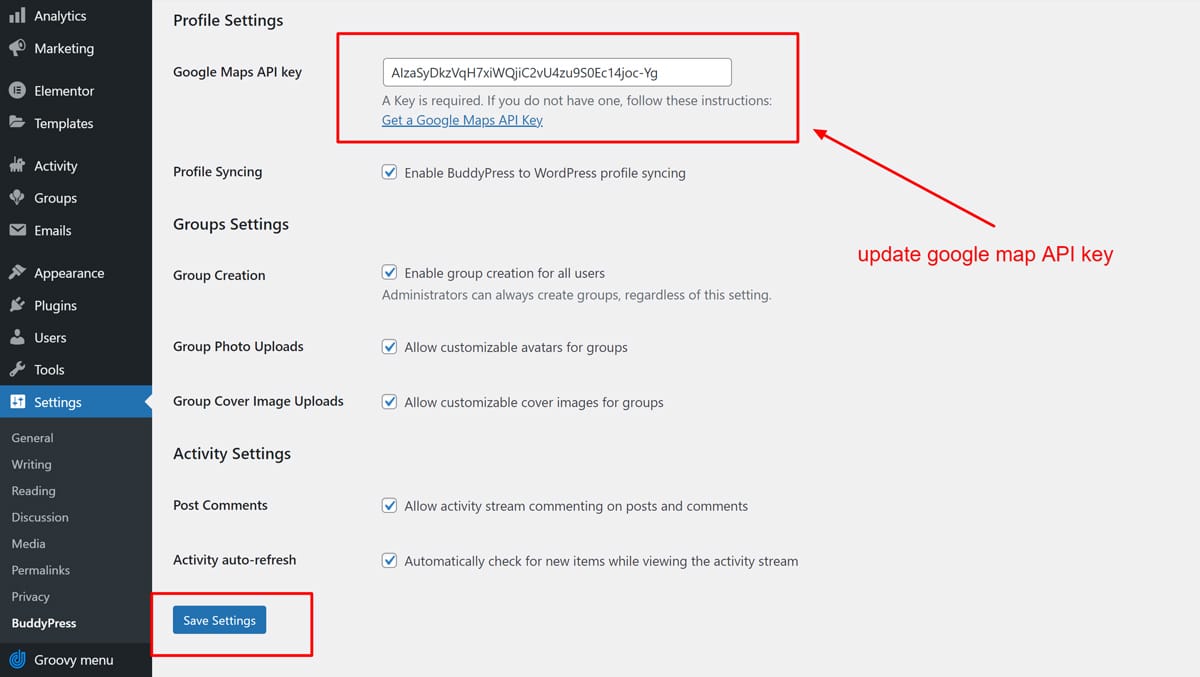
- To use the plugin, a Google Maps API Key is required. Admins can set this up in the respective settings of BuddyPress or BuddyBoss.
- Installation steps include uploading the plugin zip file, activating it, and entering the Google Maps API Key in the settings.
- User Instructions
- When creating profile fields, it is advisable to include instructions to ensure users select addresses from the dropdown suggestions provided by Google to facilitate geocoding.