Exploring MultiVendorX: The Ultimate Multivendor Marketplace Solution

Creating a multivendor marketplace has become a popular trend. A multivendor marketplace allows multiple sellers to sell their products on a single platform, providing customers with a wide variety of products to choose from. One such solution that has been making waves in the e-commerce industry is MultiVendorX.
The e-commerce landscape is constantly evolving, and multivendor marketplaces are at the forefront of this evolution. These platforms offer numerous benefits for both sellers and customers, including increased product variety, competitive pricing, and enhanced convenience.
MultivendorX

MultiVendorX plugin, seamlessly integrates marketplace and multi-vendor functionalities into existing WooCommerce-powered websites, eliminating the need for coding hassles. This robust solution serves as the ultimate marketplace software for entrepreneurs, enabling them to effortlessly create their own marketplaces.
Each vendor receives a dedicated store page, showcasing their logo, banner, and complete product catalog, enhancing their visibility and facilitating customer interaction. It has a rich feature set exceeding 200, including support for multiple payment gateways, multi-language and multi-currency capabilities, single product multiple vendor (SPMV) functionality, insightful analytics, vendor verification, and customizable commission plans, the plugin caters to diverse business needs.
Built for both novices and experts, it boasts a user-friendly interface and provides comprehensive support for selling any type of product. Trusted by thousands of users worldwide since its inception in 2013, MultiVendorX continues to redefine the marketplace landscape. Additionally, entrepreneurs can unlock enhanced features and benefits with the Pro version of MultiVendorX.
Pricing
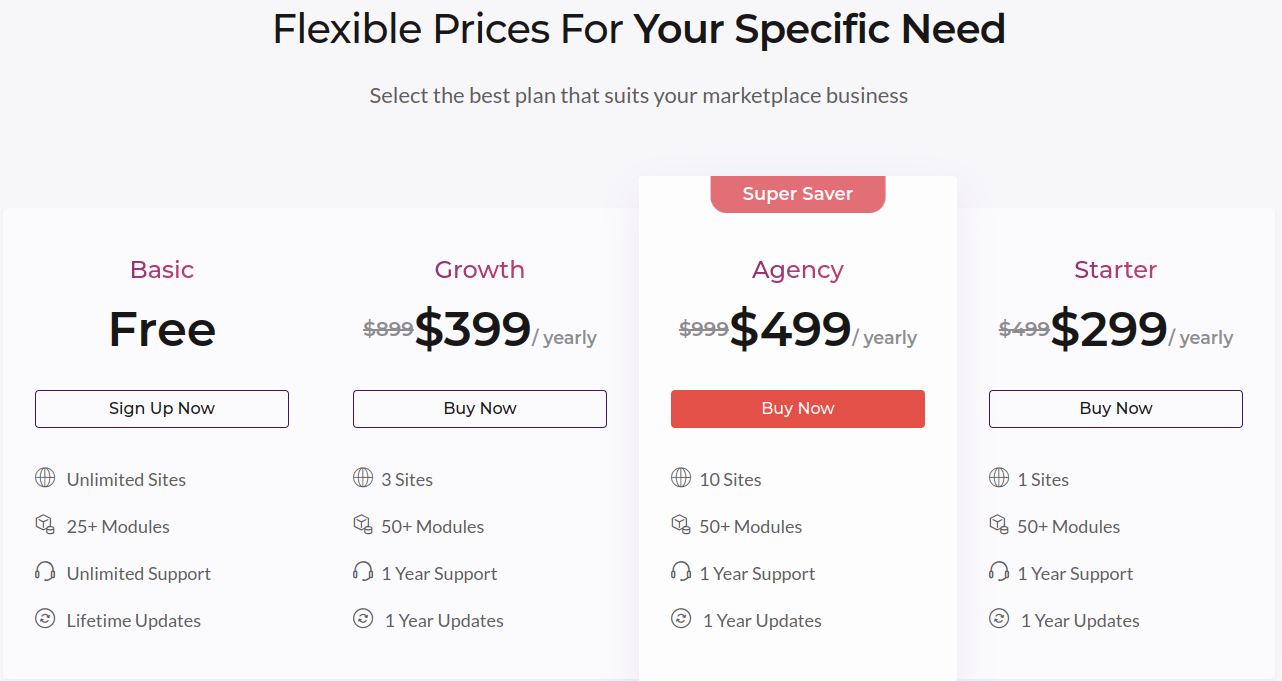
It offers flexible pricing options tailored to the needs of entrepreneurs, with the cost varying depending on the selected plan. Pro version initiates at $299 per year, providing a solid foundation for marketplace creation. For those seeking additional features and capabilities, the pricing extends to higher tiers, culminating in the Agency plan priced at $499 per year. The Agency plan stands out for its comprehensive support for advanced features and over 50 modules, catering to the demands of ambitious entrepreneurs looking to unlock the full potential of their multi-vendor marketplace.
It’s important to note that all prices mentioned are exclusive of taxes, ensuring transparency in the pricing structure
Key Features
It stands out as a comprehensive solution for entrepreneurs aiming to establish vibrant multivendor marketplaces. Let’s delve deeper into its key features and how they contribute to the robustness and versatility of this platform:
1. Multiple Payment Gateways: Ensuring seamless transactions is crucial for any online marketplace. It enables seamless customer-to-admin payments by integrating any WooCommerce compatible payment gateway. It offers a range of convenient payment methods for admin-to-vendor transactions, which includes
i) PayPal Masspay
ii) PayPal Payout
iii) Stripe Connect
iv) Direct Bank Transfer
v) Razorpay
vi) Mangopay, or
vii) Use woocommerce Payment gateway
2. Multi-language and Multi-currency Support: Breaking down language and currency barriers is essential for expanding the reach of a marketplace. It offers comprehensive support for multiple languages and currencies, allowing vendors to communicate with customers in their preferred language and conduct transactions in their local currency. This feature not only enhances accessibility but also fosters trust and confidence among international buyers and sellers.
3. Analytics: Informed decision-making is essential for optimizing marketplace performance and driving growth. MultiVendorX provides insightful analytics tools that offer valuable insights into customer behavior, sales trends, and vendor performance. By analyzing data such as sales metrics, customer demographics, and product performance, merchants can identify opportunities, address challenges, and refine their marketplace strategy to maximize profitability.
4. Vendor Verification: Maintaining trust and credibility within the marketplace is paramount. The plugin offers robust vendor verification mechanisms to ensure that only reputable and trustworthy sellers can list their products. By verifying vendors’ identities, credentials, and business practices, MultiVendorX helps prevent fraud, counterfeit products, and other fraudulent activities, safeguarding the integrity of the marketplace and protecting the interests of both buyers and sellers.
5. Commission Plans: Flexibility in revenue sharing is essential for accommodating various business models and marketplace dynamics. MultiVendorX allows merchants to create customizable commission plans tailored to their specific requirements. Whether it’s a percentage-based commission, flat fee structure, or tiered pricing model, MultiVendorX offers the flexibility to set up commission plans that align with the marketplace’s revenue goals and profit-sharing arrangements.
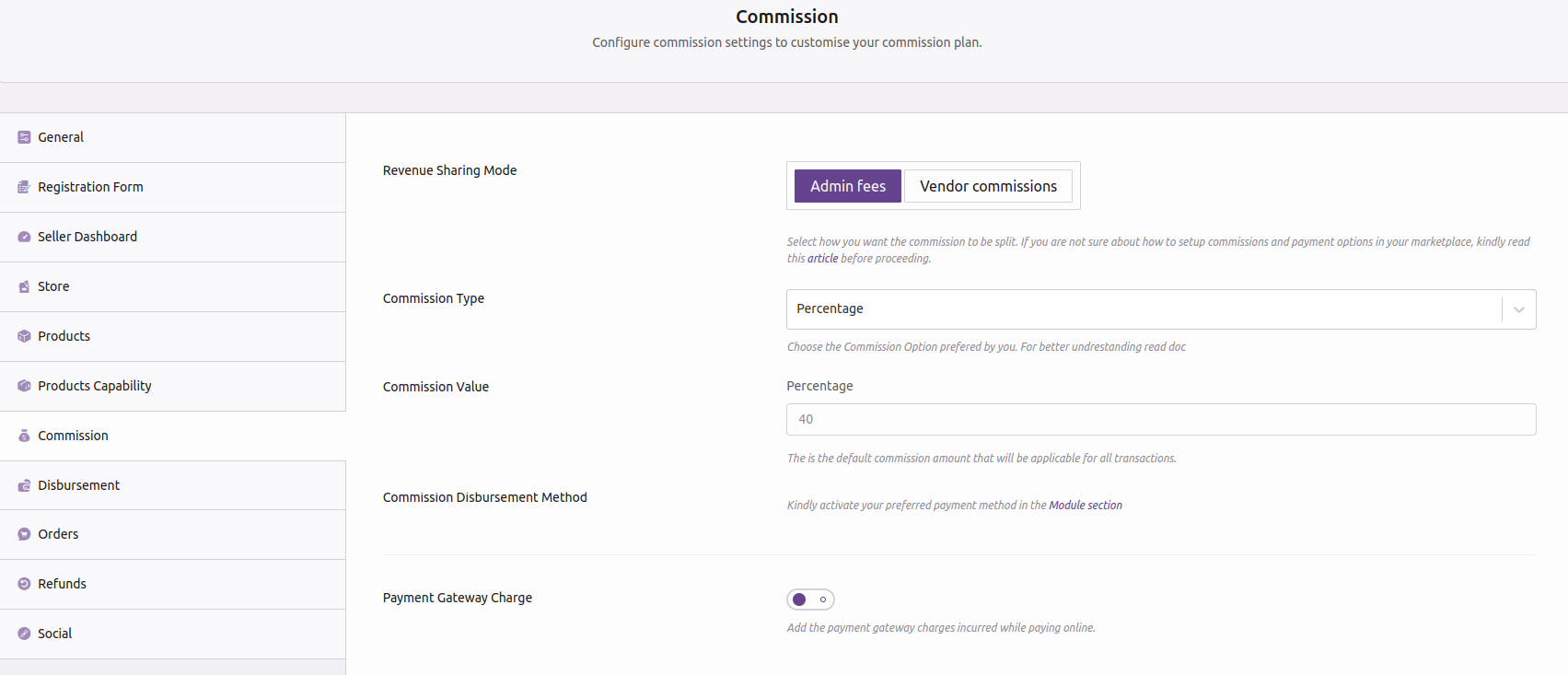
6. Easy-to-Setup Wizard: Simplifying the onboarding process is crucial for accelerating marketplace launch and adoption. MultiVendorX features an intuitive and easy-to-setup wizard that guides merchants through the initial setup and configuration steps. This user-friendly interface streamlines the setup process, eliminating the need for complex coding or technical expertise, and enabling merchants to launch their marketplace quickly and efficiently.

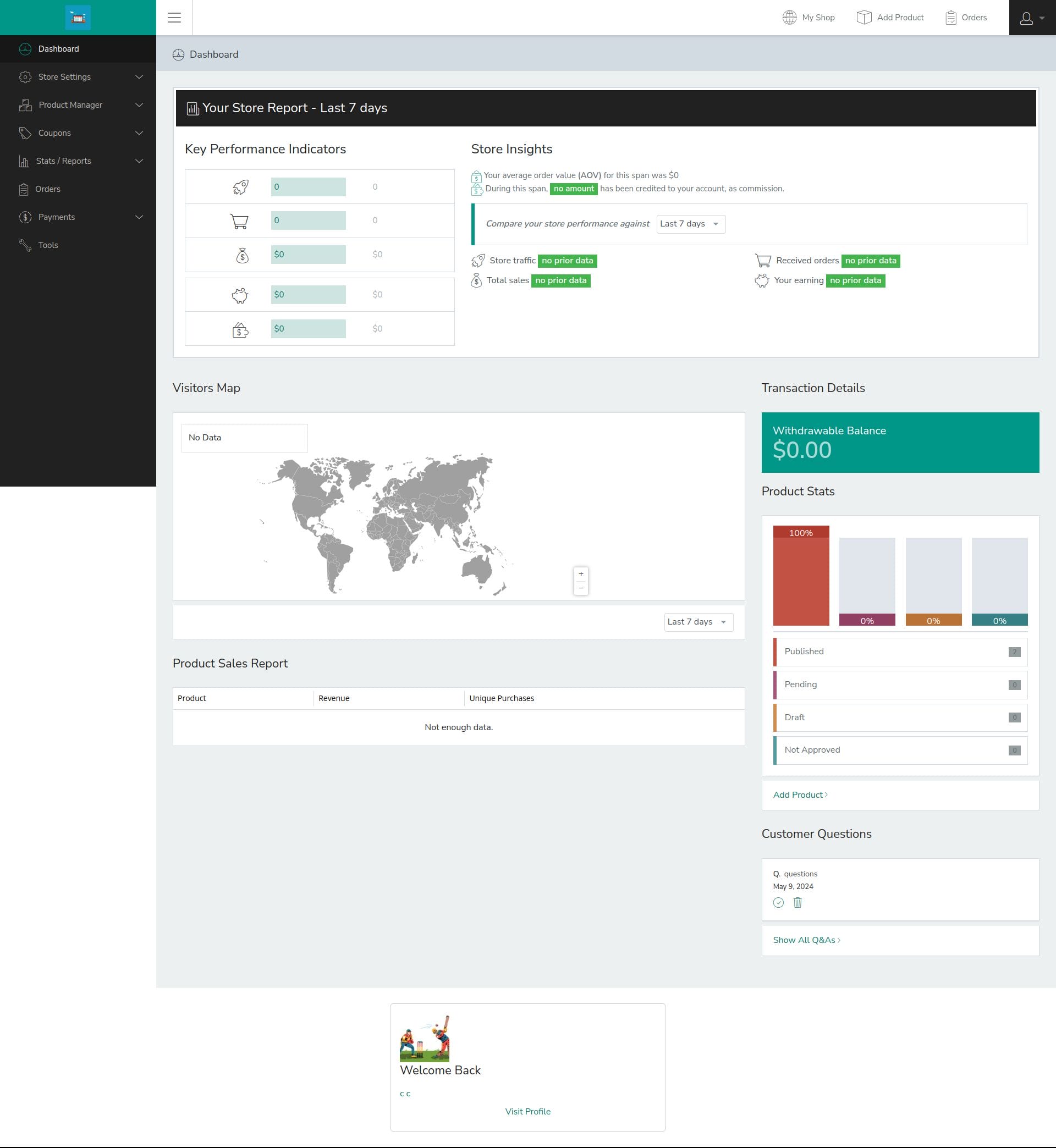
7. User-Friendly Dashboard: Efficient management of vendors and marketplace activities is essential for ensuring smooth operations and optimal performance. MultiVendorX provides merchants with a user-friendly dashboard that offers a centralized view of key metrics, vendor activities, sales data, and more. This intuitive interface allows merchants to monitor marketplace performance, track vendor performance, and manage transactions effectively, empowering them to make informed decisions and drive growth.

8. Membership-Model Businesses: Building subscription-based revenue streams is a viable strategy for monetizing marketplaces and driving recurring revenue. MultiVendorX offers support for membership-model businesses, enabling merchants to create subscription plans, membership tiers, and exclusive benefits for subscribers. This feature opens up new monetization opportunities, fosters customer loyalty, and provides a stable revenue stream for marketplace operators.
9. Powerful Product Management Tools: Empowering vendors with robust product management tools is essential for enabling them to showcase, organize, and manage their product catalogs effectively. MultiVendorX provides vendors with powerful product management tools, including options for product listings, inventory management, pricing customization, and more. This comprehensive suite of tools equips vendors with the capabilities they need to optimize their product offerings, attract customers, and drive sales within the marketplace.
10. Coupon Management: It provides a robust coupon management system that allows vendors to create and manage their own coupons. This feature can help attract more customers and boost sales.
11. Simple Account Management For Members: It makes it easier for members to manage their accounts.
12. Compatibility with Standard Themes and Plugins: MultivendorX ensures seamless compatibility with standard themes and plugins, guaranteeing a smooth experience for users. Additionally, it seamlessly integrates with the BuddyX theme, providing a cohesive and aesthetically pleasing environment for multivendor marketplaces.

Vendor Registration
1. Allow Vendors to Sign-Up: Begin by navigating to the WordPress dashboard and accessing the Settings menu. Within the General tab, locate the membership section and enable the “Anyone can register” option. Set the default user role to “vendor” to designate new users as vendors by default.
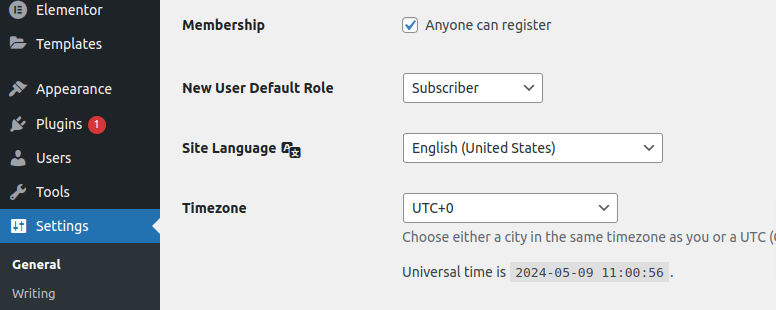
2. Build Vendor Registration Form: It simplifies the creation of registration forms with its intuitive form builder feature. Access this tool by navigating to the MultiVendorX menu in your WordPress Dashboard and selecting the Settings option. Within the Settings page, locate the Registration form option to access the form builder.
3. Customize Registration Form: Tailor the registration form to suit the specific requirements of your marketplace. Add relevant questions and fields to gather essential information from prospective vendors. By customizing the form, you can ensure that vendors meet the criteria and standards of your marketplace. Begin by providing a Form Title and Description to guide vendors through the registration process.

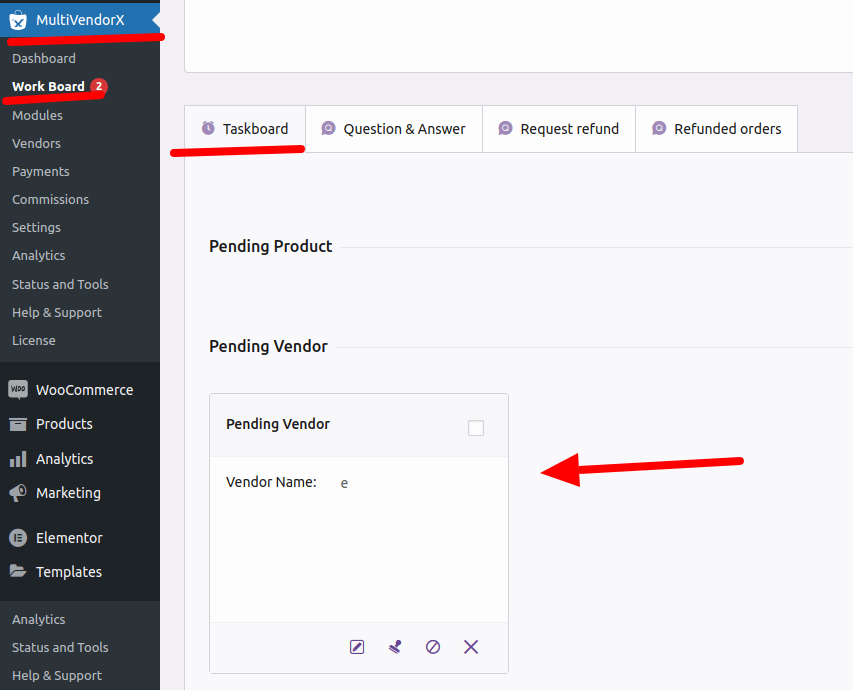
4. Vendor Approval: MultiVendorX offers flexibility in vendor approval, allowing you to choose between automatic and manual approval processes. With automatic approval, new vendors are instantly onboarded upon registration. Alternatively, opt for manual approval to review and verify vendor applications before granting access to the marketplace. Utilize the Taskboard or Vendor’s Log to manage and approve new vendor registrations efficiently.
How to add a Product
Adding a product in MultiVendorX is a straightforward process, empowering vendors to effortlessly showcase their offerings. Here’s a step-by-step guide to help you navigate through the process:
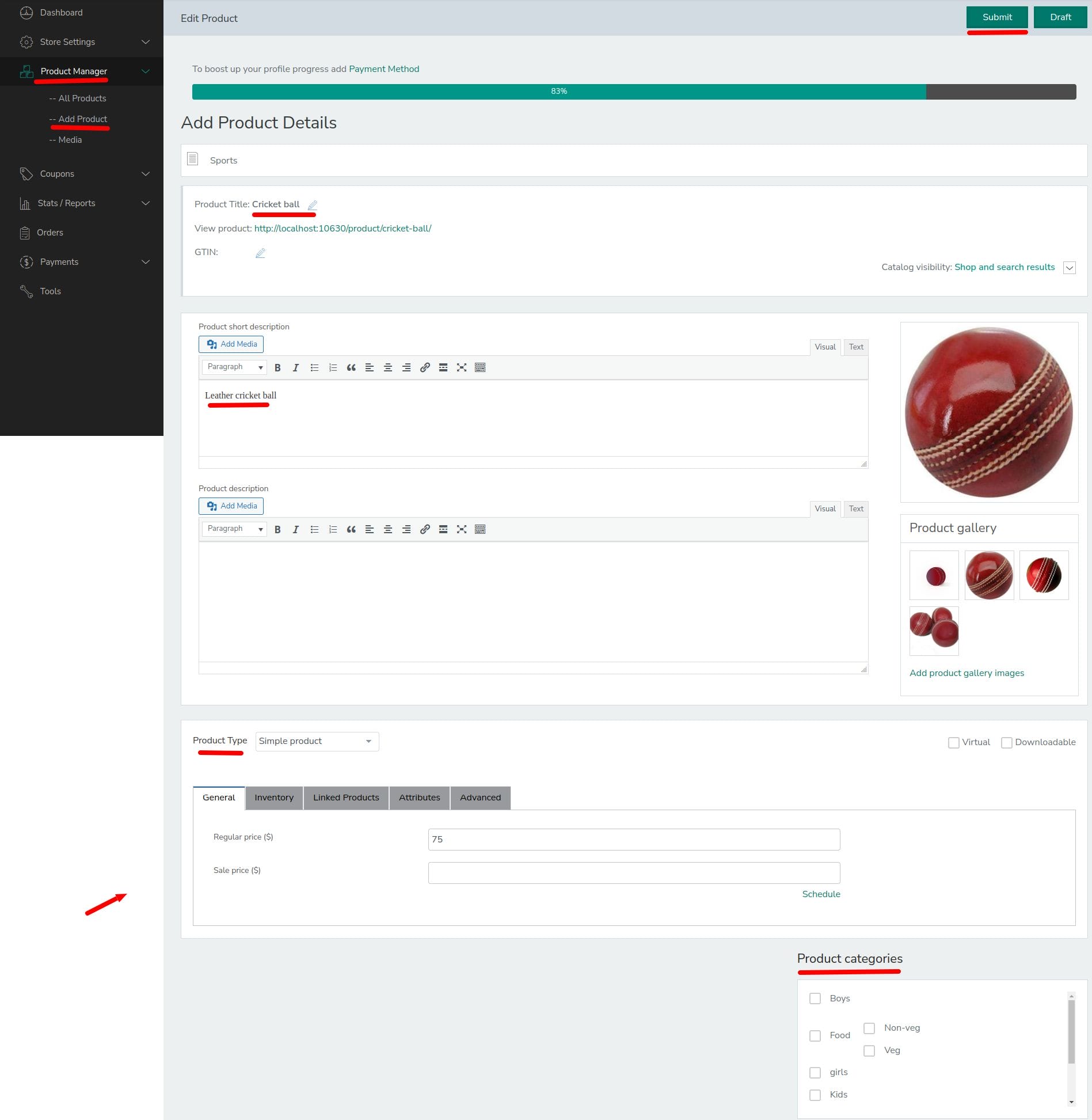
1. Go to the Vendor’s Dashboard: Begin by accessing the Vendor’s Dashboard, where vendors manage their store and product listings.
2. Navigate to Products: Within the Vendor’s Dashboard, locate and navigate to the ‘Products’ section. This is where vendors can view and manage their existing product listings.
3. Select ‘Add Product’: Choose the ‘Add Product’ option to initiate the process of adding a new product to your store. Alternatively, vendors can directly access the ‘Add Product’ link located at the top of the vendor’s dashboard for quick access.
4. Fill in the Product Details: Upon selecting ‘Add Product’, you’ll be directed to an ‘Add New Product’ page. Here, you can fill in all the necessary details about the product, including its name, description, price, stock availability, variations, images, and more. Provide comprehensive information to ensure clarity and accuracy for potential buyers.
5. Save : Once you’ve completed filling in the product details, take a moment to review and ensure accuracy. Then, click on the ‘Save’ or ‘Publish’ button to make the product live on your store. By saving or publishing the product, it becomes visible to customers, allowing them to browse and make purchases.
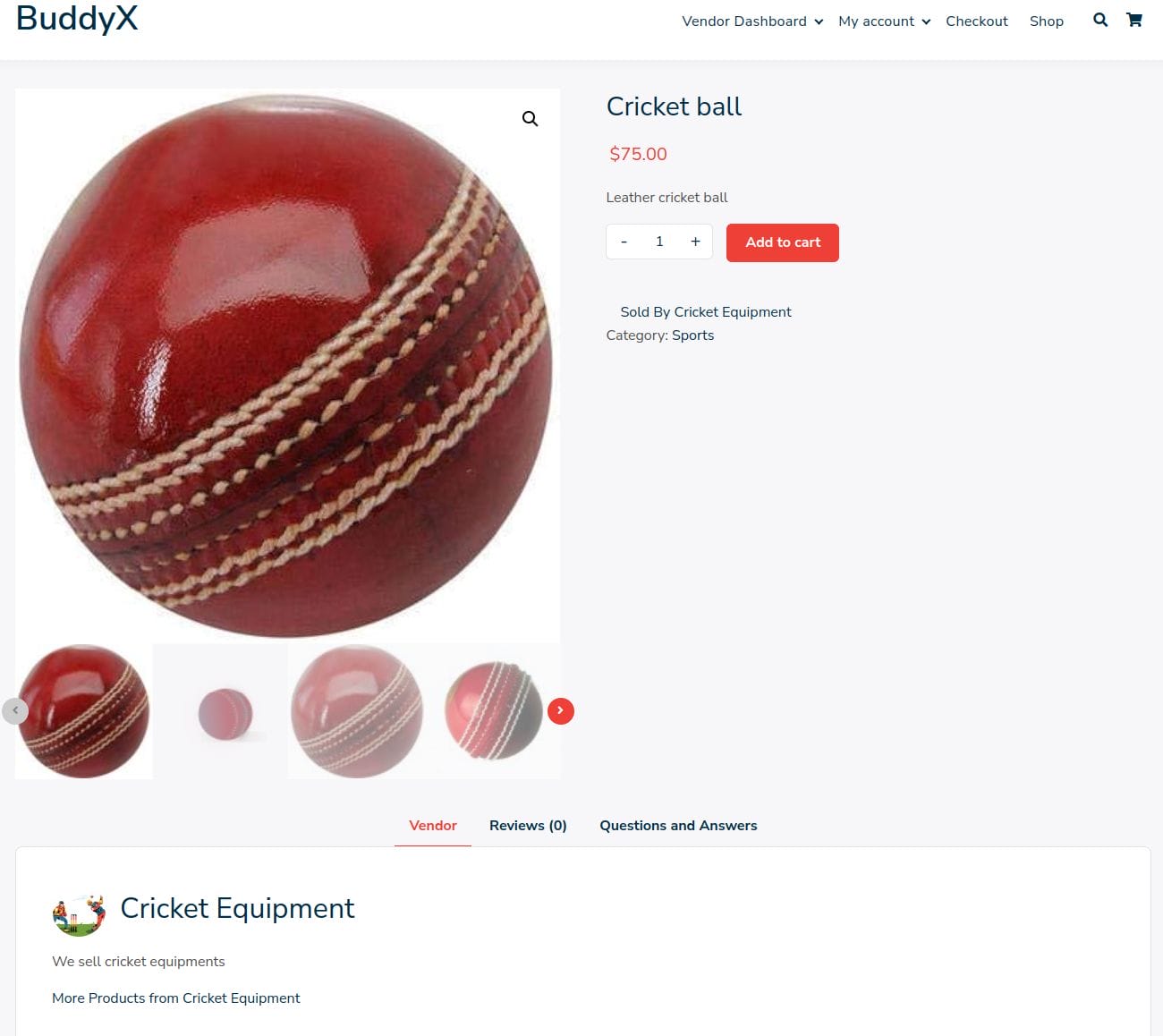
6. Product: Products is generated at the front end.
Single Product MultiVendor
The concept of Single Product Multiple Vendor (SPMV) is a game-changer in the realm of multivendor marketplaces, offering a unique and innovative approach to e-commerce. This business model allows multiple vendors to sell the same product on a single marketplace, presenting a plethora of benefits for both site administrators and vendors alike.
Benefits of SPMV
1. Increased Product Variety: SPMV significantly enhances the variety of products available on the marketplace, enticing customers with a diverse range of options to choose from. This variety can attract more customers and keep them engaged, leading to higher sales and revenue for the site admin.
2. Reduced Stock Risk: By allowing multiple vendors to sell the same product, SPMV mitigates the risk of the marketplace running out of stock for a particular item. Customers can always find the product they need, even if one vendor’s stock is depleted.
3. Competitive Pricing: Competition among vendors selling the same product can drive prices down, benefitting customers with lower prices and better deals. Vendors are motivated to offer competitive prices and promotions to attract customers, resulting in a win-win situation for all parties involved.
4. Wider Audience Reach: For vendors, SPMV provides a platform to showcase their products to a broader audience. With multiple vendors offering the same product, customers have more opportunities to discover and purchase from different sellers, expanding vendors’ reach and customer base.
5. Cost Savings: Participating in SPMV can help vendors reduce marketing and customer service costs. Instead of solely bearing the burden of promoting their products and handling customer inquiries, vendors can leverage the marketplace’s existing infrastructure and customer base to reach potential buyers and provide support.
6. Performance Tracking: SPMV enables vendors to track their sales and performance metrics, empowering them to make informed business decisions. By monitoring sales trends, customer feedback, and competitive positioning, vendors can refine their strategies and optimize their product offerings for maximum profitability.
How to Implement SPMV
1. Enable SPMV Module: In the MultiVendorX admin dashboard, navigate to the Modules section and enable the SPMV module. This feature allows multiple vendors to sell the same product on the marketplace.
2. Configure Settings: Customize SPMV settings according to your preferences, such as allowing vendors to copy products and choosing the listing format (e.g., maximum price, minimum price, top-rated vendor).
3. Assign Products to Vendors: Admins can assign the same product to multiple vendors by adding the product in the admin dashboard and selecting the vendors from the product data meta box.
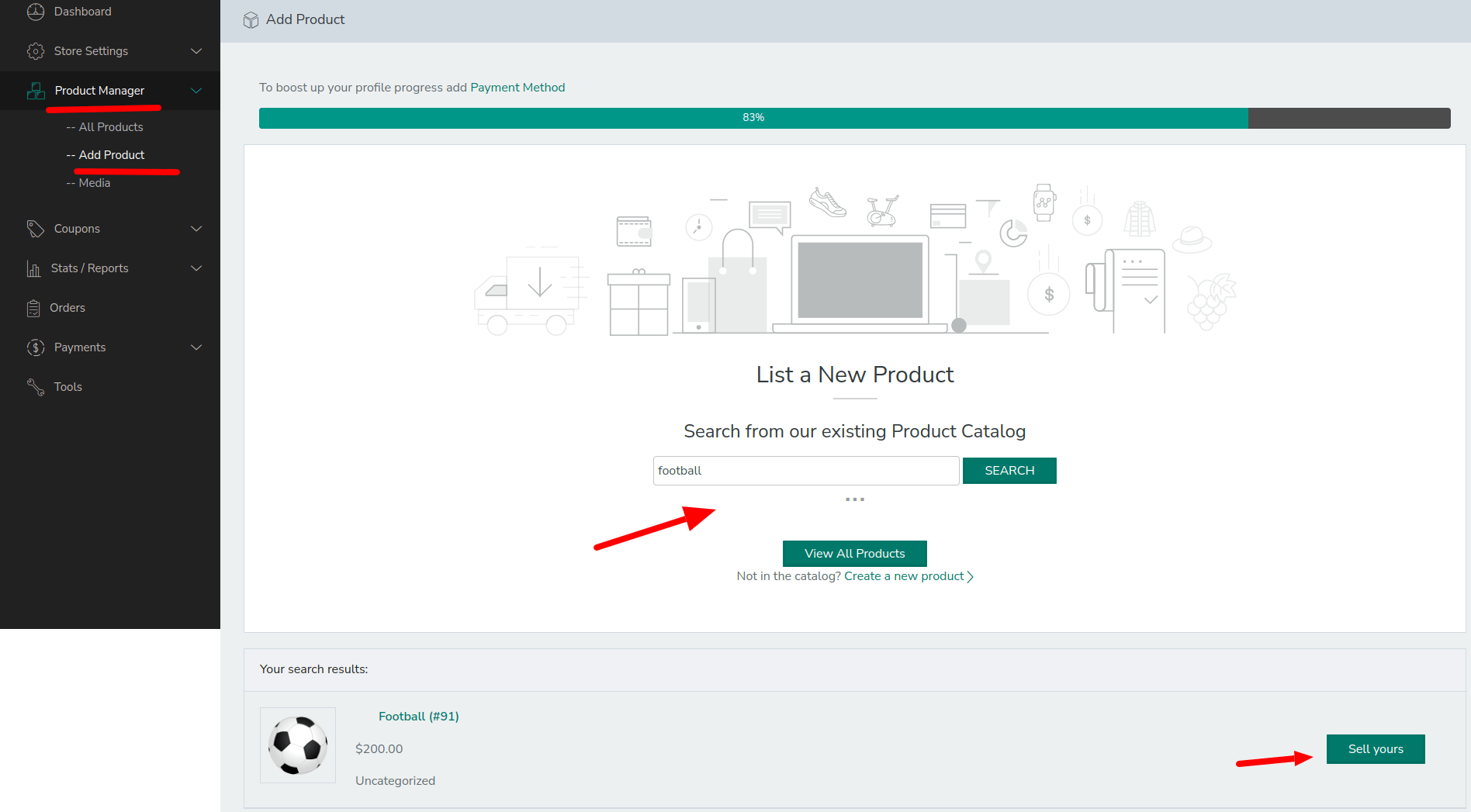
4. Vendors List Same Products: Vendors interested in listing the same product as fellow vendors can do so by accessing the Add Product option in their store dashboard. They can search for the desired product and click on the “Sell Yours” button to create a new product listing with pre-filled details.
5. View and Compare Products: Customers can browse and compare products from multiple vendors on the marketplace. They can view product listings, compare prices and features, and make informed purchasing decisions.
Conclusion
MultiVendorX empowers entrepreneurs to create vibrant and successful multivendor marketplaces, offering a comprehensive suite of features, seamless integration capabilities, and flexible pricing options. With flexible pricing options tailored to the needs of entrepreneurs, MultiVendorX ensures transparency and affordability, enabling entrepreneurs to unlock the full potential of their multi-vendor marketplace. MultiVendorX seamlessly integrates with the BuddyX Pro theme, providing a cohesive and aesthetically pleasing environment for multivendor marketplaces.
Its robust features, seamless integration, and user-friendly interface, MultiVendorX is poised to revolutionize the way entrepreneurs create and manage multivendor marketplaces. Experience the power of MultiVendorX and unlock new opportunities for growth and success in the dynamic world of e-commerce.
Interesting Reads:
Power of Membership Sites with MemberDash