

To create and manage user blogs directly from their BuddyPress profile is a powerful way to enhance community engagement and give users a voice on your platform. The BuddyPress Member Blog plugin streamlines this process, allowing users to effortlessly create and manage user blog posts without leaving their profile. This not only promote a sense of ownership and participation among members but also enriches the content on your site.
Let’s leverage the BuddyPress Member Blog plugin to enable user-generated content, moderate posts, and set restrictions based on user roles and member types, ensuring a vibrant and well-maintained community. By effectively managing these user-generated blogs, you can create a dynamic and engaging community that thrives on shared knowledge and experiences.

Quick Links
BuddyPress Member Blog
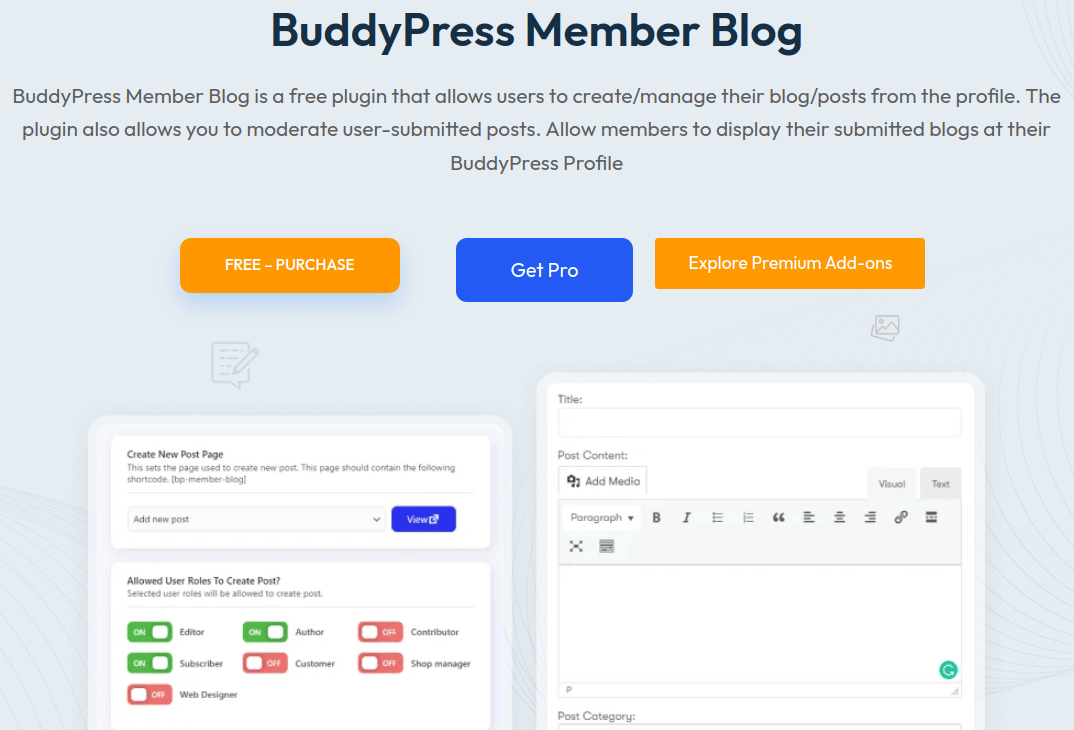
The BuddyPress Member Blog plugin empowers users to create and manage their blogs and posts directly from their BuddyPress profile. This seamless integration not only enhances user engagement but also simplifies the blogging experience for your community members. By using this plugin, administrators have the ability to moderate user-submitted posts, ensuring that only high-quality content is published on the site.
Site administrators can review and approve blogs based on their preferences, maintaining control over the content that appears on the platform. By utilizing the BuddyPress Member Blog plugin, you can foster a dynamic and interactive community where members feel empowered to share their thoughts and expertise, while also ensuring that the content aligns with the site’s standards and goals.
Key features
1. Front-end posting: The BuddyPress Member Blog plugin simplifies the blogging experience by allowing users to submit blog posts directly from the front end of their BuddyPress profiles. This user-friendly feature eliminates the need for members to access the wp-admin dashboard, making the process more intuitive and accessible for users of all technical levels. By enabling front-end posting, the plugin encourages more frequent and spontaneous content creation from your community members.

2. Media Uploads: Members can easily upload various media files, such as images and videos, along with their blog posts. This capability allows users to create rich, multimedia content that can captivate and inform readers, promote a more vibrant and engaging community.
3. Display on User Profiles: Each user blogs are prominently displayed on their BuddyPress profile, making it easy for other community members to discover and read their content. This integration ensures that the user’s contributions are visible within their profile, promoting their posts within the community. Visitors can simply navigate to a user’s profile to explore their blogs, facilitating greater interaction and engagement among members.

4. Role-Based Posting: Maintaining control over the content published on the site is important, administrators can leverage the role-based posting feature of the BuddyPress Member Blog plugin. This functionality allows admins to restrict user blog posting privileges based on user roles and member types. By setting these permissions, admins can ensure that only trusted or appropriately ranked members are able to contribute blog posts, thereby maintaining the quality and relevance of the content shared within the community.

5. Post Management: The plugin also offers comprehensive post management capabilities for user blog posts. Members have the ability to edit, delete, or unpublish their posts directly from their profiles. This empowers users to keep their content up-to-date, correct any mistakes, or remove posts that are no longer relevant. The easy-to-use post management tools provided by the BuddyPress Member Blog plugin ensure that users have full control over their content, enhancing their blogging experience and engagement with the community.
6. Categories and Tags: To improve content organization and discoverability, the BuddyPress Member Blog plugin allows users to categorize their blog posts by topics or themes. Implementing categories helps in grouping similar content together, making it easier for readers to find posts related to specific interests. Additionally, users can implement tags to further enhance the searchability of their content. Tags provide a more granular way to organize posts, enabling readers to quickly find all content related to a particular keyword. This dual system of categories and tags ensures that the blog posts are well-organized and easily accessible, enhancing the overall user experience on your platform.
Installation
1. Download the ZIP file(wbcomdesigns) and extract it.
2. Upload the directory named “BuddyPress-member-blog” to the “/wp-content/plugins/” directory.
3. Activate the plugin through the “Plugins” menu.
4. Alternatively, you can install this plugin using the WordPress Plugin installer by navigating to Dashboard > Plugins > Add New.
Why you should use BuddyPress Member Blog for User Blog Posting?
1. Seamless Integration with BuddyPress: The plugin seamlessly integrates with BuddyPress, leveraging its community features to allow user blog posting directly from their profiles.
2. Enhanced User Engagement: By enabling user blog posts effortlessly, the plugin boosts user engagement within your community. It encourages active participation and content creation, fostering a more vibrant and dynamic community environment.
3. User-Friendly Front-End Posting: User blog posts can be submitted directly from their BuddyPress profiles without needing to access the WordPress admin dashboard. This simplifies the posting process and encourages more frequent content creation.
4. Media-Rich Content: Supports media uploads such as images and videos, enabling users blogs to be visually appealing and engaging. This feature enhances storytelling and content quality, attracting and retaining community members.
5. Personalization and Visibility: Blog posts are prominently displayed on user profiles, enhancing personal branding and visibility within the community. Other members can easily discover and read user blog posts by navigating to a user’s profile, fostering connections and interactions.
6. Free: The BuddyPress Member Blog plugin is available for free, making it accessible to all BuddyPress users without any cost barriers.

Empower Your Community with BuddyPress Member Blog
The BuddyPress Member Blog plugin by wbcomdesigns stands as an invaluable tool for enhancing community engagement and empowering users within your BuddyPress-powered platform. By facilitating seamless blog creation and management directly from user profiles, this plugin fosters a sense of ownership and active participation among members. Administrators benefit from robust moderation tools that ensure only high-quality content enriches the community space.
To further enhance your community’s capabilities, consider upgrading to BuddyPress Member Blog Pro. This premium extension offers additional user blog features such as advanced post scheduling, member blog restrictions, group posting, and expanded customization options. These enhancements empower administrators and users alike to create, manage, and showcase content with even greater flexibility and efficiency.
Interesting Reads:
How to Display ads in BuddyPress for free

