

Ever wondered how certain search results stand out with star ratings, product prices, event dates, or recipe details? That enhanced look, which grabs attention more than a plain blue link, is thanks to something called schema markup. For beginners stepping into SEO, schema might seem like a complicated tech term, but in reality, it’s one of the most powerful and easy-to-use tools that can elevate your website’s visibility without massive effort.
Let’s break it down, strip away the jargon, and explore everything you need to know about schema markup — from what it is, to how it works, to every type you might need.

Quick Links
What is Schema Markup?
Schema markup is a form of structured data that helps search engines better understand your content. Structured data is information formatted in a way that machines (like Google or Bing) can easily digest. While human readers can intuitively understand a recipe, review, or event date, search engines need a little help. Schema markup provides help by clearly defining what each part of your webpage means.
Imagine you’ve written a blog about a chocolate cake recipe. Without schema, Google knows you have content but doesn’t know the ingredients, cooking time, or ratings. Add schema markup, and suddenly it knows this is a recipe, includes sugar, takes 30 minutes to prepare, and is rated 4.5 stars by 200 people. This clarity allows search engines to display richer, more informative snippets in search results — known as “rich results.”
Schema is written in JSON-LD format (a type of lightweight code) and is recognized by all major search engines. While this code sits in the background of your site, its impact is felt on the frontlines — search rankings, visibility, and user engagement.
Why is Schema Markup Important?
In today’s cluttered digital ecosystem, schema gives your content an advantage. Search engines use schema to enhance how your page appears on search engine results pages (SERPs). Whether it’s an event showing exact times, a product showing price and availability, or an article showing author and publish date — schema enables those enhancements, helping users make informed decisions before even clicking.
What’s even more valuable is that schema improves click-through rates. When your listing offers more visual appeal or useful information right on the results page, users are more likely to click on it. More clicks mean more traffic, and more traffic means more opportunities to convert visitors into customers or subscribers.
In addition, schema markup plays a vital role in voice search. With voice assistants like Siri, Alexa, and Google Assistant relying on structured data to answer questions, schema increases your chances of being featured as a voice response. That’s not just visibility — that’s authority.
Even though schema isn’t a direct ranking factor (yet), it supports many things that are — like user behavior, dwell time, and CTR — which indirectly influence your position on Google.
How Schema Markup Works
Schema is a language created by Schema.org — a collaboration between Google, Bing, Yahoo, and Yandex. It provides a shared vocabulary to define specific pieces of content like people, places, products, reviews, recipes, and more. Using this language, webmasters can tell search engines exactly what a page is about, removing any guesswork.
Let’s say you own a bakery. Your “Contact” page shows your address and business hours. With schema markup (specifically, LocalBusiness schema), you tell Google directly: “This is a bakery located in Chicago, open from 8 am to 6 pm, with a phone number and customer reviews.” This information can then be featured prominently in the search results or Google Maps, improving discoverability.
Most schema is added via a JSON-LD script, which is inserted in your site’s <head> section or right before the closing </body> tag. If you’re using a CMS like WordPress, plugins like Yoast, Rank Math, or Schema Pro can handle it for you with simple fill-in-the-blank templates.
Types of Schema Markup
Schema.org offers hundreds of schema types, but as a beginner, it helps to understand the major categories. Each type serves a specific purpose and is tailored to different kinds of content. Here’s a breakdown of the most commonly used and useful schema types.
1. Article & BlogPosting Schema
This schema is designed for written content such as news stories, blog posts, and editorial pieces. The Article schema helps search engines understand details like the headline, publish date, author, article body, featured image, and publisher. For more informal content like blogs, the BlogPosting schema is used.
Using these schemas can help your content appear in “Top Stories” carousels or rich snippets showing metadata like publication time and publisher logo. It’s ideal for publishers and content marketers aiming for greater visibility and credibility.
2. Product Schema
Product schema is essential for eCommerce websites. It allows you to describe products in detail — including name, brand, SKU, price, availability (in stock, out of stock), reviews, and ratings. When implemented correctly, Google may display all this info right in the search snippet.
Imagine someone Googling “wireless earbuds.” If your product listing has schema, your result could show price, stock status, and a star rating — making your link more attractive than others with just a title and meta description.
3. Review & Rating Schema
Review schema allows you to highlight user-generated reviews for products, services, or businesses. You can include the reviewer’s name, rating score, and review body. There’s also the AggregateRating schema, which combines multiple reviews into an average rating.
This type is powerful because it adds star ratings under your search result, which not only builds trust but also increases CTR. However, it’s important to ensure that the reviews shown in the schema are also visible on the actual page.
4. Local Business Schema
Local Business schema is crucial for brick-and-mortar stores. It tells Google your business name, location, contact number, opening hours, and even accepted payment methods. It supports subtypes like Restaurant, Bakery, Dentist, and AutoRepair — each with industry-specific properties.
Properly implementing the Local Business schema helps improve your visibility in local search, Google Maps, and Google’s local 3-pack listings. It also improves how your business appears in mobile search results, helping you attract nearby customers.
5. Organization Schema
Organization schema communicates who you are as a company. It includes your name, logo, contact info, location, founder, social media profiles, and more. Google uses this schema to create a Knowledge Panel for your brand, giving users a detailed snapshot of your identity.
For businesses looking to build brand authority and trust, Organization schema is a must-have, especially when trying to rank for branded search queries.
6. Event Schema
Event schema allows you to mark up events with key information like name, date, time, location, organizer, and ticketing details. This schema is great for concerts, webinars, conferences, and festivals.
Google may display your event in a carousel or calendar view right in the search results, giving you instant visibility and increasing ticket sales or registrations.
7. Recipe Schema
Recipe schema is a favorite among food bloggers and cooking websites. It structures your recipe content into defined attributes like ingredients, preparation time, cook time, nutritional info, reviews, and cooking instructions.
This enables your content to appear as a rich card in mobile search, complete with images, star ratings, and cooking details, which dramatically improves user engagement.
8. FAQPage Schema
This schema is used for pages with a list of frequently asked questions and answers. When properly implemented, Google may display the questions and answers directly under your result as expandable dropdowns.
This makes your listing taller in search results, gives users immediate value, and can boost traffic and time-on-page.
9. HowTo Schema
HowTo schema is perfect for instructional content. Whether it’s “How to tie a tie” or “How to install a plugin,” this schema breaks your content into step-by-step instructions, possibly accompanied by images, duration, and required tools.
Google can display this in a special format, making your tutorial more likely to be featured as a snippet or voice assistant response.
10. Video Schema
If you produce video content, VideoObject schema helps search engines index your videos and show rich results with video previews, durations, and upload dates.
It’s especially useful for YouTube or embedded videos on your site. With this schema, your content can appear in Google’s video search tab or even in suggested clips for related queries.
11. Job Posting Schema
This schema is a must for recruitment websites. It allows you to mark up job titles, company name, employment type, location, salary, qualifications, and application deadlines.
Google uses this to list your job in their “Google for Jobs” feature, giving you direct exposure to active job seekers.
Also Read: 10 Best WordPress Filter Plugins for Better User Experience
How to Add Schema Markup to Your Website
There are multiple ways to add schema to your site, and the method you choose depends on your comfort level with code.
For WordPress users, the easiest method is using a plugin like Rank Math, Yoast SEO, or Schema Pro. These tools provide pre-built templates for different schema types. You just fill in the blanks — no coding required.
If you’re more hands-on or use a different platform, you can manually generate schema using Schema.org or Google’s Structured Data Markup Helper. Once generated, the JSON-LD code can be pasted into your site’s HTML — ideally in the header or right before the closing body tag.
After adding schema, always test your implementation using Google’s Rich Results Test or the Schema Markup Validator. These tools tell you if your code is valid and which types of enhancements your page may be eligible for.
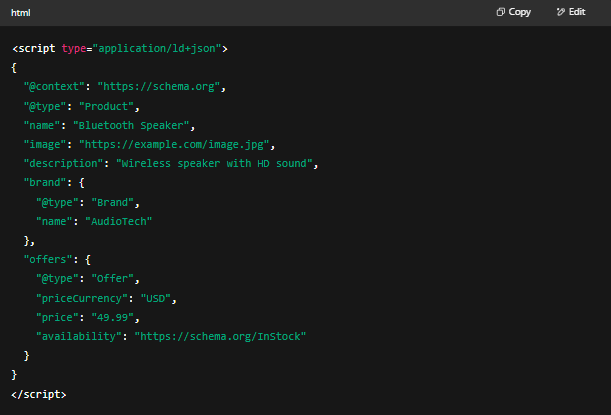
Validating and Testing Your Schema Markup
Before deploying your website’s structured data, it’s imperative to ensure its accuracy and effectiveness through thorough validation. This process not only enhances your site’s eligibility for rich results but also safeguards against potential penalties from search engines due to erroneous or misleading markup.
Essential Tools for Schema Validation:
-
Google’s Rich Results Test: This tool evaluates whether your webpage is eligible for rich results by analyzing the structured data present. It provides insights into how your page might appear in Google’s search results and highlights any issues that could prevent rich feature display.
-
Schema Markup Validator: For a comprehensive analysis, the Schema Markup Validator examines your structured data for adherence to Schema.org standards. It offers detailed feedback on errors or warnings, ensuring your markup aligns with universally accepted schemas.
Utilizing these tools allows you to identify and rectify issues proactively, ensuring that search engines interpret your data as intended.
Advanced Strategies for Effective Schema Implementation:
-
Integrate Multiple Schema Types: When appropriate, combining various schemas—such as Product, Review, and Offer—can provide a richer context to search engines, enhancing the depth and relevance of your content representation.
-
Maintain Up-to-Date Schema Markup: As your webpage content evolves, regularly update your schema to reflect these changes accurately. This practice ensures consistency between your content and its structured data representation.
-
Implement Breadcrumb Schema: Incorporating Breadcrumb schema enhances site navigation clarity for users and provides search engines with a hierarchical structure of your site, potentially leading to improved search result displays.
-
Leverage Speakable Schema for Voice Search: With the rise of voice-activated assistants like Google Assistant, marking portions of your content as ‘speakable’ can optimize your site for voice search, making it more accessible to auditory queries.
-
Adhere to Search Engine Guidelines: Strict compliance with search engine protocols is crucial. Deviations or manipulative practices can lead to your markup being flagged as spam, adversely affecting your site’s credibility and ranking.
Optimizing for Voice Search with Structured Data:
Structured data plays a pivotal role in enhancing your content’s compatibility with voice search technologies. Voice assistants rely heavily on well-structured data to fetch and deliver concise, accurate answers to user queries.
Particularly, implementing FAQ and How-To schemas can position your content favorably for voice search results. When these schemas are correctly applied, they increase the likelihood of your content being selected as the source for voice responses, thereby broadening your reach in the growing domain of voice-activated searches.
Common Pitfalls to Avoid in Schema Markup:
-
Utilizing Incorrect or Irrelevant Schema Types: Applying schemas that don’t accurately represent your content can mislead search engines and users, diminishing trust and relevance.
-
Neglecting to Test Your Markup: Skipping the validation process can result in unnoticed errors, leading to missed opportunities for rich results or potential penalties.
-
Fabricating Reviews or Concealing Content: Presenting falsified reviews or hiding content within your markup violates ethical guidelines and can lead to severe penalties from search engines.
-
Omitting Required Fields: Incomplete schema implementations can render your structured data ineffective. Ensure all mandatory fields are accurately filled to maximize the benefits.
-
Unnecessary Duplication of Schema: Redundant or overlapping schemas can confuse search engines and dilute the effectiveness of your structured data.
By meticulously avoiding these common errors, you enhance the integrity and performance of your structured data, leading to better interpretation by search engines and a more robust online presence.

Schema is Your SEO Secret Weapon
In the ever-competitive world of search, schema markup is your silent warrior — working behind the scenes to amplify your visibility, improve click-through rates, and future-proof your content. It doesn’t matter if you’re running a blog, selling products, or promoting events — there’s a schema for you.
Schema markup isn’t a shortcut; it’s a long-term investment. It’s about making your content machine-readable and user-friendly at the same time. The best part? It’s not just for tech experts anymore. With tools, plugins, and generators available today, anyone can implement schema, even beginners.
So don’t let your site remain invisible in a sea of search results. Add schema, speak search engines’ language, and let your content shine brighter than ever.
Interesting Reads:
10 Best WordPress Warehouse & Dropshipping Plugins

