

If you run a blog, a small website, or any kind of social network, you know how important it is to stand out. Visuals are everything these days. You could write the best caption in the world, but if the photo isn’t grabbing attention, people scroll right past it. One easy way to level up your images? Stickers.
Yep, stickers! Those cute little characters and emojis that we all love staying with our messages can be just as wonderful for your images as they are for your text. Whether you want to draw attention to a detail in a photo, create a fun banner, or create a jaw-drapping cover for your page, adding some stickers can make a yawn image pop to life with a few clicks. If you’re curious just how to add stickers to photos, sit tight — this tutorial will walk you through the whole thing with friendly tools and zero stress.
If you’re curious just how to add stickers to photos, sit tight — this tutorial will walk you through the whole thing with friendly tools and zero stress.
Why Stickers Work
Stickers are more than just decoration. They help highlight key parts of your image, guide the viewer’s eye, or just give your visuals a little personality. Think emojis, speech bubbles, arrows, hearts, funky frames. They’re great for:
- Drawing attention to a product or call-to-action
- Creating fun, meme-style content
- Making banners and post covers stand out
- Adding a personal or playful touch to brand images
You don’t need to know Photoshop. You don’t need to hire a designer. You don’t even need to leave your computer. There are tools that make this super simple.
A Simple Photo Editor That Gets the Job Done
Let’s talk about tools. You want something easy, fast, and reliable. Something that works offline, doesn’t need tutorials, and lets you save in high quality. There’s a PC photo editor that does exactly this — no design skills needed.
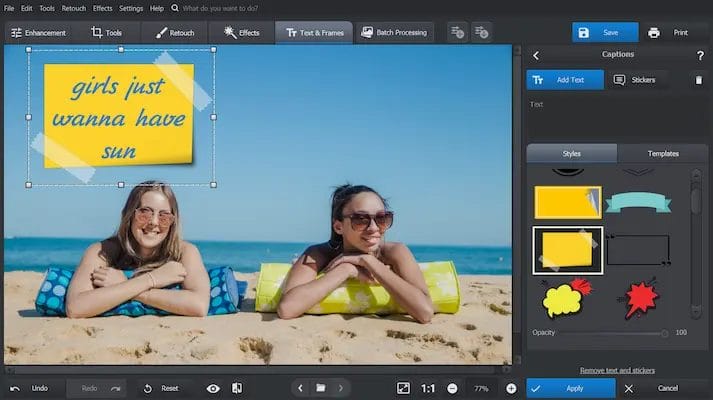
Load up your photo, pick a sticker, drag it where you want it. Done.
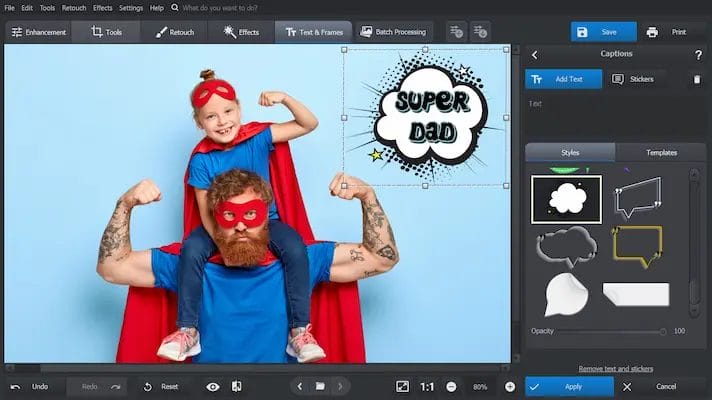
You can resize, rotate, flip, or layer stickers however you like. Want to stack emojis on someone’s head? Add a speech bubble with a funny quote? Throw some sparkle on your logo? It’s all a few clicks away.
Practical Ideas for Creators and Bloggers
1. Highlighting Details
Add arrows or circles to show off important parts of an image. Got a product feature you want to spotlight? Drop a sticker over it. Want people to notice a detail in the background? Use a magnifying glass or emoji to point it out.
2. Making Covers That Pop
If you create blog headers, post covers, or YouTube thumbnails, stickers are your new best friend. Slap on bold text, graphics, or icons to make your image scream “Click me!” You can also add borders or shapes to give your images structure and style.
3. Creating Seasonal or Themed Content
Holiday stickers. Birthday balloons. Summer icons. Stickers can instantly turn a plain photo into themed content without having to redo the whole design. Just add a few themed graphics and you’re good to go.
4. Boosting Engagement on Social Media
Use stickers to make your content more relatable or shareable. People love quirky edits. Add a funny reaction emoji, a “tap here” icon, or a sticker quote. It’s low effort, but it often gets more likes, shares, and comments.
5. Add Humor or Emotion
Sometimes a sticker says more than words ever could. A crying-laugh emoji on a meme-style post, a heart over a featured product, or a skull emoji next to a “Don’t Try This at Home” warning — it all adds flavor.
Tips for Using Stickers Like a Pro
- Don’t Overdo It: Too many stickers can make your image look cluttered. Stick to 2–3 max per image.
- Match Your Style: Use stickers that match your brand colors or tone. Don’t mix cartoonish and realistic styles unless you’re going for contrast on purpose.
- Keep It Transparent: Always go for PNG stickers with transparent backgrounds. Otherwise, you’ll end up with ugly white boxes around your stickers.
- Resize Smartly: Make sure the sticker isn’t too big or too small. It should enhance the image, not distract from it.
- Test on Mobile: Preview how your image looks on phone screens. Sometimes stickers that look good on a desktop can disappear or look off on smaller displays.
Final Thoughts
Using stickers isn’t about making your photos look silly (unless that’s your vibe). It’s about giving your images an extra punch. Making them a little more engaging. More fun. More you.
Try it out with a simple PC editor and start playing around. You’ll be surprised how much more lively your content feels. Once you get the hang of it, you’ll wonder how you ever posted without them.
Your photos deserve more than filters. Give them some flair. Add a sticker.
How to Create Your Social Networking Website?

