

Lockdowns did something odd to how people think about websites. For a couple of years, “social” stopped meaning a feed you scrolled during a commute and started meaning the only place you could see your coworkers, your book club, or your extended family. That shift didn’t reverse when offices reopened. Businesses and niche communities noticed people would rather join a focused space with fifty like-minded members than shout into a public feed with two billion strangers, and a lot of them decided to build their own social networking website instead of renting attention on someone else’s platform.
If you’re one of them, here’s the honest version of what that build looks like: the research phase that most guides skip, the technical decisions that actually matter, and the mistakes that kill momentum before launch day.
What Counts as a Social Networking Website?

A social networking website lets people with something in common find each other and keep coming back to talk. That’s the whole definition. Facebook and Instagram are the obvious examples, but the category stretches far past the household names. A private forum for retired military veterans is a social network. A membership site for freelance illustrators who trade feedback on portfolios is a social network. So is a customer community where people troubleshoot a software product together instead of calling support.
The meaning keeps shifting because the use cases keep multiplying. Ten years ago “social network” meant a public profile with a wall. Now it might mean a private Slack-style space, a gated forum tied to a paid course, or a members-only directory with messaging built in. What hasn’t changed is the underlying need: people want a place that feels like theirs, built around a shared interest rather than an algorithm’s guess at what keeps them scrolling.
Do the Research Before You Touch a Website Builder
Most failed community sites didn’t fail because of bad design. They failed because nobody answered two questions before development started: who is this for, and why would they choose it over the dozen alternatives already competing for their attention.
Define the Niche and the Person
“Everyone who likes travel” is not a niche. “Solo female backpackers planning six-month trips through Southeast Asia” is a niche. The narrower the definition, the easier it is to build features people actually want, write copy that resonates, and find your first hundred members through targeted outreach instead of hoping for organic discovery.
Write down who your ideal member is: their profession, their frustration with existing options, and the specific outcome they want from joining. If you can’t fill that in with confidence, you’re not ready to pick a domain name yet.
Study Where People Already Gather
Your future members are already talking somewhere, whether that’s a subreddit, a Facebook group, a Discord server, or a competitor’s forum. Spend time reading those conversations before you build anything. What do people complain about? What questions come up over and over? What features do existing platforms lack that would make someone switch?
This is also where you find your unique selling point. If three existing communities in your space are all clunky and covered in ads, “fast and ad-free” might be enough of a differentiator on its own. If they’re all missing a specific feature, like the ability to organize members by sub-interest or region, build that first.
Map Out How You’ll Get the First 100 Members
A community with zero members is a ghost town, and nobody wants to be the first person in an empty room. Before launch, have a concrete plan: a waitlist you’ve been building, a partnership with an existing newsletter, a handful of people you’ll personally invite and ask to seed the first few discussions. The technical build is the easy part. Getting from zero to a room that feels alive is where most projects stall.
Domain and Hosting: the Foundation You’ll Live With for Years
Once the research is done, it’s time to lock in the infrastructure. This part is boring compared to picking a theme, but getting it wrong is expensive to fix later.
Pick a Domain That Won’t Embarrass You in Five Years
Choose a name that’s short enough to say out loud without spelling it, doesn’t lean on a trend that will feel dated in two years, and matches your actual brand rather than a keyword you think will help SEO. If your business already has a name, use that name as your domain unless there’s a strong reason not to. Consistency between your brand and your URL builds trust faster than a keyword-stuffed domain ever will.
Choose Hosting Built for Community Traffic, Not Just a Brochure Site
A community website behaves differently than a five-page brochure site. Members log in, post, comment, upload images, and refresh their activity feed constantly. That’s a lot more database activity than a static page. Shared hosting plans built for simple blogs often buckle once a community gets a few hundred active members, so look for a host that explicitly supports WordPress with BuddyPress or similar plugins, offers decent server-side caching, and gives you room to scale without a full migration in year one.
If you’re not sure how much traffic to plan for, err toward a mid-tier managed WordPress host rather than the cheapest shared plan you can find. The cost difference is small compared to the cost of downtime during a growth spurt.
Choosing the Platform: Why WordPress Still Wins
WordPress now powers a large share of the web, and for community builders specifically, it has an advantage no closed platform can match: you own your data. If you build on a hosted social app and that company changes its pricing, gets acquired, or shuts down, your community goes with it. WordPress sites live on your own hosting, under your own domain, for as long as you keep paying for hosting.
The other reason WordPress wins for this use case is the plugin ecosystem. You’re not stuck waiting for a platform vendor to build the feature you need. Community-specific plugins, membership tools, forum software, and event calendars already exist and mostly play well together, which means you can assemble a fairly sophisticated community site without hiring a development team.
Building the Front End with BuddyX
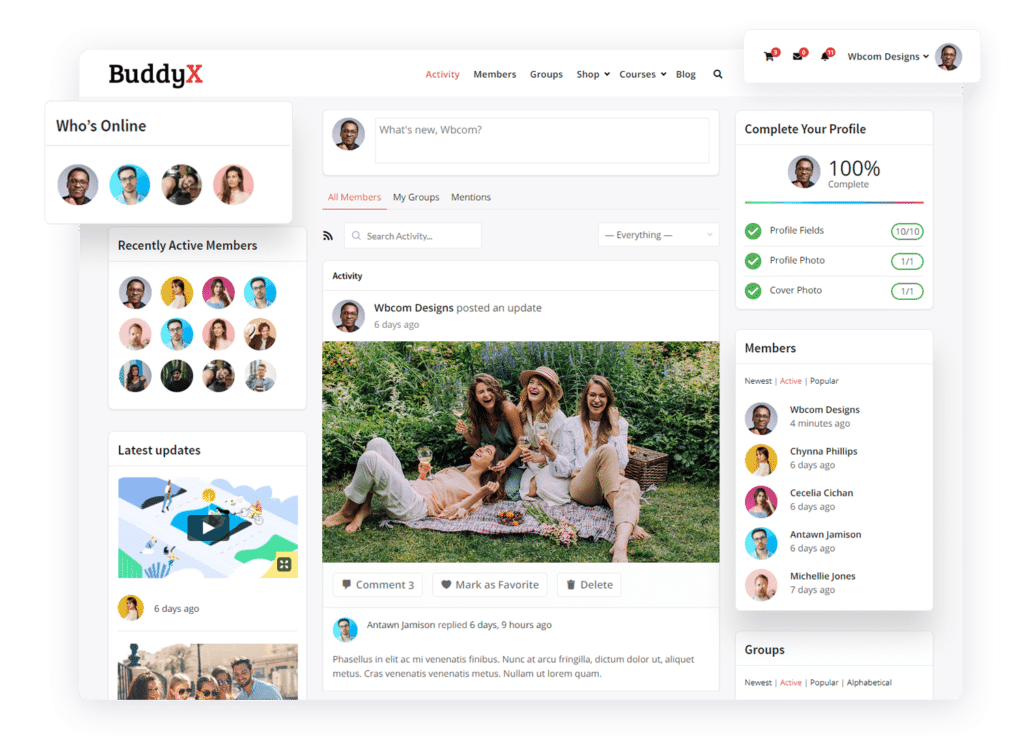
Once WordPress is installed, the theme decides how your site looks and feels on the front end, and how quickly it performs once real traffic shows up. BuddyX theme is built specifically for community sites and integrates directly with BuddyPress, which is the plugin most WordPress social networks are built on top of. A few reasons it keeps showing up in this kind of build:
Member profiles look like something people would actually want to fill out, with cover photos and bios laid out cleanly instead of crammed into a sidebar, and a scrollable history of everything that member has posted. The activity feed scrolls the way people expect from years of using Facebook and Twitter, so there’s no learning curve for new members. Friend and follow connections let people build their own sub-network inside your larger community, which keeps engagement personal instead of just broadcast. And the free version is genuinely usable on its own; you’re not locked out of core functionality until you pay.
Adding the Engine: BuddyPress and the Plugin Stack
BuddyPress is the plugin that turns a regular WordPress install into a full social network: member directories, private messaging, groups, activity streams, and notifications. It’s mature, actively maintained, and free, which matters because you don’t want your community’s core functionality dependent on a plugin that might disappear.
Beyond the core plugin, plan for a few additions before launch: a spam-prevention plugin, since any public sign-up form eventually attracts bots, and a backup solution that runs automatically rather than one you remember to trigger manually. Skipping these two is how communities lose months of member content to a single bad update.
If setting up BuddyPress feels heavier than you want for a first version, it’s worth knowing there are lighter alternatives now. BuddyNext, for instance, is a standalone community platform that isn’t built on top of BuddyPress at all, so there’s less plugin configuration involved if you want member profiles and groups running, complete with activity feeds, from a simpler setup. It’s worth comparing before you commit to a stack, especially if your team doesn’t have someone comfortable troubleshooting plugin conflicts.
Moderation and Safety Aren’t Optional Extras
Every community that grows past a few dozen members eventually deals with spam, off-topic arguments, or someone testing how far they can push the rules. Decide your moderation approach before launch, not after the first incident. Write a short, plain-language set of community guidelines and put them somewhere new members will actually see, not buried in a footer link nobody clicks. Assign at least one person, even if it’s you, to check new posts and flagged content daily during the early months when patterns of bad behavior are easiest to catch and correct.
Automated moderation tools help, but they can’t replace a human checking tone and context. A comment that trips a keyword filter might be a harmless joke; a comment that passes every filter might still be genuinely harassing another member. Plan for both.
It also helps to decide, ahead of time, what happens after a warning. A three-strike system written down somewhere public feels fair to members even when they’re on the receiving end of it. A moderation decision made up on the spot, with no stated policy behind it, tends to look arbitrary even when it isn’t, and that’s the kind of thing that gets screenshotted and shared outside your community as proof of favoritism. Nobody wants that conversation happening about the space they just spent weeks building.
Give your moderators, even if that’s just you for now, a private channel to flag borderline cases before acting on them. A second opinion catches the calls that look obvious in isolation but read differently with more context.
Consider building in a light onboarding flow, too: a short welcome message, a pinned post explaining the rules in plain language, maybe an introduction thread where new members say a bit about themselves. That first five minutes shapes whether someone becomes a regular contributor or quietly leaves the tab open and never comes back.
The Technical Checklist Nobody Mentions Until Something Breaks
Past the theme and the core plugin, a handful of unglamorous technical decisions determine whether your community feels trustworthy or feels like a hobby project. Skip these and you’ll be fixing them later under pressure, usually right after something has already gone wrong.
SSL Is Not Optional
Every modern browser flags a site without HTTPS as “not secure,” right in the address bar, before a visitor reads a single word of your content. Most hosts now issue a free SSL certificate automatically. Confirm yours is active and that your whole site, not just the login page, forces HTTPS.
Backups That Run Without You Remembering
A community site accumulates something a brochure site never has to worry about: irreplaceable member-generated content. Photos, discussions, years of profile history. Set up automated daily backups stored off-server, not just a backup plugin sitting dormant in your plugin list. Test the restore process once, before you actually need it, so you’re not learning how it works during an emergency.
A Privacy Policy That Matches What You Actually Collect
If members sign up with an email address, upload a profile photo, or post publicly, you’re collecting personal data, and depending on where your members live, that comes with legal obligations around disclosure and consent. A generic template privacy policy generator will get you most of the way there for a small community; a larger one with EU or California members may need a closer look from someone who knows the relevant regulations.
Basic On-Page SEO From Day One
Community sites generate a surprising amount of organic search traffic over time, because member discussions naturally create long-tail content that ranks for specific questions. Set up an SEO plugin early, write a real meta description for your homepage instead of leaving it blank, and make sure your permalink structure uses readable URLs rather than query strings full of numbers. None of this needs to be perfect at launch. It just needs to exist, because retrofitting SEO onto two years of unstructured content is a much bigger job than doing it from the start.
Launch, Then Keep Showing Up
The build is finished. Now comes the part most tutorials skip past: getting people to actually use it. Reach out personally to the people on your waitlist rather than sending one blast email and waiting. Post an update, ask a question, or start a thread yourself every single day for the first month, because an empty community reads as a dead one, and members won’t post first into silence.
Run a small event, even something as simple as a live Q&A or an AMA, to give people a reason to show up at the same time and start recognizing each other’s names. That shared experience does more for retention than any feature you could add to the platform.
Common Questions About Building a Social Network
How long does it actually take to launch? A focused build with BuddyPress and BuddyX, working with an existing hosting account and a clear plan, usually takes two to six weeks for a first version. Add time if you’re also designing custom branding or integrating a paid membership system.
Do I need to know how to code? Not for a basic version. Theme customization, plugin configuration, and content setup can all be done without writing PHP. Custom features beyond what plugins offer will need a developer.
How do I make money from it? Common paths include paid memberships, sponsored content from relevant brands, a directory of paid vendor listings, or bundling community access with an existing product or course. Pick one model early rather than trying all of them at once.
What’s the biggest mistake first-time builders make? Spending months perfecting design before inviting a single real member. Launch with something functional, get feedback from the first twenty people, then refine.
Should I launch publicly or start invite-only? Invite-only tends to work better for new communities. A small, curated group of founding members sets the tone for the discussions, the language, and the level of civility everyone who joins after them will expect. Opening the gates too early, before that tone exists, means the first hundred people who wander in have nothing to model their behavior on, and the culture ends up defined by whoever shows up loudest rather than by you.
How much does this actually cost to run? Hosting for a small to mid-sized community typically runs somewhere between what a basic shared plan costs and what a dedicated managed WordPress plan costs, depending on member count and how much media people upload. BuddyPress and BuddyX are free. Budget separately for a security plugin, a backup service if your host doesn’t include one, and eventually a caching or CDN service once traffic grows past what shared hosting comfortably handles.
Where This Leaves You
Building a social networking website is not the hard part anymore. WordPress and BuddyPress, paired with a theme like BuddyX, have made the technical build accessible to almost anyone willing to spend a few weekends on it. The hard part, the part that separates communities that thrive from ones that quietly die a few months after launch, is everything covered above the technical steps: knowing exactly who you’re building for, showing up consistently once the doors open, and treating moderation as a daily habit instead of an afterthought.
Get those pieces right and the platform choice becomes almost secondary.
Interesting Reads:
How to Build a Social Network Website With WordPress?
Setting Up Free WordPress Social Network Website
Why is WordPress the best CMS to create a Social Network website?