
The best lead qualification tool depends on your budget and on where your leads come from. HubSpot has the most complete scoring, but you need Professional or higher. Freshsales is the cheapest real CRM with contact scoring we could verify, from $39 per user a month. Groundhogg is the pick for a WordPress site, with scoring from $40 a month. Common Room is built around community signals, from $2,500 a month. We did not test these hands-on. Every price and plan below comes from each vendor’s own pages, checked in November 2026.
Last updated: 6 November 2026
Eight tools made the list. Each one scores leads, which means it gives a person or a company a number or a grade that says how much attention they deserve. Where a vendor’s pages disagreed with each other, or hid the price, we say so instead of guessing.
Table of Contents
- What lead qualification is, and what scoring adds
- How we picked these tools
- Market snapshot
- Comparison table
- 1. HubSpot
- 2. Freshsales
- 3. Groundhogg
- 4. ActiveCampaign
- 5. Zoho CRM
- 6. Salesforce Account Engagement
- 7. Pipedrive
- 8. Common Room
- Pick by situation
- Scoring leads from your own community
- Mistakes that wreck lead scoring
- FAQs
- Sources
What lead qualification is, and what scoring adds
Lead qualification is the job of deciding whether a lead deserves a sales conversation, and how soon. Someone has to make that call for every lead. The only question is whether a person makes it by hand or a system does the first pass.
The oldest checklist is BANT: Budget, Authority, Need and Timeline. Built In traces it to IBM sales leaders in the 1950s. It still works as a set of questions to ask on a call. The same page warns that leaning on it too hard can make a conversation feel impersonal and miss buyers who do not fit the script.
Then come two labels you will see in every tool. A marketing qualified lead (MQL) has shown enough interest to be passed along. A sales qualified lead (SQL) has been checked by a person against your buying criteria. Scoring automates the move from the first to the second.
Fit and engagement are different questions
Good scoring keeps two things apart. HubSpot’s documentation defines fit scores as demographic data such as job title or company size, and engagement scores as actions such as form submissions or email opens. A student who reads every post is highly engaged and a poor fit. A perfect-fit buyer who never opens an email is the opposite. One blended number hides both.

Why bother
Because sellers do not spend their time selling. Salesforce’s State of Sales report, a survey of 4,050 sales professionals run in August and September 2025, found that the average seller spends 40% of their time selling. The same report says 87% of sales organisations use some form of AI for tasks like prospecting, forecasting and lead scoring.
Sixty percent of the week goes elsewhere. A ranked list of who to call first is one of the few tools that gives some of it back.
How we picked these tools
Four filters, applied in order.
- You can see the score. A number nobody can explain gets ignored within a month.
- It handles fit and behaviour. Tools that only count email opens were cut.
- The price is published. Where a vendor hides it, we say “see vendor site” and do not copy a figure from a review blog.
- A small team can run it. Two exceptions, Salesforce and Common Room, are in because they answer specific cases.
Method matters here. We read each vendor’s pricing page and documentation. We did not run trials, and some pricing pages load their numbers with JavaScript in ways we could not read. Those gaps are marked. Ranking is our judgement of fit for the reader of this site: people running WordPress sites, communities and small sales teams.
Market snapshot
- Sellers spend an average of 40% of their time selling, according to Salesforce’s State of Sales report (2026 edition, survey of 4,050 sales professionals, August to September 2025).
- 87% of sales organisations use some form of AI for tasks like prospecting, forecasting and lead scoring, per the same report.
- Entry prices where scoring is included range from $39 per user a month to $2,500 a month, so the budget decides the shortlist before features do. Groundhogg’s pricing page was re-checked on 6 November 2026 and still lists lead scoring from the $40 Plus plan.
Comparison table
| Tool | Best for | Scoring method | AI features | Scoring starts at | Free plan | Verified |
|---|---|---|---|---|---|---|
| HubSpot | Marketing-led B2B teams | Fit, engagement and combined scores, with decay | AI contact scores on Marketing Hub Enterprise | $800/mo (Marketing Hub Professional) | Free tier, no scoring | Nov 2026 |
| Freshsales | Small sales teams | Contact scoring | None listed for scoring | $39/user/mo (Pro) | Not shown on pricing page | Nov 2026 |
| Groundhogg | WordPress sites | Rule-based activity scoring | None listed | $40/mo (Plus) | No, cheapest plan is $20/mo | Nov 2026 |
| ActiveCampaign | Email-led automation | Point rules plus automations | Predictive sending on Pro and Enterprise | Plus plan with the Pipelines add-on; see vendor site for price | See vendor site | Nov 2026 |
| Zoho CRM | Teams already on Zoho | Scoring rules on records | Zia predictions on higher editions | See vendor site | Yes, up to 3 users | Nov 2026 |
| Salesforce Account Engagement | Enterprise B2B on Salesforce | Scoring and grading | AI-powered scoring from Plus+ | $1,250/mo per org (Growth+) | No | Nov 2026 |
| Pipedrive | Sales-led teams already on it | Custom scoring models in Pulse | AI intent scoring, in beta | See vendor site | See vendor site | Nov 2026 |
| Common Room | Community and product signals | AI scoring across connected signals | AI scoring listed | $2,500/mo (Essential) | No | Nov 2026 |

1. HubSpot
Best for: marketing-led B2B teams that want fit, behaviour and AI scoring in one place.
How it qualifies: HubSpot builds three kinds of score. Fit scores read properties like job title and company size. Engagement scores count actions such as form submissions and email opens, and you can filter rules by frequency or time frame. Combined scores use both and produce a letter-and-number grade from A1 to C3. Points can be added or subtracted, and engagement scores can use decay, so last week counts for more than last spring. AI scoring learns from your own history. It needs at least 50 contacts, with 25 converted and 25 not.
Limits: HubSpot’s documentation says scoring comes with Marketing Hub or Sales Hub Professional and Enterprise. AI scores need Marketing Hub Enterprise, and they work for contacts only, not companies or deals. The free and Starter tiers are not on the list.
Pricing: the Marketing Hub page shows Professional at $800 a month with three core seats and 2,000 marketing contacts on an annual commitment, plus a one-time $3,000 onboarding fee. Enterprise is $3,600 a month with a $7,000 onboarding fee. The same page also shows $890 for Professional without saying which figure is which, so confirm before you budget.
Verdict: the best scoring of the eight, and priced like it. If your pipeline is a few leads a week, it is more machine than you need.
2. Freshsales
Best for: small sales teams that want a proper CRM with scoring and not a whole marketing suite.
How it qualifies: Freshworks lists contact scoring under the Pro plan, next to sales sequences. It is not on the Growth plan.
Limits: the pricing page says nothing about how the scoring is built or whether AI is involved. The Freddy AI Agent add-on on the page ($49 per 100 sessions) is a customer-facing chatbot, not a scoring model. Open a trial and look at the scoring editor before you commit.
Pricing: $9 per user per month for Growth, $39 for Pro and $59 for Enterprise, all billed annually. Monthly prices sit behind a toggle we could not read.
Verdict: the cheapest route to scoring inside a real CRM that we could verify. Start here if you have a handful of salespeople and a short budget.
3. Groundhogg
Best for: WordPress sites that already run forms, email and funnels on their own server.
How it qualifies: Groundhogg’s feature page describes lead scoring as custom rules over contact activity. You add rules for behaviours that signal readiness, define scoring levels, edit or switch off rules, reset scores and see each contact’s score. The page says it is available on Plus and up.
Limits: there is no AI here. It is rules you write. It also scores activity Groundhogg can see, which means what happens on your WordPress site and in its emails, not in a separate app. The feature page calls scoring an add-on while the pricing page lists it as included from Plus, so check what your plan covers.
Pricing: Basic $20 a month with no scoring, Plus $40, Pro $50 and Agency $100, billed annually. The page shows no monthly billing option.
Verdict: the right answer for a site owner who wants scoring without adding a second platform.
4. ActiveCampaign
Best for: teams whose leads arrive by email and who want a score to trigger the next step.
How it qualifies: in ActiveCampaign’s help centre, you go to Contacts, then Scoring, and add a score. Rules add or subtract points when a condition is met. A condition counts once, so repeated behaviour needs an automation to keep adding points. Website visits count only if you set up Site Tracking. The first calculation can take several hours, and after that scores refresh every 12 hours.
Limits: that 12-hour refresh rules it out for routing a hot lead within minutes. On the pricing page, scoring comes with the Pipelines enhanced CRM add-on on Plus, Pro and Enterprise. Starter does not include it.
Pricing: priced by contact count. The numbers on the pricing page did not load for us, so see vendor site.
Verdict: best when a score should fire an email or create a task, not just sit in a column.
5. Zoho CRM
Best for: budget-minded teams already using other Zoho apps.
How it qualifies: Zoho’s developer documentation says scoring rules apply to Leads, Accounts, Contacts, Deals and custom modules, and one rule can use up to six fields. Zoho’s pricing page lists predictive intelligence for lead and deal likelihood from the Professional edition, and Zia insights and predictions at Enterprise.
Limits: we could not find an official table that says which edition gets how many scoring rules. If rules are the point of your purchase, ask Zoho or test in a trial.
Pricing: free for up to 3 users. Paid editions are Standard, Professional, Enterprise and Ultimate, priced per user per month. Zoho’s page showed no figures in the text we could read, and prices vary by region, so see vendor site.
Verdict: good value if you already live in Zoho. Less compelling if you would be starting from nothing.
6. Salesforce Account Engagement
Best for: B2B companies already on Salesforce, with someone who owns marketing operations.
How it qualifies: Salesforce’s pricing page says the Growth+ edition includes lead nurturing and scoring, and Plus+ adds AI-powered scoring. The feature comparison lists lead scoring and grading, multiple scoring categories, rule-based account scoring and several Einstein scoring features, but we could not read which edition gets which.
Limits: every plan needs an annual contract. The page’s FAQ also says Marketing Cloud Next uses consumption-based pricing, so AI features need Einstein Request Credits on top of the plan.
Pricing: per organisation, billed annually: $1,250 a month for Growth+, $2,750 for Plus+, $4,400 for Advanced+ and $15,000 for Premium+.
Verdict: a strong fit if Salesforce already runs your sales. If it does not, the price alone settles it for most small teams.
7. Pipedrive
Best for: sales-led teams already on Pipedrive who can wait for native scoring.
How it qualifies: Pipedrive’s Pulse announcement describes an AI-driven scoring system that ranks leads by buyer intent, plus engagement scoring based on things like email interactions. Its product page talks about custom scoring models.
Limits: the announcement was published on September 16, 2024, and the page, last updated in September 2026, still says Pulse is in “closed beta with waitlist-only access”. Do not plan around it until it appears on your plan. Pipedrive’s pricing page refused our automated request, so we have no verified prices. See vendor site.
Verdict: worth watching. Hard to recommend as a scoring tool today.
8. Common Room
Best for: companies whose buyers show up in communities and around a product, and who want those signals scored.
How it qualifies: Common Room’s plan comparison lists AI scoring, custom signals, aggregated signals, job change tracking and social and community engagement signals. The text we could read did not show which plan gets which row.
Limits: the entry price is high, and a small community will not generate enough signal to justify it. Check that it connects to the platform your community runs on before you sign anything.
Pricing: Essential is $2,500 a month billed annually, with five seats and up to 100,000 contacts. Advanced and Enterprise are custom.
Verdict: the only tool here built around community activity. Worth a demo if you have a large audience and a sales team to act on the signals. We covered the reasoning, and Common Room’s own data, in why AI lead generation is community-led.
Pick by situation
Start from your constraint, not the feature list.
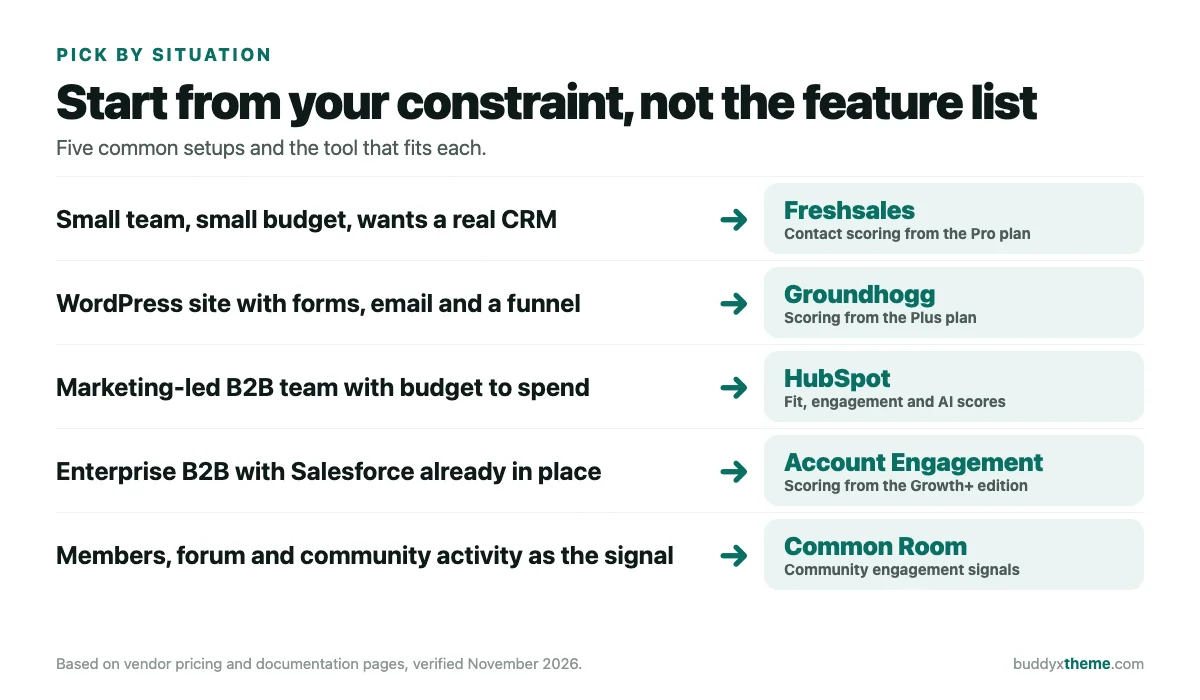
- Solo or tiny team: Freshsales on the Pro plan, or Groundhogg if your funnel lives on WordPress.
- Agency or growing team: HubSpot if marketing owns the funnel, ActiveCampaign if email does.
- Enterprise: Salesforce Account Engagement if Salesforce is already the system of record.
- Community-led: Common Room if the budget exists. Otherwise score members yourself, as the next section shows.
Scoring leads from your own community
A BuddyPress or BuddyNext community throws off better signals than any form. People tell you their role at signup, ask questions in public, attend events and come back. No tool above reads that for you by magic. The practical route is to send those events to a CRM that scores them.
BuddyNext helps with the plumbing. Its features page lists a REST API behind every screen and outbound webhooks for 13 community events, signed with HMAC-SHA256. It does not include a scoring model, and we would not pretend otherwise. The score lives in whichever CRM you connect. On BuddyPress, the same job runs off its action hooks, using a small plugin or an automation tool to relay the events.
Start with one workflow: new signup in, fit score out. Add activity once you trust the fit score. Tell members you use their activity to decide who gets a personal message, and say so in your privacy policy. When someone crosses your threshold, let a person read the profile and write the message. An automatic message at that moment is cold outreach with extra steps.
If you do run outbound alongside, keep it clean. Our cold email tools roundup and email deliverability guide cover that side. And once leads turn into customers, WhatConverts vs Ruler Analytics looks at tracing which channel produced them.
Mistakes that wreck lead scoring
- Weighting every action the same. A pricing page visit and a newsletter open are not equal signals. Give them different points.
- Never checking against closed deals. Take your last 20 customers and see what they would have scored. If most land low, the model is wrong, not the customers.
- Skipping decay. Points from six months ago should not count like points from last week. HubSpot supports decay on engagement scores. Look for the same feature in any tool you pick.
- Scoring on one field. Job title alone is a weak signal. Pair it with company size or what the person actually did.
- Automating the message at the threshold. Let the score start a human task, not a canned email.
- Leaving it unowned. Someone needs to review the weights every quarter. A model nobody maintains drifts.
FAQs
What is lead qualification?
It is the process of deciding whether a lead is worth a sales conversation and how urgently. Frameworks like BANT do it by asking questions. Scoring tools do the first pass automatically using data you already hold.
What is the difference between lead scoring and lead qualification?
Qualification is the decision. Scoring is one method for making it. A score ranks leads quickly, and a person still confirms the best ones before anyone commits time.
What is a good lead score?
There is no universal number. HubSpot labels engagement and fit scores High, Medium or Low, and uses A1 to C3 for combined scores. Set your threshold from your own closed deals, then adjust it each quarter.
Do I need AI for lead scoring?
No. Rule-based scoring works and you can explain every point. AI scoring needs data to learn from. HubSpot’s version asks for at least 50 contacts with 25 converted and 25 not, so a small list cannot use it anyway.
Can a WordPress site do lead scoring?
Yes. Groundhogg runs inside WordPress and lists lead scoring from its Plus plan. You can also send site and community events to an outside CRM and score them there.
How many leads do I need before scoring pays off?
There is no honest minimum. If you get a dozen leads a month, read each one by hand. Scoring starts to earn its keep when you cannot look at every record yourself.
Is it legal to score members based on their activity?
This is not legal advice. Generally you need a clear basis for processing, you should disclose it in your privacy policy, and some regions give people the right to object or see their data. Check the rules where your members live.
Which tool is best for a small business?
Freshsales if you want a CRM, from $39 per user a month for Pro, or Groundhogg if your funnel runs on WordPress, from $40 a month. Both have scoring on the plans named, per the vendors’ own pages.
Sources
- HubSpot, Understand the lead scoring tool: tiers, score types, decay, AI scoring requirements.
- HubSpot, Marketing Hub pricing.
- Freshworks, Freshsales pricing.
- Groundhogg, Lead scoring and pricing.
- ActiveCampaign, Contact Scoring and pricing.
- Zoho, CRM pricing and Scoring Rules API reference.
- Salesforce, Account Engagement pricing.
- Pipedrive, Introducing Pipedrive Pulse and Score CRM.
- Common Room, Pricing.
- Salesforce, State of Sales report: 4,050 sales professionals, August to September 2025.
- Built In, BANT: what it is and how to use it.
- BuddyNext, Features: REST API and webhooks.