12 Best Online Image-to-Text Converter Tools

Online Image-to-Text Converter Tools have become invaluable assets in the digital landscape, offering a seamless solution for extracting text from images. In an era where visual content reigns supreme, these tools bridge the gap between images and textual data, unlocking a myriad of possibilities for businesses, educators, and individuals alike. Leveraging advanced optical character recognition (OCR) technology, these tools can swiftly and accurately convert scanned documents, photographs, and other image files into editable and searchable text formats. As the demand for digitization and data accessibility continues to rise, Online Image-to-Text Converter Tools emerge as essential allies, empowering users to effortlessly transform visual content into actionable and shareable text-based assets.
Here are some of the best online Image to Text Converter tools
1. Online OCR

Online OCR (Optical Character Recognition) is a web-based service that allows users to convert scanned images, PDFs, and other documents containing text into editable digital text. It uses OCR technology to recognize the characters in the image and convert them into machine-readable text that can be searched, copied, and edited. Online OCR services typically allow users to upload their image or document and then choose the output format (such as plain text, Microsoft Word, or PDF). The service will then process the document and provide the converted text in the selected format.
Online OCR services can be useful for a variety of applications, including digitizing paper documents, extracting text from images or PDFs, and converting handwritten notes to digital text. They are often used by businesses and individuals who need to process large volumes of documents quickly and accurately, without the need for manual data entry. Some online OCR services are available for free, while others require a subscription or payment for use. The accuracy and speed of online OCR can vary depending on the quality of the document and the complexity of the text. It is important to review and edit the converted text to ensure accuracy.
2. OCR.Space

OCR.Space is an online OCR (Optical Character Recognition) service that allows users to convert scanned images, PDFs, and other documents containing text into editable digital text. It is a cloud-based service that can be accessed from any web browser.
OCR.Space supports a wide range of image and document formats, including JPEG, PNG, GIF, BMP, and PDF. It uses OCR technology to recognize the characters in the image and convert them into machine-readable text that can be searched, copied, and edited. The service also includes support for over 100 languages, making it useful for users around the world.
To use OCR.Space, users simply upload their image or document and select the desired output format (such as plain text, Microsoft Word, or PDF). The service will then process the document and provide the converted text in the selected format. OCR.Space also includes an API for developers who wish to integrate OCR functionality into their applications. OCR.Space offers both free and paid plans, with the paid plans offering additional features such as higher processing speeds, higher file size limits, and the ability to process multiple files at once. The accuracy and speed of OCR.Space can vary depending on the quality of the document and the complexity of the text, but it generally provides high accuracy and fast processing times.
3. Free OCR
Free OCR (Optical Character Recognition) is a type of OCR software that is available for free download and use. Free OCR software allows users to convert scanned images, PDFs, and other documents containing text into editable digital text, without the need for manual data entry. There are several free OCR software options available, including Tesseract OCR, SimpleOCR, and FreeOCR. These software applications use OCR technology to analyze the image identify the characters within it, and then convert them into digital text.
Free OCR software can be useful for individuals and small businesses who need to process small volumes of text data, without incurring the cost of a paid OCR service or software. However, it is important to note that the accuracy and speed of free OCR software can vary depending on the quality of the image, the font used, and other factors. Users may need to manually review and correct the converted text to ensure accuracy.
4. SmallSEOTools OCR

SmallSEOTools OCR is an online OCR (Optical Character Recognition) tool that allows users to convert scanned images, PDFs, and other documents containing text into editable digital text. It is a free online service that can be accessed from any web browser.
SmallSEOTools OCR supports a wide range of image and document formats, including JPEG, PNG, GIF, BMP, and PDF. It uses OCR technology to recognize the characters in the image and convert them into machine-readable text that can be searched, copied, and edited. The service also includes support for multiple languages, making it useful for users around the world.
To use SmallSEOTools OCR, users simply upload their image or document and select the desired output format (such as plain text, Microsoft Word, or PDF). The service will then process the document and provide the converted text in the selected format. SmallSEOTools OCR offers a free service with no file size or usage limits. The accuracy and speed of SmallSEOTools OCR can vary depending on the quality of the document and the complexity of the text, but it generally provides high accuracy and fast processing times.
5. NewOCR.com

NewOCR.com is an online OCR (Optical Character Recognition) tool that allows users to convert scanned images, PDFs, and other documents containing text into editable digital text. It is a free online service that can be accessed from any web browser.
NewOCR.com supports a wide range of image and document formats, including JPEG, PNG, GIF, BMP, and PDF. It uses OCR technology to recognize the characters in the image and convert them into machine-readable text that can be searched, copied, and edited. The service also includes support for multiple languages, making it useful for users around the world.
To use NewOCR.com, users simply upload their image or document and select the desired output format (such as plain text, Microsoft Word, or PDF). The service will then process the document and provide the converted text in the selected format.
NewOCR.com offers a free service with no file size or usage limits. The accuracy and speed of NewOCR.com can vary depending on the quality of the document and the complexity of the text, but it generally provides high accuracy and fast processing times. NewOCR.com can be a useful tool for those who need to convert scanned documents or images of printed text into editable text, without incurring the cost of a paid OCR service. However, it is important to note that the accuracy of the converted text may not always be perfect, and users may need to manually review and correct the converted text to ensure accuracy.
6. DNSChecker.org
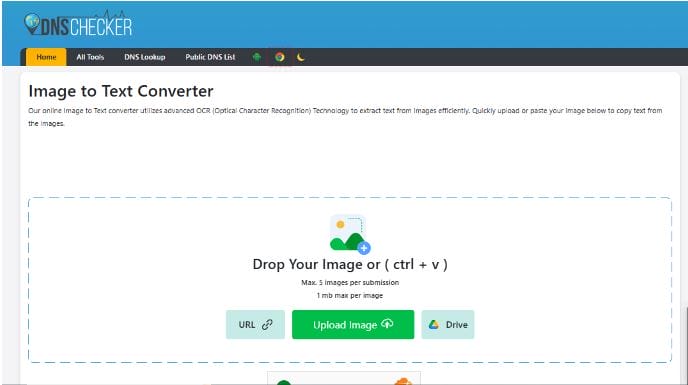
The DNS Checker image-to-text-converter is a free online OCR tool. This tool can extract text from any image. Popular supported formats include:
PNG
JPG
WEBP
JPEG
GIF
You can digitize documents with it by using their photos and extracting their text. Doing so will also preserve their formatting. Due to its impressive accuracy, the text will also have no mistakes, even if the writing in the image is bad.
Users can upload up to five images at once, provided that each image does not exceed one megabyte. Users can extract text from online images by using their URLs. Images stored in cloud storage like Google Drive can also be imported for text extraction.
The tool is free, and users do not need to register to use it. The number of uses is also unlimited. Additionally, once text has been extracted, users can edit it, copy it, or download it as a TXT or DOCX file.
7. Easy Screen OCR

Easy Screen OCR is a software tool that allows users to extract text from images, screenshots, and other visual content displayed on their computer screen. It is a paid software product that can be downloaded and installed on Windows or Mac operating systems. With Easy Screen OCR, users can capture an image of their screen and then use OCR technology to recognize the characters in the image and convert them into editable text. The software supports multiple languages and allows users to select the desired output format, such as plain text or Microsoft Word.
Easy Screen OCR can be used to extract text from a wide range of visual content, including web pages, images, PDFs, and more. The software also includes a built-in image editor that allows users to crop, rotate, and adjust the image before processing it with OCR. Easy Screen OCR can be a useful tool for individuals and businesses that need to extract text from visual content on their computer screens. It is a paid software product, but it offers a range of features and capabilities that may be useful for users who need to process large volumes of visual content regularly.
8. JPG to Word

Converting a JPG image to Word format requires the use of OCR (Optical Character Recognition) technology, which can recognize the text in the image and convert it into editable text that can be saved in a Word document. Several online tools and software applications can perform this conversion, including:
- SmallSEOTools: SmallSEOTools offers a free online JPG to Word converter that uses OCR technology to recognize the text in the image and convert it to an editable Word document.
- OnlineOCR.net: OnlineOCR.net is another free online OCR tool that supports JPG to Word conversion. The service can recognize text in multiple languages and provides accurate results.
- Adobe Acrobat: Adobe Acrobat is a paid software application that includes OCR technology and can convert JPG images to Word documents. The software provides advanced OCR capabilities and allows users to adjust the output format and quality settings.
- ABBYY FineReader: ABBYY FineReader is another paid software application that includes OCR technology and can convert JPG images to Word documents. The software provides advanced OCR capabilities and supports a wide range of image and document formats.
Converting a JPG image to Word format requires the use of OCR technology, which can recognize the text in the image and convert it into editable text that can be saved in a Word document. Several online tools and software applications can perform this conversion, both for free and for a fee, and users can choose the one that best meets their needs and budget.
9. Capture2Text
Capture2Text is a free and open-source OCR (Optical Character Recognition) software tool for Windows that allows users to quickly capture and extract text from images on their computer screen. The software supports multiple languages and can recognize both printed and handwritten text.
To use Capture2Text, users simply select the area of the screen containing the text they want to extract and then press a hotkey to capture the image and run it through the OCR engine. The software provides the extracted text in a pop-up window that can be copied and pasted into other applications, such as Microsoft Word or Notepad.
Capture2Text also includes a range of customization options, allowing users to adjust the OCR engine settings, such as the recognition language and character set. The software can also be configured to automatically copy the extracted text to the clipboard or save it to a file. Capture2Text can be a useful tool for individuals and businesses that need to quickly extract text from images or screenshots on their computer screens. It is a lightweight and easy-to-use tool that provides accurate OCR results and supports a wide range of customization options.
10. Photo Scan

Photo Scan is a mobile application developed by Google that allows users to quickly and easily digitize printed photos using their smartphone camera. The app uses advanced algorithms to automatically detect the edges of the photo, straighten and crop the image, and remove any glare or distortion.
To use Photo Scan, users simply point their smartphone camera at the printed photo and take a picture. The app then guides users through a process of taking several more pictures of the same photo from different angles to ensure that all areas of the image are captured.
Once the photos are captured, the app stitches them together to create a high-quality digital copy of the printed photo. Users can then save the digital copy to their device or upload it to a cloud storage service, such as Google Drive or Dropbox. A Photo Scan can be a useful tool for individuals who want to digitize their printed photos quickly and easily using their smartphone camera. The app is free to download and use, and it provides accurate and high-quality results.
Also Read: Unleashing the Power of Authenticity: How to Attract and Engage Members Who Truly Care
11. English OCR

English OCR refers to Optical Character Recognition technology that is specifically designed to recognize and extract text from English-language documents. OCR is a technology that allows computers to recognize printed or handwritten text in images or scanned documents and convert it into editable text that can be saved in a digital format, such as a Word document or PDF.
English OCR technology is particularly useful for businesses and organizations that need to process large volumes of English-language documents, such as invoices, forms, and contracts. The technology can save time and reduce errors by automating the process of data entry and document processing.
There are many OCR software tools and services that support English OCR, including Adobe Acrobat, ABBYY FineReader, Readiris, and Microsoft OneNote. These tools typically use machine learning algorithms to improve recognition accuracy over time and can support multiple file formats and languages. English OCR technology can be a powerful tool for businesses and individuals who need to process large volumes of English-language documents quickly and accurately. With advances in machine learning and artificial intelligence, OCR technology is becoming increasingly sophisticated and capable of recognizing a wide range of fonts, languages, and handwriting styles.
12. Tomedes Image to Text Converter
Tomedes Image to Text Converter is a free OCR tool that extracts text from images and PDFs using dual AI-powered engines. It allows users to compare two OCR results side-by-side for better accuracy—making it ideal for professional use in translation, localization, and content preparation.
The tool supports a wide range of file formats, including JPG, PNG, PDF, WEBP, and HEIC. Whether you’re digitizing handwritten notes, scanned documents, or screenshots, the Tomedes OCR tool delivers clean, editable, and searchable text in seconds. It also supports batch uploads for handling multiple files at once.
Using the tool is simple: upload your file(s), and the AI instantly generates two OCR outputs you can view, copy, or export. No registration is required, and all data is processed securely with no storage.
Conclusion On Best Image to Text Converter Tools Online
In conclusion, the landscape of Online Image to Text Converter Tools presents a wealth of options catering to diverse needs and preferences. These tools have revolutionized the way we interact with visual content, offering seamless solutions for extracting text from images with speed and accuracy. Whether you’re digitizing documents, extracting text from photographs, or enhancing accessibility for visually impaired individuals, these tools have proven indispensable. From industry giants to innovative startups, the market offers a range of options, each with its unique features and capabilities. As technology continues to evolve, we can expect further advancements in OCR algorithms, user interfaces, and integration with other platforms.
Interesting Read:
How to Create Your Social Networking Website?
Take The Stress Out Of Best Online Community Platforms
Building an Online Community From Scratch: The Definitive Guide

Shashank is a seasoned digital marketing and WordPress expert who specializes in SEO, software tools reviews, and cutting-edge strategies for boosting online presence. With a passion for simplifying complex topics, Goutham crafts engaging blog posts that help readers optimize their websites, improve search engine rankings, and stay ahead in the ever-evolving digital landscape.