

BuddyPress is one of the most widely used plugins for turning a WordPress site into a social network or community platform. Building a strong online community takes more than attracting members. It also means giving people an easy way to actually talk to each other, including the visitors who haven’t joined yet but might if the right member reaches out to them first. Contact forms are a small piece of that puzzle, but a genuinely important one: they give visitors a direct line to members without forcing an account creation step that stops a lot of casual interest before it starts.
The BuddyPress Contact Me plugin, built by Wbcom Designs, adds a contact tab directly to each member’s profile, complete with spam filtering and role-based rules on both the sending and receiving side. A visitor browsing a community, whether they’re a registered member or not, can reach out to someone whose profile they landed on without needing to sign up first. Here’s how the plugin works and how to set it up on a BuddyPress or BuddyBoss profile.
Key features of BuddyPress Contact Me
1. Contact Form Integration: The plugin embeds a contact form directly into each member’s profile page, letting visitors reach out through the provided form without leaving the profile they’re viewing.
2. Guest Messaging with Spam Protection: Visitors without an account can still send a message, verified through a simple arithmetic check rather than a full CAPTCHA. Built-in filtering catches the kind of spam that tends to target open contact forms: pharmacy links, casino promotions, loan offers, and prize-winner scams, along with messages carrying an excessive number of links.
3. BuddyPress Notifications Management: The site admin controls whether members receive BuddyPress notifications when someone contacts them, giving administrators the flexibility to tune the notification system to the site’s actual communication needs.

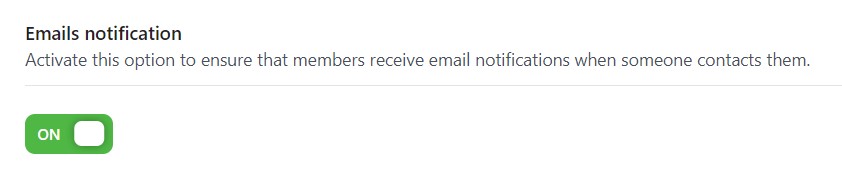
4. Email Notifications Management: Similarly, the site admin can decide whether members receive email notifications when contacted, letting the email side of communication get fine-tuned separately from in-site notifications.
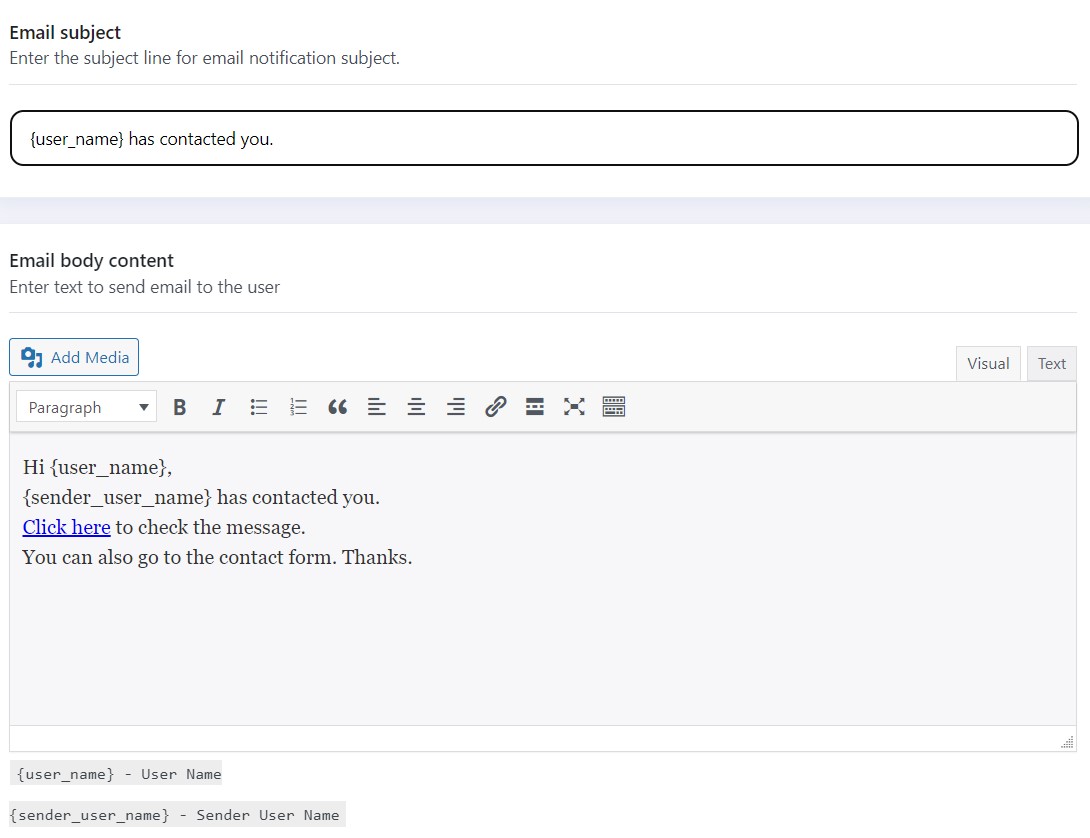
5. Email Customization Options: Site admins can control the content and subject text of outgoing emails, which keeps automated messages on-brand instead of reading like a generic system notification with no connection to the community sending them.
6. Flexible Placement with Shortcodes: Site admins can place a member-specific contact form on any page using a shortcode and the member’s ID, which opens up placements beyond the default profile tab, a dedicated staff directory page, for instance.
[buddypress-contact-me id="user_id"]
In place of USER_ID, enter the actual ID of the member, like this:
[buddypress-contact-me id="23"]
7. Member-Controlled Contact Form: Members can enable or disable the contact form on their own profile, giving each person control over whether they want to be reachable through the site at all.
8. Message Inbox with Filtering: Recipients get a dedicated inbox for incoming messages, with All and Unread filtering plus pagination, so a member with a busy profile isn’t stuck scrolling through a flat, unsorted list to find what still needs a reply.
Why you need to use the BuddyPress Contact Form
The BuddyPress Contact Me plugin offers several concrete benefits for a community site:
1. Enhanced User Engagement: A contact form creates a direct communication channel between members and visitors. This encourages interaction, making it easy for people to reach out, ask a question, and start building an actual relationship instead of just browsing past a profile.
2. Seamless Integration: The plugin works with both BuddyPress and BuddyBoss, so the experience stays consistent regardless of which platform a community is built on. Members manage their profile and contact settings from the same place they already manage everything else.
3. Member Autonomy: Members decide for themselves whether their contact form is active. Someone who’d rather not field messages from strangers can turn it off without losing any other profile functionality.
Also Read: How to Show Price History for WooCommerce to Boost Sales
4. Increased User Participation: Making it easy for people to connect tends to increase overall participation across a community, since a member who gets a genuine message from a visitor has a reason to log back in and reply, which often leads to more activity elsewhere on the site too.
5. Administrative Control: Admins manage whether members receive BuddyPress and email notifications when contacted, which matters on larger sites where uncontrolled notification volume can start to feel like noise rather than useful information.
6. Flexible Placement: Shortcodes let admins put a contact form anywhere on the site, tied to a specific member’s ID, which is useful for building dedicated pages like a staff directory or a “meet the team” section outside the standard profile layout.
7. Bridging the Gap: The contact form helps connect members and non-members directly, which matters for any community trying to convert casual visitors into engaged participants rather than one-time page views.
Spam handling matters more than it looks like at first
Open contact forms attract spam almost immediately once a site gets any real traffic, and a form with no protection quickly turns a member’s inbox into something they stop checking altogether. The plugin’s filtering specifically targets the categories of spam that show up most often on public-facing forms: pharmacy and prescription drug links, casino and gambling promotions, predatory loan offers, and fake prize-winner notifications, along with a general check against messages stuffed with an unusual number of outbound links.
The arithmetic verification step for guest senders adds friction that’s deliberately minimal. A full CAPTCHA can be enough of an obstacle that a genuinely interested visitor abandons the message instead of finishing it, while a simple math check filters out the bulk of automated spam bots without meaningfully slowing down a real person trying to send a real message.
Setting up role-based access
Not every community wants every visitor messaging every member. Role-based rules on both the sending and receiving side let an admin decide, for example, that only logged-in members can initiate contact, or that certain member roles have their contact form disabled by default regardless of individual preference. This matters for communities with a mix of public-facing members, like staff or moderators, and members who joined mainly to participate in discussions rather than field outreach from strangers.
The per-member override sits on top of these role rules, so even within a role that has contact enabled by default, an individual member retains the final say over whether their own form stays active.
Pricing
The plugin is available on an annual or lifetime license, with three tiers based on how many sites it’s activated on. The Personal tier runs $49 a year (or $149 for a lifetime license) and covers a single site. Professional, at $99 a year or $299 lifetime, covers multiple sites. Agency, at $129 a year or $349 lifetime, covers unlimited sites. All three tiers include the same feature set, the difference is purely the number of sites the license activates on, and every purchase carries a 30-day money-back guarantee.

Technical requirements and compatibility
The plugin requires WordPress 6.0 or newer and PHP 7.4 or newer, alongside an active BuddyPress or BuddyBoss Platform install. The Notifications component needs to be active for in-site alerts to work, since that’s the underlying system the plugin hooks into for delivering them. It also ships with dark mode and RTL stylesheet support, which matters for communities running a dark-themed site design or serving a right-to-left language audience, both of which are easy to overlook in a plugin that wasn’t built with them in mind from the start.
Setting it up on a new community
Installation follows the standard WordPress plugin flow: upload it through the plugins screen, activate it, and it registers itself as a BuddyPress component addition rather than requiring a separate settings page hunt. Because it depends on an active BuddyPress or BuddyBoss install with the Notifications component enabled, the first real setup step is confirming that component is switched on. A site that has BuddyPress running but never enabled Notifications will find the plugin’s core in-site alert feature simply doesn’t fire, not because anything is broken, but because the underlying system it plugs into is dormant.
After that, the meaningful configuration work is deciding on defaults: whether contact forms are on or off by default for new members, which roles can send messages without an account, and what the outgoing email template says. Getting these defaults right before launch saves a round of confused support requests from members wondering why their contact form appeared without them turning it on, or why it wasn’t there when they expected it to be.
How this compares to a generic WordPress contact form plugin
A general-purpose contact form plugin can technically be placed on a profile page too, but it misses the parts that make this specifically useful for a community site. A generic form has no concept of “this message is for member X specifically,” no per-member on/off control, and no awareness of BuddyPress roles or notification settings. Setting up the equivalent functionality with a generic form builder means manually creating a separate form for every member, which stops being realistic past a handful of profiles.
The tradeoff runs the other way too. A generic contact form plugin usually offers more advanced form-building flexibility, conditional fields, file uploads, multi-step forms, than a purpose-built member contact tool needs or wants. For a community site, that flexibility is mostly unused weight. The right choice depends on whether the goal is one general site contact page or a scalable, per-member communication channel across potentially thousands of profiles; this plugin is built specifically for the second case.
Cost tends to favor the purpose-built option too once the comparison accounts for setup time rather than just the license price. A generic form builder that’s technically cheaper still costs real hours to configure per-member logic manually, hours that add up fast on a community with more than a handful of active profiles. A tool built around the exact use case from the start usually ends up cheaper in practice, even when the sticker price looks higher at first glance.
Moderation considerations for admins
Giving every member a public contact channel does introduce some moderation surface that a closed, members-only community doesn’t have to think about. Harassment through an open contact form is a real possibility on any platform that allows unsolicited messages from strangers, and a site should have a clear, visible policy on what happens when a member reports abuse through this channel, not just a generic site-wide conduct policy that doesn’t specifically address it.
The per-member and per-role controls help here directly. A site running a community for a vulnerable population, or one that has experienced harassment issues in the past, can default the contact form to off and let members opt in individually rather than opt out, which shifts the default toward safety without removing the feature’s value for members who do want to be reachable.
Documenting the reporting path clearly, where a member goes to flag a message, how quickly an admin typically responds, what consequences follow a confirmed violation, does more for actual safety than any single technical control. Members are far more likely to use a feature they know has a working escalation path behind it than one where reporting abuse feels like shouting into a void with no visible response.
Mobile experience matters for a feature like this
A visitor deciding whether to message a member is often doing so from a phone, browsing a profile they found through a search or a shared link rather than sitting at a desktop. A contact form that renders awkwardly on mobile, tiny tap targets, a form that requires horizontal scrolling, loses exactly the casual, low-commitment inquiries this feature is designed to capture. Testing the contact tab specifically on a phone, not just the profile page it sits on, catches layout issues that a desktop-only review would miss entirely.
A practical use case worth considering
A membership site for freelance consultants illustrates the value well. Visitors browsing consultant profiles want to reach out before committing to anything, and forcing a full account signup just to ask a preliminary question is exactly the kind of friction that costs a site real leads. A visible, low-friction contact form on each consultant’s profile lets a prospective client ask a quick question, gauge fit, and decide whether to move forward, all without creating an account they may never use again.
The same pattern applies to any community where members offer something the public wants access to: coaches, tutors, service providers, or even hobbyist groups where an outsider wants to ask a question before deciding whether to join. The lower the friction to that first message, the more of those casual inquiries actually convert into something real.
Real estate agent directories, alumni networks trying to reconnect graduates with current students, and marketplace-style communities where members list services all benefit from the same underlying mechanism. In each case, the value isn’t the contact form itself, it’s the fact that a genuinely interested visitor can act on that interest immediately instead of hitting a signup wall that gives them time to reconsider and leave.
What happens after a message is sent
Once a visitor submits a message, it lands in the recipient member’s inbox alongside whatever notification settings the admin has configured, an in-site BuddyPress notification, an email, or both. The recipient can filter their inbox by All or Unread, which matters once a member starts accumulating enough messages that scrolling through everything becomes impractical. Pagination keeps that inbox from turning into an endless single-page list as message volume grows over time.
The message itself stays tied to the sender’s identity when they’re a logged-in member, giving the recipient context about who’s reaching out. For guest senders without an account, the plugin still captures enough information, typically name and email, for the recipient to reply through normal channels, since the guest has no account to respond through directly.
A few questions site owners commonly ask
Does this replace a general site contact page? No. It’s built specifically for member-to-visitor communication tied to individual profiles, not a general “contact us” page for the site itself. Most communities run both: a standard contact form for site-wide inquiries and this plugin for the member-level connections BuddyPress profiles are actually built around.
Can an admin see every message sent through the plugin? Message content lives in the recipient’s inbox rather than a centralized admin log by default, which respects member privacy but also means admins relying on the plugin for moderation oversight need a clear reporting process for members to flag problematic messages, since there’s no built-in admin-wide message review.
Does it work with custom BuddyPress profile layouts? The contact tab integrates through BuddyPress’s standard profile navigation, so it fits into most custom layouts without extra configuration, though heavily customized profile templates built outside BuddyPress’s normal component system may need a quick compatibility check before launch.
Bridging the Gap Between Members and Non-members with BuddyPress Contact Me Plugin
The BuddyPress Contact Me plugin is a genuinely useful tool for WordPress sites trying to build an active online community. Putting a contact form directly into member profiles removes a real barrier between members and non-members, and the notification management, email customization, and shortcode-based placement options give site administrators enough control to tailor it to how their specific community actually communicates. Members keep control over their own contact forms, which means the feature adds a communication channel without taking away anyone’s ability to opt out of it.
The plugin plays a real role in connecting members and non-members, encouraging participation, and building a community that feels active rather than static. To learn more about the BuddyPress contact form, visit the wbcomdesigns archive.
Interesting Reads:
Understanding Actions and Filters Hooks