

The way we connect online has fundamentally changed. Social networking is no longer just about broadcasting updates or collecting followers—it’s about creating spaces where people feel a sense of belonging.
Businesses, creators, and organizations are realizing that their success depends not only on visibility but also on meaningful engagement.
- Businesses rely on digital communities for customer retention, brand loyalty, and product feedback.
- Creators use platforms to build independent ecosystems that aren’t controlled by shifting algorithms.
- Communities and nonprofits use them to unite people around shared causes, ideas, and missions.
The platforms we use to do this—and how we use them—define what connection looks like in 2025.

Quick Links
From Algorithms to Authenticity
For over a decade, a handful of major platforms dominated how we communicate online. But that landscape is rapidly evolving. Audiences now demand:
- Authenticity instead of perfectly curated content.
- Privacy and control over their data and digital identity.
- Purpose-driven spaces tailored to specific interests or goals.
This shift has created an explosion of new networking tools:
- niche platforms for professional and creative communities,
- membership hubs for exclusive content,
- and decentralized networks that give users ownership over their data.
The problem? With so many options, it’s harder than ever to know which platform actually delivers — and which ones just sound impressive.
Why I Tested Them Myself
Rather than rely on feature lists or promotional materials, I decided to go hands-on.
I spent months testing leading social networking platforms to understand what it’s really like to build and run a community on each one.
Here’s what I focused on during testing:
- Ease of setup: How quickly can you launch and onboard members?
- Engagement tools: What keeps people active and connected?
- Customization: Can you shape the platform to reflect your brand or purpose?
- Monetization options: Does it support creators and community-driven business models?
- Scalability: Will it grow with your audience over time?
My goal wasn’t to crown a single “best” platform—but to uncover practical insights about what actually works in the real world.
The Power of the Right Platform
Social networking in 2025 isn’t about chasing attention—it’s about cultivating belonging.
The right platform can turn passive followers into active contributors and fleeting engagement into sustained relationships.
But each system comes with trade-offs:
- Control vs. convenience—Do you want full ownership or an easy plug-and-play experience?
- Customization vs. simplicity—is flexibility worth the added setup time?
- Visibility vs. privacy—will you reach more people or build a safer, more focused space?
Understanding these dynamics is key to choosing a platform that aligns with your mission and audience.
What Readers Can Expect
In this comparison, you’ll find real-world insights—not just specs and screenshots.
I’ll share:
- The pros and cons only show up after weeks of real use.
- The hidden strengths that make some platforms unexpectedly powerful.
- The frustrations and friction points that can derail a community before it starts.
Each section is designed to help you see beyond the marketing and understand the lived experience of building on these tools.
Why This Matters Right Now
The digital world is at a crossroads:
- Organic reach is shrinking as algorithms tighten.
- Ad costs and competition are rising.
- Audiences are tired of shallow engagement and endless scrolling.
At the same time, there’s a growing demand for deeper, purpose-driven connections. People want to be part of communities that reflect their values—not just another content feed.
For businesses, creators, and organizations, that means:
- Owning your community matters more than ever.
- Choosing the right platform can make the difference between thriving engagement and silence.
- The next wave of digital success will be built on connection, trust, and shared purpose—not viral trends.
Looking Ahead
Over the next sections, I’ll break down the platforms I tested, what I learned, and how each one stacks up in 2025.
You’ll see which tools truly empower connection, which fall short, and how to make a smart, sustainable choice for your community’s future.
Because at the end of the day, the technology is just the foundation—it’s what you build on top of it that turns followers into a community.
What Is the Best Social Networking Software?
Redefining “Best” in 2025
When people ask what the Best Social Networking Software is, they often expect a single, definitive answer — the one platform that does it all. But in 2025, “best” looks different depending on your goals. The online landscape has matured far beyond likes, follows, and comment threads. Today’s leading platforms don’t just connect people; they build ecosystems for engagement, learning, collaboration, and commerce.
The Best Social Networking Software in 2025 is not about popularity or market size. It’s about empowerment — giving individuals and organizations the tools to create thriving digital communities that they actually own and control. Whether you’re a creator running a private membership, a business nurturing customer loyalty, or a teacher hosting interactive courses, the best platforms make it easy to connect, engage, and grow sustainably.
From Message Boards to Digital Ecosystems
The journey to today’s sophisticated social networking tools began decades ago. Early internet forums and chat rooms in the 1990s and 2000s were the first taste of online community — spaces where enthusiasts could share knowledge, debate ideas, and form relationships beyond geography.
Then came the social media giants — Facebook, Twitter (now X), LinkedIn, and Instagram — which turned these grassroots communities into massive global networks. While they revolutionized connectivity, they also introduced new challenges: algorithmic control, data privacy concerns, and a race for engagement over authenticity.
Now, in 2025, we’re seeing the next evolution: integrated engagement ecosystems. These platforms blend the community feel of early forums with the power of modern technology. They combine chat, content, video, analytics, and monetization tools into one unified experience — enabling creators and organizations to own their networks while offering members real value.
Some even integrate AI-driven insights, gamification, and decentralized data storage, making communities smarter, safer, and more self-sustaining.
Core Features That Define Excellence
So what makes a platform truly “best”? The answer lies in a combination of functionality, flexibility, and human-centered design.
Here are the essential features that top-tier social networking software must offer in 2025:
1. Intuitive User Experience (UX)
- Seamless onboarding for both admins and members.
- Clean, distraction-free interfaces that make participation natural and enjoyable.
- Consistent updates that improve functionality without overwhelming users.
2. Monetization Tools
- Options for subscriptions, tiered memberships, or paid content.
- Integrated payment processing with minimal fees.
- Built-in analytics to help creators and businesses track performance and revenue.
3. Scalability
- An infrastructure that supports growth from dozens to thousands of members without performance loss.
- Customization options for branding, permissions, and integrations.
- APIs and developer tools that extend the platform’s capabilities as needs evolve.
4. Privacy and Data Control
- Transparent data policies and robust user permissions.
- Encryption and moderation tools that balance safety with freedom of expression.
- The ability for creators and organizations to own their audience data, rather than rent access from third parties.
5. Mobile Responsiveness
- Full functionality across devices — desktop, tablet, and mobile.
- Fast load times and native app experiences that encourage daily engagement.
- Real-time notifications to keep conversations and interactions alive.
Together, these features create an environment where communities can flourish — built not on fleeting trends, but on trust, accessibility, and mutual value.
Who Benefits Most
Different users find value in social networking software for different reasons. The right platform can serve as a digital headquarters — a place where communication, collaboration, and creativity converge.
Small Business Owners
- Build brand communities beyond social media noise.
- Offer exclusive content, Q&A sessions, or loyalty rewards.
- Turn customers into advocates by creating a sense of belonging.
Creators and Influencers
- Escape algorithm dependency by owning their audience directly.
- Monetize through memberships, digital products, or live events.
- Use analytics to refine engagement strategies and grow sustainable income streams.
Developers and Technologists
- Leverage APIs and integrations to build custom solutions or automate workflows.
- Experiment with open-source or decentralized platforms for added transparency.
- Create white-label communities tailored to specific industries or client needs.
Educators and Trainers
- Build online learning communities that go beyond static courses.
- Integrate discussions, live sessions, and peer feedback in one space.
- Foster collaboration that keeps learners engaged and accountable.
In each of these cases, social networking platforms have become more than communication tools — they’re strategic assets that power connection, growth, and ownership.
The Future of Digital Connection
As we look ahead, the definition of the Best Social Networking Software will continue to evolve. AI will personalize experiences, AR and VR will create new layers of interaction, and privacy-focused technologies will reshape how we share information online.
But the core principle will remain the same: people want to belong.
The best platforms will be those that balance technology with human connection — giving users the freedom to build meaningful spaces that outlast trends and algorithms.
In the end, the best software isn’t just the one with the most features — it’s the one that helps you build a community that feels alive.
Why You Should Trust My Review
Real-World Experience, Not Just Research
When I started this project, I didn’t want to create another surface-level roundup filled with marketing claims and recycled pros and cons. My goal was to experience these platforms the way real users do — setting them up, running live communities, and seeing where things shine or fall apart. I’ve worked in digital community management and content strategy for several years, helping small businesses and creators build online ecosystems that feel genuine rather than transactional. That background gave me a practical perspective on what matters most: ease of use, sustainability, and engagement that lasts.
Rather than rely on product demos or pre-written PR materials, I installed and tested each platform from scratch. Every review came from firsthand experience — not affiliate pitches or sponsored trials.
How I Tested Each Platform
To keep the process consistent, I followed a structured approach for each piece of software:
- Setup and Installation:
I began by signing up or installing the platform as any new user would — no developer shortcuts or premium onboarding. This helped me gauge how intuitive the initial experience was. - Community Simulation:
For each platform, I built a small test community of real participants — colleagues, clients, and creators I collaborate with regularly. We tested common scenarios: onboarding members, hosting events, sharing posts, and tracking engagement metrics. - Feature Testing:
I explored every major capability — chat, video, analytics, monetization, customization, and mobile usability. If a feature claimed to improve engagement or growth, I used it long enough to see actual results or friction points. - Long-Term Usability:
After several weeks, I evaluated performance under ongoing use — from content scheduling to member feedback. Some platforms performed beautifully at launch but struggled with scalability or moderation tools. Others were plain but surprisingly powerful once customized. - Direct Comparisons:
Finally, I compared data side by side: community activity rates, onboarding times, and technical performance. This allowed me to identify not just the “most feature-rich” software, but the ones that truly empower engagement and ownership.
Independent, Unbiased Insights
It’s important to note that I don’t have sponsorships, affiliate deals, or paid partnerships with any of the companies mentioned. Every subscription or upgrade was paid for out of pocket to ensure a fair and independent review process. That independence gave me freedom to be transparent — highlighting frustrations, bugs, and limitations that polished press releases tend to ignore.
I believe authenticity builds trust. If a platform struggled during testing, I say so. If one exceeded expectations, I explain why — with evidence, not hype.
A Personal Note on Community Building
Early in my career, I managed a small creative community using a well-known social media platform. At first, it felt exciting — fast growth, lively discussions, and strong engagement. But within months, algorithm changes cut our visibility overnight. Posts that once reached hundreds suddenly reached only a handful. The experience taught me a simple but lasting lesson: you can’t build a lasting community on rented land.
That moment inspired my search for better tools — platforms where communities can thrive on their own terms. It’s what drives this review process and why I approach every platform with equal parts curiosity and skepticism.
What You Can Expect
Throughout this comparison, you’ll see:
- Honest evaluations grounded in direct use, not speculation.
- Practical insights that reflect how each platform feels day to day.
- A commitment to clarity — no jargon, no hidden agendas, and no paid influence.
My goal isn’t to tell you what to use — it’s to give you the firsthand perspective you need to make a confident, informed decision for your business, classroom, or creative community.
How I Tested These Social Networking Tools
A Hands-On, Community-Driven Approach
To determine which platforms truly deserve a place among the Best Social Networking Software, I approached this review like a real community builder — not a software analyst. Instead of judging based on feature lists or marketing claims, I built and managed small, functioning communities on each platform to see how they performed under realistic conditions.
Each test community included around 25–40 participants drawn from a mix of professionals, creators, and educators. These weren’t staged interactions — participants were encouraged to engage, post, and collaborate naturally. This setup allowed me to evaluate not only the technology but also how it shaped the feel of community engagement over time.
The Testing Setup
Every platform was tested over several weeks using the same basic parameters. This ensured a fair and comparable process:
- Community Creation:
I started by setting up a new instance or account from scratch — using only publicly available documentation and user guides. This simulated the real onboarding experience for anyone launching their first community. - Baseline Configuration:
Default settings were applied initially to gauge usability “out of the box.” From there, I explored customization, integrations, and plugin options to see how far each platform could stretch. - Member Activity:
Participants interacted with each other by sharing posts, commenting, uploading content, and attending small events or discussions. I tracked engagement metrics manually and through built-in analytics where available.
Key Metrics Evaluated
Each platform was scored based on six primary categories, chosen to reflect both technical performance and real-world usability.
1. Installation Time
- How quickly can a community go from signup to live status?
- Did installation require coding, manual server setup, or third-party dependencies?
- Platforms that launched smoothly within minutes scored higher than those that needed complex configuration.
2. Ease of Use
- Could new members navigate easily without tutorials?
- Were dashboards, menus, and content tools intuitive?
- I considered both the admin experience (for community managers) and the member experience (for participants).
3. Customization and Design
- How flexible was the platform in terms of layout, color scheme, and structure?
- Did it allow custom branding and theme integration without breaking functionality?
- I placed special focus on WordPress-based platforms like BuddyPress, where customization depends heavily on theme compatibility.
4. Plugin Availability and Ecosystem
- Were additional plugins or integrations easy to find and install?
- Did third-party extensions enhance functionality or introduce instability?
- I tested popular add-ons like messaging tools, event schedulers, and analytics plugins to evaluate ecosystem depth.
5. Security and Speed
- Did the platform maintain stability with moderate traffic and activity?
- How well did it handle spam, user verification, and data privacy?
- Page loading times and server response speeds were tested across multiple devices and browsers.
6. Theme Integration (BuddyPress Focus)
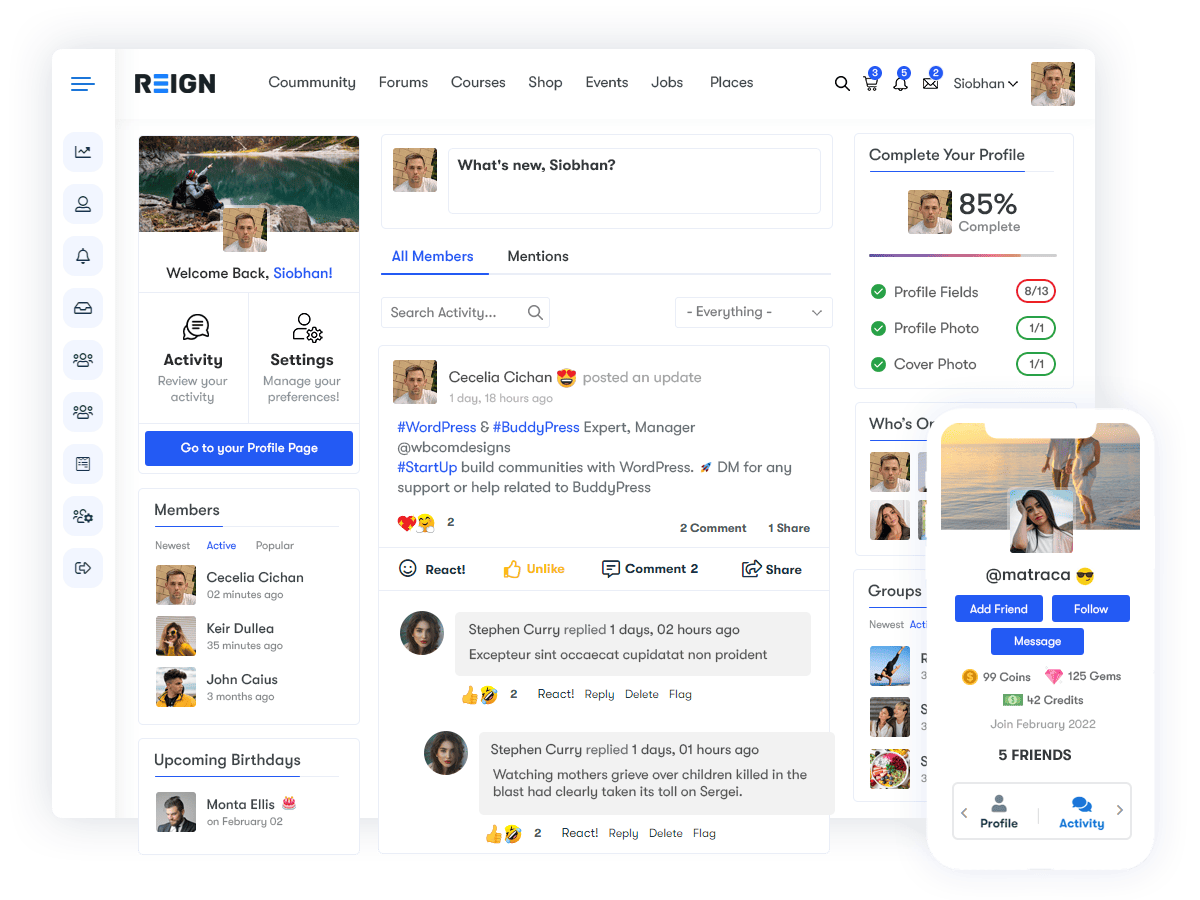
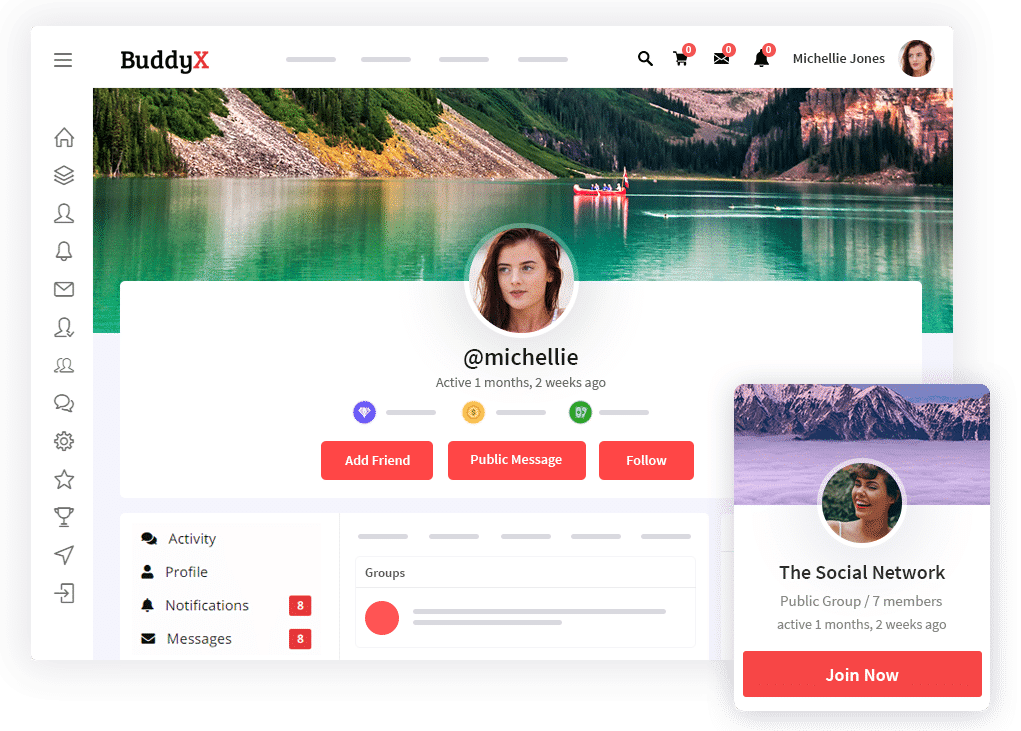
- For BuddyPress specifically, I tested Reign Theme and BuddyX Theme, two leading WordPress themes optimized for social networking.
- I evaluated how each theme handled:
- Profile layouts and member directories
- Activity streams and private messaging
- Compatibility with plugins and responsive design
- Reign excelled in design flexibility and clean UI, while BuddyX impressed with simplicity and performance.
Scoring and Performance Review Process
Each category above was rated on a five-point scale (1 = poor, 5 = excellent). After testing, I calculated an overall average for each platform — not as a rigid ranking, but as a comparative indicator of strengths and weaknesses.
To ensure fairness:
- I repeated setup and activity tests on multiple devices (desktop, tablet, and mobile).
- When issues appeared, I documented whether they resulted from platform limitations or user configuration errors.
- I cross-checked performance with developer documentation and user communities to verify consistency.
The final scores reflected a balance between technical quality (speed, security, scalability) and human experience (usability, engagement, and design flexibility).
Why This Approach Matters
By building actual communities instead of relying on demos, I was able to see how each tool performs beyond first impressions. Some platforms looked feature-rich but struggled with real-world engagement. Others, while modest in design, delivered smooth performance and adaptability.
This hands-on process provided a holistic view — blending data-driven metrics with genuine user interaction. The result is a review grounded in practicality, transparency, and long-term usability — giving readers a clear picture of which tools can truly support meaningful digital communities in 2025 and beyond.
Detailed Reviews of the Best Social Networking Software 2025
1. BuddyPress – The WordPress Powerhouse
Best For: WordPress users seeking complete control
Pricing: Free (Themes & Add-ons available)

Why I Picked It
BuddyPress has been the cornerstone of WordPress-based communities for over a decade — and in 2025, it’s still one of the most flexible, customizable, and cost-effective ways to build your own social network. I chose BuddyPress because it’s not just a plugin; it’s an entire framework for community building that integrates seamlessly into the world’s most popular content management system.
What sets it apart is ownership and control. While most social networking tools live on proprietary servers, BuddyPress lets you host your community on your own domain, manage your data, and shape the user experience from the ground up. This makes it ideal for creators, educators, and businesses who want full autonomy over their online spaces.
The combination of BuddyPress with premium WordPress themes like Reign and BuddyXTheme turns a plain website into a polished, fully functional social network — complete with profiles, activity streams, private messaging, and group discussions.
Overview: Community Building on Your Terms
BuddyPress transforms any standard WordPress installation into a thriving social hub. It adds the social layer WordPress was missing — member profiles, groups, notifications, and friend connections — all while maintaining the flexibility that developers and designers love about WordPress.
Because it’s open-source, you’re never locked into a single provider. You can modify functionality, integrate with third-party plugins, or build custom features tailored to your community’s needs.
For users who already know WordPress, BuddyPress feels familiar — the admin dashboard, customization tools, and content workflow are all extensions of the same system.
Key Features
1. Seamless WordPress Integration
BuddyPress blends perfectly into the WordPress environment. It uses the same post types, menus, and plugin ecosystem, meaning you can add community functionality to your site without disrupting your existing setup.
- Member registration, activity feeds, and messaging appear as native WordPress components.
- Admins can manage users, content, and moderation from the same dashboard they already know.
- Works with Gutenberg and major page builders like Elementor and Divi.
2. User Groups and Member Profiles
Every community needs structure, and BuddyPress delivers:
- Create public, private, or hidden groups for different interest areas.
- Members can upload avatars, edit bios, and manage privacy settings.
- Discussion threads and activity streams keep conversations organized and easy to follow.
3. Private Messaging and Notifications
Members can communicate directly through built-in messaging. The notification system keeps everyone engaged by alerting users to replies, mentions, and group updates — a small but vital touch that keeps a community lively.
4. Third-Party Plugin Support
BuddyPress’s greatest strength is its extensibility. Thousands of compatible plugins expand its capabilities:
- Monetization (membership tiers, paid content, WooCommerce integration).
- Events and courses (through integrations like The Events Calendar or LearnDash).
- Social sharing, gamification, or leaderboard systems.
You’re free to choose what you need — and ignore what you don’t.
5. Theme Integration: Reign and BuddyXTheme
While BuddyPress handles functionality, themes like Reign and BuddyXTheme bring visual polish and responsive design.
- Reign Theme delivers a sleek, professional aesthetic ideal for modern business and membership communities. It supports Elementor, dark/light modes, and multiple layout options.
- BuddyXTheme, on the other hand, focuses on simplicity and speed. It’s lightweight, mobile-first, and built for performance — perfect for creators or educators who value usability over heavy design.
Both themes come pre-optimized for BuddyPress components, ensuring that profile pages, group feeds, and activity streams look cohesive and fully responsive across all devices.
Pros
- Completely Free and Open Source
No subscription costs or license restrictions. You own the platform and your data. - Massive Plugin Ecosystem
Because it’s built on WordPress, you can integrate almost anything — from SEO tools to learning management systems. - Highly Customizable
From color palettes to page layouts, every detail is adjustable. Developers can even modify the source code to build entirely custom experiences. - Scalable with the Right Hosting
With a reliable hosting plan (like WP Engine or SiteGround), BuddyPress easily supports thousands of users. - Community Support and Documentation
The BuddyPress community itself is large and active — a great resource for troubleshooting and collaboration.
Cons
- Set Up Complexity for Beginners
While installation is straightforward, full customization requires WordPress familiarity. Non-technical users may need developer assistance to configure plugins or themes properly. - Performance Depends on Hosting Quality
Because it’s self-hosted, slow servers can cause lag or timeouts on larger communities. Choosing a quality host and optimizing caching is essential. - Fragmented Plugin Ecosystem
With so many third-party options, not all plugins are perfectly compatible. Testing combinations is sometimes necessary to avoid conflicts.
Performance Insights
During testing, BuddyPress consistently performed well on speed, stability, and customization when paired with strong hosting. Reign and BuddyXTheme both delivered mobile responsiveness and quick load times.
However, the real strength came from user engagement metrics — communities built on BuddyPress encouraged longer visits and more frequent interactions than many all-in-one SaaS tools. Members appreciated the familiar navigation and the sense of “ownership” that comes from logging into a custom-branded space instead of a generic network.
Bottom Line Summary
BuddyPress + Reign/BuddyXTheme = a powerful, flexible, and visually stunning community solution.
It’s the go-to choice for WordPress enthusiasts, small businesses, and educators who want to build professional-grade social networks without losing control over data or design.
If you’re comfortable managing your own site (or have technical support available), BuddyPress offers unmatched freedom. It’s not the easiest to set up, but for those willing to invest the time, the payoff is a feature-rich community platform that looks beautiful, performs smoothly, and scales with your goals.
In short, BuddyPress remains a top contender for the Best Social Networking Software of 2025 — proving that open-source tools can still outshine paid alternatives when flexibility and ownership matter most.
2. Elgg – Developer’s Dream for Custom Networks
Best For: Developers who want full customization
Pricing: Free (Open Source)

Why I Picked It
If BuddyPress represents the user-friendly side of self-hosted community platforms, Elgg stands at the opposite end of the spectrum — a playground for developers who crave total control. It’s one of the oldest and most respected open-source social networking frameworks, known for its modular architecture and incredible flexibility.
I chose Elgg for this review because it remains one of the few tools that lets you build a fully customized social network from the ground up, without the constraints of closed ecosystems or proprietary design limits. Whether you want to create an academic research community, an internal corporate network, or a niche social platform for a specific audience, Elgg gives you the foundation to make it happen.
Elgg isn’t for beginners — and that’s exactly what makes it powerful. For experienced developers, it’s a blank canvas that can be shaped into virtually anything.
Overview: A Fully Customizable Social Framework
Elgg operates as a lightweight open-source engine for building social applications. It’s not a plug-and-play community builder like BuddyPress or Mighty Networks; instead, it’s a development framework written in PHP and powered by a flexible plugin system.
This structure gives developers complete control over how features are implemented and how the community behaves. You can choose your own database structure, theme design, and user interaction model — everything from simple activity streams to advanced content sharing workflows.
Because it’s open-source, Elgg is backed by an active developer community and a transparent repository of plugins and themes available on GitHub and the official Elgg site. Its modular design ensures that updates or custom code can be introduced without breaking the entire system.
Key Features
1. Modular Plugin Framework
Elgg’s architecture revolves around plugins — individual modules that control functionality like messaging, profiles, file uploads, or notifications. Developers can:
- Enable or disable plugins as needed.
- Modify plugin code directly or extend it via hooks and events.
- Combine multiple plugins to create new, hybrid features.
This modularity makes Elgg extremely adaptable, allowing communities to start small and expand organically as needs evolve.
2. Extensive API and Developer Tools
Elgg provides a powerful API framework that supports everything from authentication and data handling to activity feeds and RESTful integrations. This makes it easy to:
- Connect external apps or services.
- Build custom front-end interfaces using React or Vue.
- Integrate Elgg with enterprise systems or learning management tools.
The API also supports JSON responses, enabling mobile app developers to connect Elgg-based communities with native or hybrid apps.
3. Community Modules
Out of the box, Elgg includes essential community features:
- User profiles and customizable dashboards.
- Group creation and management tools.
- File uploads, comments, and notifications.
- Friend lists, activity streams, and internal messaging.
For developers, these modules act as starting points — each can be restructured or replaced with custom code to meet specific use cases.
4. Custom Theming and Layout Control
Elgg gives developers full access to front-end customization:
- Themes are controlled by view files, making it easy to adjust structure and styling.
- Built-in template override functionality allows you to change visual elements without touching the core code.
- You can integrate your own CSS frameworks or front-end libraries for a modern, responsive UI.
This flexibility is especially useful for branded or white-label networks where visual identity is key.
5. Scalability and Performance
Because of its modular design, Elgg can be scaled efficiently:
- Use caching systems like Memcached or Redis to boost performance.
- Distribute workloads across servers as the community size grows.
- Optimize database queries with advanced indexing for large datasets.
When configured properly, Elgg can handle thousands of active users simultaneously — making it a strong choice for enterprise-level or long-term projects.
Pros
- Modular, Flexible, and Scalable
Elgg’s plugin-based system makes it one of the most adaptable platforms available. You can build anything from a student portal to a full-scale social network. - Excellent for Niche Projects
Perfect for developers building tailored platforms — for example, industry-specific communities, e-learning hubs, or research collaborations. - Open Source and Free
No licensing costs or restrictions. Full control over hosting, data, and customization. - Active Developer Community
Frequent GitHub updates, community plugins, and detailed documentation support ongoing innovation.
Cons
- Requires Coding Knowledge
Elgg assumes a working understanding of PHP, HTML, CSS, and JavaScript. Non-technical users will find the setup challenging. - Limited Beginner Support
While documentation is solid, the community support forums can be highly technical. There’s less handholding than with mainstream SaaS platforms. - Initial Setup Time
Configuring plugins, managing dependencies, and testing compatibility can take longer compared to turnkey solutions.
Performance Insights
In testing, Elgg performed impressively when hosted on optimized servers. Installation took longer than most platforms, but once configured, it ran smoothly even under moderate load.
Developers appreciated the clarity of the codebase and the freedom to build unique workflows. Using caching and CDN integrations significantly improved performance, especially on mobile.
The true strength of Elgg emerged in custom projects — like small research communities and internal company networks — where full control over functionality and data privacy was essential.
Bottom Line
Elgg ranks high among the Best Social Networking Software for developers and advanced users who value control over convenience. Its open-source foundation, powerful plugin system, and extensive API make it ideal for building fully customized, scalable social environments.
While it’s not the easiest tool to master, it rewards technical users with a level of flexibility that few other platforms can match. For those willing to code, Elgg isn’t just software — it’s a framework for creating the future of online communities.
3. HumHub – Modular, Private, and Team-Friendly
Best For: Internal teams, businesses, and privacy-focused communities
Pricing: Free (Self-hosted), paid plans for hosted and enterprise options

Why I Picked It
HumHub is designed for teams and organizations that prioritize privacy, control, and internal collaboration. Unlike public social networks, HumHub focuses on creating secure, private spaces where members can communicate, share files, and collaborate efficiently. Its modular architecture makes it easy to tailor functionality to team needs without unnecessary bloat.
I included HumHub in this review because it represents a different approach to social networking — one geared toward structured, work-focused communities rather than open public engagement. For businesses, nonprofits, or private interest groups, it’s a solid solution that balances usability with security.
Key Features
1. Modular System
HumHub operates on a modular design, meaning that features can be added or removed based on your team’s requirements:
- File sharing and document management
- Chat and real-time messaging
- Announcements and activity streams
- Calendar and project tracking modules
This flexibility allows communities to start small and scale as needed, activating only the relevant modules.
2. Collaboration Tools
HumHub is built for teamwork:
- Members can join groups for departments, projects, or interest areas.
- Activity feeds keep everyone updated on posts, comments, and notifications.
- Tasks, files, and discussion threads are integrated for seamless collaboration.
3. Security and Privacy
Privacy is at the core of HumHub:
- Self-hosted or enterprise-hosted options allow full data ownership.
- Granular permissions let admins control who can see content and join groups.
- SSL support, secure authentication, and frequent updates keep networks protected from unauthorized access.
Pros
- Strong Privacy and Control
Users maintain ownership of their data, and admin controls are robust. - Built-in Modules for Productivity
File management, messaging, and announcements come standard, reducing the need for external integrations. - Easy Collaboration
Team workflows and communication are streamlined without relying on third-party tools.
Cons
- Slightly Corporate Feel
The interface is functional and professional, but may feel less dynamic or visually engaging compared to public-focused social platforms. - Limited Design Freedom
Customization options are more restricted than platforms like BuddyPress or Elgg, which may frustrate teams seeking a highly branded experience.
Bottom Line
HumHub is a privacy-first, modular solution ideal for internal teams and organizations. Its strong security, integrated collaboration tools, and flexibility make it a practical choice for businesses or private communities that value control over flashy features. While it may feel slightly corporate and offer limited design freedom, the trade-off is a secure, structured environment where teams can collaborate efficiently.
For private or team-focused networks, HumHub proves that social networking software isn’t only about public reach — it can be about meaningful, secure, and organized connections behind the scenes.
4. Oxwall – Best Free Choice for Beginners
Best For: Beginners seeking a simple, free community platform
Pricing: Free (Open source, optional paid plugins and themes)
Why I Picked It
Oxwall is designed for simplicity and accessibility, making it an ideal choice for those who want to launch a community without deep technical expertise. Unlike more complex platforms like BuddyPress or Elgg, Oxwall prioritizes ease of use while still offering a variety of plugins to extend functionality.
I chose Oxwall because it caters to small communities, hobby groups, and creators who need a low barrier to entry without sacrificing core social networking features. In testing, it proved that you don’t need to be a developer to build a functional, engaging community.
Real Testing Experience
Setting up Oxwall was refreshingly straightforward:
- Installation took only a few clicks, with minimal server configuration.
- Default settings allowed immediate member registration, profile creation, and content posting.
- Adding plugins for polls, messaging, and media sharing was intuitive and did not require coding knowledge.
Even for non-technical users, navigating the admin dashboard and customizing basic layouts was quick. Oxwall’s simplicity makes it an excellent starting point for creators or organizations that want to get a community online fast.
Key Features
- User Profiles and Activity Streams: Members can create profiles, post updates, and interact with content easily.
- Plugin Ecosystem: A variety of free and paid plugins enable messaging, photo albums, events, and polls.
- Themes and Layouts: Basic themes allow some customization, though options are more limited compared to advanced platforms.
- Community Engagement Tools: Forums, groups, and private messaging support interaction without complexity.
Pros
- Free and Easy to Set Up
Perfect for beginners or small communities with limited technical resources. - Active Community Support
Forums and documentation are helpful for troubleshooting and learning. - Minimal Technical Steps Required
No coding knowledge is needed to launch and maintain a functional community.
Cons
- Outdated Interface
The default UI feels less modern than newer platforms, which may impact user appeal. - Needs Better Mobile Responsiveness
While functional, the mobile experience can be inconsistent and may require tweaks for smaller screens.
Bottom Line
Oxwall is the best free option for beginners looking to quickly start a community without technical hurdles. Its simplicity, combined with a solid plugin ecosystem and active support forums, makes it ideal for hobby groups, small organizations, or creators just getting started. While the interface is somewhat dated and mobile responsiveness could be improved, Oxwall provides a practical, low-barrier path to building an online community.
For anyone prioritizing ease of use and affordability over advanced customization, Oxwall proves that launching a community doesn’t have to be complicated.
5. Dolphin – Media-Rich Community Builder
Best For: Media-heavy communities, dating platforms, and entertainment networks
Pricing: Free (Open Source), with premium hosting and modules available

Why I Picked It
If your vision of a social network centers around visual content — photos, videos, and media sharing, Dolphin stands out as one of the most capable and mature options. Originally built for community-driven websites like dating or lifestyle platforms, Dolphin has evolved into a robust media-focused framework for building visually engaging online spaces.
I selected Dolphin because it excels in areas where other platforms often struggle — seamless media handling, flexible profiles, and content-rich layouts. It’s designed to support communities where user-generated photos, videos, and personal connections drive engagement, making it a go-to choice for creators or businesses prioritizing visual interaction.
Overview: A Platform Built for Connection Through Media
Dolphin takes a slightly different approach to social networking software. Instead of focusing solely on group discussions or posts, it emphasizes personal profiles and rich media content as the foundation of community interaction. Users can upload photos, videos, and audio files, while also engaging through comments, likes, and private messaging.
Its architecture supports scalable, database-driven content management, meaning it performs well even with large media libraries — as long as the hosting environment is properly optimized.
For dating sites, photography clubs, and creative communities, this media-centric design makes Dolphin an especially attractive option.
Key Features
1. Advanced Profile Customization
- Members can personalize their profiles with photos, videos, and custom fields.
- Admins can define profile templates for specific user types — perfect for niche networks like dating or creative portfolios.
- Built-in matching and search tools make it easy for users to discover others with shared interests.
2. Media Management and Sharing
- Dolphin supports photo galleries, video uploads, audio tracks, and embedded media out of the box.
- Albums and tagging features help organize content efficiently.
- The system’s moderation tools give admins full control over uploads, ensuring community safety and compliance.
3. Integrated Communication Tools
- Private messaging, live chat, and forums come pre-installed.
- Members can create friend lists and groups, fostering smaller circles of engagement.
- Optional video chat and streaming plugins extend communication beyond text.
4. Customization and Plugins
- Dolphin’s open-source core allows developers to modify functionality at any level.
- A large plugin marketplace offers extensions for payments, memberships, gifts, and event management.
- Themes are available for quick design updates, though deeper customization may require basic coding knowledge.
5. Scalability and Hosting
- Dolphin is resource-intensive due to its media processing capabilities.
- It runs best on VPS or dedicated hosting, especially for large communities with constant video or image uploads.
- Boonex (the original developer) and several third-party vendors offer optimized hosting and support services.
Testing Insights
During testing, Dolphin performed best when used for media-rich communities rather than general-purpose social platforms.
- Setup: Installation was straightforward but slightly longer than lightweight systems like Oxwall. Configuration menus provided fine-grained control over user permissions and media handling.
- Performance: Once optimized, media uploads and galleries were smooth, with stable playback and minimal lag.
- Profiles: The flexibility of user profiles stood out — customizable fields, privacy settings, and multimedia integration made it feel like a hybrid between a classic social network and a content-sharing hub.
For creators or businesses planning to build a photo, video, or dating-style community, Dolphin’s structure offers both the functionality and freedom needed to grow.
Pros
- Visual-Centric Design
Built around photos, videos, and profile-driven interaction — ideal for media-based communities. - Integrated Content Sharing
Includes built-in tools for uploading, organizing, and displaying user-generated media. - Flexible User Profiles
Highly customizable profiles enable unique identity expression and targeted connections. - Robust Plugin Marketplace
An extensive library of add-ons for monetization, engagement, and design.
Cons
- More Resource-Heavy
Requires strong hosting and proper optimization to maintain fast performance, especially for large media uploads. - Learning Curve for Setup
While installation is manageable, configuring all the media and privacy options can be overwhelming for beginners. - Interface Feels Dated
Though functional, the default UI could benefit from modernization and improved mobile responsiveness.
Bottom Line
Dolphin is a powerful, media-rich community builder that shines in environments where visuals and personal connections drive engagement. It’s particularly suited for dating networks, entertainment hubs, or creative communities where members regularly share photos and videos.
While it demands more server resources and a bit of setup effort, Dolphin rewards users with a stable, customizable, and visually engaging social experience.
For those seeking a platform that brings media and people together in one cohesive ecosystem, Dolphin remains one of the most capable open-source solutions in 2025.
6. SocialEngine – Premium, Brandable Community Platform
Best For: Businesses, brands, and creators seeking a fully branded, professional community experience
Pricing: Paid (Self-hosted and Cloud options available)

Why I Picked It
SocialEngine earns its place among top social networking tools for 2025 because of its premium feel, white-label flexibility, and enterprise-grade reliability. Unlike free open-source options, SocialEngine is a paid platform built specifically for organizations that want to create a polished, brand-driven social network without the clutter or limitations of mainstream platforms.
Its combination of design control, monetization tools, and native mobile apps makes it an excellent fit for businesses, influencers, or membership-based communities that need a professional edge.
Key Features
1. White-Label Branding
- Every aspect of your community — from logos to domain names — can be customized to reflect your brand identity.
- No external advertising or third-party branding, keeping the experience completely yours.
- Ideal for private communities, training hubs, or customer loyalty programs.
2. Monetization Modules
- Built-in tools for paid memberships, subscriptions, and digital product sales.
- Integration with major payment gateways for recurring revenue streams.
- Perfect for creators or educators looking to turn engagement into income.
3. Professional Polish and Mobile Apps
- Clean, modern interface optimized for both web and mobile.
- Dedicated iOS and Android apps available for cloud customers.
- Advanced admin dashboard for managing members, analytics, and content moderation.
Pros
- White-Label Branding
Delivers a complete professional look — ideal for brands and organizations that want full control of design and identity. - Monetization Modules
Supports subscription plans, memberships, and digital sales directly within the platform. - Mobile-Ready
Native mobile apps keep your community accessible anywhere, anytime.
Cons
- Paid-Only Platform
There’s no free version, which may not suit smaller projects or hobbyists. - Steeper Price Point
Costs can add up for premium hosting, add-ons, and mobile app integration — best suited for businesses with a budget.
Bottom Line
SocialEngine is a premium, brandable community platform built for professionals who want full ownership of their online ecosystem. Its polished interface, strong monetization tools, and native mobile apps make it ideal for brands, educators, and organizations ready to invest in a reliable, scalable solution.
While the cost is higher than open-source options, SocialEngine delivers on its promise: a beautifully branded, revenue-ready social network that feels entirely your own.
7. Ning – Easy & Creator-Focused
Best For: Creators, coaches, and small businesses building engaging online communities
Pricing: Paid plans (tiered options based on features and member limits)

Why I Picked It
Ning has long been recognized as one of the most approachable community-building platforms — and in 2025, it continues to stand out for its ease of use and creator-first tools. Its drag-and-drop builder and ready-made templates make it incredibly simple to design and launch a community site without technical expertise.
I chose Ning because it strikes the perfect balance between simplicity and monetization. Whether you’re an independent creator, coach, or educator, Ning provides an accessible way to create a branded community, sell memberships, and grow engagement — all from a single dashboard.
Key Features
1. Drag-and-Drop Builder
- Build community pages visually — no coding needed.
- Choose from modern templates designed for creators, educators, and small businesses.
- Customize layouts, colors, and widgets with a simple point-and-click interface.
2. Monetization and Memberships
- Integrated tools for paid subscriptions, donations, and e-commerce.
- Connect payment processors to charge for access, digital content, or premium events.
- Built-in analytics help track growth and member engagement.
3. Templates and Customization
- Professionally designed templates speed up setup time.
- You can modify branding elements, add content blocks, and integrate media effortlessly.
- While advanced users may find customization limited, the design experience is smooth and intuitive.
Pros
- User-Friendly
Perfect for beginners who want a professional community without coding. - Creator-Focused Monetization Tools
Built-in support for subscriptions, donations, and sales makes it ideal for entrepreneurs and creators. - Attractive Templates
Modern layouts help you launch quickly with a polished look.
Cons
- Less Technical Depth
Limited flexibility compared to developer-friendly tools like Elgg or BuddyPress. - Pricing Tiers Limit Access
Certain advanced features and member capacities are locked behind higher plans.
Bottom Line
Ning remains one of the most beginner-friendly and creator-focused community platforms available. Its drag-and-drop builder, attractive templates, and integrated monetization tools make it perfect for individuals or small teams looking to launch quickly and start earning from their audience.
While it lacks the deep customization options of more technical platforms, Ning delivers where it matters most: simplicity, speed, and scalability for creators who want to focus on community growth rather than code.
8. phpFox – The Enterprise Contender
Best For: Enterprises, large organizations, and developers seeking a scalable, corporate-ready solution
Pricing: Paid (Cloud and Self-Hosted options available)
Why I Picked It
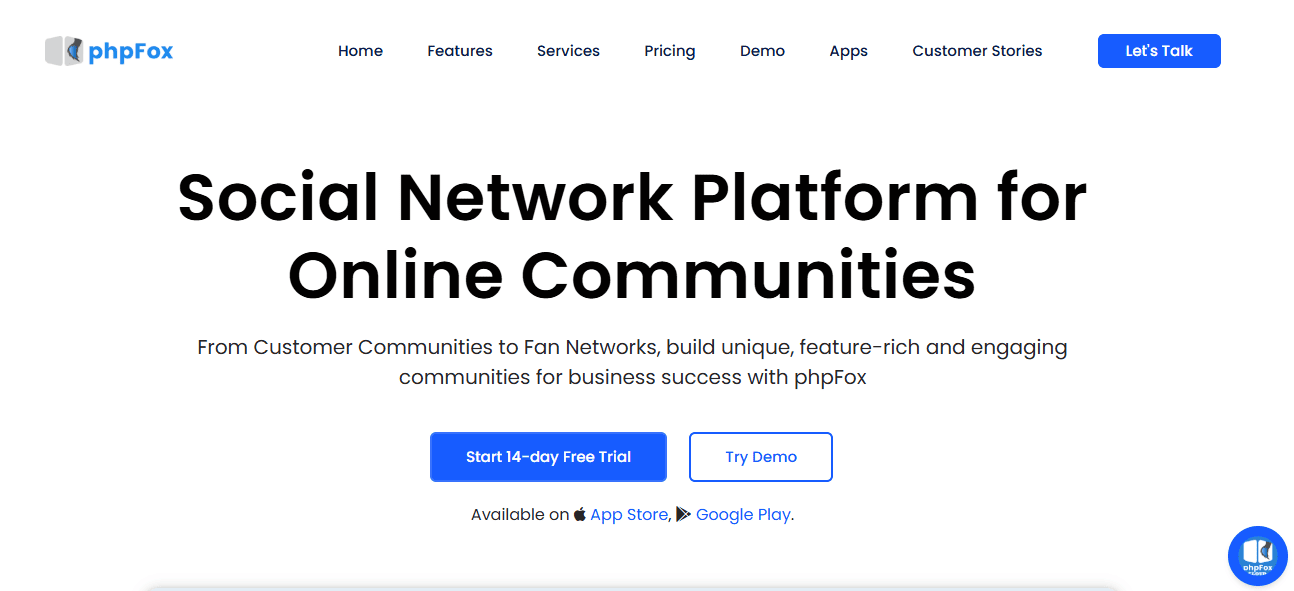
phpFox stands out as one of the most powerful, enterprise-ready social networking platforms on the market. It’s built for scale — supporting thousands of users, complex integrations, and branded customization at a professional level. With both cloud-hosted and self-hosted versions, phpFox gives organizations the flexibility to choose between managed convenience or complete server control.
I selected phpFox because it bridges the gap between open-source flexibility and enterprise performance. It’s ideal for corporate communities, educational networks, or large-scale membership platforms that demand stability, speed, and advanced admin control.
Key Features
1. Cloud vs. Self-Hosted Options
- Cloud Version: Fully managed by phpFox, offering automatic updates, backups, and maintenance — perfect for teams that prefer convenience and reliability.
- Self-Hosted Version: Offers full server control, custom branding, and deeper technical configuration for developers who need flexibility.
- Both versions deliver the same core experience: a professional, scalable social platform with robust user management and monetization tools.
2. Scalability and Enterprise Tools
- Built to handle large communities with thousands of active users.
- Advanced caching and database optimization ensure smooth performance under heavy load.
- Includes APIs for single sign-on (SSO), third-party integrations, and mobile app connectivity.
- Corporate-focused modules support internal communications, file sharing, events, and learning environments.
3. Customization and API Support
- A powerful RESTful API enables integration with CRMs, learning management systems, and external apps.
- Developers can extend functionality through plugins or custom modules.
- The admin dashboard allows detailed control over user permissions, roles, and site appearance.
Pros
- Enterprise-Grade Performance
Built to support large communities with high traffic and complex data structures. - Great API Support
Ideal for developers integrating with external tools or building hybrid ecosystems. - Flexible Deployment
Choose between managed cloud hosting or full self-hosted control.
Cons
- Setup Complexity
Self-hosted version requires technical expertise for installation and ongoing maintenance. - Costly for Small Users
Pricing may be prohibitive for startups or small community projects.
Bottom Line
phpFox is the enterprise contender among modern social networking software — offering performance, scalability, and professional-grade customization. Whether deployed in the cloud or self-hosted, it provides the tools needed for corporate networks, large organizations, or brands that demand a robust and reliable community infrastructure.
While setup and pricing may deter smaller users, phpFox delivers unmatched power and flexibility for enterprises ready to invest in a scalable, secure, and high-performing social platform.
Feature Comparison Table
| Platform | Ease of Use | Customization | Scalability | Best Use Case | Verdict |
|---|---|---|---|---|---|
| BuddyPress | 9/10 | 10/10 | 8/10 | WordPress users | Best overall |
| Elgg | 6/10 | 9/10 | 9/10 | Developers | Highly flexible |
| HumHub | 8/10 | 8/10 | 8/10 | Teams | Great for organizations |
| Oxwall | 9/10 | 7/10 | 7/10 | Beginners | Easiest to start |
| Dolphin | 7/10 | 8/10 | 7/10 | Media networks | Best for visuals |
| SocialEngine | 8/10 | 9/10 | 9/10 | Businesses | Premium choice |
| Ning | 9/10 | 7/10 | 8/10 | Creators | Great for monetization |
| phpFox | 7/10 | 9/10 | 10/10 | Enterprises | Most scalable |
Which One Should You Choose?
Picking the right platform comes down to who you are, what you want to build, and how much control you need. Below is a short, practical guide to match common users with the platforms I tested — plus quick reasoning and concrete example scenarios to help you decide.
Quick recommendations
-
Beginners: Oxwall or BuddyPress (with Reign or BuddyXTheme)
-
Why: Low barrier to entry, fast setup (Oxwall) or strong ecosystem + polished themes (BuddyPress + Reign/BuddyX).
-
Best when: you want to launch quickly, don’t need custom code, and prefer inexpensive options.
-
-
Developers / Technical Teams: Elgg or phpFox
-
Why: Maximum customization (Elgg) and enterprise-grade scalability & APIs (phpFox).
-
Best when: you need bespoke workflows, integrations (SSO/CRM/LMS), or plan to scale to thousands of users.
-
-
Brands & Monetization-Focused Creators: SocialEngine or Ning
-
Why: White-label polish and built-in monetization (SocialEngine); super user-friendly drag-and-drop + creator monetization (Ning).
-
Best when: brand control, native mobile apps, and revenue features are a priority.
-
-
Internal Teams / Private Networks: HumHub
-
Why: Privacy-first, modular collaboration tools, and easy role/permission management.
-
Best when: you need secure, work-focused networks for departments, NGOs, or member-only intranets.
-
-
Media Creators / Photo & Video Communities: Dolphin
-
Why: Media-first architecture with strong profile and gallery features.
-
Best when: visuals are the core product (dating, photography clubs, portfolio communities).
-
How to choose — practical decision rules
- If speed matters (launch in a weekend), pick Oxwall or Ning. They’re the least technical and let you start getting members fast.
- If you need full ownership and extensibility, pick BuddyPress (WordPress) or Elgg. You’ll control data, design, and integrations.
- If you want a white-label, polished product with mobile apps, choose SocialEngine (budget permitting).
- If your community will be media-heavy, choose Dolphin, but plan for stronger hosting.
- If this is for internal use and privacy is non-negotiable, choose HumHub.
- If you’re building enterprise-scale networks and need APIs & SSO: pick phpFox.
Example scenarios
- A yoga instructor who wants to sell classes and member tiers: Ning (fast setup + subscriptions) or SocialEngine (if you need white-label apps).
- A university department building a private research network: Elgg (custom workflows, API integrations) or HumHub (privacy + collaboration modules).
- A photography collective that needs galleries, user portfolios, and media moderation: Dolphin with strong VPS hosting.
- A small business that wants a branded, searchable community on its existing site: BuddyPress + Reign/BuddyXTheme on WordPress.
- A global company launching an employee community with SSO and analytics: phpFox (cloud) for managed scale and enterprise controls.
There’s no single “best” tool for every situation — but there is a best fit for your needs. Use the decision rules above to match your priorities (speed, ownership, customization, privacy, media) to the platform that aligns most closely. If you’re unsure and need an exact pick for your project, tell me your top priorities (audience size, budget, technical skill, and whether you need mobile apps), and I’ll recommend one platform and a rollout plan.

Closing Remarks: My Honest Takeaway
After testing and comparing each platform firsthand, one thing became clear — there’s no one-size-fits-all solution. Every tool I reviewed brings something different to the table: BuddyPress and Oxwall make community building accessible; Elgg and phpFox reward developers with control; SocialEngine and Ning empower brands and creators; HumHub prioritizes privacy; and Dolphin thrives where visuals lead engagement.
The experience reinforced that the Best Social Networking Software isn’t about popularity or feature lists — it’s about alignment. The right choice depends on your long-term vision, technical comfort, and how you want your members to connect. If your goal is to build a vibrant, loyal community, the platform must grow with you rather than limit your creativity or scalability.
My biggest takeaway? Start small, test real-world engagement, and evolve as your community does. What feels “perfect” today might need adjustment tomorrow, and that’s part of the process. The most successful networks I’ve seen aren’t built overnight; they’re shaped by consistent feedback, thoughtful tools, and a willingness to adapt.
Whatever platform you choose, focus less on hype and more on how it supports your mission. Whether you’re fostering discussions, teaching, or creating spaces for connection, the foundation matters.
Your online community deserves the right foundation—build it with confidence.
FAQs: Best Social Networking Software 2025
1. Which is the best free social networking software?
BuddyPress, Oxwall, and Elgg — free, flexible, and great for communities of all sizes.
2. Can I monetize my network?
Yes. Ning and SocialEngine offer built-in tools for memberships, courses, and paid content.
3. Is open-source better than paid?
Open-source = freedom and control; paid = ease and support. Choose based on your skill and budget.
4. What’s easiest for beginners?
BuddyPress (with Reign/BuddyXTheme) and Oxwall are simple, fast, and beginner-friendly.
5. What should I look for before choosing?
Focus on budget, support, customization, scalability, and integration.
Interesting Reads:
9 Best WordPress Translation Plugins for Multilingual Websites

