

“Webinar platform” gets used as a catch-all for two completely different tools, and mixing them up is how community sites end up paying for software that does not do what they needed. A dedicated webinar platform, Zoom Webinars, WebinarJam, Demio, StreamYard, handles the actual video: the stream itself, who is on camera, screen share, live chat during the broadcast. A community event-registration layer handles something different: who is attending, whether they RSVP’d with their existing member account, whether the session is full, and whether a reminder lands in the same inbox members already check for everything else in the community.
Most WordPress community sites running regular live sessions need both, paired together, not one replacing the other. This guide ranks the real dedicated webinar platforms on video quality, attendee limits, and price, and is honest about where Eventonomy, the free WordPress events plugin we build at Wbcom Designs, fits: it is not a streaming tool and does not pretend to be one. It is the registration and reminder layer that sits in front of whichever streaming platform you pick, tied to the member accounts your community already uses.
Last updated: 6 November 2026
Quick answer: For most community sites, Zoom Webinars is the easiest streaming choice because members already have the app, StreamYard and Demio are the cheapest ways to start, and WebinarJam suits marketing-style launches. Whichever you pick, pair it with Eventonomy for member RSVPs, waitlists and reminders, since a streaming tool does not handle registration for your community.
Table of Contents
- Market snapshot
- The Real Distinction: Streaming Tool vs. Registration Layer
- What the Data Says About Webinar Attendance
- Ranked: Best Webinar Platforms for Community Sites
- Comparison Table
- A Closer Look at the Registration Layer
- How to Pair a Streaming Tool With Eventonomy
- Common Mistakes
- Real-World Scenario
- FAQs
- Sources
The Real Distinction: Streaming Tool vs. Registration Layer
A dedicated webinar platform solves the broadcast problem. It gets video and audio from a presenter to an audience reliably, at scale, with the engagement tools, polls, hand-raise, breakout rooms, that make a one-to-many session feel less like a lecture. That is a genuinely hard problem, and the platforms in this guide are good at it for a reason: it is the one thing they build for.
A community event-registration layer solves a different problem entirely: turning a scheduled session into something a member finds, RSVPs to with the account they already use to post in groups, gets reminded about in a channel they already check, and can look back on alongside the rest of their community activity. None of the dedicated platforms above do this well, because it is not their job. Zoom Webinars will happily generate a registration page, but that registrant is a row in Zoom’s database, not a member of your community, and the reminder comes from Zoom’s email system, not yours.
The split matters most the moment a community runs more than one or two live sessions a year. A single one-off webinar can live entirely inside a dedicated platform’s own registration flow. A community running a weekly AMA, a monthly member call, or a recurring workshop series needs that activity tied to the same accounts, the same calendar, and the same notification system as everything else members do on the site, or the webinar schedule quietly becomes a second, disconnected thing members have to remember to check.
What the Data Says About Webinar Attendance
Webinar benchmark reports from several vendors put the live show-up rate among people who register for a free session at roughly a third to a half, which usually works out to a 35-45% planning range, well under half in most cases. That gap between “registered” and “showed up” holds regardless of which streaming platform runs the broadcast, and it is the reason reminder timing and a low-friction join flow matter as much as video quality when you are choosing the tools for a recurring webinar program.
That gap is a planning input, not a verdict on any platform. A session with 300 registrants and a 40% show rate is a 120-person session; capacity planning, host expectations, and reminder cadence should all be set around that real number. It is also a strong argument for keeping registration inside a system that can actually send a reminder where a member will see it, which is the registration layer’s job, not the streaming platform’s.
Market snapshot
- ON24’s benchmark reporting puts registration-to-attendee conversion at roughly 57% to 60% when live and on-demand viewing are counted together, so live-only show-up is lower, which is why this guide plans around a 35-45% live range (ON24 Webinar Benchmarks Report).
- StreamYard lists a Free plan, Essential at $14.99 per month billed yearly ($18.99 monthly), Core at $35.99 yearly and Advanced at $68.99 yearly (StreamYard pricing, November 2026).
Ranked: Best Webinar Platforms for Community Sites
These are ranked on the thing that matters most for a community running recurring sessions: reliable video at a reasonable attendee cap, without forcing you into enterprise pricing for a 100-person call. Eventonomy closes out the list, not ranked against the streaming tools since it solves a different problem, but included because most of the community sites reading this will end up running it alongside whichever platform they pick above.
1. Zoom Webinars
Zoom Webinars is the default choice for a reason: most members already have the Zoom app installed, and that single fact removes more friction from a live session than any feature comparison can. The webinar add-on sits on top of a regular Zoom account and adds a dedicated registration page, a practice session mode, Q&A separate from chat, and panelist/attendee roles so only the people you choose can appear on camera. Pricing starts around $66-99 per month (billed annually) for the Standard and Plus webinar tiers, scaling up through higher-capacity and multi-session Events tiers for larger programs. The honest downside: Zoom’s own registration and reminder system is built for Zoom, not for your community, so a member registers as a Zoom contact, not as the member they already are on your site.
2. WebinarJam
WebinarJam is built specifically for marketing webinars, live launches, sales presentations, lead-gen sessions, with live chat, polls, multi-presenter support, and broadcasting directly to Facebook and YouTube alongside its own room. Its standout feature is the pairing with EverWebinar for automated, evergreen replays of a recorded session on a recurring schedule, useful if your community runs the same onboarding or training webinar repeatedly rather than live every time. Pricing runs from roughly $39/month (annual) for 100 attendees up to $379/month for 5,000, with registration pages and A/B testing built in. It is a strong fit for a community with a sales or marketing use case behind its webinars; it is overbuilt, and priced accordingly, for a simple weekly member call.
3. Demio
Demio is the platform most often picked by teams who found Zoom Webinars’ interface too corporate and WebinarJam too marketing-heavy. The room itself is clean and browser-based (no app download for attendees), with chat, polls, handouts, and featured actions (an in-session call-to-action button) available even on its entry plan. Pricing starts at $45/month for a 50-attendee Starter plan, scaling to $117-196/month per host for the Growth and Premium tiers that support up to 3,000 attendees and up to 10 people on stage at once. For a community running polished, branded sessions with a design-conscious audience, Demio’s room looks better out of the box than most competitors at a similar price.
4. StreamYard
StreamYard is technically a multistreaming and live-production tool first, built to broadcast simultaneously to YouTube, Facebook, LinkedIn, and custom RTMP destinations, with on-air webinar rooms layered on as a feature rather than the core product. That makes it a genuinely good fit for a community that wants its live sessions to also double as public YouTube content: one broadcast, multiple destinations, with on-screen guest management and branded overlays included even on cheaper tiers. Pricing starts free with real limitations, then $14.99-68.99/month (annual) across Essential, Core, and Advanced plans, with the webinar-specific viewer cap (around 100 on the Advanced tier) coming in lower than Zoom or Demio’s higher tiers. Choose StreamYard specifically when the broadcast itself is content you want living on YouTube afterward, not just a private member session.
5. GoTo Webinar
GoTo Webinar is the longest-running name in this list and still a reasonable default for organizations that already run on the GoTo/LogMeIn stack for meetings and support. It covers the standard set, branded registration, automated email reminders, polls, live Q&A, breakout rooms, plus Simulive playback of pre-recorded content presented as a live event, a genuinely useful feature for a community that wants the engagement of a live Q&A without the risk of a live full-length presentation. Its Reach, Elevate, and Unlimited tiers scale by attendee capacity and feature depth; exact current pricing requires a quote, which is itself a signal that GoTo leans toward mid-market and enterprise buyers rather than a solo community manager comparing prices on a Tuesday afternoon.
6. Eventonomy (the community registration layer, not a streaming tool)
Eventonomy does not belong in a head-to-head with the five platforms above, because it solves a different half of the problem. It is a free WordPress events plugin that handles RSVPs with automatic waitlisting, capacity caps, guest RSVPs via magic link for people without an account, add-to-calendar links, and a live events list or calendar block that renders your webinar schedule directly on your community site. With BuddyNext Pro active, an event can be linked into the relevant community space the organizer belongs to, so a webinar shows up next to the rest of a member’s regular activity instead of on a separate, disconnected schedule. It does not stream video, run chat during a broadcast, or host the call itself; you still need one of the five platforms above (or an existing tool you already pay for) for that half. The free tier covers unlimited events and RSVPs at $0; Pro, needed for paid webinar tickets or built-in check-in, starts at $99/year or $249 one-time for one site.
Comparison Table
| Platform | What it actually does | Attendee cap (entry tier) | Starting price |
|---|---|---|---|
| Zoom Webinars | Video streaming, Q&A, polls, panelist roles | 500 (scales to 100,000+ on higher tiers) | ~$66-99/mo (annual) |
| WebinarJam | Live + automated/evergreen webinars, marketing tools | 100 | ~$39/mo (annual) |
| Demio | Branded browser-based webinar rooms, handouts, analytics | 50 | $45/mo |
| StreamYard | Multistreaming + live production, on-air webinars | Varies by tier; ~100 on Advanced | Free, then $14.99/mo (annual) |
| GoTo Webinar | Video streaming, Simulive, breakout rooms | Varies by tier; quote-based | Contact sales |
| Eventonomy | RSVP, waitlist, capacity, reminders, community-tied registration (no streaming) | Unlimited RSVPs (free) | Free; Pro $99/yr |
A Closer Look at the Registration Layer
Eventonomy’s homepage states its scope directly: it “handles the calendar, the RSVPs, and the tickets,” with attendee data staying in your own database rather than a third-party vendor’s. For a webinar series specifically, that means a member RSVPs with the account they already have, the event shows up on the same calendar as every other community event, and a capacity cap with automatic waitlisting keeps a popular session from silently overselling the Zoom room it is tied to.

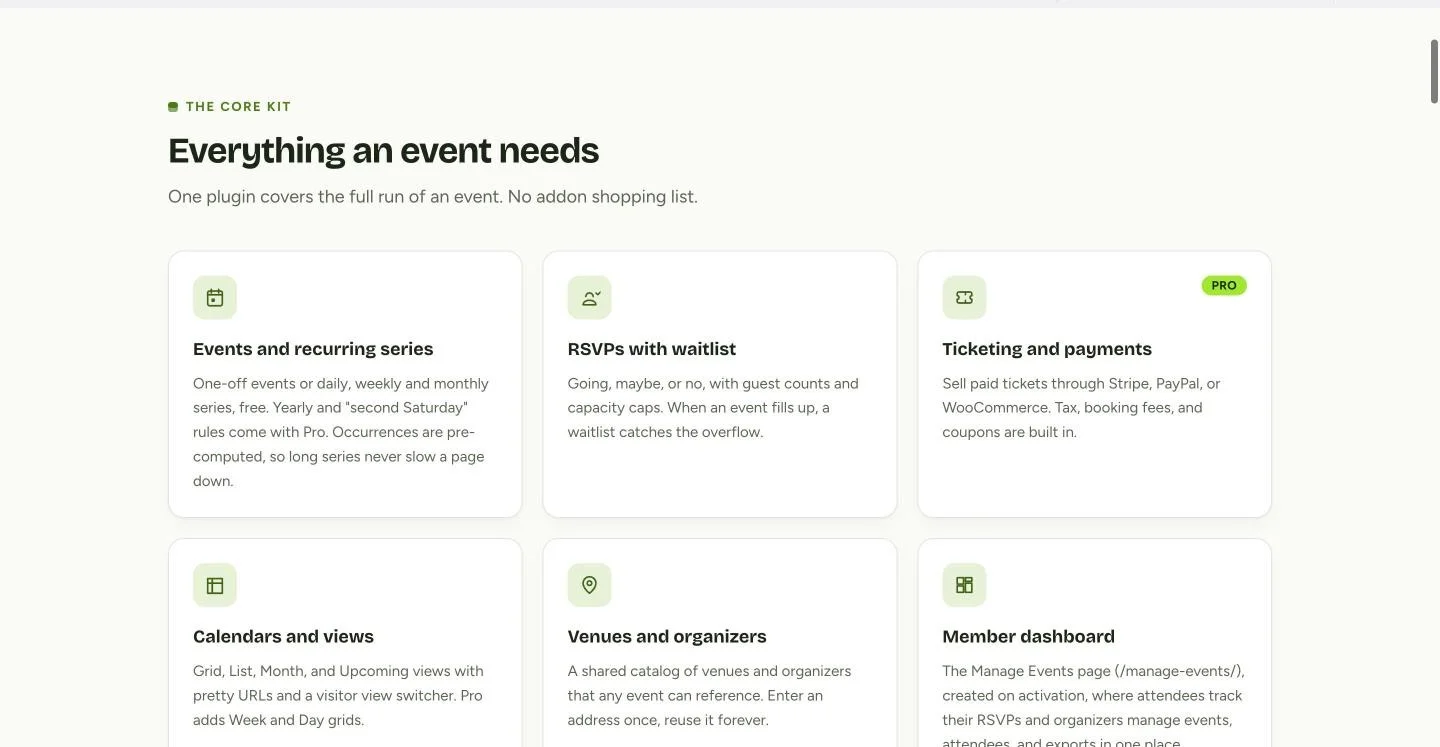
The feature set is deliberately scoped to registration and scheduling rather than trying to be a smaller, worse version of a dedicated webinar platform. Events and recurring series, RSVPs with waitlist, a shared venue and organizer catalog, and a member dashboard where attendees track their own RSVPs are all part of the free plugin; ticketing and payments through Stripe, PayPal, or WooCommerce are Pro-only, for the webinar series that charges admission.
How to Pair a Streaming Tool With Eventonomy
Pick the streaming platform first, based on attendee count and whether the session needs to live on YouTube afterward, then build the registration layer around it rather than the other way around. In Eventonomy, create the webinar as a normal event with a capacity cap matched to the streaming platform’s attendee limit, and put the actual join link (your Zoom, Demio, or StreamYard room) directly in the event description and in the reminder email, not behind a separate sign-up flow a member has to click through twice.
Set the reminder sequence to account for the registration-to-attendance gap covered above: Eventonomy sends reminder emails a day and an hour before an event by default, which is the single reminder most responsible for closing that gap on the day. If the webinar repeats weekly or monthly, build it as a recurring series in Eventonomy so members can RSVP to the next occurrence without re-finding the event each time, while the streaming platform side (the actual Zoom or Demio room) stays whatever your existing recurring meeting setup already is.
For a paid webinar series, Eventonomy Pro’s Stripe, PayPal, or WooCommerce checkout handles the ticket, and the confirmation email is the natural place to put both the receipt and the join link together, so a member who paid is not hunting through two separate emails from two separate systems to find the actual call.
Common Mistakes
- Picking the streaming platform by price alone. A platform with a lower monthly fee but a capacity cap below your actual audience size costs more in upgrades than starting with the right tier.
- Registering members through the streaming platform’s own form. That registrant becomes a contact in Zoom or Demio’s system, disconnected from their actual community account and activity.
- No capacity cap on the registration side. An uncapped RSVP can register more people than the streaming platform’s room actually supports, which is discovered only when attendees can’t join.
- Skipping the hour-before reminder. It is the single change most responsible for closing the registration-to-attendance gap, and it is a registration-layer job, not a streaming-platform one.
- Treating a recurring webinar as a one-off event each time. Rebuilding the RSVP from scratch every week loses the attendance history that tells you whether the series is actually working.
- Burying the join link. Put it in the reminder email and directly on the event page, not behind a separate “you’ll receive the link closer to the date” message that adds a step between RSVP and showing up.
Get the registration layer set up correctly and the streaming platform choice becomes much lower-stakes: swapping Zoom for Demio later means changing one join link in Eventonomy, not rebuilding your entire webinar program.
Real-World Scenario: A SaaS Community’s Monthly Office Hours
A product community running on BuddyX hosts a monthly “Office Hours” call where the founder answers member questions live. For the first year, it ran as a bare Zoom link pasted into a pinned community post, with attendance hovering around 20-30 people out of a membership of several hundred, most of whom said afterward they simply forgot it was happening.
The organizer switches to Demio for the room itself, since the audience is under 100 and the branded, browser-based experience matches the community’s visual identity better than a generic Zoom call. On the registration side, Office Hours becomes a monthly recurring event in Eventonomy, RSVP’d to with each member’s existing account, capped at 90 to leave headroom under Demio’s 50-attendee Starter-tier limit after upgrading to Growth, with a waitlist ready in case a session goes viral in the community.
The Demio join link sits directly in the Eventonomy event description and in both reminder emails, the day-before and hour-before. Within two months, RSVPs climb to 140 per session and live attendance settles around 55-60, a show rate squarely in line with the industry benchmark, up from the 20-30 the bare Zoom link had been pulling with no reminder system behind it at all. The organizer credits the jump less to the switch from Zoom to Demio and more to the fact that Office Hours now lives on the same calendar, with the same reminders, as every other event members already track.
FAQs
1. What is the actual difference between a webinar platform and Eventonomy?
A webinar platform (Zoom Webinars, WebinarJam, Demio, StreamYard, GoTo Webinar) handles the live video stream itself. Eventonomy handles who is registered, capacity, waitlists, and reminders, tied to your community’s existing member accounts. Most recurring webinar programs need one of each, not one instead of the other.
2. Does Eventonomy stream video or host the actual webinar call?
No. Eventonomy manages registration, scheduling, and reminders. Pair it with whichever streaming tool you use, Zoom, Demio, StreamYard, or another platform, and place the join link in the event description and the reminder email.
3. Which webinar platform is cheapest for a small community?
StreamYard’s free tier or $14.99/month Essential plan and Demio’s $45/month Starter plan are the lowest-cost entry points among the platforms in this guide, both well suited to a community running sessions under 100 attendees.
4. Which platform handles the largest audience?
Zoom Webinars scales the furthest, with higher-capacity Events tiers supporting audiences well beyond what WebinarJam, Demio, or StreamYard’s standard tiers are built for, making it the default choice once a webinar program outgrows a few hundred attendees.
5. Can members RSVP to a webinar with the account they already use on the community?
Yes, that is specifically what Eventonomy is for. A member RSVPs with their existing site account rather than creating a separate registration on the streaming platform’s own system, and the event appears on the same calendar as the rest of the community’s activity.
6. Do we need Eventonomy Pro to run a free webinar series?
No. RSVPs, waitlists, capacity caps, recurring series, and reminders all work in the free plugin. Pro is needed only for paid webinar tickets through Stripe, PayPal, or WooCommerce, or for built-in check-in.
7. What happens if a webinar session fills up?
Eventonomy automatically queues additional RSVPs on a waitlist once the capacity cap you set is reached, and notifies waitlisted attendees if a spot opens, matching the registration limit to whatever cap your streaming platform actually supports.
8. Is StreamYard a good fit for a private members-only webinar?
It works, but StreamYard is built primarily for multistreaming to public destinations like YouTube and Facebook. A fully private session is possible, but Demio or Zoom Webinars are more purpose-built for a members-only room with no public broadcast component.
9. Can we run a recurring weekly webinar without rebuilding the event every time?
Yes. Build it as a recurring series in Eventonomy, daily, weekly, or monthly rules are supported, so members RSVP to upcoming occurrences without the organizer recreating the event each week.
10. What realistic attendance rate should we plan capacity around?
Industry webinar benchmark reports commonly put the show-up rate among free registrants in the 35-45% range. Set streaming platform capacity and host expectations around that number rather than the raw registration count.
Where to Start
Pick the streaming platform based on attendee count and whether the session needs a public life on YouTube afterward: Demio or Zoom Webinars for a polished private room, StreamYard if the broadcast is also content, WebinarJam if evergreen replays matter, GoTo Webinar if you already run on that stack. Then build the registration layer in Eventonomy so members RSVP with the account they already have, get reminded in a channel they already check, and find the webinar on the same calendar as everything else in the community. Neither tool replaces the other; the pairing is the actual answer.
Interesting Reads:
How to Run a Virtual Summit on WordPress with Eventonomy
How to Run a Hybrid (In-Person + Virtual) Event on WordPress