
Two Very Different Things Called “Photo Albums”
An admin-managed album and a member-owned album solve different problems, even though most plugin listings lump them together under the same word. An admin-managed album is a folder: you, the site owner, group some photos together and give the group a name. A member-owned album is a piece of someone’s identity on your site: a member built it themselves, named it, curated what goes in it, and it shows up on their profile as something they made, not something you organized on their behalf.
Most “best photo album plugin” lists are really display-plugin lists, Envira, NextGEN, FooGallery, all genuinely useful, all technically support albums as a way to group photos you control. If your site has members and you want them building their own albums, that’s a narrower, more specific need, and it’s the one this list is actually organized around.
The test that actually separates the two categories: open any album on the site and ask who made it. If the answer is always “the admin,” you’re looking at a display plugin with an album feature. If the answer can be “whichever member decided to make one,” you’re looking at something built for member-owned content, and that’s a different product even when the marketing page uses the same word.
Comparison at a Glance
| Plugin | Album Type | Who Creates Albums | Starting Price |
|---|---|---|---|
| WPMediaVerse | Member-owned, profile-linked | Any member, from their own uploads | Free |
| WP Photo Album Plus | Front-end uploadable, nested sub-albums | Admin or authorized front-end users | Free |
| Envira Gallery | Admin-organized display albums | Site admin only | $79/yr |
| NextGEN Gallery | Admin-organized display albums | Site admin only | Free / $29/yr Pro |
| FooGallery | Admin-organized display albums | Site admin only | Free / $59 Pro |
1. WPMediaVerse: Albums as Part of a Member’s Identity
Every member on a WPMediaVerse site can build their own albums from photos they’ve already uploaded, no admin approval, no waiting for someone else to organize their work. An album gets a title, a description, a cover photo, and a privacy level, and it becomes a permanent part of that member’s profile, sitting right alongside their posts, their media, and their activity.

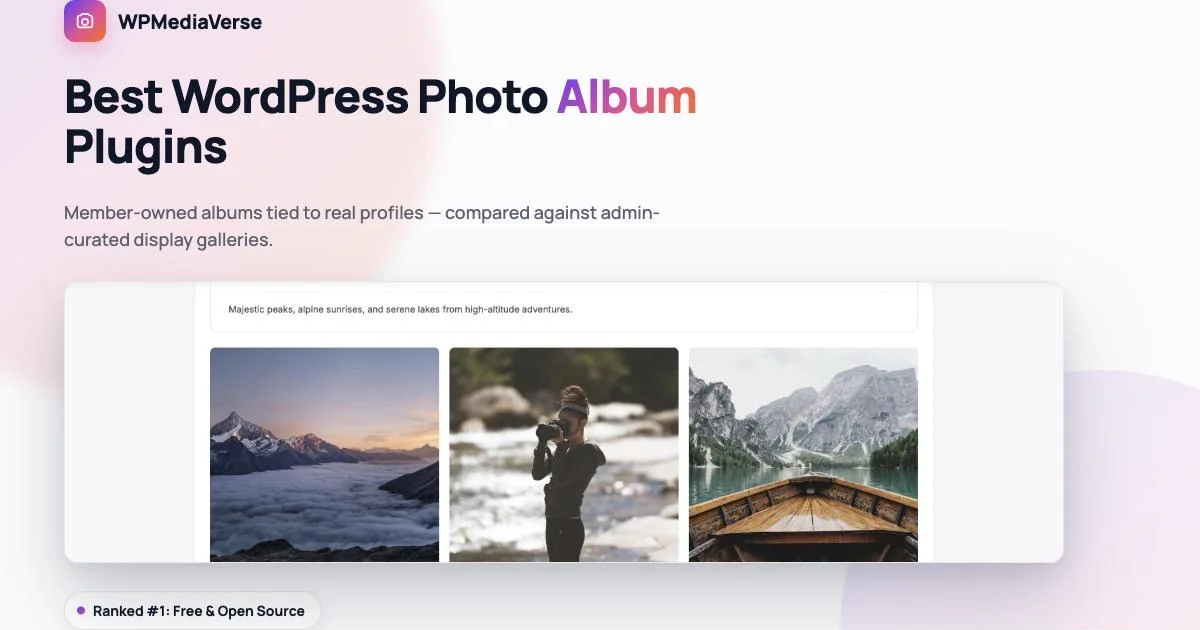
That’s what a real one looks like: a member named it, wrote a real description (“Majestic peaks, alpine sunrises, and serene lakes from high-altitude adventures”), set it public, and the six photos in it read as a genuine, considered collection rather than a folder somebody dumped files into. Anyone browsing the site can react to and comment on the photos inside it, so an album isn’t a dead-end display case, it’s a piece of content other members actually engage with.
Albums live directly on the member’s profile, under their own Media tab, right next to their regular uploads.
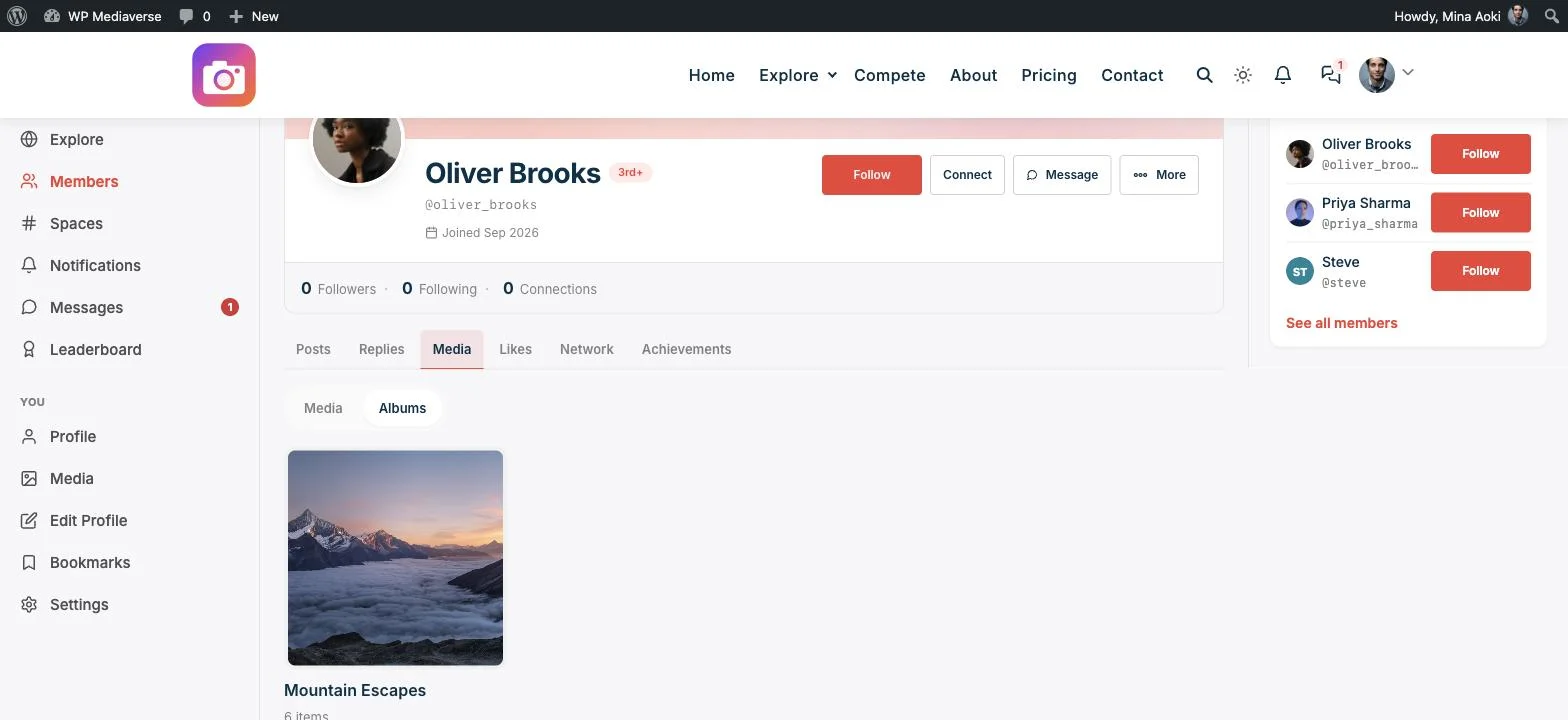
That placement matters more than it sounds. An album that only exists on a standalone gallery page is disconnected from the person who made it. An album that lives on a member’s own profile is proof of what they’ve contributed to the community, discoverable by anyone who visits their page, which gives people an actual reason to build one instead of just dropping photos into the general feed.
Privacy works per-album, not just per-photo: a member can set one album public and keep another visible only to followers or a specific group, which matters the moment albums stop being purely decorative and start being where people put things like family photos or an ongoing personal project they don’t want fully public. All of this, member-created albums, profile integration, per-album privacy, reactions and comments on album contents, is included free, with no album-count limit or feature gate.
The practical effect on a growing community is worth spelling out. On a site where only the admin can create albums, the album section stops growing the moment the admin stops having time to build new ones, which on a busy site is usually within the first month. On a site where any member can build one, the album section keeps growing on its own, driven by however many members feel like curating a collection that week, which is a fundamentally different growth curve and one the admin doesn’t have to personally sustain.
A member-created album also gives new content a home that a plain upload doesn’t. Someone posting a single photo to the explore feed gets a moment of attention and then it scrolls away. Someone building an album titled “Six Months of Sunday Hikes” is creating something with staying power, a page other members can return to, follow, and watch grow, which is a meaningfully different kind of engagement than a single post ever produces.
Download WPMediaVerse free or see the Pro plans.
2. WP Photo Album Plus: The Free, Deeply Nested Option
WP Photo Album Plus is the closest thing to a genuine peer here, and it deserves real credit for being both free and remarkably feature-complete. It supports any number of albums, including sub-albums nested inside parent albums, front-end uploading so contributors don’t need wp-admin access, visitor ratings and comments on individual photos, full EXIF and IPTC metadata display, Google Maps integration for geotagged photos, and 20 widgets for surfacing albums around the site.
Where it differs from WPMediaVerse is structural rather than feature-based: albums aren’t tied to a member profile system the way WPMediaVerse’s are, there’s no explore feed, no follows, no direct messaging layered on top, so it functions more as a powerful, flexible album and gallery CMS than as a piece of a broader social platform. If what you need is genuinely just deep, nested album organization with front-end contribution, on a site that isn’t otherwise trying to be a community, this is a strong, completely free choice.
It’s also worth noting as the plugin that’s been around the longest of anything on this list, which cuts both ways. The maturity means most edge cases have already been found and fixed. It also means the admin UI and the underlying architecture predate the block editor, and it shows in places, this is a plugin built in a different era of WordPress, not a fresh take on the problem.
3. Envira Gallery: Albums as Portfolio Organization
Envira’s Albums add-on lets a site owner group multiple galleries into a browsable album structure, useful for a photographer organizing shoots by client or event, or an agency organizing project work by category. It’s genuinely well built for that purpose: drag-and-drop reordering, custom album covers, and the same polished lightbox and mobile behavior as the rest of Envira.
It’s an admin tool through and through. Visitors browse; only the site owner (or someone with admin access) creates and organizes albums. There’s no mechanism for a member to build their own, and no reason to expect one, that’s not the job Envira is built for.
Pricing starts at $79/year for one site as part of the standard Envira plans; Albums functionality is included at that tier. For a photographer or small studio managing a handful of shoots a month, that admin-only model is exactly right, there’s no ambiguity about who should be organizing the work.
4. NextGEN Gallery: Free Admin-Organized Albums
NextGEN’s album styles (compact and extended) have been part of the plugin for years and remain a solid free way to group multiple galleries into a browsable structure. It’s mature, well-documented, and free at the core, which makes it a reasonable choice for a simple, admin-curated album structure with no ongoing cost.
Same limitation as Envira: albums are something the admin builds by organizing existing galleries, not something a visitor or member creates themselves. Paid tiers (from $29/year) add more layout and lightbox options but don’t change that fundamental shape. Its sheer install base and years of active use mean documentation and community troubleshooting are easy to find, a real advantage if you’re setting this up without much technical help.
5. FooGallery: Albums With Built-In SEO
FooGallery’s free tier includes an albums feature alongside its seven gallery layouts, with the same SEO-conscious approach that defines the rest of the plugin, album pages are structured to be genuinely search-friendly, not just visually organized. Drag-and-drop reordering and live preview make building an album fast for the admin doing the work.
As with the other display-focused options here, album creation is an admin task. FooGallery Pro (from $59) adds more templates and the ability to pull album content from external sources like Instagram, but the underlying model, admin curates, visitor browses, stays the same. If image search traffic matters to your site specifically, this is the one worth testing first among the display-focused options, since SEO isn’t an afterthought bolted onto the album feature here.
How to Choose
The fastest way to decide is to picture your site a year from now and ask who’s still adding albums to it at that point.
- Need deep, nested album categories with front-end uploading, on a site that isn’t a broader community? WP Photo Album Plus, free.
- Organizing your own photography portfolio by client or project, no member contribution needed? Envira.
- Want a free, simple, admin-curated album structure? NextGEN.
- Care about album pages ranking well in search? FooGallery.
- Want albums that are actually member-owned, tied to real profiles, and part of an ongoing social platform rather than a static display? WPMediaVerse, and it’s free.
Frequently Asked Questions
Can members create their own albums without admin approval?
In WPMediaVerse, yes, any member can create an album from their own uploads at any time. In Envira, NextGEN, and FooGallery, album creation is an admin-only action performed in wp-admin, not a front-end member feature. WP Photo Album Plus sits in between: it supports front-end uploading, but you configure who’s authorized to use it.
Do albums show up on a member’s profile?
In WPMediaVerse, yes, every album appears under the member’s own Media tab automatically, no extra setup required. None of the admin-curated display plugins on this list have a member profile system to attach albums to in the first place.
Can I control who sees a specific album?
WPMediaVerse supports per-album privacy (public, followers-only, or specific group), independent of the site’s overall privacy settings. The admin-curated plugins generally control visibility at the page or gallery level rather than per-album, since there’s no concept of an individual member’s private content to protect.
Is there a free option if I just need simple albums with no community features?
Yes, both NextGEN Gallery and WP Photo Album Plus are free and don’t require any community infrastructure. If you never plan to add member profiles, follows, or a feed, either is a perfectly reasonable choice, and choosing WPMediaVerse for that narrow a use case would be more plugin than you need.
Can I migrate existing admin-organized galleries into member-owned albums?
Not automatically, and it’s worth thinking through before switching plugins on an established site. Photos already grouped by an admin don’t have a natural “owner” to assign them to unless you know who originally submitted each one. For a new site, or a site where members are about to start uploading fresh, WPMediaVerse’s member-owned model works from day one with no migration question at all.
Can an album have more than one contributor?
In WPMediaVerse, an album belongs to the member who created it, and they curate what goes in it from their own uploads, which keeps ownership clear and avoids the awkward question of who’s responsible for a shared folder’s content. If your use case genuinely needs multiple people actively adding to the same collection (an event where several photographers are all contributing), the practical pattern is a shared theme or tag that a group’s individual albums all carry, browsable together via the explore feed, rather than one literal shared album with ambiguous ownership.
Bottom Line
If you’re organizing your own photos, Envira, NextGEN, and FooGallery are all mature, capable tools built exactly for that, and WP Photo Album Plus is the strongest free option if you need real nested structure without member profiles attached. If you want your members building their own albums as part of their presence on your site, not folders you maintain for them, start with WPMediaVerse free.