

Search “BuddyBoss alternative” on any given week and you will find two different people typing it. One already owns a BuddyBoss license, renewed it out of habit for the third year running, and is doing the math on whether $599 a year buys them anything they could not get for free. The other has not bought anything yet, is still sketching out a members area on a whiteboard, and got quoted a price that made them close the tab and start Googling.
Both of them usually land on comparison posts that read like press releases. Feature grids with green checkmarks, a paragraph about “engagement,” and a call-to-action at the bottom. None of that tells you what a free, standalone community platform actually contains the day you install it, before you have paid anyone anything.
This post is about BuddyNext, a free community platform built by the same team behind BuddyX, and what its no-cost tier gives a WordPress site owner who is tired of paying a subscription to run a members area. We already wrote a straight cost comparison in BuddyBoss Alternative: BuddyX + Wbcom Stack Compared. This piece goes narrower: what ships in the free tier of a standalone community OS, what architecture decisions make that possible, and where BuddyBoss genuinely still has the edge.
Why “alternative” searches spike around BuddyBoss specifically
BuddyBoss earned its reputation honestly. It took the aging BuddyPress codebase, wrapped it in a polished theme, and built a genuinely good app builder on top of it years before most WordPress community tools took mobile seriously. For a long stretch it was the obvious answer to “how do I make BuddyPress not look like 2010.”
The friction shows up later, usually around renewal time. BuddyBoss now runs three tiers, Pro at roughly $299 a year, Plus at $349 for the first year then $599 annually (bundling the theme, gamification, and offload media), and a Done-For-You package north of $2,400. Add the native mobile app and you are looking at $219 a month on top of the platform license, before a single push notification goes out. None of that is unreasonable for what it does. It just means the “free-ish” community plugin from a decade ago has become a recurring line item, and site owners who are budgeting a new project, or re-evaluating an old one, go looking for what else exists.
What they usually find is a pile of thin, three-year-old “10 best BuddyBoss alternatives” listicles that recommend BuddyPress itself (the raw, unstyled version) as the free option. That answer is technically true and practically useless. Raw BuddyPress without a purpose-built theme and a moderation layer is not a finished product, it is a starting point that needs another six plugins bolted onto it before it resembles what BuddyBoss ships out of the box.
The architecture difference nobody puts in the pricing table
Here is the part that actually matters and rarely gets explained: BuddyBoss is built on top of BuddyPress. It is a fork and extension of that codebase, which means it inherits BuddyPress-era assumptions, activity data stored as custom post types in wp_posts, admin-ajax-driven interactions, and a plugin architecture designed around 2010s WordPress patterns. That is not a criticism so much as a fact about its lineage, and it is why BuddyBoss add-ons and BuddyPress add-ons often overlap.
BuddyNext takes a different starting point. It is a standalone platform, not built on BuddyPress at all, and not a fork of it. It runs on custom database tables instead of stuffing everything into wp_posts, ships REST-complete (no admin-ajax dependency), and targets modern baselines, WordPress 6.9 and PHP 8.2 at minimum. That single decision, custom tables versus post-type storage, is why a Spaces feed with deep threading and reactions can stay fast at scale without the query overhead that comes from treating every activity item like a blog post.
The tradeoff is honest and worth stating plainly: because BuddyNext is a genuinely new architecture, the old BuddyPress add-on ecosystem you might already own does not run on it. If your current site depends on a specific niche BuddyPress plugin from a small developer, that plugin will not simply drop into BuddyNext. Wbcom’s approach is to rebuild the equivalent functionality natively into BuddyNext’s core over time, some of it already shipped, some still in progress, rather than ask you to hunt for compatible third-party replacements. It is a different bet than BuddyBoss makes, and it is worth knowing that going in rather than discovering it after a migration.
What actually ships before you touch a credit card
BuddyNext’s free tier is not a trial and not a stripped-down teaser. It currently covers 31 distinct capabilities, and it is worth walking through what that means in practice rather than just citing the number.
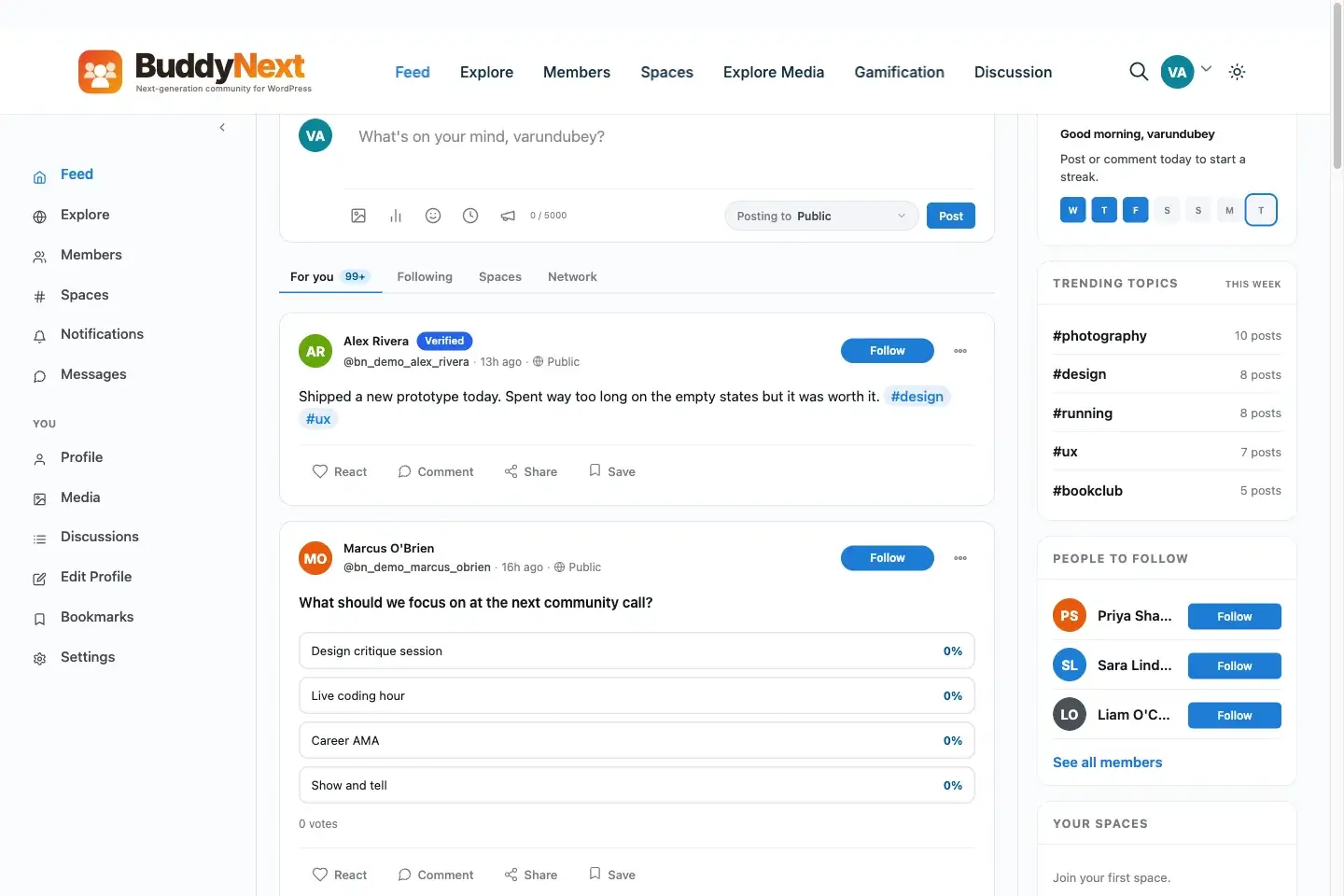
The activity feed ships with four tabs, six reaction types, and five-level threading, all in the free tier.
The activity layer gives you a four-tab feed (For You, Following, Spaces, Network), a composer that handles text, media, links, and polls in one box, six reaction types instead of a single like button, five-level threaded comments, reposts with quote support, hashtags with trending detection, bookmarking, and draft saving. That is roughly the feature set people pay for in a BuddyBoss Plus tier, present in the free download.
Spaces, BuddyNext’s answer to BuddyPress groups, come in open, private, and secret visibility levels, with role management, structured join flows, sub-spaces for larger communities that need sub-topics, and per-space bans and notification controls. Profiles support thirteen field types with per-field privacy settings and a completion meter that nudges members to fill theirs out, backed by a full member directory with a following and connections model separate from group membership.
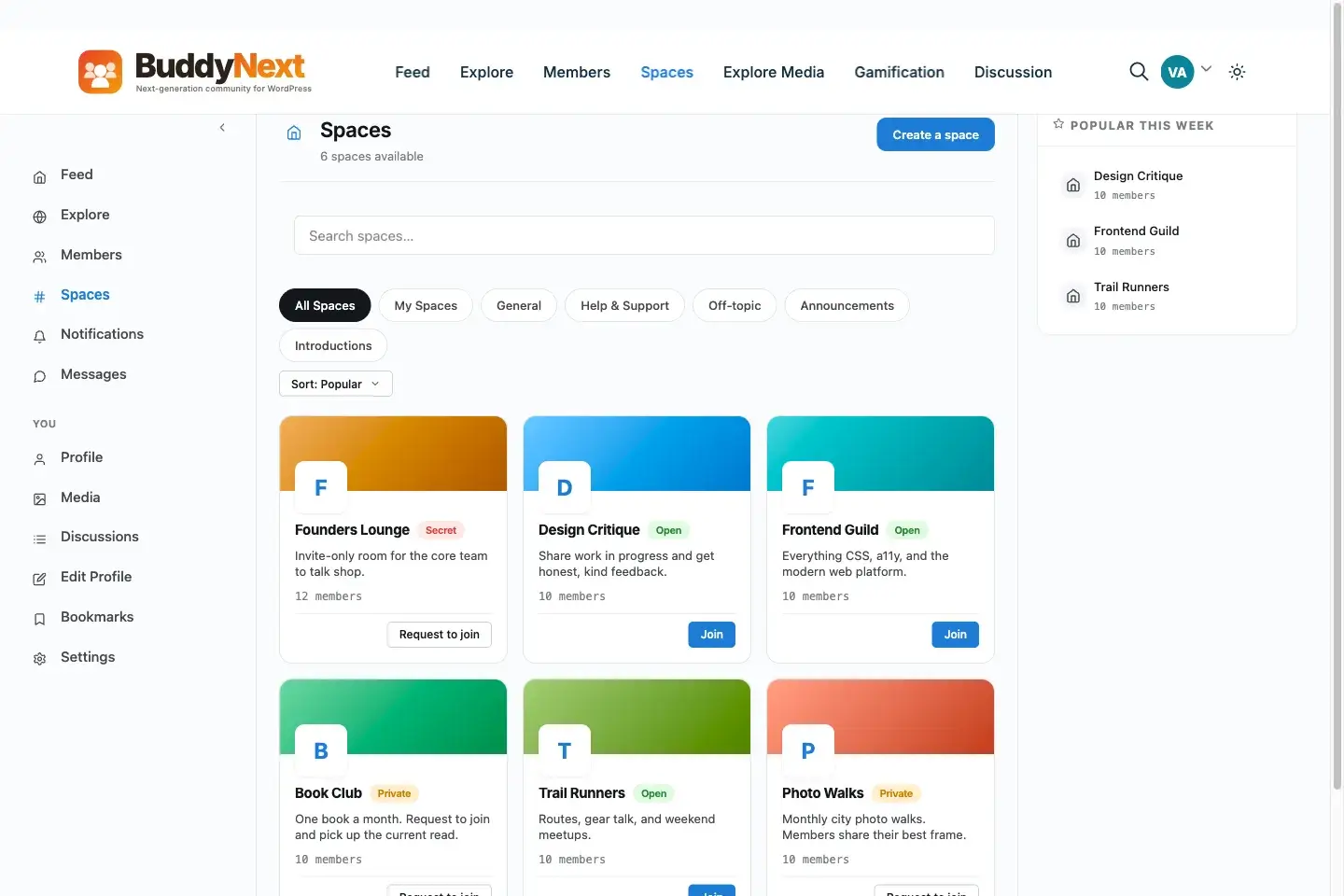
BuddyNext’s Spaces feature, included free, supports open, private, and secret visibility with per-space moderation controls.
Authentication is not an afterthought either. Social login through Google, Facebook, GitHub, and Discord ships free, alongside two-factor authentication, email verification, invite-only and approval-gated signup modes, and built-in spam protection at the registration layer. New members walk through a four-step onboarding wizard with reminder emails for anyone who stalls halfway through. Once they are in, notifications group intelligently instead of flooding a bell icon, and a branded email engine handles templated sends, digests, a send log, and one-click unsubscribe without needing a separate transactional email plugin.
None of that is Pro-gated. It is the default install.
Theme freedom is the part BuddyBoss pricing pages don’t mention
BuddyBoss is sold as a platform, but in practice it works best paired with the official BuddyBoss Theme, and that pairing is where a chunk of the yearly bill actually goes. Step outside that pairing, try to run BuddyBoss Platform with a different WordPress theme, and you will spend real hours patching layout conflicts that the official theme simply avoids by being built for the platform specifically.
A standalone community engine sidesteps that dependency by design. BuddyNext is not tied to a single theme, and pairing it with a theme purpose-built for community sites, such as BuddyX, gives you the design flexibility of a normal WordPress theme without the platform forcing your hand on which one you are allowed to use. Eighteen Gutenberg blocks ship with the free tier, so page layout happens the same way it does everywhere else in modern WordPress, through the block editor, not through a proprietary page builder bolted onto an older codebase.
That matters more than it sounds like on a pricing page. A site that outgrows its theme, rebrands, or simply wants a different visual identity two years in should not have to renegotiate its community platform to do it.
Search, discovery, and the developer surface
Past the member-facing features, the free tier also covers ground that usually only shows up once a community has grown past its first few hundred members. An Explore section and unified search work across the whole platform, including with JavaScript disabled, which matters more than it sounds for accessibility and for members on restrictive corporate networks. Over a thousand hooks are available for developers who want to customize behavior without forking core files, the REST API is complete rather than partial (no admin-ajax fallback anywhere), WP-CLI is supported for scripting bulk operations, and one webhook is included free for anyone who wants to pipe activity into an external tool like Zapier or a custom dashboard.
None of that shows up in a feature-comparison screenshot, but it is the difference between a platform you can grow into and one you eventually have to work around.
The moderation gap specifically
This is the part that surprises people who assume “free” means “basic.” BuddyNext’s free moderation suite is deep enough that most site owners running BuddyPress or even BuddyBoss end up stacking two or three separate plugins to approximate it.
The built-in toolkit covers member reports with a review queue, a strikes system that accumulates against repeat offenders, account suspension, shadow-banning (where a member keeps posting without realizing nobody else can see it), and an appeals process so bans are not a dead end. On the content side there are banned word lists, banned hashtag lists, banned domain lists, and IP banning, plus auto-hide thresholds that pull content out of view once it crosses a report count you set. Moderation can also be scoped per space, so a Space owner can moderate their own sub-community without needing site-wide admin access.
We covered the underlying philosophy in Why Trust Levels Are the Future of Community Moderation, and the short version applies here too: moderation that depends entirely on a human checking a queue does not scale past a few hundred active members. A system with strikes, shadow-bans, and auto-hide thresholds built in from day one means the community can self-regulate a meaningful share of the noise before anyone has to intervene by hand.
Where BuddyBoss still has the real edge
It would be dishonest to write this post as a one-sided pitch, and the person deciding between these two tools deserves better than that. BuddyBoss has advantages that a newer platform cannot simply out-feature its way past.
Its native mobile app builder has been refined over years of real customer feedback, submitted to app stores, and iterated against actual store rejection cycles. That maturity is hard to shortcut. BuddyBoss also carries a decade of accumulated third-party integrations and a large support community, meaning that if something breaks at 11pm, the odds of finding a forum thread with your exact error message are higher simply because more people have hit it first. Its LearnDash integration in particular is battle-tested at a depth that any newer LMS pairing takes time to match.
BuddyNext, at version 0.6.0, is younger. Its free tier does not include a native mobile app at all, that capability sits in the Pro plan. Its third-party integration surface is smaller because it deliberately does not inherit the BuddyPress plugin ecosystem, so if your workflow depends on a specific obscure BuddyPress add-on, you should check whether an equivalent exists before assuming it will transfer over. Anyone telling you a newer, architecturally cleaner platform has zero tradeoffs against a decade-old incumbent is selling you something.
What Pro adds if the free tier stops being enough
The free tier is not designed to be a funnel that quietly withholds features until you pay. But some things genuinely belong behind a paid tier because they carry ongoing infrastructure cost or serve a narrower audience, and BuddyNext Pro (70 capabilities across Personal, Professional, and Agency plans) is where those live.
Native Stripe membership tiers arrive in Pro, monthly, yearly, and one-time billing, trial periods, gated spaces, inline content locks, a customer self-service portal, and an MRR dashboard for tracking recurring revenue. Email moves from the free branded engine into full campaigns with drip sequences and per-space digests. A set of AI features layers on top of the free experience, feed ranking, semantic search, smart reply suggestions, and AI-assisted moderation with a test bench for tuning rules before they go live. Real-time infrastructure through WebSockets brings typing indicators, live toasts, and presence, paired with web and mobile push through Firebase. Analytics gets a proper dashboard, DAU/WAU/MAU, cohort tracking, funnels, per-space breakdowns, CSV export. The native mobile app also lives here.
Pricing runs Personal at $149 a year (or $399 lifetime, one site), Professional at $249 a year ($599 lifetime, five sites), and Agency at $399 a year ($999 lifetime, unlimited sites with white-label). A 30% EarlyBird discount currently applies at launch pricing, and the license model only gates updates and support, not features, so nothing you already installed stops working if a subscription lapses. Compare that to BuddyBoss Plus at $599 a year just for the platform bundle, or Circle.so’s Business tier running roughly $199 a month before its 0.5 to 2 percent transaction fees on paid memberships, and the math starts to look different than a feature-checklist comparison would suggest.
Stretch that comparison over three years and the gap widens rather than closes. A site that never needs anything beyond the free BuddyNext tier spends nothing on platform licensing across that entire period. A site that grows into Pro Professional at $249 a year still lands under $750 across three years, membership billing and analytics included. The same three years of BuddyBoss Plus at $599 annually runs past $1,800 before a mobile app add-on enters the picture, and a Circle.so Business subscription clears $7,000 in platform fees alone over the same stretch, before transaction fees on anything members actually pay for. None of that makes BuddyBoss or Circle wrong choices for every situation, but it does mean the sticker price on a pricing page is rarely the number that ends up mattering.
The tradeoff, worth repeating from earlier in this piece, is that lower cost comes from a younger, standalone codebase without a decade of accumulated third-party integrations. For some sites that tradeoff is irrelevant. For others, particularly ones with heavy existing investment in a specific BuddyBoss or LearnDash workflow, it is the whole decision.
A practical way to decide, not a sales pitch
If you are launching a new paid community and have not committed to a platform yet, the free BuddyNext tier is worth installing before you evaluate anything else, simply because it covers so much of what most communities actually need without a subscription attached. Spend a week running real content through it, invite a handful of test members, and see whether the moderation tools and Spaces model fit how your community actually behaves, not how a feature grid describes it.
If you are running an established BuddyBoss site with years of content, an active mobile app, and a member base that expects things to keep working exactly as they do today, this is not a “swap the plugin” decision. It is a migration project, and it deserves the planning that comes with one. We cover that specific scenario, what changes technically and what to budget for, in our full cost and migration breakdown, and our standalone BuddyBoss review is worth reading if you want the fair case for staying put.
What kind of site owner this fits, and who should keep looking
Coaches and course creators launching a paid community alongside their existing offer tend to fit the free BuddyNext tier well, because the moderation and membership groundwork is already there before they add anything paid. Niche professional communities, the kind built around a specific trade, hobby, or local network, benefit from the Spaces model’s private and secret visibility options, since those groups usually need tighter access control than a public forum ever did. Agencies building community sites for multiple clients get real mileage out of the free tier’s REST API and hooks, since a repeatable setup process matters more to them than any single feature.
Sites that lean the other way tend to share a pattern: heavy existing investment in the BuddyBoss mobile app specifically, a LearnDash integration built over years that nobody wants to re-test, or a support team that has built internal documentation around BuddyBoss’s exact admin screens. None of those are reasons a newer platform is worse. They are reasons switching costs more than the subscription price implies, and that cost deserves to be counted honestly before anyone commits to a migration.
Frequently asked questions
Is BuddyNext built on top of BuddyPress?
No. BuddyNext is a standalone platform with its own architecture, custom database tables, and REST API. It does not require BuddyPress to be installed, and it is not a fork of the BuddyPress codebase the way BuddyBoss is.
Will my existing BuddyPress or BuddyBoss add-ons work on BuddyNext?
Not directly. Because BuddyNext uses a different architecture, plugins built for BuddyPress’s post-type-based activity system will not run on it. Wbcom is rebuilding equivalent functionality natively into BuddyNext’s core over time, but you should check whether a specific add-on you rely on has a native equivalent before planning a migration around it.
Does the free plan actually include moderation tools, or is that a Pro feature?
Moderation is one of the deepest parts of the free tier. Reports, strikes, suspension, shadow-banning, appeals, banned word/hashtag/domain/IP lists, auto-hide thresholds, and space-scoped moderation all ship without a paid license.
Can I run a real community on BuddyNext without ever buying Pro?
Yes. The 31 free capabilities cover activity feeds, Spaces, profiles, member directories, following, authentication, onboarding, notifications, email, moderation, and a progressive web app. Pro adds paid membership tiers, AI features, real-time infrastructure, analytics, and the native mobile app for communities that need those specifically.
Does BuddyNext have a native mobile app in the free tier?
No, the native mobile app is a Pro capability. The free tier does include a progressive web app, which gives members an installable, app-like experience from a mobile browser without requiring an app store submission.
Is there a wordpress.org listing I can install BuddyNext from directly?
Not currently. BuddyNext is distributed through its product page on wbcomdesigns.com rather than the WordPress.org plugin repository.
The honest bottom line
“Free” is a word that gets abused in software marketing until it stops meaning anything. In this case it is worth checking against the actual capability list rather than taking it on faith, and the list holds up: activity feeds, Spaces, deep moderation, profiles, authentication, and a working email system, with nothing behind a paywall that a typical launching community would hit in its first year. BuddyBoss earned its market position by being genuinely good at what it does, and for an established site with a mature mobile app and years of integrations, ripping that out for a younger platform is not automatically the right call. But for anyone starting fresh, or anyone who has been quietly wondering whether $599 a year is buying them anything BuddyPress-era architecture couldn’t do for free with a cleaner foundation, the answer is now a specific, checkable list instead of a vague promise.