
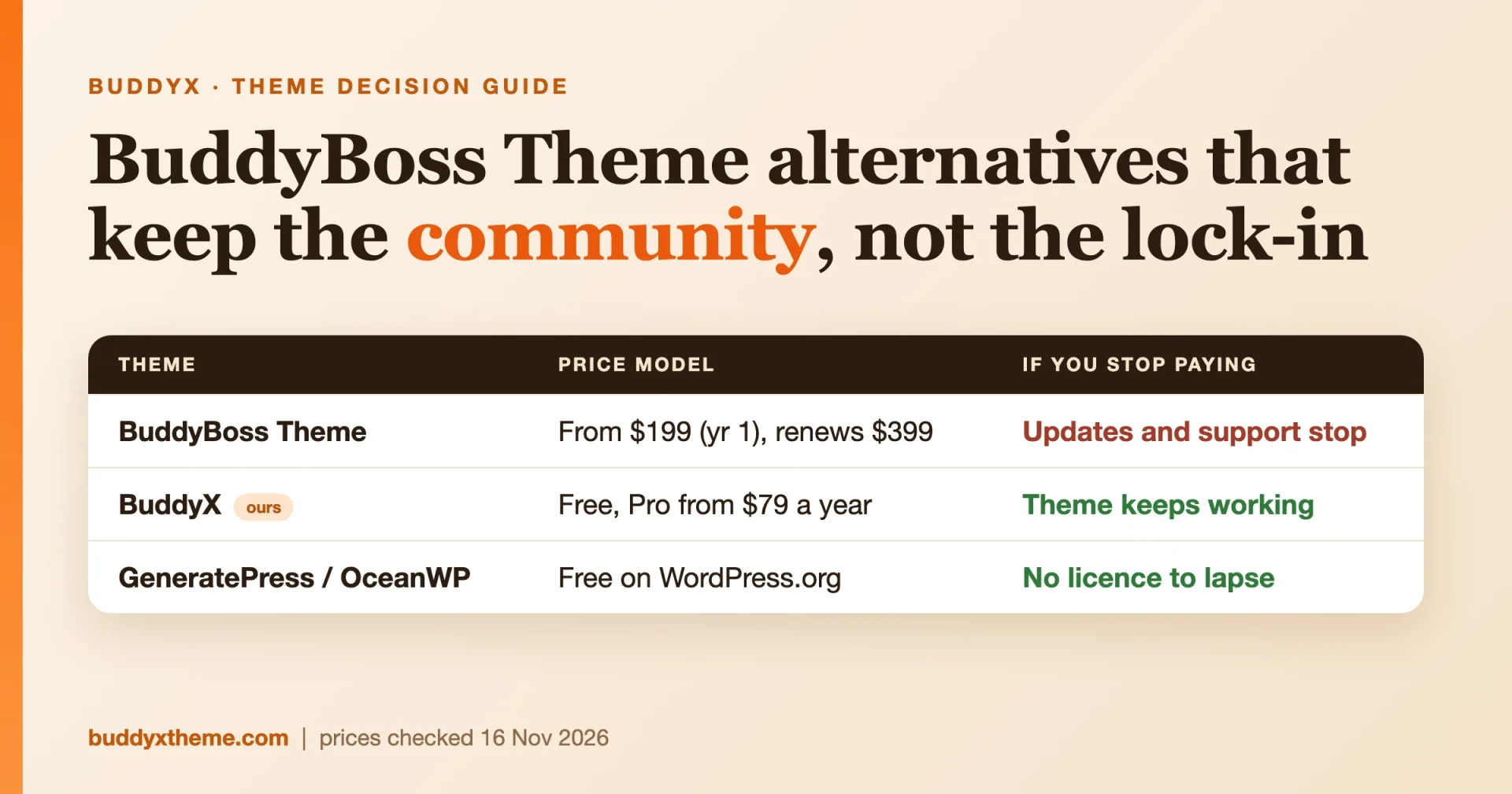
If you want to leave the BuddyBoss Theme, you do not have to leave your community. BuddyBoss’s own documentation says the free BuddyBoss Platform plugin is built to work with any WordPress theme, so the usual move is to keep the Platform (or plain BuddyPress) and swap only the theme. The themes worth testing are BuddyX, Reign, GeneratePress and OceanWP, and the right pick depends on how much template work you are willing to own.
We make two of those themes, BuddyX and Reign (Wbcom Designs), so weigh our ranking with that in mind. BuddyX is listed first because it is the one we know best, and we list its real downsides below. Every price, version and rating in this guide was read on the vendor’s own page or from the WordPress.org API on 16 November 2026.
What does the BuddyBoss Theme need, and what does it cost in 2026?
The BuddyBoss Theme is designed to run on top of the BuddyBoss Platform plugin. The Platform itself is free to download, according to BuddyBoss’s Platform page, and the theme comes with a paid plan. On the BuddyBoss pricing page we read on 16 November 2026, the plans are Start, Launch and Scale, and the FAQ says Launch is the plan that adds the BuddyBoss Theme.
| Plan | First year | Renews at | Theme included |
|---|---|---|---|
| Launch | $199 (50% intro discount) | $399 a year | Yes, listed as “ReadyLaunch or BuddyBoss Theme” |
| Scale | $349 (50% intro discount) | $699 a year | Yes, plus gamification, media offload and member blogs |
One licence covers one production site, and the page lists additional site licences at $99 each. Hosting is not included.
The lock-in question is about what happens when you stop paying. BuddyBoss’s article on what happens if a subscription expires (updated 24 October 2025) says the licence becomes inactive and you lose security updates, bug fixes, new features, the latest versions and support. Subscriptions auto-renew, and an expired subscription cannot be reactivated; you buy a new licence. The site does not vanish, but the theme stops getting patched.
We did not test the BuddyBoss Theme without the Platform plugin installed. BuddyBoss’s installation guide frames the theme as part of a pair with the Platform, so plan on needing both.
What does “switching theme” mean on a BuddyBoss site?
It means replacing the layout and styling layer while the community engine stays put. Your members, groups, activity and messages live in the Platform plugin and the database, not in the theme.
BuddyBoss’s page “Can you use another theme with BuddyBoss Platform?” (updated 5 May 2025) is direct about the trade. The Platform works with any theme that follows the standard WordPress template hierarchy, but full compatibility needs support for the modern Nouveau templates. A theme without them can misplace or leave out community components. You may need to copy templates into a child theme’s buddypress or bp-templates folder, add CSS to match the Platform’s markup, and BuddyBoss Support does not fix problems in a third-party theme’s customizations.
So a theme swap has three costs. You lose the BuddyBoss Theme’s options (header, colors, layout settings), so those get rebuilt. You may carry template overrides you did not need before. And support splits in two: the Platform team for the plugin, the theme author for the theme.
Is ReadyLaunch a middle path?
Possibly. BuddyBoss’s ReadyLaunch guide describes it as a starter layout with control over branding, sidebars and menus, and says to make sure the free Platform plugin is active. Turning it off restores your previous theme settings. The pricing page lists “ReadyLaunch or BuddyBoss Theme” under Launch, so check what your own plan covers. We did not test ReadyLaunch beside a third-party theme.
What if you run plain BuddyPress instead?
Then the BuddyBoss Theme was never your problem. BuddyPress is at version 14.5.4 on WordPress.org, updated 23 October 2026, with 90,000+ active installs and an 82% rating from 375 reviews. The BuddyPress project documents a theme compatibility layer so it can render inside most themes, although that page is old (the codex marks it as updated years ago). The BuddyBoss pricing FAQ says the Platform includes migration tools for BuddyPress, which suggests the two are separate installs and not the same plugin.
Which themes work with BuddyPress or the BuddyBoss Platform?
This table separates what the vendor states from what we assume. “Directory tag” means the author ticked BuddyPress in the WordPress.org theme directory; it is the author’s own label, so it proves intent, not quality.
| Theme | Price model | Version / last update | Active installs | WordPress.org rating | BuddyPress evidence |
|---|---|---|---|---|---|
| BuddyX (ours) | Free; Pro from $79 a year or $199 lifetime | 5.2.0, 10 Nov 2026 | 3,000+ | 100% from 26 ratings | Directory tag; BuddyPress and BuddyBoss named on its product page |
| Reign (ours) | $99 a year or $249 lifetime for 1 site | 8.0.8, Oct 2026 | Not in the directory | Not in the directory | Vendor page names BuddyPress, BuddyBoss, BuddyNext, PeepSo |
| GeneratePress | Free on WordPress.org; reviews mention a paid plan | 3.6.1, 1 Dec 2025 | 500,000+ | 98% from 1,428 ratings | Directory tag only |
| OceanWP | Free on WordPress.org | 4.2.8, 26 Oct 2026 | 400,000+ | 98% from 5,721 ratings | Directory tag only |
1. BuddyX: our own theme, so read the cons
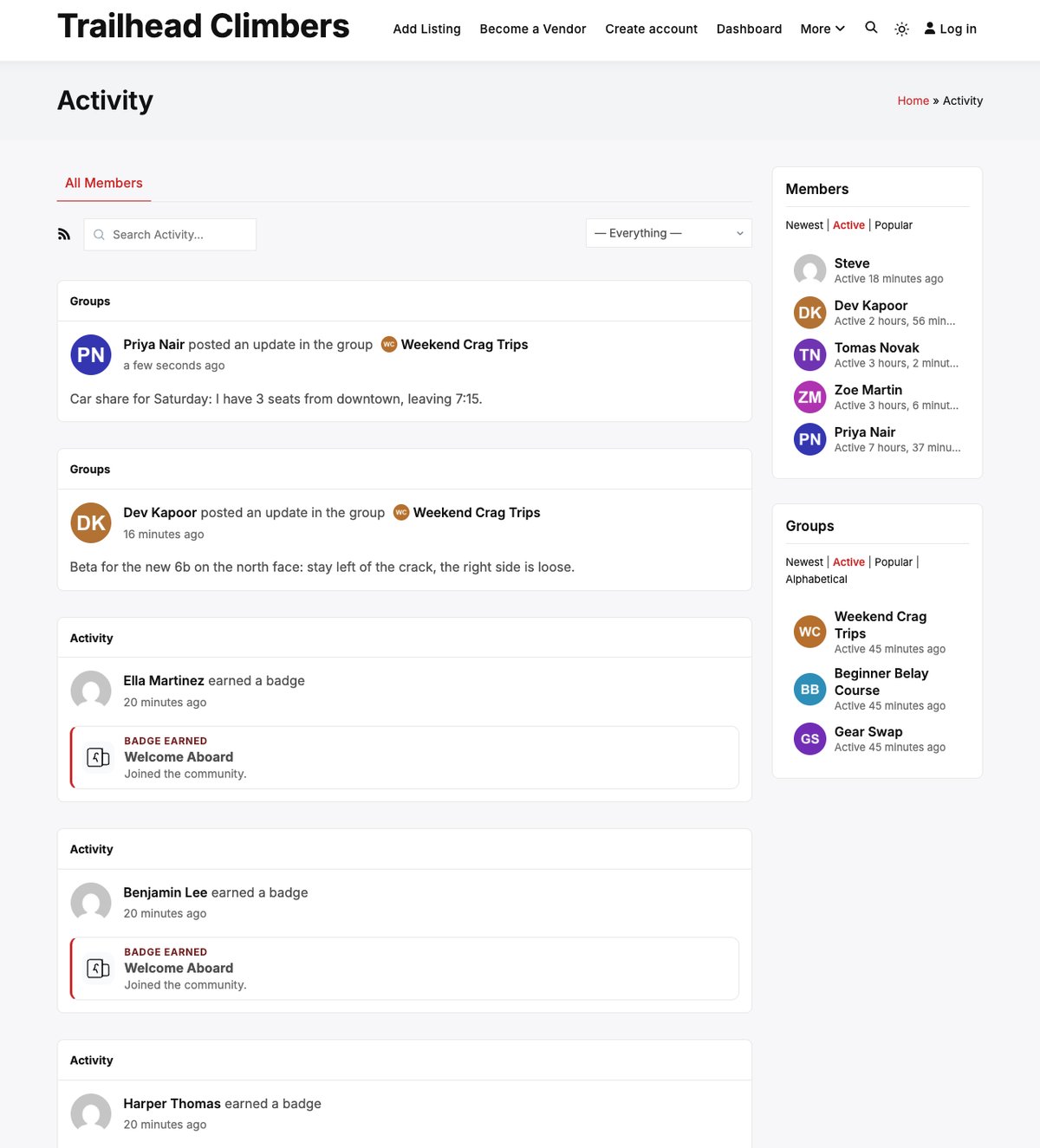
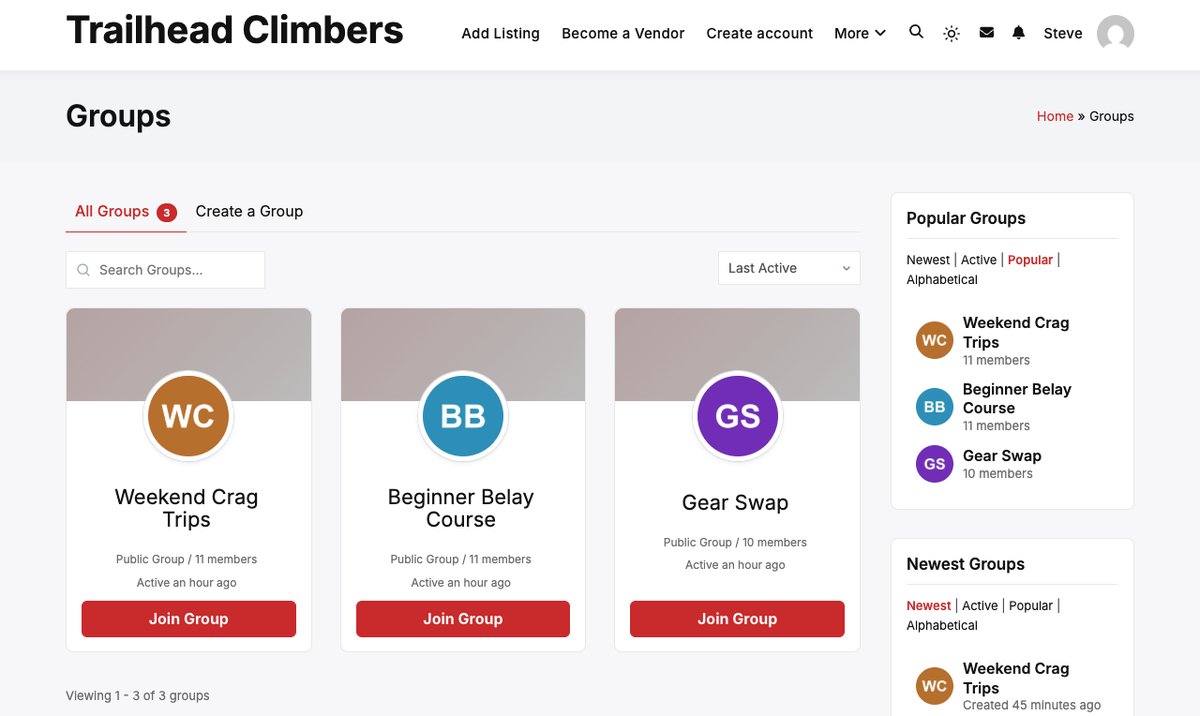
BuddyX is a free theme on WordPress.org with a paid Pro version. The directory shows version 5.2.0, updated 10 November 2026, requiring WordPress 6.5 and PHP 8.1. Its description calls it a hybrid theme: classic templates plus theme.json design tokens you can edit in the Site Editor, with BuddyPress, WooCommerce and LearnDash compatibility. Its product page says BuddyPress and BuddyBoss are supported, and that Pro adds a header builder, dark mode, colour schemes and layouts for the free BuddyNext engine, WooCommerce and LearnDash.
Pricing as listed on the BuddyX free versus Pro page: Personal (1 site) $79 a year or $199 lifetime, Professional (5 sites) $119 or $299, Agency (unlimited sites) $199 or $499, with a 30-day money-back guarantee. If an annual licence lapses, the theme keeps working, and updates and support stop until you renew at 30% off. That is the same shape as BuddyBoss’s expiry rules, at a lower price, but it is not the same product: BuddyBoss Launch bundles Platform Pro features, and BuddyX Pro is a theme.
The real cons:
- It is small. 3,000+ active installs against 400,000 to 500,000 for the general-purpose themes means fewer third-party tutorials, fewer freelancers who know it and fewer forum answers.
- Some layouts you may want, such as profile and group header layouts and directory layout options, are Pro features according to our comparison page.
- Its 26 ratings are a small sample, and several of the reviews praise our own support. That is evidence about our team, not an independent test of the theme.
- Our team positions BuddyX around the BuddyNext engine now. BuddyPress and BuddyBoss work, but they are no longer the main path we test first.
If you are weighing BuddyX against staying on BuddyBoss, our earlier post on the BuddyBoss alternative: BuddyX and the Wbcom stack covers cost and migration at platform level, and the beginner’s guide for BuddyBoss users covers running BuddyX on the Platform.
2. Reign: also ours, built for bigger community sites
Reign is the other theme from our team. The pricing page lists $99 a year or $249 lifetime for one site, with a five-site plan at $149 a year. The store page showed version 8.0.8, updated October 2026. The Reign site says it styles BuddyPress, BuddyBoss and PeepSo as well as our BuddyNext engine, and that BuddyBoss sites keep their data and only change theme. Treat that last line as the vendor’s claim; it matches BuddyBoss’s own statement that the Platform is theme-independent.
The cons: it is paid from the first day, with no free version to trial for long. It is not in the WordPress.org directory, so there is no public star rating to check. And it is more theme than a small group needs. If your community is a few hundred members and a forum, a lighter theme will do.
3. GeneratePress: fast and plain, with template work on you
GeneratePress has 500,000+ active installs and 1,428 ratings at 98%. The theme description centers on speed: it says a fresh install adds less than 10kb gzipped. It carries the BuddyPress tag in the directory. We searched the vendor’s site for BuddyPress and found nothing, so we cannot point you to vendor documentation for community layouts. Version 3.6.1 was last updated on 1 December 2025, almost a year ago on the day we checked, which is not alarming for a stable theme but is worth knowing.
Choose it if you want a clean base and are comfortable with child-theme template overrides for profiles and groups. Skip it if you want finished community layouts out of the box.
4. OceanWP: flexible, with more settings to learn
OceanWP has 400,000+ installs and a 98% rating from 5,721 ratings, with version 4.2.8 updated 26 October 2026. It also carries the BuddyPress tag. We searched the OceanWP documentation site for BuddyPress and found no matching page, so the same caveat applies: you own the community styling. A reviewer in September 2026 called it flexible and powerful but complicated to use once the site design gets involved.
What about other BuddyPress-tagged themes?
The directory’s BuddyPress tag also lists Customizr, with 30,000+ installs and a last update on 11 December 2024. We would not start a new community on a theme that has gone almost two years without an update. The tag cannot tell you that; the update date can.
What do users say, and what do we suggest?
These are ratings from the WordPress.org theme API read on 16 November 2026, plus reviews from the directory’s review pages.
| Theme | Ratings | 5-star share | What the reviews say |
|---|---|---|---|
| BuddyX | 26 | 25 of 26 five-star, one four-star | Praise for support and ease of use. Our own support is named in several, so discount it. |
| GeneratePress | 1,428 | 1,394 five-star | Praise for speed and tidy code. Newer complaints about paid plan changes and what happens after a licence lapses. |
| OceanWP | 5,721 | 5,571 five-star, 50 one-star | Praise for flexibility and fast support. One reviewer calls it powerful but complicated. |
Two GeneratePress reviews matter for this topic. On 13 September 2026, a user gave three stars after their annual plan expired and they did not renew: customizing their sites became harder, and a footer credit changed back to the vendor’s text without notice. They raised the rating a star after a reply from the team. On 8 November 2026, a long-time user gave two stars, complaining that a premium plan became bundled and more expensive. These are single reports, not a pattern, but both touch the same worry as the BuddyBoss expiry rules: what you lose when a subscription ends.
For BuddyBoss Theme itself, there is no directory rating, because it is not in the WordPress.org directory. The pricing page shows two score badges (4.7 and 4.5 out of 5) without naming the review sites in the text we read, so we are not quoting them as reviews.
Our suggestion
- Small or new community, tight budget: try the free BuddyX on a staging copy, and OceanWP or GeneratePress if you want the largest user base. Budget time for community template work on the general-purpose themes.
- Community plus courses, shop or marketplace: test BuddyX Pro and Reign side by side on staging. Both are ours, so run your own checks and read our cons above.
- Existing BuddyBoss site that works and is paid up: there may be no reason to move. Renew only if the theme and the Platform Pro features are things you use.
- Existing BuddyBoss site that is unhappy with renewal pricing: keep the free Platform, replace the theme, and price the template overrides you will need.
What does each option cost over three years?
Here is the arithmetic from the prices listed above, for one production site. It compares licence fees only, not hosting, plugins or the time you spend on template work, and the products are not equal in scope: BuddyBoss Launch bundles Platform Pro features, while the others are themes.
| Option | Year 1 | Years 2 and 3 | Three-year total |
|---|---|---|---|
| BuddyBoss Launch (theme included) | $199 | $399 a year | $997 |
| BuddyX Pro Personal, annual | $79 | about $55 a year (30% off renewal) | about $190 |
| BuddyX Pro Personal, lifetime | $199 | $0 | $199 |
| Reign, annual | $99 | not stated on the pages we read; $99 if unchanged | $297 if renewals match |
| Reign, lifetime | $249 | $0 | $249 |
| GeneratePress or OceanWP free versions | $0 | $0 | $0 plus your template work |
The free row is not free in practice. If you need profile layouts, group headers and a polished directory, someone builds those with child-theme overrides, and that is hours of work you either do or pay for. Price your own hours before you decide that $0 is the cheapest option.
How do you avoid theme lock-in?
Lock-in has little to do with the theme’s name. It comes from where your community’s features and customizations live.
- Keep features in plugins, not the theme. Profiles, groups, messaging and membership rules should survive a theme change. Check that a theme does not ship them as its own shortcodes or custom post types.
- Read the expiry rule before you buy. BuddyBoss: updates and support stop, and you cannot reactivate. BuddyX Pro: the theme keeps working, updates and support stop, renewal at 30% off. Free themes: no expiry at all.
- Customize in a child theme only. BuddyBoss’s documentation says the same, and its theme installation guide has you activate the child theme to preserve changes through updates.
- Keep an override list. Every template you copy is a file you maintain.
A minimal child theme with only the overrides you need looks like this:
wp-content/themes/my-child-theme/
  style.css
  functions.php
  buddypress/
    members/single/home.php   (copy only files you change)
How do you keep a community site fast after switching?
The theme is rarely the whole story. BuddyBoss’s performance guide (updated 5 July 2025) says community sites grow heavier as members and interactions grow, and recommends a VPS or cloud host over shared hosting, a persistent object cache such as Redis, compressed images and minified assets, and removing unused plugins. Those points apply to any BuddyPress or Platform site, whichever theme you pick.
When you compare themes on staging, measure the same pages each time: the activity feed, a long member directory and a busy group. A theme that is quick on a blank homepage can still be slow on a feed with real data. We did not benchmark these themes against one another for this guide, and a number from a demo site tells you little about yours.
How do you switch themes without breaking the site?
- Copy the live site to staging. BuddyBoss’s documentation says staging domains with keywords such as
.test,.dev,staging.,localhostor.localdo not need a licence key for the theme and Platform Pro. - Write down the current theme options, menus, widget areas and any child-theme overrides.
- Activate the new theme on staging and open the main member pages, group pages, messages, registration and activation.
- Compare every page against the live site, on desktop and a phone.
- Rebuild menus and widgets, then redo only the overrides you still need.
- Switch on a quiet day, with a backup taken first.
Common mistakes people report
These come from vendor documentation and the public WordPress.org forums. We paraphrased each and dated it. They are individual reports, so use them as a checklist, not a measure of frequency.
1. Using a theme without modern BuddyPress templates
BuddyBoss’s theme compatibility page (updated 5 May 2025) says themes without the Nouveau template structure can misplace or omit community components. Test the member, group and registration screens before committing.
2. Editing the parent theme directly
The same page says a theme update can overwrite your customizations, and recommends a child theme for any template or CSS override.
3. Letting a licence lapse without knowing what stops
BuddyBoss’s expiry article (24 October 2025) lists what ends, and the GeneratePress review from 13 September 2026 shows a user finding changes after their plan ended. Read the expiry rule before you buy, and set a renewal reminder.
4. Running a busy community on shared hosting
BuddyBoss’s performance guide (5 July 2025) says shared hosting can slow social communities significantly as activity grows. A new theme will not fix a hosting limit.
5. Carrying many template overrides
BuddyBoss’s WooCommerce template notice article (undated on the page) says outdated template warnings can appear in the dashboard after a WooCommerce update, sometimes more than once a month, and that they generally do not affect functionality. Every override is a maintenance item, whichever theme you use.
6. Updating BuddyPress without a staging test
In February 2024, a user reported empty member pages after upgrading to BuddyPress 12, and a later reply in the thread said it had not been resolved. Major community-plugin updates deserve the same staging test as a theme switch.
7. Trusting a directory tag as a promise
The BuddyPress tag on WordPress.org is a label the author chose. Neither GeneratePress’s nor OceanWP’s directory description mentions BuddyPress, and we found no BuddyPress page on either vendor’s site. Verify on your own staging site.
FAQ
Do I need the BuddyBoss Platform to use the BuddyBoss Theme?
BuddyBoss describes the theme as designed to work with the Platform, and its installation guide frames them as a pair. We did not test the theme without the Platform, so plan on using both.
Can I keep BuddyBoss Platform and change only the theme?
Yes. BuddyBoss’s documentation says the Platform works with any WordPress theme, with the caveat that full compatibility needs Nouveau template support, and that BuddyBoss Support does not fix third-party theme customizations.
Is the BuddyBoss Platform free?
The Platform plugin is free to download according to BuddyBoss’s Platform page. The theme is part of the Launch and Scale plans, priced at $199 and $349 for the first year on the pricing page we read on 16 November 2026.
What happens to my site if my BuddyBoss subscription expires?
The licence becomes inactive, and updates, fixes and support stop, per BuddyBoss’s expiry article. It cannot be reactivated; you buy a new licence.
Is BuddyX free?
Yes, the theme is free on WordPress.org. BuddyX Pro starts at $79 a year per the pricing page. Some layouts are Pro-only.
Which theme is the safest choice?
There is no single answer. A free, widely used theme costs nothing to try and has no expiry rule. A community theme saves template work. Test two of them on staging with your real data.
Where to go next
Pick two themes, build a staging copy of your community, and run the member, group and feed pages through both before you spend anything. If BuddyX is one of your two, start with the free version from the WordPress.org theme page and see our free versus Pro comparison to check what Pro adds. If you are also weighing a different community engine, our post on BuddyBoss, FluentCommunity and BuddyNext covers that decision, and BuddyNext is our own option there. For a Facebook-style layout on a budget, see the BuddyPress Facebook theme guide.