

If you’re seeking a way to streamline and manage your activity planner, the BuddyPress Schedule Activity plugin is a game-changer. This plugin is tailored to assist in planning and scheduling activities, making it more manageable to handle your community’s content delivery. Whether you’re an administrator of a large community or managing a smaller group, this plugin provides the tools you need to keep your content organized and timely. With features designed to save time, improve efficiency, and optimize post timing, the BuddyPress Schedule Activity plugin ensures that your community remains active and engaged without the constant need for manual updates. By automating your posting schedule and providing a clean, intuitive interface, this plugin takes the hassle out of content management, allowing you to focus on more important aspects of your community.

Quick Links
Save Time with Advanced Scheduling
A standout feature of the BuddyPress Schedule Activity plugin is its ability to schedule posts in advance. By planning your content ahead of time, you can free up your schedule for other important tasks, enhancing your productivity. This automation ensures that your content is delivered consistently and punctually, without the need for constant manual input. Whether you have a busy week ahead or want to ensure a steady flow of posts during holidays or weekends, the scheduling feature allows you to maintain an active presence in your community. This not only helps in keeping your audience engaged but also reduces the stress and workload associated with manual posting.
Efficient Content Management
Managing content effectively is key to maintaining a steady flow of posts and avoiding last-minute rushes. The BuddyPress Schedule Activity plugin offers a well-organized content calendar that keeps you on track and helps prevent any gaps in your posting schedule. With this tool, you can plan your posts well in advance, set deadlines, and ensure that your content pipeline remains steady and organized. This structured approach not only makes content management more efficient but also reduces the stress associated with impromptu posting. By providing a clear overview of your upcoming activities, the plugin enables you to stay ahead of your content strategy and maintain a consistent presence in your community.
Optimal Post Timing
Timing is everything when it comes to engaging your audience. The BuddyPress Schedule Activity plugin allows you to schedule posts to go live at optimal times, ensuring your content reaches your audience when they are most active. By analyzing when your audience is most likely to engage, you can strategically plan your posts to maximize visibility and interaction. This can significantly boost the reach and impact of your content, leading to higher engagement rates and more meaningful interactions. With this feature, you can take the guesswork out of posting times and ensure that your messages hit the mark every time.
Also Read: 9 Top Trending AI Business Name Generators In 2024
Key Features
1. Scheduling Activities: The plugin lets you create a detailed schedule of activities in advance, ensuring consistent and timely content delivery. This is crucial for keeping your community engaged.
2. Viewing Scheduled Activities: Members can view and manage their scheduled activities directly from their BuddyPress profile. This feature provides transparency and allows for easy adjustments as needed.
3. Streamlined Interface: With a clean and intuitive interface, the BuddyPress Schedule Activity plugin makes it easy to schedule posts, select dates and times, and manage your content calendar. Its user-friendly design makes it accessible for both beginners and experienced users.
Installation and Usage
Step-by-Step Installation
1. Download the Plugin
- Go to the BuddyPress Schedule Activity plugin page and download the plugin zip file.
2. Upload the Plugin
- In your WordPress admin dashboard, go to Plugins > Add New and click the
Upload Plugin button. Select the downloaded zip file and click
Install Now.
3. Activate the Plugin
- Once the plugin is installed, click the Activate Plugin button to start using it.
How to Use the Plugin to Schedule Activities?
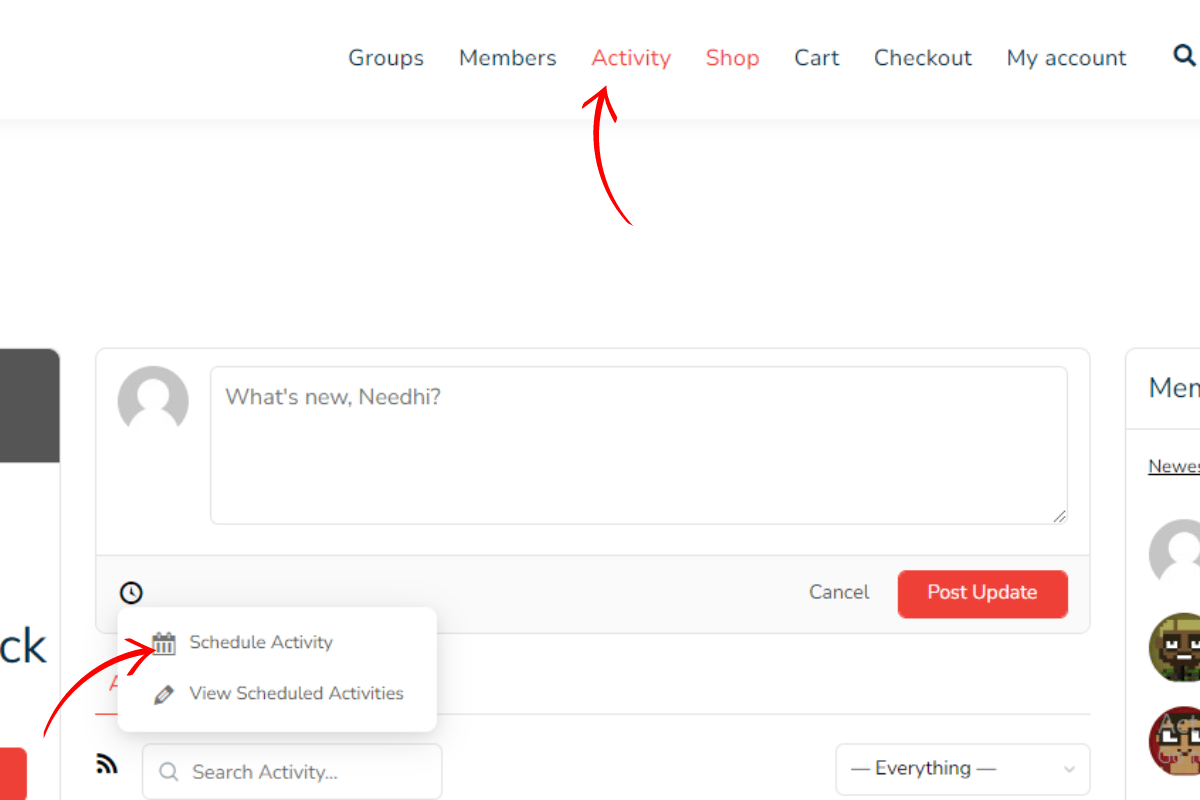
1. Create a New Activity
- In your WordPress admin dashboard, go to the Activity menu.
- Click the Schedule button on the left-hand side in the activity section to create a new activity.
2. Schedule the Activity
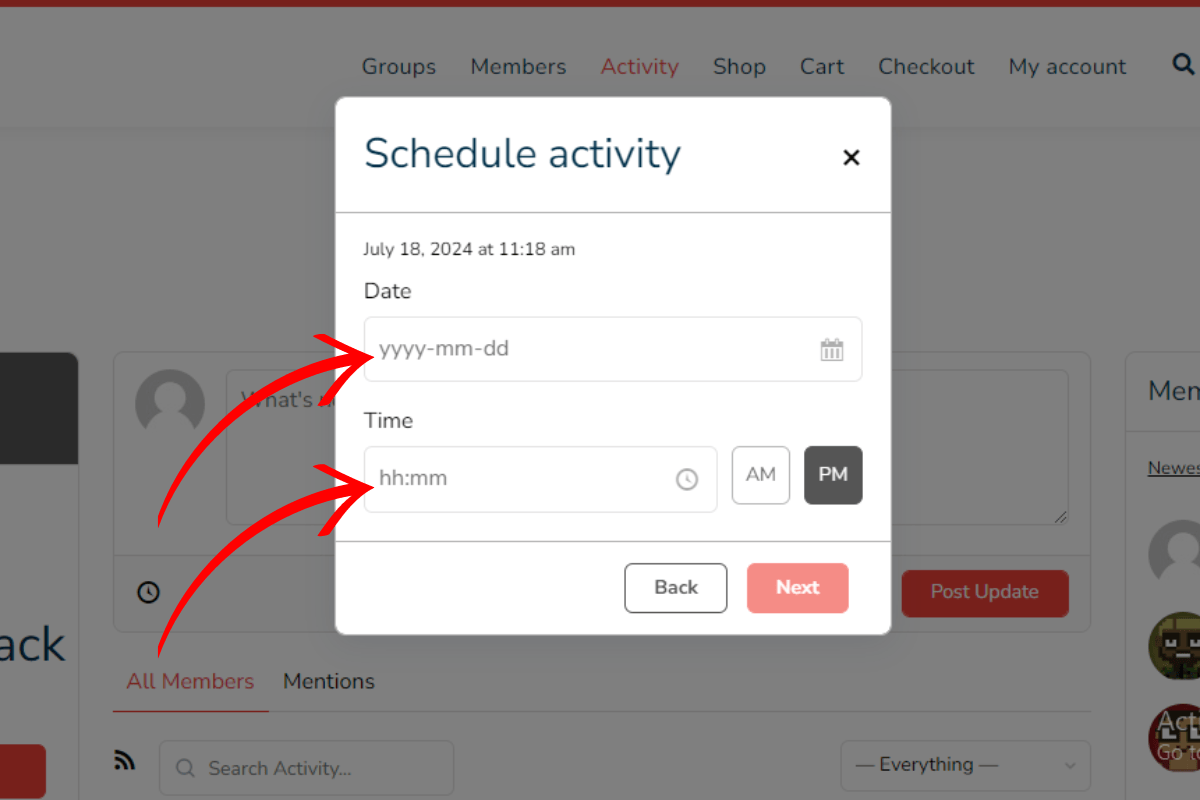
- In the activity creation screen, you will see an option to schedule the activity.
- Select the desired date and time for the activity to be posted.
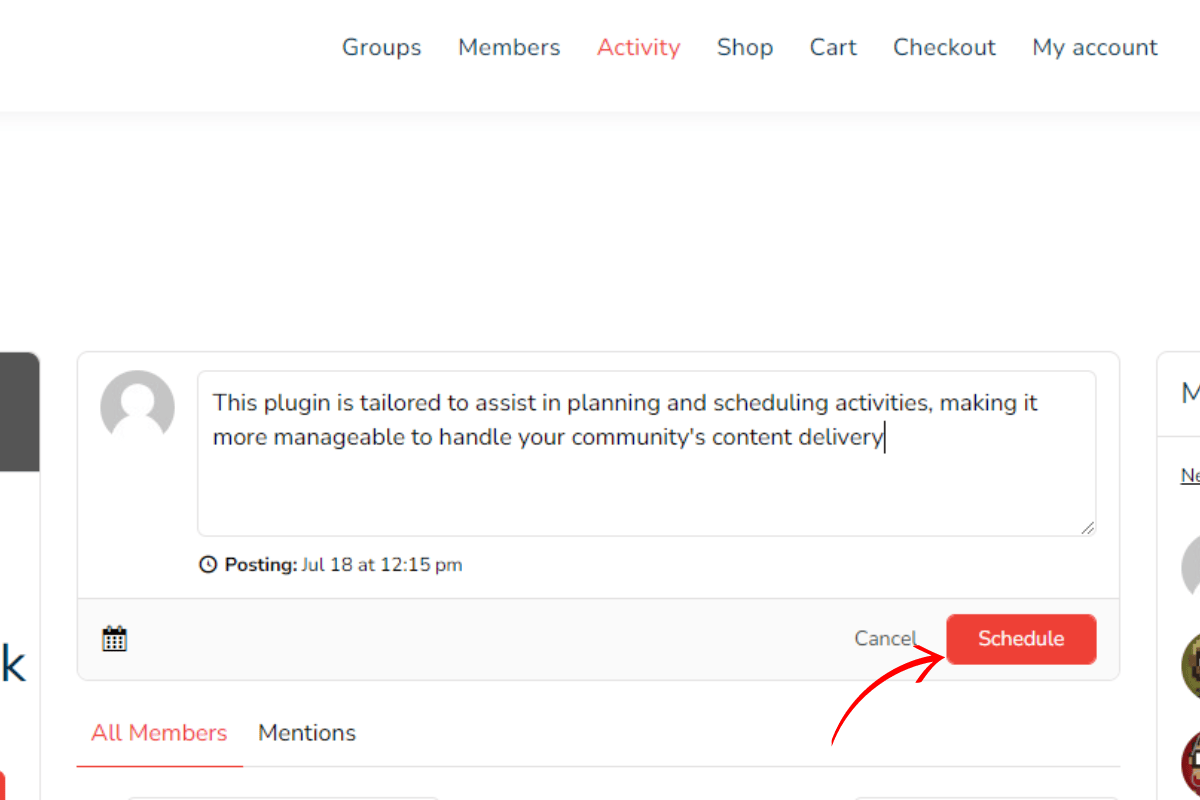
- Fill in the activity content and any other necessary details.
3. Save and Publish
- Once you have scheduled the activity and filled in the necessary details, click the Schedule button.
- The activity will now be scheduled to post at the specified date and time.
5. View and Manage Scheduled Activities

- Click the Activity button to view and manage your scheduled activities.
- You can delete activities as needed.
Conclusion
The BuddyPress Schedule Activity plugin is a must-have for anyone looking to simplify their content planning and scheduling. Its advanced scheduling capabilities allow users to plan posts in advance, ensuring a consistent content flow and freeing up time for other tasks. Efficient content management features provide a well-organized calendar, avoiding last-minute rushes and maintaining a steady posting schedule. The optimal post timing feature ensures that posts go live when the audience is most active, maximizing engagement and reach. With a user-friendly interface, the plugin is accessible for both beginners and experienced users, making it an invaluable tool for maintaining an active and engaged online community.
Interesting Reads:
Maximizing Your WordPress Site: Top Marketing Plugins to Boost Engagement

