BuddyX Now Has a Complete Media Platform: Introducing WPMediaVerse

BuddyX has always been about building real communities on WordPress. Profiles, activity streams, groups, messaging, member directories, BuddyX handles all of it with a design that actually looks modern. But if you have been running a BuddyX-powered community for any length of time, you already know what is missing.
Media.
Not “attach an image to a post” media. Real media sharing. Albums. Collections. Privacy controls that understand BuddyPress relationships. A lightbox that does not look like it was designed in 2014. Reactions beyond a like button. Stories. An activity feed where visual content feels native rather than bolted on.
Every community platform outside WordPress figured this out years ago. Discord, Circle, Mighty Networks, Skool, they all ship rich media sharing out of the box. BuddyPress communities have been stuck choosing between rtMedia (which has not had meaningful development in years), MediaPress (a niche solution with limited adoption), or BuddyBoss media (which requires abandoning BuddyX entirely and locking into their closed platform).
None of those options were good enough. So we built our own.
WPMediaVerse is a complete media platform for WordPress, built by the same team that builds BuddyX. It launches this Friday on wbcomdesigns.com. It is free. And it was designed from day one to fill the exact media gap that BuddyX communities have been living with.
The Media Gap Is Real
Instagram proved visual content drives engagement. Every community platform has rich media sharing. BuddyPress communities have been stuck with rtMedia or nothing, and rtMedia development has stalled while the rest of WordPress moved to blocks, Interactivity API, and modern patterns.
This is not an exaggeration. Look at any thriving online community, the ones with high daily active users, the ones where members keep coming back, and you will find that visual content is the backbone of engagement. Photo shares, album collections, visual stories, reaction-driven comment threads on images. Media is the engagement loop.
The average community member shares 3x more photos than text posts. Media is not a nice-to-have, it is the primary engagement driver. Without proper media handling, BuddyPress communities feel incomplete.
We have watched BuddyX users build impressive communities, professional networks, learning platforms, membership sites, creative collectives, and then hit this wall. They need members to share photos from events. They need groups to maintain shared albums. They need uploaded media to feel like a first-class citizen in the activity stream, not an afterthought attachment. They need privacy controls that understand that “friends only” means something specific in BuddyPress.
And until now, the answer was always: install rtMedia and hope it works with your theme, or accept that media sharing will be basic.
That changes this Friday.
Why BuddyX Needed Its Own Media Solution
We did not set out to build a media plugin because we thought it would be fun. We built it because every alternative created problems for BuddyX users.
rtMedia Has Stalled
rtMedia was groundbreaking when it launched. It gave BuddyPress communities media uploads, albums, and activity integration at a time when nothing else existed. But WordPress has moved forward dramatically, block editor, Interactivity API, modern REST patterns, PHP 8.x standards, and rtMedia has not kept pace. The last meaningful architectural update was years ago. It still relies on legacy patterns. It does not use custom database tables for performance. It has no REST API worth mentioning. There is no AI moderation. Privacy controls are basic. Signed URLs for protected content do not exist.
Worse, rtMedia was not designed with BuddyX in mind. Every BuddyX user who installs rtMedia deals with styling conflicts. The lightbox clashes. The upload forms do not match. The media tabs on profiles look like they belong to a different theme. You end up writing custom CSS overrides just to make things look coherent, and even then, dark mode breaks.
BuddyBoss Locks You In
BuddyBoss has solid media features, but they come with a catch: you have to use BuddyBoss Platform. That means abandoning BuddyPress, abandoning BuddyX, and locking your entire community into a proprietary fork. If you chose BuddyX because you value open-source BuddyPress and a theme that stays current with WordPress standards, BuddyBoss media is not an option, it is a platform migration.
MediaPress Stayed Niche
MediaPress took a different approach and earned respect for it, but it never achieved the adoption or ecosystem support that community builders need. Limited documentation, limited integrations, limited block editor support. It works, but it was never going to become the standard media solution for BuddyPress communities.
Same Team, Same Design System
WPMediaVerse is built by the same people who build BuddyX. This matters more than it might seem. We use the same design token system. WPMediaVerse CSS custom properties (--mvs-*) inherit directly from BuddyX brand colors, typography, spacing, and dark mode settings. There are zero styling conflicts because there is nothing to conflict, the media components were designed inside the same design system as your BuddyX community.
This is the same approach we took with Jetonomy for forums and Q&A. A shared design token bridge means every product we build for BuddyX looks and feels like it belongs. No custom CSS required. Dark mode works. Responsive breakpoints match. Typography scales consistently.
What WPMediaVerse Brings to BuddyX
WPMediaVerse is not a media attachment plugin. It is a complete media platform with its own social layer, and it integrates deeply with BuddyPress when BuddyPress is present.
Deep BuddyPress Integration
When WPMediaVerse detects BuddyPress, it activates a full set of integrations that make media feel native to your community:
Profile Media Tab, Every member gets a media tab on their BuddyPress profile at /members/{username}/media/. This is not an iframe or an embedded shortcode. It is a proper BuddyPress profile tab that respects your navigation structure, your theme styling, and your member privacy settings. Members can browse their uploads, albums, collections, and favorites directly from their profile.
Group Media Tab, Every BuddyPress group gets a media tab at /groups/{slug}/media/. Group admins control whether media uploads are open to all members or restricted. Group media respects group privacy, private group media stays private, hidden group media stays hidden. Members can create shared albums within groups, and group activity shows media uploads inline.
Activity Stream Media, When a member uploads media, it appears in the BuddyPress activity stream as a rich media post, not a text link, not a thumbnail attachment, but a proper visual post with the Instagram-style lightbox built in. Click any image in the activity stream and it opens in a fullscreen lightbox with reactions, comments, sharing, and navigation between items.
BP Notifications, When someone reacts to your photo, comments on your media, mentions you in a media comment, or shares your upload, the notification goes through BuddyPress notifications. No separate notification system. No notification fatigue from two different notification channels. Everything flows through the notification system your members already check.
Activity Image Lightbox, This one deserves extra attention. Every image posted to the BuddyPress activity stream, whether uploaded through WPMediaVerse or posted through regular activity updates, gets the Instagram-style lightbox treatment. Swipe between images. React with any of the six reaction types. Comment without leaving the lightbox. Share directly. This single feature transforms how activity streams feel.
Standalone Social Layer
Here is what makes WPMediaVerse different from every other BuddyPress media plugin: it works without BuddyPress too. If you run BuddyX without BuddyPress (yes, some sites do), or if you run a standard WordPress site, WPMediaVerse still gives you a complete media platform with its own social features.
User uploads with drag-and-drop. Albums and collections. Six reaction types (like, love, laugh, wow, sad, angry, the full emotional range). Threaded comments with an edit window. Favorites and bookmarks. @mentions in comments. Follow/unfollow between users. Direct messaging around shared media. Stories that expire. A unified activity feed.
All of this works standalone. All of it gets enhanced when BuddyPress is present.
The BuddyPress Bridge Pattern
The architecture behind WPMediaVerse is something we are proud of, and it matters for anyone evaluating whether this will work for their specific setup. We call it the bridge pattern.
Every social service in WPMediaVerse, follows, notifications, activity, messaging, is built as a standalone service first. Follows work on their own. Notifications work on their own. The activity feed works on their own. Then, a bridge layer detects BuddyPress and enhances each service.
Follows sync to BuddyPress Friends. When a user follows someone in WPMediaVerse, the bridge checks if BuddyPress is active. If it is, the follow relationship syncs to BuddyPress friends. Unfollow syncs to unfriend. The two systems stay in sync without duplicating data.
Notifications sync to BuddyPress Notifications. WPMediaVerse generates notifications for reactions, comments, mentions, shares, follows, and DMs. When BuddyPress is active, these notifications route through BP’s notification system instead of WPMediaVerse’s standalone system. Your members see everything in one place.
Activity reads from BuddyPress Activity. When BuddyPress is active, the WPMediaVerse activity feed pulls from the BuddyPress activity stream rather than maintaining a separate stream. Media uploads post to BP activity. Media reactions and comments appear as BP activity. The unified feed shows everything.
Why does this matter? Because it means WPMediaVerse never fights with BuddyPress. It does not try to replace BP’s social layer. It extends it. And if you ever deactivate BuddyPress, WPMediaVerse keeps working with its own standalone social services. No data loss, no broken features.
This is the same bridge pattern we use in Jetonomy. Build the service standalone, enhance it when BuddyPress is present. It is the cleanest way to integrate with BuddyPress without creating a hard dependency that breaks when configurations change.
Social Features That Communities Actually Need
We studied what makes media sharing sticky on platforms like Instagram, Pinterest, and Flickr. Then we built the features that actually drive engagement, not vanity features that look good in a feature list but nobody uses.
Six Reaction Types
A single “like” button is not enough for visual content. When someone shares a photo of their kid’s graduation, “like” does not capture the response. WPMediaVerse ships with six reaction types: like, love, laugh, wow, sad, and angry. Members can react to any media item, and reaction counts display on the media card. This mirrors what every major social platform has learned, emotional range in reactions drives more engagement than binary like/dislike.
Comments With an Edit Window
Media comments support threading, @mentions, and, critically, an edit window. Members can edit their comments within a configurable time period after posting. This reduces the “I made a typo” delete-and-repost cycle and keeps comment threads cleaner. After the edit window closes, comments are locked.
Favorites and Collections
Members can favorite any media item and organize favorites into collections. Collections are like Pinterest boards, curated sets of media organized by topic, project, event, or any other grouping that makes sense. Collections can be public or private, and they support cover images and descriptions.
@Mentions in Media Comments
Type @ and start typing a username. WPMediaVerse autocompletes from your community’s member list. The mentioned user gets a notification (through BuddyPress notifications if BP is active, through WPMediaVerse’s standalone system if not). This is table stakes for community engagement but missing from most WordPress media solutions.
Follows
Members can follow other members to see their media uploads in their personal feed. When BuddyPress is active, follows sync to BP friends as described above. When BP is not active, follows work as a standalone social graph. The follow count displays on member profiles.
Direct Messaging
Members can send direct messages to other members in the context of shared media. “Hey, can I use this photo for our group project?” happens naturally when DM is available right next to the media item. When BuddyPress is active, DMs route through BP messaging. When BP is not active, WPMediaVerse provides its own messaging.
Stories
Ephemeral visual content that expires after a configurable period. Members post stories, photos or short videos, that appear at the top of the activity feed in the familiar stories carousel. Stories drive daily engagement because they create urgency: see it now or miss it. For communities running events, workshops, or daily challenges, stories are transformative.
Activity Feed
A unified feed that shows media uploads, reactions, comments, shares, follows, and stories from the members you follow. When BuddyPress is active, this merges with the BP activity stream. When BP is not active, it works as a standalone social feed. Either way, your members get a chronological view of all media activity in the community.
AI Moderation: Stop Reviewing Every Upload Manually
If you run a community with media uploads, you know the moderation burden. Every photo needs to be checked. Inappropriate content slips through. Manual review does not scale. You either spend hours moderating or you accept risk.
WPMediaVerse includes AI-powered moderation out of the box. When a member uploads media, the AI moderation system analyzes the content before it goes live. The free version integrates with OpenAI Vision API, which handles the vast majority of moderation needs: nudity detection, violence detection, hate symbol detection, and general content safety scoring.
You configure moderation thresholds, strict, moderate, or permissive, and the system handles the rest. Uploads that pass moderation go live immediately. Uploads that fail get flagged for manual review. Borderline cases can be auto-held or auto-published depending on your threshold settings.
This means most uploads require zero manual review. Your moderators only see the flagged content that the AI could not confidently classify. For communities with dozens or hundreds of daily uploads, this saves hours of moderation time every week.
The Pro version adds Google Cloud Vision and Amazon Rekognition for more advanced analysis, but the free OpenAI Vision integration handles the common cases that matter most.
Privacy Controls That Understand BuddyPress Relationships
Media privacy is not just “public or private.” In a BuddyPress community, privacy is relational. You want to share some photos with everyone. Some with just your friends. Some with just your group members. Some with nobody. And some with a custom list of specific people.
WPMediaVerse ships with six privacy levels:
- Public, Anyone can see it, including logged-out visitors. Good for community showcases, public galleries, marketing content.
- Members Only, Only logged-in community members can see it. The baseline privacy level for most community media. Keeps content behind the registration wall.
- Friends Only, Only your BuddyPress friends can see it. This maps directly to the BP friends relationship. If someone is your friend in BuddyPress, they see your friends-only media. If they are not, they do not. When someone unfriends you, they lose access immediately.
- Group Only, Only members of a specific BuddyPress group can see it. Perfect for project teams, study groups, departments, or any group that needs a shared media space that outsiders cannot access. When someone leaves the group, they lose access.
- Private, Only you can see it. Your personal media storage that nobody else can access. Useful for drafts, works-in-progress, or personal archives.
- Custom, You choose exactly which members can see it. Build a custom access list by searching and selecting individual members. This is the most flexible option for situations where none of the other levels fit, sharing event photos with attendees who are not all in the same group, for example.
Every privacy level is enforced at the REST API layer with signed URLs for protected content. This is not CSS-hidden or JavaScript-gated privacy. If a user does not have access, the API returns a 403, and the signed URL does not resolve. Protected media cannot be hotlinked, shared via direct URL, or accessed by inspecting network requests.
This is a fundamental difference from rtMedia, where privacy controls are basic and enforcement happens at the template layer rather than the API layer.
Why Not Just Fix rtMedia?
We considered it. We really did. Contributing to rtMedia or forking it and modernizing the codebase was on the table. But the deeper we looked, the clearer it became that the architectural foundation would not support what BuddyX communities need.
No custom database tables. rtMedia stores everything in WordPress post meta and options. This works at small scale but becomes a performance problem as media libraries grow. WPMediaVerse uses 23 custom database tables designed specifically for media operations, media items, albums, collections, reactions, comments, follows, notifications, activity, privacy permissions, AI moderation results. Queries are fast because the schema is designed for the access patterns that media platforms actually use.
No REST API. rtMedia predates the WordPress REST API. It uses admin-ajax for everything. WPMediaVerse exposes 58 REST API endpoints covering every operation, uploads, album management, reactions, comments, follows, privacy, moderation, search, and more. Every endpoint is authenticated, rate-limited, and documented. This means WPMediaVerse works with headless WordPress, mobile apps, third-party integrations, and any client that speaks REST.
No Interactivity API. rtMedia uses jQuery for all client-side interactions. WPMediaVerse is built on the WordPress Interactivity API for all dynamic features, lightbox, reactions, comments, infinite scroll, real-time updates. This is not a philosophical preference. The Interactivity API is how WordPress handles client-side interactivity going forward. Building on it means WPMediaVerse stays compatible with core WordPress as it evolves.
No AI moderation. rtMedia has no concept of automated content moderation. Every upload is either auto-approved or manually reviewed. In 2026, with AI vision APIs widely available and affordable, there is no reason to put this burden on human moderators.
No privacy beyond basic levels. rtMedia offers public, friends, and private. No group-level privacy, no custom access lists, no signed URLs, no API-level enforcement. For communities that need real privacy controls, professional networks, healthcare communities, educational platforms, this is a dealbreaker.
No signed URLs. Protected media in rtMedia is protected by PHP checks at the template level. The actual media files can be accessed via direct URL by anyone who knows or guesses the path. WPMediaVerse generates signed URLs with expiration times for all non-public media. The file is not accessible without a valid, unexpired signature.
Fixing these issues would require rewriting rtMedia from scratch. At that point, you are not fixing a plugin, you are building a new one. So we built a new one, designed from the ground up for modern WordPress and deep BuddyPress integration.
What Ships Free
WPMediaVerse launches this Friday as a free plugin with a feature set that covers the majority of community media needs:
- User media uploads with drag-and-drop, multi-file upload, and progress indicators
- Albums with cover images, descriptions, and privacy controls
- Collections for curating and organizing favorited media
- Stories with configurable expiration and a stories carousel
- Six reaction types on all media items
- Threaded comments with edit window and @mentions
- Favorites and bookmarks with collection organization
- Follow/unfollow between members with activity feed filtering
- Direct messaging around shared media
- Activity feed with media-first design
- BuddyPress integration, profile tabs, group tabs, activity stream media, BP notifications, lightbox on activity images
- Six privacy levels, public, members, friends, group, private, custom
- Signed URLs for protected media
- AI moderation via OpenAI Vision API
- 13 Gutenberg blocks built on the Interactivity API, media gallery, album grid, upload form, stories carousel, activity feed, member media, group media, collection grid, reaction display, comment thread, follow button, media search, and privacy selector
- 8 shortcodes for legacy theme support and page builder compatibility
- 58 REST API endpoints for headless and third-party integration
- 23 custom database tables for performance at scale
- Design token bridge with BuddyX, inherits brand colors, typography, spacing, and dark mode
- Responsive design from mobile to desktop
This is not a limited free version designed to push you toward Pro. It is a complete media platform that handles uploads, organization, social engagement, privacy, moderation, and BuddyPress integration.
What Pro Adds
For communities that need advanced capabilities, WPMediaVerse Pro adds features that go beyond the core platform:
Migration Tools
The biggest pain point for communities switching from existing media solutions. WPMediaVerse Pro includes dedicated migration tools for:
- rtMedia migration, imports all media items, albums, privacy settings, activity relationships, and user associations. Your existing media library transfers over with its organizational structure and privacy settings intact.
- MediaPress migration, imports galleries, media items, and user relationships. Maps MediaPress privacy levels to WPMediaVerse’s six-level system.
- BuddyBoss media migration, for communities moving from BuddyBoss Platform back to BuddyPress + BuddyX. Imports media, albums, groups media, and activity relationships.
Cloud Storage
Move media storage off your server to Amazon S3, Google Cloud Storage, or DigitalOcean Spaces. Reduces server disk usage, improves load times through CDN distribution, and scales storage independently from compute. Signed URLs work with cloud storage, protected media stays protected regardless of where the files are physically stored.
Advanced AI Moderation
Google Cloud Vision and Amazon Rekognition integration for more sophisticated content analysis. Multi-provider fallback so moderation stays active even if one API is down. Custom moderation rulesets for community-specific requirements.
Video Features
Video uploads with transcoding, adaptive streaming, thumbnail generation, and video-specific reactions and comments. Video is the fastest-growing content type in online communities, and Pro gives you the infrastructure to handle it without third-party video hosting.
Instagram Feed Layout
A masonry-style media feed that mirrors the Instagram explore page. Dynamically sized cards, infinite scroll, and smooth transitions. For communities where visual browsing is the primary use case, photography groups, design communities, fashion networks, this layout drives significantly more engagement than a standard grid.
Migrating From rtMedia
If your BuddyX community currently runs rtMedia, migration is straightforward. WPMediaVerse Pro includes a WP-CLI importer that handles the full migration:
Media items transfer with their original upload dates, descriptions, and file associations. The importer does not re-upload files, it creates WPMediaVerse records pointing to the existing media files on disk. No storage duplication.
Albums transfer with their structure, cover images, and member associations. Album privacy maps to WPMediaVerse’s privacy system, rtMedia public becomes WPMediaVerse public, rtMedia friends becomes WPMediaVerse friends, rtMedia private becomes WPMediaVerse private.
Privacy settings map from rtMedia’s three levels to WPMediaVerse’s six levels. The importer preserves existing privacy and never makes content more public than it was. Private stays private. Friends-only stays friends-only. Public stays public. After migration, you can take advantage of the additional privacy levels (members-only, group-only, custom) for new uploads.
Activity stream transforms update existing BuddyPress activity entries that referenced rtMedia to point to WPMediaVerse instead. The activity stream stays continuous, members do not lose their media history.
The WP-CLI interface means you can run the migration in a staging environment first, verify everything looks correct, and then run it in production. For large media libraries, the CLI importer supports batch processing with progress reporting so you can monitor the migration.
“ wp mediaverse migrate rtmedia --batch-size=100 --dry-run wp mediaverse migrate rtmedia --batch-size=100 “
The --dry-run flag lets you see exactly what will be migrated without making any changes. Run it first, review the report, then run the actual migration.
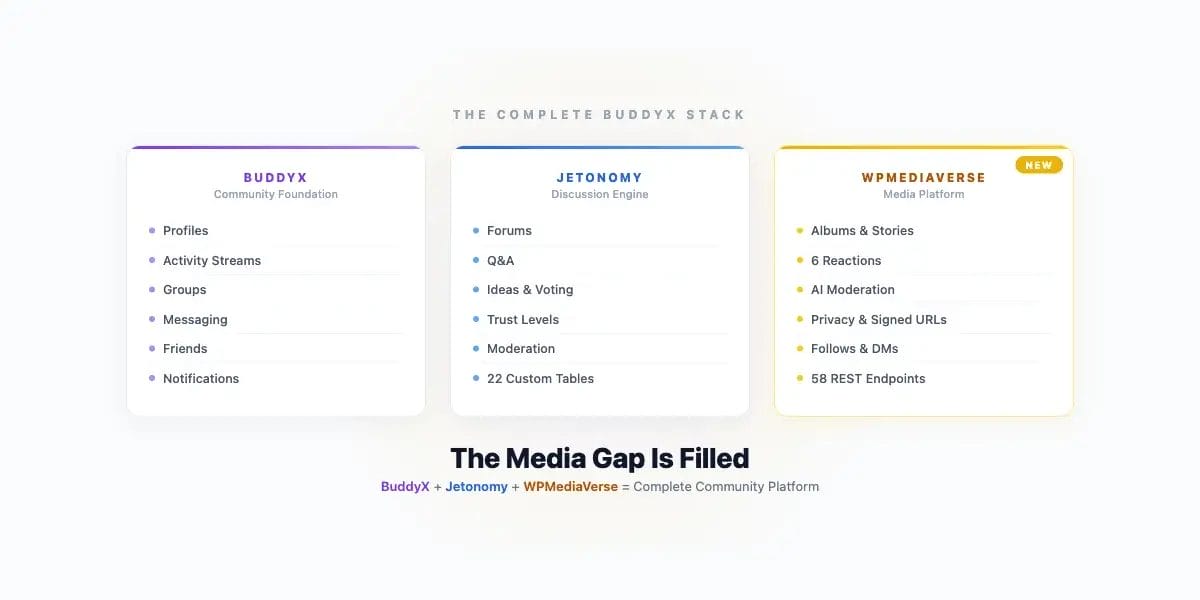
The Complete BuddyX Community Stack
With WPMediaVerse, the BuddyX ecosystem reaches a milestone we have been building toward for a long time.
BuddyX handles the community foundation, member profiles, activity streams, groups, messaging, member directories, notifications, friend connections. It is the social layer that makes your WordPress site feel like a community platform.
Jetonomy adds structured knowledge sharing, forums, Q&A with accepted answers, ideas and voting, knowledge bases. When your community needs to discuss, debate, ask questions, and build shared knowledge, Jetonomy provides the formats that make those conversations productive.
WPMediaVerse completes the picture with visual content, media uploads, albums, collections, stories, reactions, social engagement around visual content, AI moderation, and privacy controls that understand BuddyPress relationships.
Together, these three form a complete community platform:
| Need | Solution |
|---|---|
| Member profiles and directories | BuddyX + BuddyPress |
| Activity stream and social feed | BuddyX + BuddyPress |
| Groups and group management | BuddyX + BuddyPress |
| Private messaging | BuddyX + BuddyPress |
| Forums and discussions | Jetonomy |
| Q&A with accepted answers | Jetonomy |
| Ideas and feature voting | Jetonomy |
| Photo and media sharing | WPMediaVerse |
| Albums and collections | WPMediaVerse |
| Stories and ephemeral content | WPMediaVerse |
| Media social engagement | WPMediaVerse |
| AI content moderation | WPMediaVerse |
Every piece uses the same design token bridge. Every piece looks like it belongs. Dark mode works across everything. Responsive layouts are consistent. Typography scales the same way. And everything integrates through BuddyPress, notifications flow through one system, activity feeds merge, friend relationships are respected.
This is what BuddyX users have been asking for: a complete platform where they do not have to cobble together plugins from five different developers and then spend weeks fixing styling conflicts and integration gaps.
Use Cases
Photography and Creative Communities
Members share portfolios, get feedback through reactions and comments, organize work into albums, curate inspiration collections, and follow their favorite creators. Stories work as daily photo challenges. The Instagram-style lightbox makes browsing feel natural. Group media lets critique circles share work privately.
Learning Platforms and Course Communities
Students share project screenshots, lab photos, visual notes, and study materials. Group media keeps course materials organized per cohort. Instructors share visual resources with group-level privacy, only enrolled students see course media. AI moderation keeps content appropriate without instructor oversight.
Professional Networks
Members share conference photos, presentation slides, project screenshots, and work portfolios. Friends-only privacy lets members share personal content with trusted connections. Custom privacy lets you share specific media with project collaborators who are not in the same group. The professional context demands real privacy enforcement, signed URLs ensure protected content stays protected.
Membership Sites and Paid Communities
Members-only privacy creates a media experience that non-members cannot access, adding tangible value to membership. Groups can serve as tiers, basic members see basic group media, premium members see premium group media. AI moderation protects community standards without moderator overhead. Cloud storage in Pro keeps media costs predictable as the library grows.
Hobby and Interest Groups
Book clubs share reading nook photos. Gardening communities share seasonal progress. Fitness groups share workout screenshots and progress photos. Cooking communities share recipe results. The stories feature drives daily sharing, “what are you reading today” or “what did you cook tonight” become daily engagement rituals. Reactions beyond simple likes let members express genuine responses to shared content.
Event-Based Communities
Event organizers share event photos in dedicated albums. Attendees contribute their own photos to shared group albums. Privacy controls ensure event photos stay within the community. Collections let members curate their favorite moments. The activity feed captures the event timeline as it happens, with media, reactions, and comments creating a living record.
Technical Foundation
For developers and site administrators who want to understand what is under the hood:
13 Gutenberg blocks built on the WordPress Interactivity API. Every block is server-side rendered with client-side enhancement. No jQuery dependencies. No React bundle bloat. The Interactivity API handles reactivity, reactions update in real-time, comments appear without page reload, the lightbox navigates without route changes.
8 shortcodes for backward compatibility and page builder support. If you are using Elementor, Divi, or Beaver Builder, shortcodes drop in anywhere. They render the same components as the Gutenberg blocks with the same functionality.
58 REST API endpoints covering every operation. Upload media, manage albums, react, comment, follow, configure privacy, run moderation, search, filter, paginate. Every endpoint uses WordPress REST API authentication, supports both cookie and application password auth, and returns consistent JSON responses. Rate limiting protects against abuse. CORS headers are configurable for headless setups.
23 custom database tables designed for media-specific access patterns. Media items, albums, collections, reactions, comments, follows, notifications, activity, privacy permissions, moderation results, signed URL tokens, stories, DMs, mentions, shares, and more. Indexes are tuned for the queries that media platforms actually run, “show me this user’s public media sorted by date” is one indexed query, not a multi-join across WordPress post meta.
CSS custom properties bridge with BuddyX. All WPMediaVerse styling uses --mvs-* custom properties that inherit from BuddyX’s design tokens. Brand colors, font families, font sizes, spacing units, border radii, shadow definitions, and dark mode values all come from BuddyX. Change your BuddyX brand color and WPMediaVerse updates automatically. Toggle dark mode and WPMediaVerse matches. No separate theme settings to maintain.
Try It This Friday
WPMediaVerse launches this Friday on wbcomdesigns.com. The free version ships with everything described above, uploads, albums, collections, stories, reactions, comments, follows, DM, @mentions, shares, activity feed, BuddyPress integration, six-level privacy, signed URLs, AI moderation, 13 Gutenberg blocks, 8 shortcodes, 58 REST endpoints, and the BuddyX design token bridge.
If you are running a BuddyX community and you have been waiting for a media solution that actually fits, one that does not clash with your theme, does not lock you into a different platform, does not rely on stalled development, and does not treat BuddyPress integration as an afterthought, WPMediaVerse is what we have been building for you.
Install it. Upload some photos. Create an album. React to a friend’s media. Watch the activity stream come alive with visual content. See the lightbox open on activity images. Check that dark mode works without touching a single line of CSS.
This is the media platform that BuddyX communities have been missing. We are proud to finally ship it.
*WPMediaVerse is built by the Wbcom Designs team, the same team behind BuddyX, Jetonomy, and the BuddyPress plugin ecosystem. We build tools for BuddyPress communities because we believe WordPress deserves a community platform that competes with the closed alternatives.*