
Building an online community shouldn’t require a design degree. Yet for years, WordPress community builders have spent countless hours tweaking colors, adjusting layouts, and wrestling with settings just to achieve a professional look. Today, that changes forever.
This release isn’t just about new features. It’s about fundamentally reimagining how you build and customize your community. Whether you’re launching a brand new membership site or upgrading an existing community, version 5.0.0 delivers the tools you’ve been asking for, wrapped in an experience that respects your time.
The gap this release closes is a familiar one. A site owner picks BuddyX Pro because it handles BuddyPress, BuddyBoss, bbPress, and WooCommerce out of the box, then spends the next week fighting the Customizer to make the color palette look intentional instead of default. That mismatch between “powerful theme” and “still needs a designer” is exactly what 5.0.0 targets. Every feature below started from the same question: what is a non-designer actually trying to accomplish, and how many clicks does it currently take them to get there?
Below is the full breakdown of what shipped, what it replaces, and how to actually use each feature once you’ve updated.
One-Click Color Scheme Presets
Designer-Quality Results, Zero Effort
“Most community builders aren’t designers, and they shouldn’t have to be.”
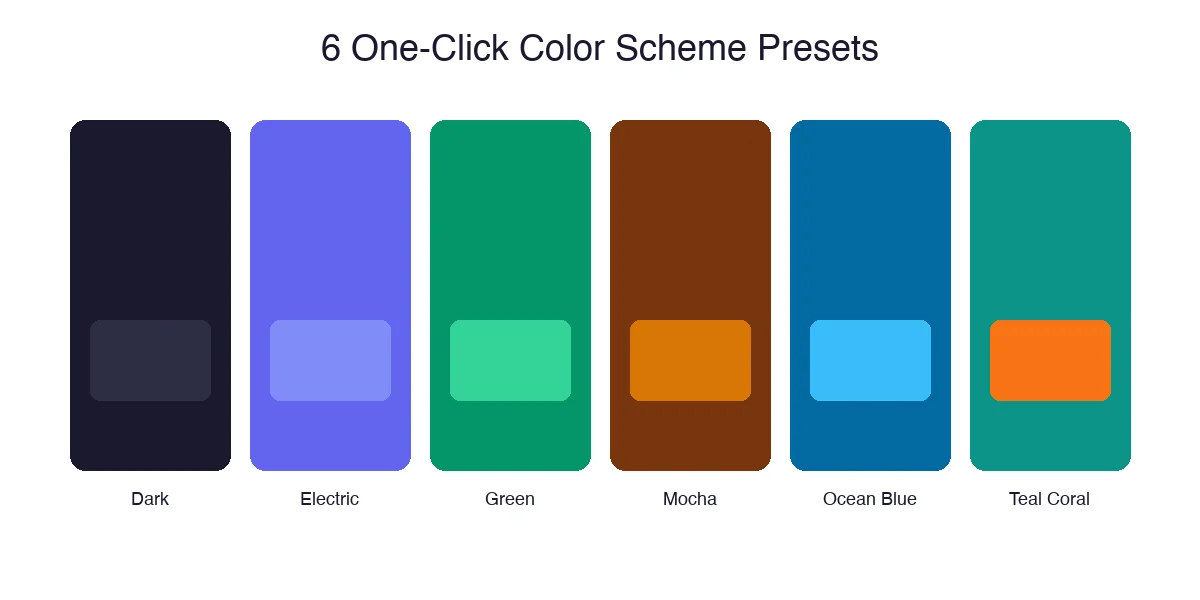
Choosing the right colors for your community is harder than it sounds. You need colors that work together, look professional, maintain accessibility, and reflect your brand’s personality. That’s why we’ve introduced One-Click Color Scheme Presets: six professionally crafted color palettes that instantly transform your entire community with a single click.
Dark
Sophisticated and modern, perfect for tech communities
Electric
Bold and energetic, ideal for creative groups
Green
Fresh and natural, great for wellness communities
Mocha
Warm and inviting, perfect for professional networks
Ocean Blue
Clean and trustworthy, excellent for educational platforms
Teal Coral
Vibrant and unique, stands out from the crowd
And here’s the best part: these presets are just starting points. Once applied, you can still customize any individual color to match your exact brand requirements. It’s the perfect balance between instant results and complete control.
Applying one takes three steps. Open the Customizer from Appearance, go to the new Color Presets panel, then click any of the six swatches to preview it live on your actual site before committing. Nothing saves until you click Publish, so you can click through all six presets against your real content and pick whichever one reads best with your logo and existing images. If none of the six is quite right, use a preset as your base and then adjust individual colors in the standard color controls underneath; the preset just sets the starting values instead of leaving you to guess at a palette from a blank slate.
Each preset was built around a specific type of community rather than a generic aesthetic. Dark suits developer and tech communities where members expect a lower-glare interface. Mocha and Ocean Blue lean toward the professional-network and education use cases where trust and readability matter more than visual excitement. Electric and Teal Coral exist for creative and hobbyist communities that want the site itself to feel less corporate. Green was tuned specifically for wellness and lifestyle communities where a calmer, more organic palette fits the subject matter better than a high-contrast theme would.
Block Patterns
Build Pages in Minutes, Not Hours
WordPress block patterns have revolutionized page building, and BuddyX Pro 5.0.0 fully embraces this power. We’ve created a collection of ready-to-use design patterns specifically optimized for community websites.
You’ll find the patterns in the block inserter under the Patterns tab, filtered to a BuddyX Pro category so they’re not buried among the dozens of generic core patterns WordPress ships by default. Drop one onto any page, and it arrives already carrying your active color preset and typography, so there’s no manual restyling step afterward. The initial set covers the sections most community sites rebuild over and over: homepage hero sections built around a clear call-to-action, pricing comparison tables for paid membership tiers, and FAQ layouts for the questions every new visitor asks before signing up. Later Pro releases have continued adding to this library, including patterns built specifically for course and learning-content pages.
Match your theme’s styling automatically: They inherit your color scheme and typography
Work perfectly with BuddyPress and BuddyBoss: Designed for community use cases
Stay fully responsive: Looks right on a widescreen monitor down to a phone screen
Remain completely customizable: Edit any element after insertion
Live Login Page Customization
First Impressions Matter
“Your login page is often the first touchpoint new members have with your community. A generic WordPress login screen doesn’t exactly scream ‘professional community.’”
Now you can design your login page in real-time, watching every change take effect instantly. This isn’t just a settings panel, it’s a visual design experience that shows you exactly what your members will see.
This matters more than it sounds like on paper. A default WordPress login screen is one of the few pages on a site that carries zero branding by default, and it’s often the page a lapsed member sees again after months away, right before they decide whether to stick around. Giving that page the same visual identity as the rest of the community, rather than leaving it as an unstyled form on a blank white background, closes a small but real trust gap. Split layouts with a background image work particularly well for communities built around a physical location, event, or visual hobby, where the image itself does part of the persuading before the member even types a password.
- Split layout options: Create stunning two-column designs with images
- Custom background images: Upload your own visuals or use solid colors
- Logo placement controls: Position your brand exactly where you want it
- Form styling options: Customize the login form to match your brand
- Welcome messages: Add custom text to greet your members
Performance That Powers Growth
Speed isn’t just a technical metric, it directly impacts your community’s success
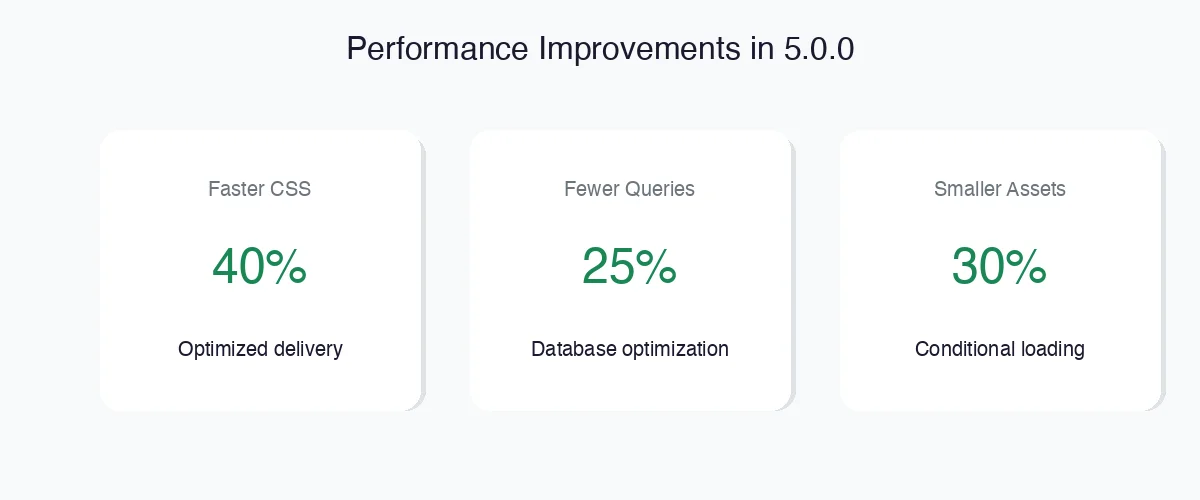
Optimized CSS Delivery
We’ve completely restructured how stylesheets load. Critical CSS now loads first, with non-essential styles deferred.
Database Query Optimization
Every database query has been analyzed and optimized. We’ve eliminated redundant queries and added strategic caching.
Smarter Asset Loading
Scripts and styles now load conditionally based on what’s actually needed on each page.
These optimizations directly improve your Core Web Vitals scores, the metrics Google uses to evaluate user experience. Better scores mean better rankings, which means more organic traffic to your community.
The database query work is the change most site owners won’t ever see directly but will feel indirectly. Community sites tend to accumulate query load faster than a typical brochure site because every activity feed, member directory, and group page is pulling live data rather than serving a cached static page. Reducing redundant queries on those specific templates has a bigger real-world effect on a busy community than the same optimization would on a five-page marketing site, since those are exactly the pages members hit repeatedly during a normal session.
Enhanced Dark Mode
Because Your Members Have Preferences
Dark mode isn’t a trend, it’s a fundamental user preference that’s here to stay. Studies show that over 80% of users prefer dark mode for at least some of their browsing, especially during evening hours.
Earlier versions of dark mode support in the theme worked, but colors sometimes felt like an inverted afterthought rather than a deliberately designed second theme. This release treats dark mode as a first-class design target rather than a filter applied on top of the light version. Every one of the six color presets was checked in both modes before shipping, so switching to dark mode doesn’t wash out your brand colors or push contrast below a readable level on body text, buttons, or form fields.
- Better toggle placement: Easy to find, easy to use
- Improved color consistency: Dark mode now looks intentional
- Extended compatibility: Works with BuddyPress, BuddyBoss, bbPress, WooCommerce
- Per-user preference saving: Choices persist across sessions
- System preference detection: Automatically match OS preference
- All presets dark-mode ready: Colors designed for both modes
Mobile-First Community Building
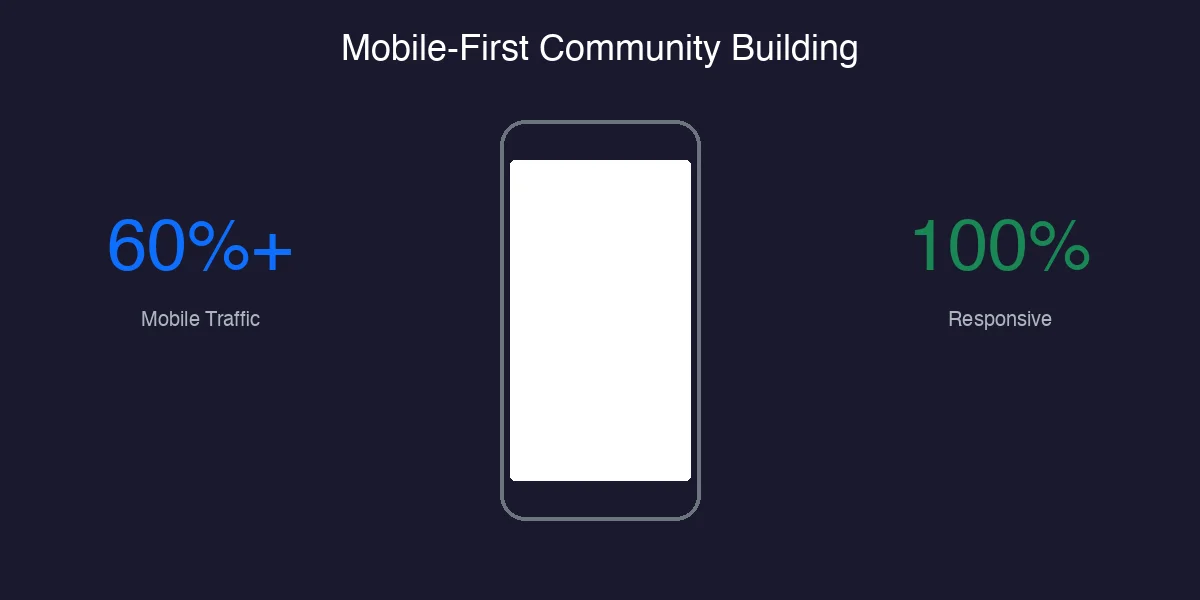
Refined cart panel: WooCommerce cart now works smoothly on all devices
Better mobile navigation: Menus that actually work on touch screens
Improved off-canvas filters: Filter panels that slide in cleanly
Responsive member profiles: Headers and buttons align correctly
These are the kind of fixes that rarely show up in a highlight reel but matter constantly in daily use. Filter sidebars that behave correctly on a desktop monitor have a well-known tendency to overlap content or resist closing on a touchscreen once member directories get busy, and a mini-cart that renders slightly off-screen on a smaller phone is exactly the kind of friction that quietly costs a WooCommerce-enabled community sales. Fixing both at the theme level means individual site owners don’t need custom CSS patches to work around them.
Under the Hood
Stability, Compatibility & Security
- Customizer reliability: Settings now save properly every time
- BuddyBoss Platform compatibility: Full support for the latest versions
- bbPress integration: Forums work seamlessly with all theme features
- LearnDash compatibility: E-learning features integrate smoothly
- WooCommerce enhancements: Shop pages look and work better than ever
- Enhanced security: Multiple security hardening improvements
None of this is glamorous compared to a new color system, but it’s the part of a release that determines whether the visible features actually hold up on a real site. The Customizer reliability fix in particular addressed a specific bug pattern where certain setting combinations wouldn’t persist correctly on save, which is the kind of issue that erodes trust in a theme fast even when it only affects a small percentage of configurations. Compatibility testing against BuddyBoss Platform, bbPress, LearnDash, and WooCommerce was run as a full pass rather than spot-checked, since community sites frequently run three or four of these plugins together rather than just one.
What’s Coming Next
A Glimpse at the Roadmap
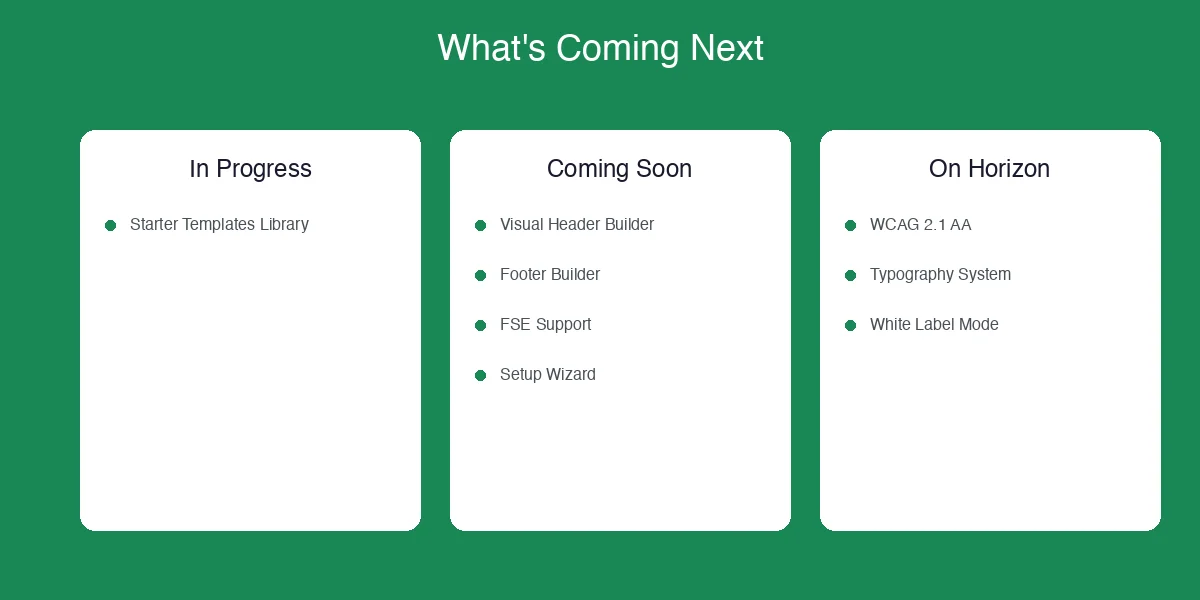
Currently In Progress
- Starter Templates Library: Complete, ready-to-import community designs
Coming Soon
- Visual Header & Footer Builder
- Full Site Editing (FSE) Support
- Theme Setup Wizard
- Mega Menu Builder
- Social Login Integration
On the Horizon
- WCAG 2.1 AA Compliance
- Advanced Typography System
- White Label Mode
- Import/Export Theme Settings
Update, August 2026: Several items from this roadmap have already shipped in later releases. BuddyX Pro now offers 12 color schemes rather than the 6 that launched with 5.0.0, a set of typography presets covering fonts like Inter, Geist, and IBM Plex, and five header style presets including transparent and glass options. If you’re reading this after updating past 5.0.0, check the current documentation for the full up-to-date feature list rather than treating this roadmap as still pending.
How to Update to BuddyX Pro 5.0.0
Updating is the same process as any other theme update. From your WordPress dashboard, go to Appearance, then Themes, and you’ll see an update notice on the BuddyX Pro tile if a new version is available. Click Update Now and WordPress handles the rest. If you manage the license through the Wbcom Designs dashboard, confirm your license key is still active first; an expired license won’t block the site from working, but it will stop automatic update notifications from appearing.
Before updating any production site, take a full backup and, if possible, test the update on a staging copy first. This matters more for this particular release than a typical point update, since the Customizer settings structure changed to support the new color preset system. Existing custom colors are preserved during the update, but it’s still worth confirming your login page and color settings look correct immediately after updating, before members start seeing the site.
If you’re on a child theme built against an older BuddyX Pro version, check your child theme’s functions.php and any enqueued stylesheets after updating. Child themes that hook into specific Customizer settings or override particular CSS selectors occasionally need a small adjustment when the parent theme restructures how those settings are stored, which is exactly what happened with the move to preset-based colors. This is a rare situation for most site owners, since the majority of BuddyX Pro installs run the theme directly without a child theme layer, but it’s worth a quick check if your setup falls into that smaller group.
Who This Release Helps Most
Site owners running a membership community without an in-house designer get the biggest jump from this release. The color presets alone remove the single most common support request Wbcom Designs sees from new BuddyX Pro customers: “how do I make this look less like a default install.” Agencies building multiple community sites for different clients benefit differently. The block patterns cut the time spent rebuilding the same landing page sections from scratch for every new client site, and the login page customization gives each client site a distinct first impression without custom CSS work.
If your site is already heavily customized with your own CSS overrides, the performance improvements still apply automatically, but you may not notice the visual changes as much since your existing styling takes precedence over the new presets. That’s expected behavior, not a bug: the presets are meant to give new and lightly customized sites a fast path to a polished look, not to override deliberate custom work.
For anyone still deciding whether to build a new community site on BuddyX Pro versus a competing theme, this release is a reasonable data point to weigh. A lot of community-focused themes treat BuddyPress or BuddyBoss support as a checkbox rather than a design priority, which shows up later as awkward spacing on activity feeds or member cards that don’t quite match the rest of the site’s visual language. The point of 5.0.0 wasn’t to add unrelated features for their own sake; every item in this release maps directly back to a real friction point in setting up and running a community site, from the first color decision to the login page a returning member sees months later.
Frequently Asked Questions
Will updating to 5.0.0 break my existing color customizations?
No. The update preserves any colors you’ve already set manually in the Customizer. The new presets are an additional option, not a replacement for existing settings, and applying a preset is a deliberate action you take rather than something that happens automatically during the update.
Do the block patterns work with the free version of BuddyX?
The block patterns introduced in this release are part of BuddyX Pro. The free BuddyX theme on WordPress.org continues to receive its own updates but doesn’t include the Pro-only patterns, color presets, or login page customization described here.
Does the new login page customization work with social login plugins?
Yes, since the customization affects layout, background, and branding rather than the authentication logic itself. Any login-related plugin that hooks into the standard WordPress login flow, including popular social login plugins, continues to function normally alongside the new design options.
Is dark mode automatic for all site visitors, or does each site owner have to turn it on?
Dark mode is available as a toggle that site owners enable; it isn’t forced on visitors. Once enabled, each visitor’s choice is remembered, and the theme can also detect and match their operating system’s dark mode preference automatically if you choose that option.
What happens if I already customized my login page with a separate plugin?
The built-in customization and a dedicated login-page plugin can conflict if both try to control the same elements, since whichever loads last on the page typically wins visually. If you’re already happy with a plugin-based login design, there’s no need to switch; the new Customizer option is there for site owners who haven’t set up custom login branding yet, not a requirement for those who already have.
Is there a cost difference between updating to 5.0.0 and buying BuddyX Pro fresh?
No. This is a standard version update included with any active BuddyX Pro license, the same as every other update. There’s no separate charge for the color presets, block patterns, or any other feature described in this release; they’re part of the existing subscription or lifetime license you already hold.
Upgrade Today and Transform Your Community
Whether you’re building a membership site, an online course community, a professional network, or a hobbyist forum, BuddyX Pro 5.0.0 gives you the tools to do it right.
Have questions? Visit our support center, we’re here to help.