

Open the plugin directory of most “members-only community” WordPress sites and you will find a familiar pile. A membership plugin handles who has paid. A separate community plugin handles who can post where. A third plugin bolts on private messaging because the community plugin’s built-in option was too limited. Somewhere in there is a fourth plugin just for moderation, because none of the first three did that job well enough on their own. Each one has its own settings screen, its own idea of user roles, and its own JavaScript running on every page load whether a given visitor needs it or not.
This is not a hypothetical. It is the default outcome of building a gated community the way WordPress tutorials from five years ago still tell people to build one: pick a membership plugin, pick a community plugin, then patch the gaps between them with whatever else you can find. This post is about what changes when the gating, the private spaces, and the moderation all live in one engine instead of three separate ones, using BuddyNext as the concrete example.
None of this is an argument against membership plugins or community plugins individually. Both categories are mature and well-built for what they were designed to do on their own. The problem shows up specifically at the seams, in the handoff between “this person paid” and “this person can now see the private content,” a handoff that a stacked setup has to build manually and a unified platform handles as one continuous system.
What “stacking three plugins” actually costs you
The obvious cost is money, three license renewals instead of one. The less obvious cost, and the one that actually causes support tickets, is the seams between the plugins. A membership plugin’s idea of a “member” and a community plugin’s idea of a “member” are not automatically the same record. Sync them wrong and you get a member who paid but cannot access the private group, or worse, a member whose subscription lapsed but who never lost group access because nothing told the community plugin to check.
Every plugin in the stack also ships its own capability system, its own settings page, and often its own JavaScript bundle. On a site with three overlapping plugins, that means three sets of admin screens to keep straight, three potential points of conflict when one plugin updates and changes a hook the others depended on, and three separate places a bug report could originate from when a member says “I can’t message anyone in my group.” Diagnosing that ticket means checking the membership plugin, the community plugin, and the messaging plugin, in some order, hoping the actual fault is in the first one you check.
A support ticket, traced through three plugins
Abstract cost arguments are easy to wave away, so trace an actual ticket through. A member emails to say they upgraded their subscription yesterday but still cannot post in the premium group. The site owner opens the membership plugin first, confirms the payment went through and the member’s account shows the correct tier. Nothing wrong there, so the next stop is the community plugin, checking whether the member’s group role updated to match the new tier. It has not, because the sync between the two plugins runs on a scheduled cron job that only fires every few hours, not instantly on payment. That is not a bug exactly, it is a gap between two systems that were never told about each other beyond a webhook someone configured eighteen months ago and half-remembers.
Multiply that one ticket by however many billing events happen in a given month, and the maintenance cost of a stacked setup stops being theoretical. It shows up as support hours, as a site owner manually nudging syncs, and eventually as a plugin update from one vendor breaking the webhook the other vendor was depending on, discovered only when tickets start arriving again.
Three plugins, three design languages
The cost is not only functional, it is visual. A membership plugin’s account dashboard, a community plugin’s profile page, and a messaging plugin’s inbox rarely share a design system, because they were built by three different teams with three different opinions about button styles, spacing, and what a card component should look like. On desktop that reads as slightly inconsistent. On a 390px mobile screen, where every extra pixel of padding or mismatched touch target matters, it reads as a site that was assembled rather than designed, and members notice even when they cannot articulate why something feels off.
A platform where the membership, community, and moderation surfaces are built by one team sidesteps that specific problem, not because any individual screen is more polished, but because every screen agrees with every other screen about how a button, a card, or a form field should look and behave.
What a single engine already covers before you add anything paid
The free tier of a standalone community platform covers more of “members-only” than most people assume before they check. Invite-only and approval-gated signup modes are built into authentication, so a site can require an invite code or manual approval before anyone even creates an account, without a separate access-control plugin. Spaces come in open, private, and secret visibility levels, meaning a genuinely hidden group, one that does not even appear in a directory to non-members, is a default option rather than something you have to hack together with a visibility plugin.

Private and secret Spaces ship free, with per-space roles and join flows built in.
Profile privacy goes deeper than most people expect from a free tier too. Each of the thirteen profile field types carries its own privacy setting, so a member-only community can, for instance, let members see each other’s job titles but keep their email addresses visible only to admins, all configured per field rather than as one blanket privacy toggle. Combined with per-space bans and role management, a site owner already has most of the tools for “only approved, verified members can see this content” without touching a second plugin.
Where paid membership tiers actually come in
The one piece the free tier genuinely does not include is billing, and that is a deliberate line, not an oversight. Charging money involves compliance, payment processor relationships, and dispute handling that carries real ongoing cost, so it sits in BuddyNext Pro. Pro adds native Stripe membership tiers with monthly, yearly, and one-time billing options, trial periods, gated Spaces that require an active subscription to enter, inline content locks that blur or hide specific posts until a member upgrades, a customer self-service portal so members can manage their own billing without emailing support, and an MRR dashboard for tracking recurring revenue as the community grows.
The distinction matters for planning purposes. If your members-only site is free to join but restricted to approved members, the invite-only and private Spaces model in the free tier likely covers the whole requirement. If members need to pay to get in, that is when Pro’s Stripe integration becomes the actual requirement, not a nice-to-have.
Messaging and media without a fourth random plugin
This is the piece that usually becomes the third or fourth plugin in a typical stack, and it is worth being precise about how it works here instead of glossing over it. BuddyNext does not build direct messaging or media posting into its own core. That functionality lives in the free WPMediaVerse companion plugin, which BuddyNext relies on for all of its messaging and media handling.
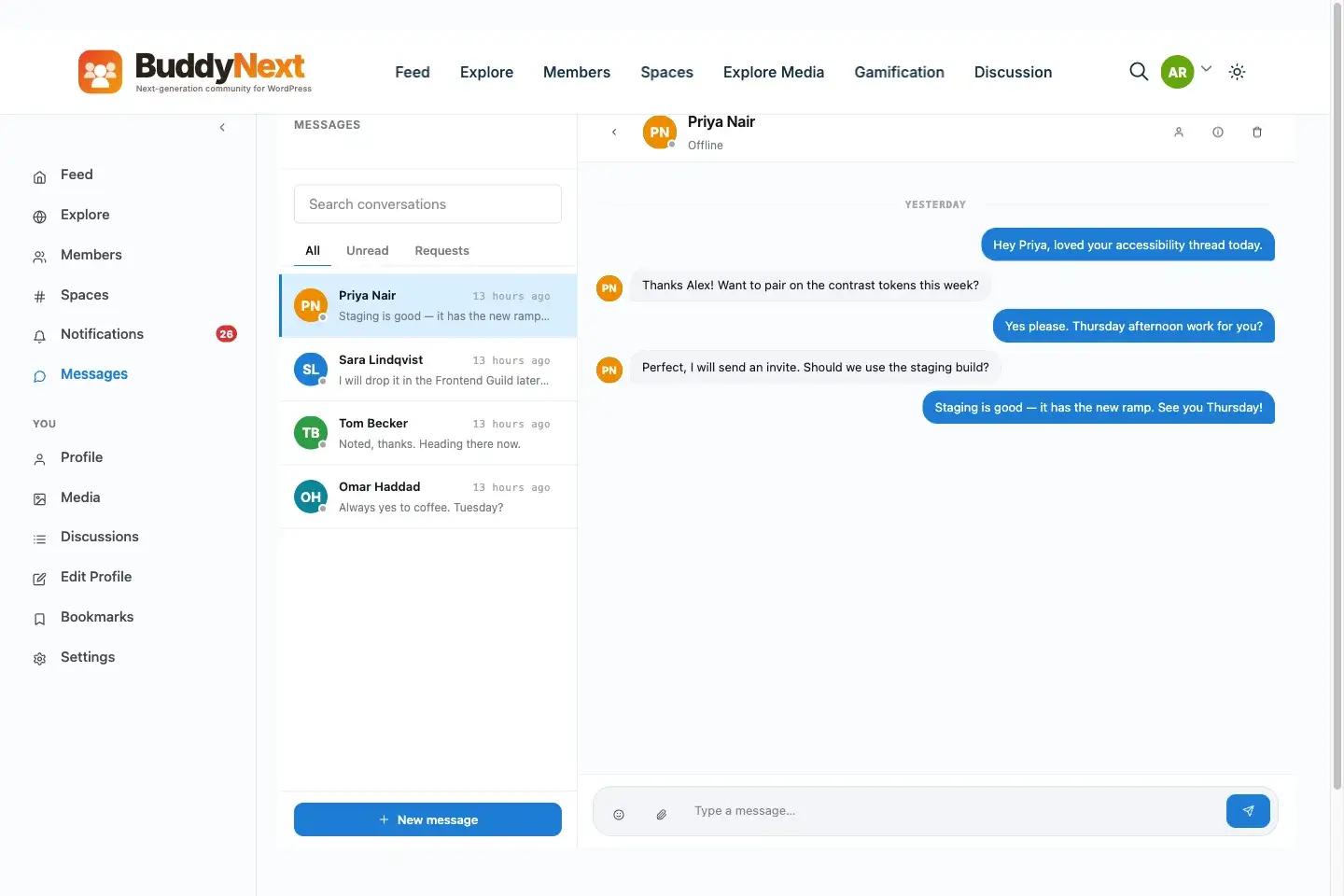
Direct messaging and media sharing run through WPMediaVerse, built to integrate rather than bolted on as an afterthought.
That is still technically a second plugin, and it would be dishonest to pretend otherwise. The difference from a typical three-plugin stack is that WPMediaVerse is built by the same team specifically to pair with BuddyNext, auto-detecting it and enhancing the member directory with media counts and profile media grids, rather than being a general-purpose messaging plugin retrofitted to work with whatever community tool happens to be installed. We covered what that pairing unlocks in more depth in WPMediaVerse Pro: Ultimate Media Features Community Members Love, and in 5 Community Types That Need WPMediaVerse for concrete use cases where the media layer matters as much as the messaging.
The role-and-capability collision
WordPress’s capability system was never designed with three overlapping community-management plugins in mind. Each plugin in a typical stack tends to register its own custom roles, a membership plugin’s “subscriber-premium” role, a community plugin’s “group-moderator” capability, a messaging plugin’s own permission flags, and none of them inherently know about each other. A site owner who wants to hand a trusted member moderation duties over just one sub-space ends up having to grant capabilities across two or three separate systems by hand, and every new plugin update carries a small risk of quietly renaming or restructuring one of those capability sets.
Space-scoped moderation inside a single platform avoids that entirely, because the role that grants a member moderation power over one Space and the role that grants a member access to that Space in the first place live in the same permission model. There is one place to look when a permissions question comes up, not three.
A concrete build: a small paid members-only community
Walk through what an actual setup looks like rather than a feature list. Say you are launching a paid community for a coaching practice, forty to eighty members expected in the first year, one core private Space, and a handful of smaller topic-specific sub-spaces.
Install BuddyNext and set signup to approval-gated rather than fully open, so every new member gets a manual or rules-based check before they can post. Create the main Space as private, visible to logged-in members but requiring an explicit join request, with sub-spaces for whatever topics the coaching program covers. Configure the profile fields you actually need, coaching communities typically want fields for goals, current stage in the program, and availability, each with privacy set to members-only rather than public. Set moderation defaults, banned word lists and auto-hide thresholds, even for a small community, because establishing the norm early is easier than retrofitting it once bad behavior has already set a precedent.
Install WPMediaVerse alongside it for messaging, so members can DM each other and the coach directly, and for media, so program materials, screen recordings, worksheets, can be shared inside the community rather than linked out to a separate file host. If the program includes paid tiers, monthly access versus a one-time program fee, that is where BuddyNext Pro’s Stripe integration comes in, gating the private Space itself behind an active subscription rather than managing access manually.
That is two plugins total for the entire members-only experience, both built to work together, rather than three or four picked independently and wired together by hand.
The onboarding sequence matters as much as the initial configuration. Every new member who clears the approval gate walks through the built-in four-step onboarding wizard, filling out the profile fields you configured, with reminder emails firing automatically for anyone who starts the process and stalls halfway. That reminder sequence alone is normally a separate email-automation plugin in a stacked setup; here it ships as part of authentication. Notifications group by type once a member is active, so a busy Space does not bury an important direct message under a wall of reaction notifications, and the branded email engine handles digests for members who would rather get a daily summary than a stream of individual alerts.
Moderation defaults deserve the same early attention as access control. Even a forty-member coaching community benefits from banned word lists and auto-hide thresholds configured before the first post goes up, not after the first problem post forces a reactive scramble. Because moderation is scoped per Space, the coach or a designated assistant can manage the community’s specific sub-spaces without needing full site-admin access, which matters once the community grows past a size where the owner personally reviews everything.
What the stack actually costs versus a unified setup
Run the numbers on a typical three-plugin stack rather than leaving the cost argument abstract. A mid-tier membership plugin commonly runs somewhere in the $200 to $300 a year range. A community plugin add-on for the same tier of features runs comparably. A dedicated messaging or private-DM add-on, often needed because the community plugin’s native option is too limited for a paid community, adds another $100 to $150 annually. Total that stack and a site owner is regularly spending $500 to $700 a year before counting the hours spent keeping three systems in sync.
BuddyNext Pro Personal, which includes native Stripe membership tiers, gated Spaces, and everything in the free tier, runs $149 a year for a single site, with WPMediaVerse’s free tier covering messaging and media at no additional cost. Even accounting for WPMediaVerse Pro if a community specifically needs its advanced layout modes or video features, the combined cost sits meaningfully below a typical three-plugin stack, and that gap is before counting the maintenance time saved by not debugging sync issues between systems that were never designed to talk to each other.
What still genuinely needs a separate app, and why that is different from stacking
It would be inaccurate to claim two plugins cover every members-only use case, and the honest answer is that some do need more. A community built around structured courses with quizzes and certificates needs an LMS, which is where Learnomy comes in as part of the same ecosystem. A community that wants a proper forums and Q&A section alongside the activity feed pulls in Jetonomy, which integrates automatically with BuddyNext, sharing design tokens and letting BuddyNext own the page header without any manual configuration.
The distinction between that and the three-plugin stacking problem from earlier is integration, not plugin count. A random membership plugin, a random community plugin, and a random messaging plugin picked independently were never designed to share a user model or a design language. BuddyNext, WPMediaVerse, Jetonomy, and Learnomy are built by the same team specifically to interoperate, which is the difference between “stacking” and “extending.”
Frequently asked questions
Can I make a fully members-only site without paying anything?
Yes, if members-only means approved or invited rather than paying. BuddyNext’s free tier includes invite-only and approval-gated signup, private and secret Spaces, and per-field profile privacy, which covers a gated community that does not charge for access.
Do I need BuddyNext Pro to charge members a subscription?
Yes. Native Stripe membership billing, monthly, yearly, one-time, plus gated Spaces and inline content locks, is a Pro capability. The free tier handles access control for approved or invited members but does not process payments.
Is WPMediaVerse required, or can I skip messaging entirely?
It is not required if your community does not need direct messaging or media sharing between members. BuddyNext’s activity feed, Spaces, and moderation work without it. WPMediaVerse becomes necessary specifically when members need to DM each other or share media beyond what the activity composer supports.
How is this different from just using a membership plugin like MemberPress with BuddyPress?
That combination works but treats membership and community as two separate systems that need manual syncing, MemberPress gates content, BuddyPress handles the social layer, and keeping a member’s paid status and their group access in agreement is your responsibility. BuddyNext Pro’s membership tiers are native to the same platform that runs Spaces and profiles, so there is no second system to keep in sync.
Can secret Spaces really stay completely hidden from non-members?
Yes. Secret Spaces do not appear in the member directory or search results for anyone who is not already a member, which is different from a private Space that is visible but requires a join request. The distinction matters for communities that need to stay genuinely invisible to outsiders, not just access-restricted.
What happens to member access if someone’s subscription lapses?
Gated Spaces tied to a Stripe membership tier in BuddyNext Pro check subscription status directly, so access follows billing status automatically rather than requiring a manual removal step when a payment fails or a member cancels.
Can I add a forum or Q&A section to a members-only community later?
Yes. Jetonomy integrates automatically with BuddyNext when both are active, sharing design tokens and letting BuddyNext own the page header without manual setup, so adding forums or a Q&A board later does not mean introducing a mismatched third-party plugin.
Is it realistic to run a members-only community with just two plugins long-term?
For most social or discussion-based communities, yes. BuddyNext plus WPMediaVerse covers activity, Spaces, moderation, membership billing, messaging, and media. Communities that add structured courses or a dedicated forums section will add Learnomy or Jetonomy specifically, but those are still ecosystem apps built to interoperate rather than unrelated plugins stitched together.
Fewer moving parts, not fewer features
The instinct to stack plugins comes from a reasonable place: each individual tool does its one job well, so surely combining the best membership plugin with the best community plugin with the best messaging plugin produces the best result. In practice it produces three admin screens, three user models, and a support burden nobody budgeted for. A members-only space built on a platform where gating, privacy, moderation, and messaging were designed to work together from the start gets you to the same destination with a fraction of the maintenance, and without the seams where bugs like to hide.
The test worth applying to your own site, whether you are planning a new members-only community or auditing one that already exists, is simple: count how many separate systems have to agree with each other before a single paying member can see a single piece of private content. Every extra system in that chain is another place things quietly drift out of sync while nobody is watching, and another reason the fix, when something breaks, takes longer to find than it should.
Run that count on your current setup today, even if you are not planning any changes right now. Knowing the number, whether it is one integrated platform or four loosely connected plugins, tells you exactly how much fragility you are carrying, and gives you a concrete target if you ever decide it is worth reducing.