

A community’s activity stream is often the first thing a member checks when they log in, and it’s also the page most likely to drive them away if it’s cluttered with content they don’t care about. Keeping people engaged means giving them a feed that actually reflects what matters to them, not a firehose of every post from every group they’ve ever joined. The BuddyPress Newsfeed plugin by Wbcom Designs replicates the kind of filtered, personalized feed people are already used to from platforms like Facebook, letting community members stay on top of the activity that’s actually relevant to them.
What is BuddyPress Newsfeed?
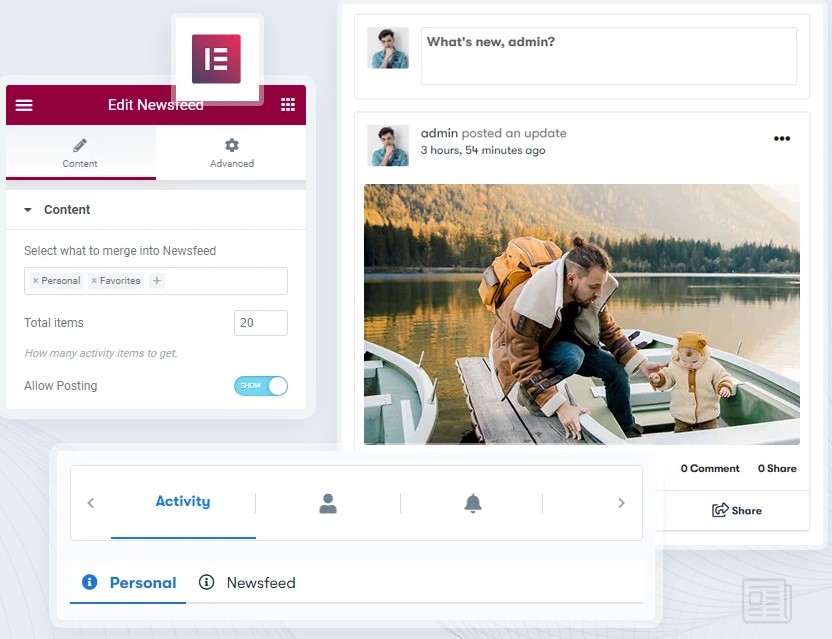
BuddyPress Newsfeed is a plugin built to enhance the activity stream on BuddyPress and BuddyBoss-powered communities. Rather than forcing members to dig through separate tabs for mentions, favorites, friends, and group activity, it merges everything into one unified stream while still letting members filter down to specific activity types when they want to. Community members can move between personal updates, group activity, and announcements without losing track of anything happening elsewhere in the community.
Key Features of BuddyPress Newsfeed
1. Customizable Activity Display: Members choose which types of activity show up on their personalized newsfeed. Someone who mainly cares about updates from friends can prioritize that, while someone more focused on a specific group’s discussions can tune their feed toward that instead. The plugin gives members that flexibility rather than locking everyone into one fixed feed structure.
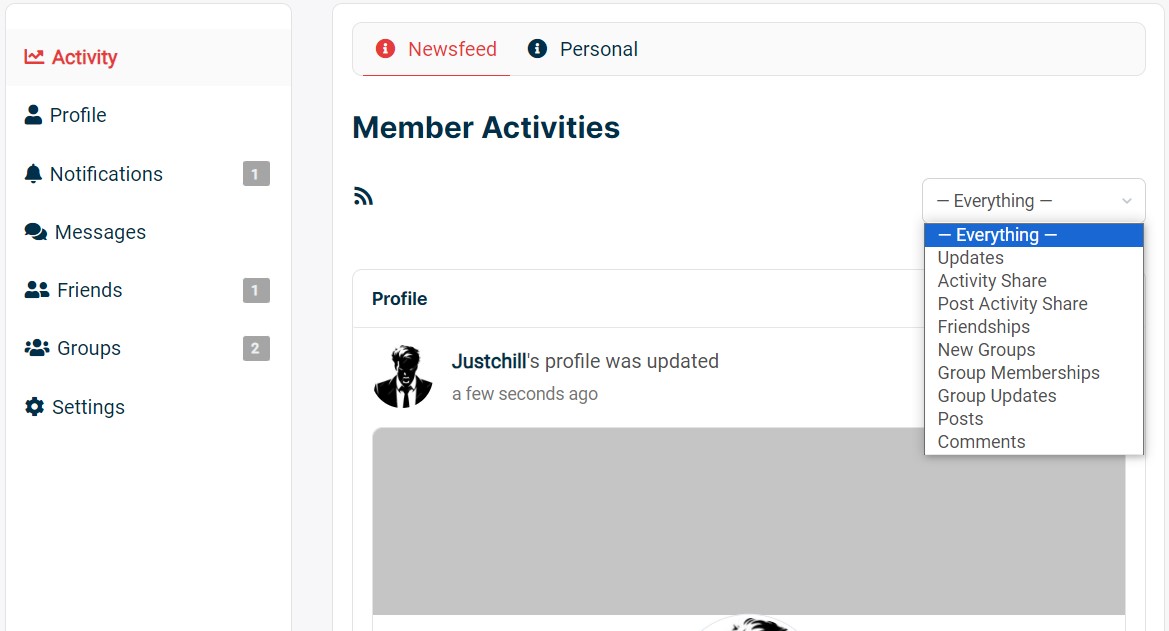
2. Segregated Activity Types: The plugin separates activity by category rather than dumping everything into one undifferentiated stream. Members can work through dedicated tabs for personal updates, group posts, and event announcements, which makes a busy community’s activity page far easier to scan than a single, unsorted list.
3. Integration with Other Plugins: BuddyPress Newsfeed works alongside other BuddyPress plugins rather than in isolation, which matters for communities running messaging systems, event management tools, or other social add-ons alongside it. The feed stays a cohesive part of the overall community experience instead of an isolated feature bolted on separately.
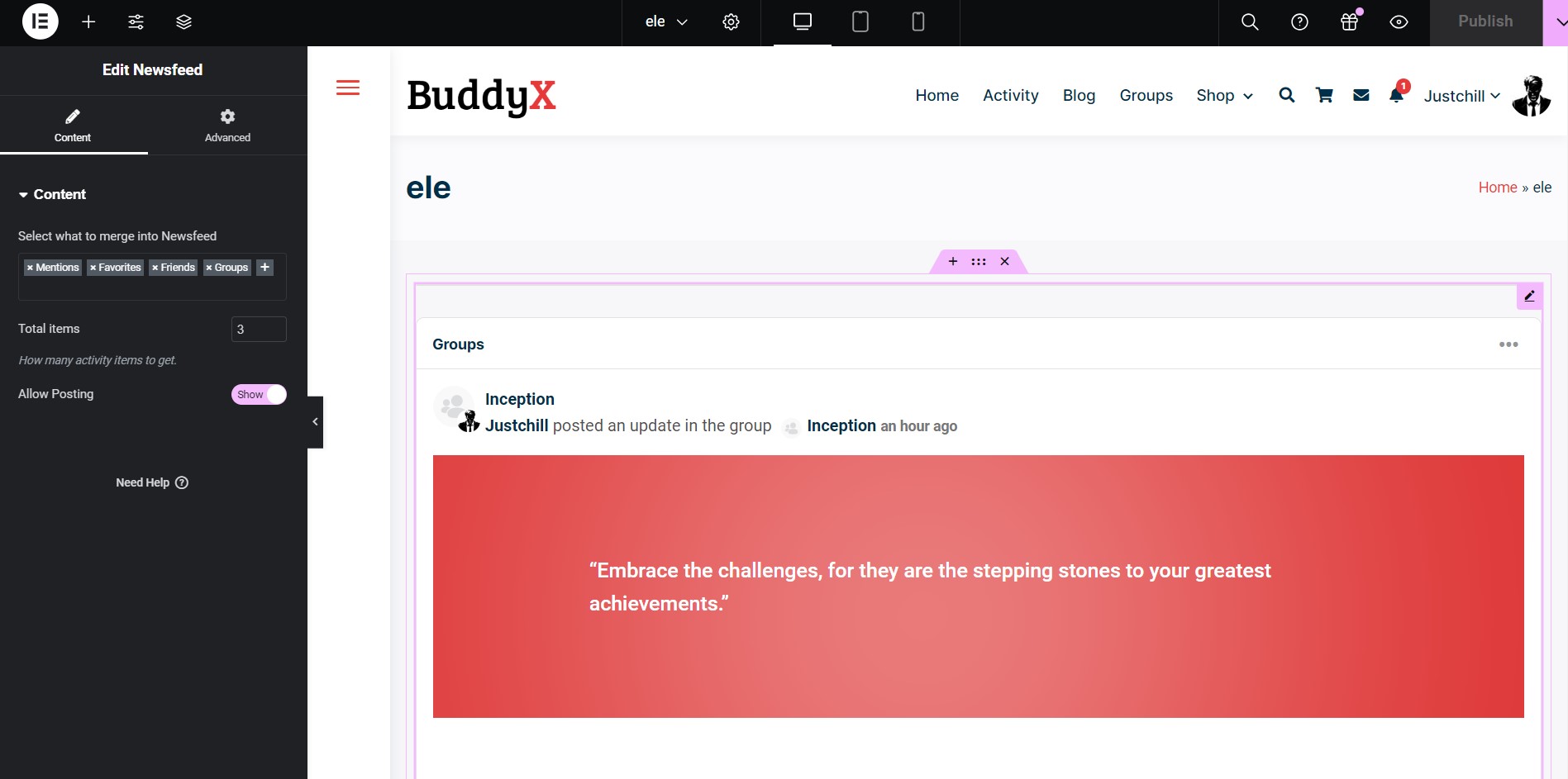
4. Newsfeed Elementor Widget: The plugin includes an Elementor widget, letting admins drop the newsfeed onto any Elementor-built page. This consolidates personal, group, friends, mentions, and favorites activity into one place, which is useful for a custom homepage or landing page that needs to show community activity without cluttering the layout with a dozen separate feed sections.
To build an Elementor page with this widget, go to Dashboard > Pages > Add a new page, then edit the page with Elementor and add the newsfeed widget from the widget panel.
5. User-Friendly Interface: The plugin is built with a focus on usability, so members can customize their newsfeed without needing any technical background to figure it out.
6. Real-Time Updates: Members see activity as it happens rather than on a delay, which keeps a community feeling responsive. People can react to a new post or comment while the conversation is still active instead of catching it hours later once the moment has passed.
Benefits of a Personalized Newsfeed
1. Increased User Engagement: A newsfeed tailored to individual interests gets more genuine interaction than a generic, unfiltered feed. Members who see content that actually matters to them have a real reason to come back regularly, rather than checking in occasionally and scrolling past most of what they see.
2. Improved Communication: The ability to filter and prioritize activity makes it easier for members to stay on top of what’s actually relevant, which reduces the odds that an important update from a group or a friend gets buried under unrelated noise.
3. Enhanced User Experience: A feed members have actually curated feels less like a chore to scroll through and more like a space worth spending time in, since most of what appears is something they’ve chosen to see rather than content forced on them.
4. Stronger Community Bonds: Keeping members informed about the activity that matters most to them builds a stronger sense of belonging over time. Regular, relevant updates give members more natural opportunities to engage with each other rather than losing track of what’s happening.
5. Customizable Content Delivery: Letting members choose what shows up in their feed puts control in their hands rather than dictating a single fixed experience for everyone, which matters more the larger and more varied a community’s membership becomes.
Setting expectations before installing
The plugin requires an active BuddyPress or BuddyBoss Platform install, since it works by enhancing the existing activity stream rather than replacing BuddyPress entirely. It doesn’t introduce a custom database table or REST API layer of its own; settings live in a single WordPress option, which keeps the plugin lightweight and avoids adding extra database overhead to an already activity-heavy part of a community site. That’s worth knowing upfront for site owners who were expecting a separate data layer or API access specifically for the newsfeed feature, since it isn’t part of the current build.
Because the plugin extends BuddyPress’s own template and styling system rather than introducing an entirely separate interface, it inherits the look of whichever activity template style a theme is already using, both the newer nouveau templates and the older legacy ones. That keeps the newsfeed visually consistent with the rest of a community’s activity pages instead of looking like a bolted-on addition with its own separate design language.
Configuring a sensible default for new members
A meaningful setting worth deciding early is which tab a new visitor lands on: the unified newsfeed or their personal activity stream. For a community where most of the value comes from discovering what’s happening across groups and other members, defaulting to the newsfeed view gives new members a faster sense of the community’s overall activity level. For a community built more around close, direct connections, defaulting to personal activity might make more sense, since a brand-new member’s personal stream is mostly empty and the newsfeed gives them something to actually look at right away.
There’s no universally correct default. What matters is picking deliberately rather than leaving it on whatever the plugin ships with by default, and revisiting that choice if new-member engagement data suggests people are landing somewhere that doesn’t hold their attention.
A/B testing the default landing tab across a batch of new signups, when a community has enough new-member volume to make that statistically meaningful, settles the question with actual data rather than a guess. Smaller communities without the volume to run a meaningful test are usually better off just picking the option that matches their community’s core value proposition and adjusting later if it clearly isn’t working.
Where the relevant activity filter helps most
On standard BuddyPress installs, the plugin can weight the feed toward a member’s actual connections rather than showing every piece of site-wide activity with equal priority. This matters most on larger communities where the raw volume of activity would otherwise bury anything specifically relevant to a given member under a wall of unrelated posts from groups and people they have no connection to. Smaller communities may not notice much difference from this weighting, since there’s simply less competing activity to filter through in the first place, but it becomes increasingly valuable as a community’s total activity volume grows.
How this compares to BuddyPress’s default activity stream
Native BuddyPress ships with an activity stream that already shows a mix of personal, group, and site-wide updates, so it’s fair to ask what a dedicated newsfeed plugin actually adds on top of that. The core difference is control. The default stream doesn’t give members a way to reweight what they see or split content into separate tabs by type; everything competes for attention in one linear timeline in roughly chronological order.
That works fine for a small, low-activity community where there’s rarely more happening than a member can scroll through in a minute or two. It breaks down once a community grows active enough that meaningful updates start getting buried under high-frequency, lower-value activity, like routine profile updates or minor group posts that don’t need the same visibility as a genuinely important announcement. A dedicated newsfeed plugin exists specifically to solve that scaling problem before it becomes a real engagement issue.
Use cases beyond a typical social community
Educational communities built on BuddyPress, cohort-based courses or alumni networks, benefit from the segregated activity tabs in a specific way: students can separate general cohort chatter from instructor announcements without missing either one. A dedicated tab for instructor posts means an important deadline reminder doesn’t get lost in a wall of casual student conversation.
Corporate intranets running on BuddyPress face a similar problem at a different scale. An internal community with dozens of departments generates activity that’s only relevant to a fraction of any given employee’s day-to-day work. Letting each employee tune their feed toward their own department and project groups, while still keeping company-wide announcements visible regardless of personal filtering, keeps an internal community useful rather than becoming another feed people learn to ignore.
Niche hobby and interest communities, the kind built around a specific game, sport, or craft, tend to have members with wildly different sub-interests within the same broader topic. A community for board game enthusiasts might have members who only care about one specific game system alongside members interested in the hobby broadly. A personalized feed lets both groups coexist in the same community without either one feeling like the site wasn’t built for them.
Performance considerations for larger communities
Because the plugin doesn’t add its own database tables or a separate API layer, it stays lightweight even as a community’s activity volume grows, which matters for site owners who’ve been burned before by plugins that scale poorly once real usage kicks in. The tradeoff is that very large communities relying heavily on the relevant-activity weighting should still monitor page load times on the activity stream directly, since the underlying BuddyPress activity queries themselves, not the newsfeed plugin specifically, are usually the actual bottleneck once a site reaches tens of thousands of activity entries.
Standard BuddyPress performance practices, object caching, appropriate database indexing on the activity table, and pagination rather than infinite unbounded loading, remain just as relevant with this plugin installed as without it. The newsfeed plugin filters and organizes what’s already there; it doesn’t change the underlying performance characteristics of BuddyPress’s activity system itself.
Site owners running a community that’s grown large enough to notice activity stream slowdowns are usually better served by addressing the underlying BuddyPress performance layer first, checking whether object caching is actually configured correctly, whether the activity table has the indexes BuddyPress expects, before assuming a filtering plugin is the source of any slowdown. Isolating the cause with a plugin conflict test, disabling the newsfeed plugin temporarily to see if load times change, settles the question quickly rather than guessing.
Rolling this out on an existing, active community
Introducing a personalized newsfeed to a community that’s already used to a single flat activity stream needs a bit more care than deploying it on a brand-new site. Long-time members have built habits around how they currently browse activity, and a sudden interface change without warning tends to generate confused support requests even when the change is objectively an improvement. A short announcement explaining what’s changing and why, posted a few days before the update goes live, heads off most of that confusion.
Defaulting existing members to whatever view most closely matches their previous experience, rather than forcing everyone into the new unified newsfeed immediately, tends to smooth the transition. Members who want the new personalized filtering can opt into it once they understand what it offers, rather than having an unfamiliar interface sprung on them without context. Over a few weeks, as members discover the filtering options on their own or through a follow-up announcement, adoption of the new feed typically increases without needing to force it.
Keeping the feed useful as a community scales
A feed that felt perfectly organized at five hundred members can start to feel cluttered again at five thousand, simply because there’s more total activity competing for the same limited screen space. Revisiting default settings periodically, not just at initial launch, keeps the feed experience matching the community’s actual current scale rather than settings that made sense a year earlier when the community was a fraction of its current size.
Group-heavy communities in particular benefit from checking whether the group activity tab is still manageable as the number of active groups grows. A community that started with a handful of groups and has since grown to dozens may need to reconsider whether every group’s activity deserves equal default visibility, or whether members would be better served by a system that lets them explicitly follow only the groups relevant to them within that already-segregated tab.
Periodic member surveys, even something as simple as a quick poll asking whether the current feed setup feels cluttered or manageable, surface this kind of drift faster than waiting for engagement metrics to quietly decline first. Members are usually happy to say when a feature that used to work well has started to feel noisy, and that direct feedback is more actionable than trying to infer the same conclusion from analytics alone.
Why filtering doesn’t mean hiding problems
A personalized feed changes what a member sees by default, but it shouldn’t become a way to quietly bury content that needs attention, like a moderation flag or a genuinely important site-wide announcement. Keeping certain announcement types outside the scope of personal filtering, so they reach every member regardless of their individual feed preferences, ensures that giving members more control over routine activity doesn’t accidentally reduce the reach of things that actually need universal visibility.
This is less about the plugin itself and more about how an admin configures activity types and their defaults. A community that treats every piece of content as equally filterable risks having something important get lost in a member’s personalized view simply because they’d previously deprioritized that activity type for unrelated reasons.
A simple rule that works well in practice: anything tied to community rules, safety, or platform-wide operational changes stays outside personal filtering entirely, while everything else, group chatter, casual updates, routine posts, remains fully under member control. That split keeps the feed genuinely personal without turning personalization into a liability for the handful of message types that actually need guaranteed visibility.
A few questions site owners commonly ask
Does this replace BuddyPress’s built-in activity stream entirely? No. It enhances the existing stream rather than replacing the underlying system, so BuddyPress’s core activity functionality stays intact and the newsfeed plugin adds filtering and organization on top of it.
Will members lose access to activity types they’re not currently filtering toward? No, filtering just changes what’s prioritized in a member’s personalized view. The underlying activity still exists and remains accessible through the appropriate tab or the group and profile pages it originated from.
Does the Elementor widget need anything beyond a standard Elementor install? Check the plugin’s current requirements before building a production page around it, since Elementor’s own free-versus-Pro widget availability changes from time to time and it’s worth confirming against the latest plugin documentation rather than assuming.
Embrace the Future of Community Interaction with BuddyPress Newsfeed
The BuddyPress Newsfeed plugin by Wbcom Designs is a genuinely useful addition for communities trying to keep members engaged without overwhelming them. Giving members a customizable, personalized newsfeed changes how they connect and communicate within a BuddyPress or BuddyBoss community, and the combination of a straightforward interface with real filtering power improves the day-to-day experience without adding technical complexity site owners have to manage.
Bringing personal updates, group activity, mentions, and favorites into one configurable stream gives members a reason to check back regularly, and the Elementor widget option extends that same feed to any custom page a site wants to build around it.
Interesting Reads:
Best AI Tools for Customer Support