
BuddyPress’s default profile fields are flat: one value per field, no way to repeat a section for someone with three jobs or four degrees. Try to model a work history field for a member who’s held four different roles and you end up either cramming everything into one oversized text area, formatting inconsistencies and all, or creating four separate fields labeled “Job 1,” “Job 2,” “Job 3,” “Job 4,” which breaks the moment a fifth member needs a fifth job listed. BuddyPress Profile Pro fixes that with repeater field groups, education, work history, or any custom category a community needs, each one repeatable as many times as a member needs it.
Why Flat Fields Break Down on Real Profiles
This isn’t a niche edge case that only affects a handful of members. Any profile field meant to capture something a person can have more than one of, past employers, degrees earned, certifications, languages spoken, publications, projects, runs into the same flat-field ceiling in core BuddyPress. The workaround most sites reach for without a repeater plugin, a single large text field where members type everything themselves, technically works but produces wildly inconsistent formatting across profiles: one member writes a tidy bulleted list, another dumps an unstructured paragraph, and a third leaves it blank because typing out four jobs in a single box feels like too much effort. None of that is searchable, filterable, or displayable in a structured way, which defeats a large part of the point of having a professional or detailed community profile in the first place.
What It Actually Adds
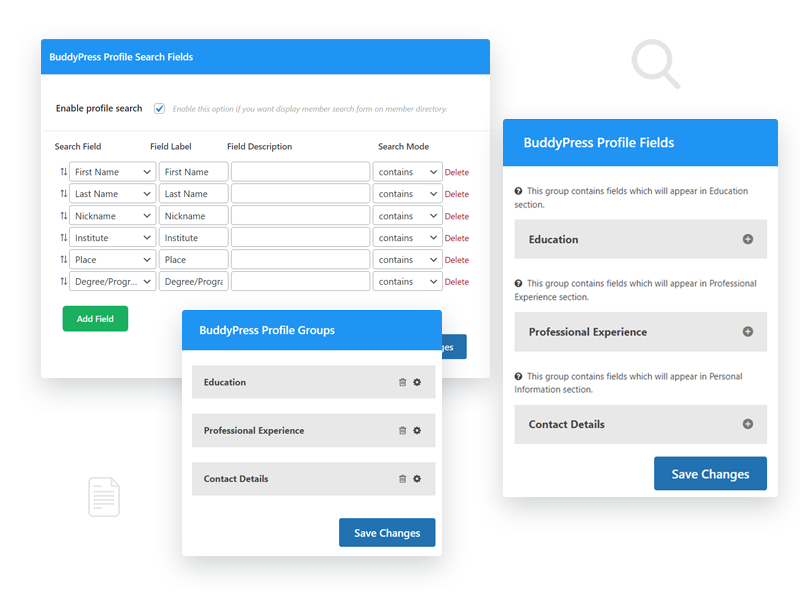
Custom field groups, organized by category, with 14 field types to choose from: text, dropdowns, checkboxes, radio buttons, date pickers, file uploads, and more.
Repeater groups are the core feature. A member with four past jobs adds four instances of the same work-history group rather than being stuck with one static field.

Admins control field order and visibility per group from a straightforward interface, add, edit, or remove groups without touching code.
The 14 Field Types in Practice
The breadth of field types matters more than it might look on a feature list, because different kinds of profile information genuinely need different input controls to stay clean and consistent. A date picker for “graduation year” prevents the inevitable mess of members typing “2019,” “’19,” and “May 2019” into a free-text field, all of which mean the same thing but display and sort completely differently. A dropdown for something like “employment type” (full-time, part-time, contract, freelance) keeps that data structured enough to filter or search on later, where a free-text field would produce a dozen slightly different phrasings for the same underlying concept. File upload fields matter specifically for communities where members need to attach a resume, a certification PDF, or a portfolio sample directly to a profile section rather than linking out to an external file host. Picking the right field type for each piece of information, rather than defaulting every field to plain text because it’s the fastest to set up, is what determines whether the resulting profile data is actually usable later for search, filtering, or display, or whether it’s just a wall of inconsistent text.
Conditional Logic and Front-End Editing
Fields can show or hide based on earlier answers, so a profile form adapts instead of showing every field to every member regardless of relevance. A common example: a “currently employed here” checkbox that, when checked, hides the “end date” field entirely rather than leaving a member to guess whether they should type “present” or leave it blank. That kind of small adaptive behavior is the difference between a profile form that feels considered and one that feels like a generic spreadsheet import got turned into a web form.
Members edit their own profiles from the front end, no dashboard access required, which matters for communities where regular members shouldn’t be anywhere near wp-admin. This is worth underlining for anyone evaluating profile plugins broadly: some profile field solutions are built primarily around Advanced Custom Fields or similar tools that assume dashboard-level editing, which is a poor fit for a public-facing community where members expect to manage their own profile the same way they’d edit a LinkedIn profile, entirely from the front end, with no admin access involved at any point.
Privacy Controls
Per-field visibility settings let members decide who sees what, useful for anything sensitive mixed in with public profile information. A member might be comfortable showing their current employer publicly but want salary expectations, phone number, or a home address restricted to friends only or hidden entirely. Field-level privacy, rather than an all-or-nothing profile-wide visibility toggle, is what makes that kind of mixed-sensitivity profile workable, without it, a community either forces every field to be equally public or equally private, neither of which matches how real people actually think about what they’re comfortable sharing.
Setting Up a Repeater Group From Scratch
A typical setup for something like work history looks roughly like this: create a new field group, name it “Work Experience,” and mark it as repeatable. Inside that group, add the individual fields that make up one work-history entry, employer name (text), job title (text), start date and end date (date pickers), and a currently-employed checkbox that conditionally hides the end date field when checked. Save the group, and it becomes available on the front-end profile editor, where a member can click “Add another” to create as many instances of that group as they have jobs to list, each one collecting the same set of sub-fields independently. The admin-side setup takes longer to describe than to actually do, most of the time investment is in deciding which fields belong in which group and what field type each one should use, not in navigating the settings screen itself.
Displaying Repeater Data on the Profile
Once populated, repeater group data displays on the member’s profile as a structured, repeated block, each work-history entry shown as its own card or row rather than run together as one undifferentiated paragraph. How exactly that renders depends on your active theme’s profile field templates, a theme built with BuddyPress profile fields specifically in mind will generally style repeater output more cleanly out of the box than a generic theme that wasn’t designed with this kind of structured, repeatable content in view. If the default display doesn’t match your site’s visual style, the plugin’s field group settings typically offer some display customization, and for anything beyond that, a developer comfortable with your theme’s profile templates can adjust the markup directly.
Search and Filtering on Structured Profile Data
One of the underrated payoffs of structuring profile data properly, rather than leaving it as free text, is that it becomes genuinely searchable and filterable in ways unstructured text never can be. A community built around professional networking benefits enormously from letting members search “show me everyone who worked at Company X” or filter the member directory by a specific skill or certification, none of which is reliably possible if that information lives in a single unstructured bio field where every member phrases things differently. Whether your specific member directory setup actually exposes this kind of search and filter capability depends on your broader directory configuration, not solely on this plugin, but having the underlying data structured correctly is the prerequisite that makes it possible at all. A site that skips structured fields in favor of a free-text bio field is closing off that capability permanently, no matter how good the search feature built on top later turns out to be.
A Realistic Timeline for Setting This Up
For a site owner planning this out rather than diving straight into the settings screen, a reasonable rough timeline: an hour or two to plan which field groups actually matter for your specific community (don’t just copy a generic “work history, education, skills” template without asking what your members would actually want to showcase), another hour or two to build those groups and their field types in the admin, and then some open-ended time testing the front-end editing experience yourself, ideally on a test account rather than your own real profile, to confirm the conditional logic and repeater behavior work the way you expect before rolling it out to real members. Skipping the planning step and building field groups reactively, adding one, realizing it’s wrong, deleting it, adding another, tends to take longer overall than spending thirty minutes upfront deciding what the finished profile should actually contain.
Import Considerations for Existing Communities
If you’re adding this plugin to a community that already has members with existing, unstructured profile data, work history typed into a single bio field, for instance, there’s no automatic migration that intelligently splits that existing text into structured repeater entries. Members will need to manually re-enter their information into the new structured fields, which is a real adoption cost worth planning for on a larger, already-established community. A practical approach: keep the old free-text field visible alongside the new structured fields for a transition period, and consider a brief announcement or email nudging active members to fill in the new structured version, rather than silently adding the new fields and hoping members discover and populate them organically.
Comparing This to Advanced Custom Fields for Profile Data
A reasonable question from anyone already using Advanced Custom Fields elsewhere on their site: why not just use ACF for BuddyPress profile fields too, rather than a separate dedicated plugin? ACF is a genuinely excellent general-purpose custom fields tool, but it wasn’t built with BuddyPress’s member profile system as its primary use case, which shows up in a few practical ways. Getting ACF fields to appear on the front-end BuddyPress profile editor, rather than only in wp-admin, typically requires either an ACF add-on or custom template code bridging the two systems. A plugin built specifically for BuddyPress profile fields handles that front-end editing integration natively, since it was designed around exactly that requirement from the start rather than needing to be adapted to it. For a site already deeply invested in ACF for other content types (custom post types, page builders, and so on), there’s a reasonable case for extending that investment to profiles too if a developer is comfortable building the bridge. For most community site owners without dedicated development resources, a purpose-built BuddyPress profile fields plugin gets to a working, front-end-editable result faster and with less custom integration work.
Who Actually Needs Repeater Fields
Not every community needs this level of profile depth. A casual hobbyist forum where members just want a display name, an avatar, and a short bio gets little practical value from repeatable work-history groups, and adding that complexity to the signup or profile-editing flow for a community that doesn’t need it just adds friction without a corresponding benefit. This plugin earns its place clearly on professional networking communities, alumni networks, freelancer or job-board platforms, and any community where a member’s background, credentials, or portfolio genuinely matters to how other members interact with them. Before installing, it’s worth being honest about which category your community falls into, since over-engineering the profile experience for a casual community can hurt signup completion rates more than it helps, members abandon long, detailed profile forms they don’t see the point of filling out.
Troubleshooting Common Issues
- Repeater “Add another” button doesn’t appear. Confirm the field group is actually marked as repeatable in its settings, this is a per-group toggle, not a global plugin setting, so it’s easy to create a group and forget to enable repeating on it.
- Conditional logic isn’t hiding or showing fields as expected. Double-check the exact trigger value the condition is checking against, a common mistake is setting a condition against a checkbox’s label text rather than its actual stored value.
- Profile display looks unstyled or the repeater entries run together visually. Usually a theme template gap rather than a plugin bug, check whether your theme has specific styling for repeater-type profile fields or whether it’s falling back to generic, unstyled output.
- File upload fields reject valid files. Check your server’s max upload size and the plugin’s own file-type restrictions, both can independently block an upload that looks like it should be fine.
Balancing Profile Depth Against Signup Friction
There’s a real tension worth naming between building a rich, detailed profile system and keeping the initial signup flow short enough that people actually finish it. The fix most communities land on isn’t choosing one or the other, it’s sequencing them: keep the required signup fields minimal (email, display name, maybe one or two essentials), and treat the deeper repeater-based fields, work history, education, certifications, as something a member fills in progressively after joining, not a wall they have to clear before they’re let in. Most profile plugins, this one included, don’t force every field to be required, and it’s worth deliberately marking the deep, repeatable fields as optional rather than mandatory. A member who joins, gets value from the community for a few weeks, and then invests time building out a complete profile is a far more likely outcome than one who abandons signup entirely because the form asked for four jobs and two degrees before they’d even seen what the community was about.
Pricing
Current tiers (v2.6.0, updated within the last month as of this writing): Personal $49/year or $149 lifetime (1 site), Professional $99/year or $299 lifetime (5 sites), Agency $129/year or $349 lifetime (unlimited sites). All tiers include the full 14 field types, repeater groups, per-field privacy, and member search.
Quick Answers
Does this replace BuddyPress’s core Extended Profiles component, or work alongside it? It works alongside and extends BuddyPress’s existing profile field system rather than replacing it outright, existing core profile fields continue to function normally alongside the new repeater groups and expanded field types.
Can I limit how many times a repeater group can be repeated? Most repeater implementations of this kind support an optional maximum, worth checking the specific field group’s settings if you want to cap work history entries at, say, ten rather than leaving it unlimited.
Does this work with BuddyBoss Platform? Since BuddyBoss Platform builds on BuddyPress’s Extended Profiles data structures, profile field plugins built for BuddyPress generally carry over, though it’s worth confirming compatibility on a staging copy of a BuddyBoss-powered site before deploying broadly, given how much BuddyBoss customizes profile display specifically.
Will adding many repeater fields slow down profile pages on a large community? Heavily populated repeater fields do add some query overhead compared to simple flat fields, worth monitoring page load time on very large, data-heavy profiles specifically, though for most communities the difference isn’t noticeable in practice.
Can members reorder their repeater entries once they’ve added several? Most well-built repeater interfaces support drag-and-drop reordering of entries after creation, worth confirming this specific behavior in the front-end editor before assuming a member is stuck with entries in the order they were originally added.
Is there a way to make certain repeater groups admin-only, visible on the profile but not editable by the member themselves? Field-level and group-level permission settings typically allow this kind of asymmetric visibility, useful for something like an internal staff note or a verified-credential field that a member can see on their own profile but only an admin can actually edit.
Does the plugin provide any built-in profile completeness indicator? Whether a “your profile is X% complete” style prompt is included depends on the specific version and configuration, worth checking the plugin’s current feature list directly, since this kind of nudge can meaningfully improve how many members actually fill out the deeper optional fields discussed above.
Interesting Reads:
How To Create A Favorite Notification Feature in BuddyPress?
How Do Shortcodes Enhance the Functionality and Display of BuddyPress Components?
How Does the Social Sharing Feature Increase User Engagement Within the BuddyPress Community?