
Most community platforms give members exactly one way to relate to each other: a single “friend” or “follow” button that has to do the job of a dozen different real relationships. A casual follower, a close collaborator, and a total stranger all end up looking identical in the data, and the inbox that sits behind that button usually has no real anti-spam design at all.
BuddyNext treats following, connecting, and messaging as three separate, deliberately different systems instead of one generic social button. Everything below is shown on a real, populated install, not a mockup.
Key takeaways
- Follow is one-directional and instant. Connect is mutual and requires acceptance. They are stored, cached, and displayed as genuinely different relationships.
- Block and mute are not the same action: a block stops all interaction, a mute hides content silently without notifying the muted member.
- Messaging carries real anti-spam limits, rate limits, a message-length cap, and a message-requests queue, not an open inbox anyone can flood.
- Messages can be unsent inside a real time window, and conversations can be pinned, closer to a modern chat app than a legacy private-message box.
- Every one of these systems is presence-aware, showing a real online indicator next to the people a member is talking to.
In this article
- Three relationships, not one generic button
- Block and mute are two different kinds of no
- Messaging that behaves like a real inbox
- Message requests keep DMs from becoming a spam inbox
- Presence follows the conversation
- Frequently asked questions
Get BuddyNext FreeTry the Live Sandbox Demo →
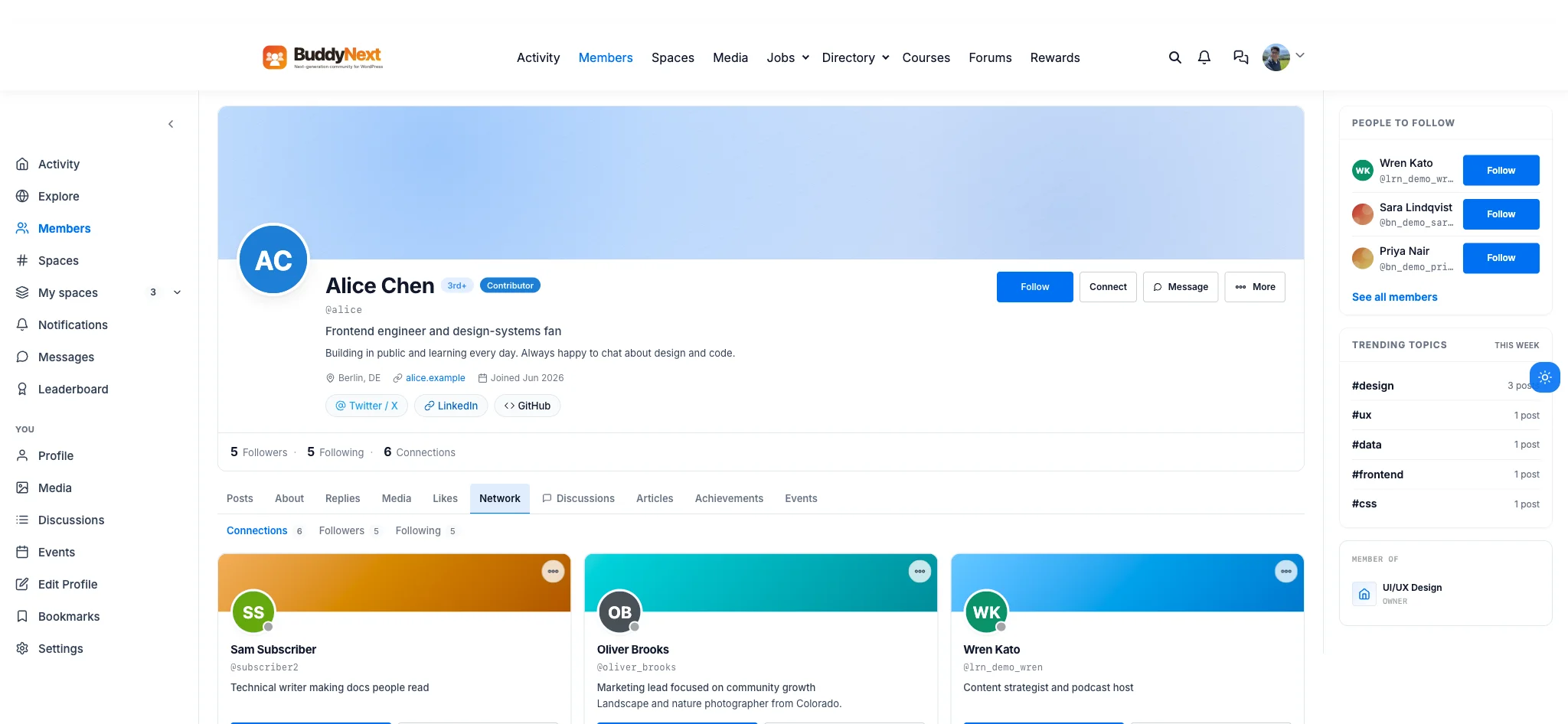
A real Network tab on this install: Connections (6), Followers (5), and Following (5), three separate, genuinely different lists.
Three relationships, not one generic button
A follow is cheap and one-directional on purpose: a member can follow someone’s posts the instant they click, no approval needed, the same way following works everywhere else on the internet. A connection is a different commitment entirely, it passes through a real pending-to-accepted lifecycle, either side can decline it, and the requester can withdraw it before it is accepted. The real profile on this install shows all three counts side by side, 5 Followers, 5 Following, 6 Connections, and they are visibly different numbers because they measure genuinely different things.
That distinction matters because collapsing it into one button forces an impossible choice: either every follow feels as heavy as a friendship, or every friendship feels as shallow as a follow. Keeping them separate lets a member build a big, loose following around their posts while keeping a smaller, mutually-confirmed circle of real connections, both real, both visible, neither one faked by the other.
Block and mute are two different kinds of no
Most platforms offer one blunt tool for an unwanted interaction: block, and hope it covers every situation. BuddyNext keeps block and mute as two distinct actions stored against the same relationship table. A block stops all interaction from that member outright. A mute is quieter by design: it silences a member’s content without ever notifying them they have been muted, so a member can simply stop seeing someone’s posts without turning a minor annoyance into a visible confrontation.
That second option matters more than it sounds. Not every unwanted interaction is a safety issue that justifies a hard block, sometimes a member just wants quieter content from one specific person, and a mute gives them that without the social cost of a block that the other person can discover.
Messaging that behaves like a real inbox
A private-message system with no real limits eventually becomes the thing every member dreads opening. The real messaging system behind this install runs actual constants: thirty messages per minute, ten new conversations per hour, a two-thousand-character cap per message, and group conversations capped at fifty participants including the creator. None of that is visible as a raw number to a member, it shows up as an inbox that simply never turns into a flood.

The real inbox on this install: a searchable conversation list, All / Unread / Message requests tabs, and a live thread with timestamped bubbles.
Two details push it past a basic private-message box entirely. Messages can be unsent inside a real fifteen-minute window, the same forgiving grace period a modern chat app gives for a typo or a message sent to the wrong person, and a member can pin up to three conversations to the top of their inbox so the ones that matter never get buried under everything else.
Message requests keep DMs from becoming a spam inbox
An open inbox where any member can message any other member at will is an inbox that fills up with cold pitches within a week of any community reaching real size. The real inbox on this install runs a dedicated “Message requests” tab, separate from the main conversation list, so a message from someone outside a member’s existing network lands in its own queue instead of the main inbox until it is accepted.
That one structural choice is what lets messaging stay a genuinely private, trusted space instead of becoming a second inbox a member has to defend the same way they defend their email from spam.
Presence follows the conversation
A conversation list that never shows who is actually around leaves a member guessing whether a message will be seen in the next minute or the next three days. Every conversation row and every open thread on this install carries a real presence indicator, the small dot on an avatar that flips from online to a last-seen state on a real, short threshold, so a member glancing at their inbox already knows who is around right now before they even open the thread.
Why this is worth taking seriously before you build
None of these three systems were bolted onto a generic WordPress user relationship as an afterthought. Follow, Connect, and Message are three real, separately-modeled systems inside BuddyNext, the complete community platform, each with its own lifecycle, its own limits, and its own presence signal. A community where every relationship looks the same, and every inbox eventually turns into noise, is a community members quietly stop opening.
Get BuddyNext FreeTry the Live Sandbox Demo →
Frequently asked questions
What is the actual difference between following someone and connecting with them?
Follow is one-directional and instant, no approval needed. Connect requires the other member to accept a request first, and either side can decline or withdraw it before that happens. They are stored as separate relationships and shown as separate counts on the profile.
Does blocking someone and muting someone do the same thing?
No. A block stops all interaction from that member outright. A mute silences their content without notifying them, so a member can quietly stop seeing someone’s posts without the social visibility of a block.
Can a member send unlimited messages to anyone on the platform?
No. Messaging runs real rate limits, thirty messages per minute and ten new conversations per hour, plus a message-requests queue that holds messages from outside a member’s existing network until they are accepted, so the inbox cannot be flooded by cold messages.
Can a sent message be taken back?
Yes, inside a real time window. Messages can be unsent for fifteen minutes after sending, long enough to catch a typo or a message sent to the wrong person without turning message history into something permanently editable.
Can I try this myself before installing anything?
Yes. The live sandbox demo linked above spins up a real, throwaway BuddyNext install with full admin access, the same follow, connect, block, mute, and messaging systems shown in every screenshot on this page.