
Most community platforms treat “groups” as an afterthought: a name, a join button, a shared wall. That works fine for the first hundred members and starts breaking down the moment a community actually grows, because a flat pile of groups gives you no real control over who sees what, who can act, or what happens when the person who started a group disappears.
BuddyNext does not call this feature Groups. It calls them Spaces, and the name change is not cosmetic. A Space carries visibility rules, a role hierarchy, its own permission gates, sub-structure, custom fields, and continuity built in from the start. Everything below is shown on a real, populated BuddyNext install, not a mockup.
Key takeaways
- Basic groups give you a name and a join button. BuddyNext Spaces add real visibility control (public, private, secret), matching join flows, and a permission model.
- A member, moderator, and owner hierarchy with per-action permission gates lets dozens of Spaces run themselves without central admin oversight.
- Sub-spaces let a community branch by topic instead of spinning up disconnected, awkwardly named groups.
- Ownership succession means a Space keeps running even after the person who founded it leaves.
- Custom fields, files, and cross-Space activity keep every Space self-contained without turning it into a silo.
In this article
- Visibility that matches how people actually trust each other
- A permission model, not just an admin toggle
- Spaces that branch instead of fragment
- Purpose-built Spaces, not one shape for everyone
- A community that survives its founder
- A home, not a folder
- Custom fields let a Space describe itself instead of relying on a bio
- Spaces feed the wider community back
- Frequently asked questions
Get BuddyNext FreeTry the Live Sandbox Demo →
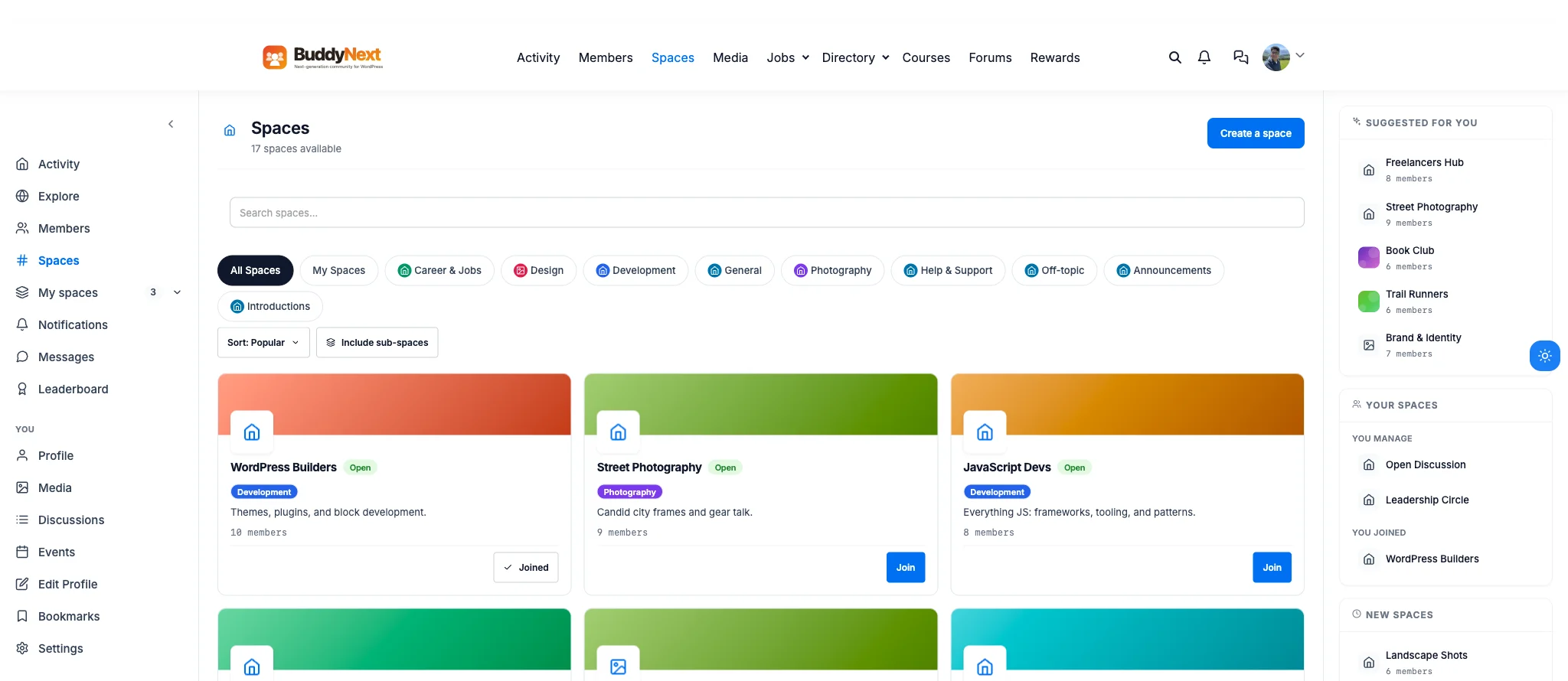
A real BuddyNext directory: 17 Spaces, nine categories, and a mix of Open, Private, and Secret visibility, all in one install.
Picture a community that has grown past three thousand members, all still sharing one activity feed. A new member’s post about a niche topic gets buried in minutes under unrelated posts from people with nothing in common except that they joined the same site. That is not an engagement problem you fix with better content, it is a structure problem, and it is exactly what Spaces exist to solve.
Visibility that matches how people actually trust each other
Not every corner of a community deserves the same level of openness, and forcing every group into “open” or “closed” ignores that. A Space can be public, private, or secret, each paired with its own join path: direct join, request-to-join, or invite-only. The create-space screen below is the real thing, not a mockup, and Type is one of the first decisions a Space owner makes.
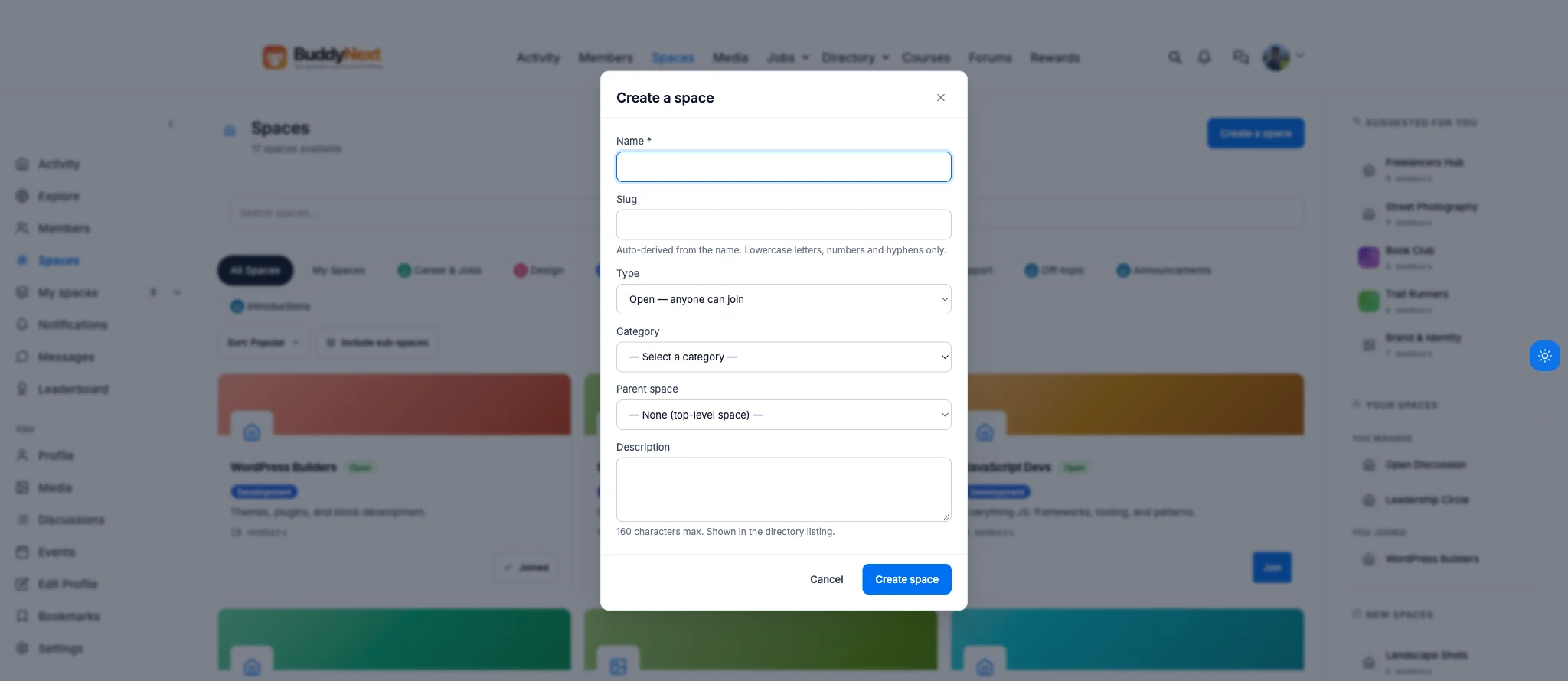
Type, Category, and Parent space are set once, at creation, and every Space inherits the right join behavior from that choice.
This is not theoretical. On this same install, WordPress Builders is Open with 10 members, anyone can join instantly. Book Club is Private, so a prospective member sees a “Request to join” button and waits for approval instead of walking straight in. Leadership Circle and Founders Lounge are Secret, invite-only, and simply do not appear in the public directory listing for anyone outside them. Three trust levels, three real Spaces, running side by side on one site without one of them compromising the others.
A permission model, not just an admin toggle
Basic groups usually offer two roles: the person who made it, and everyone else. BuddyNext Spaces run a real hierarchy, member, moderator, and owner, and every meaningful action inside a Space checks against that rank rather than a single blanket permission.
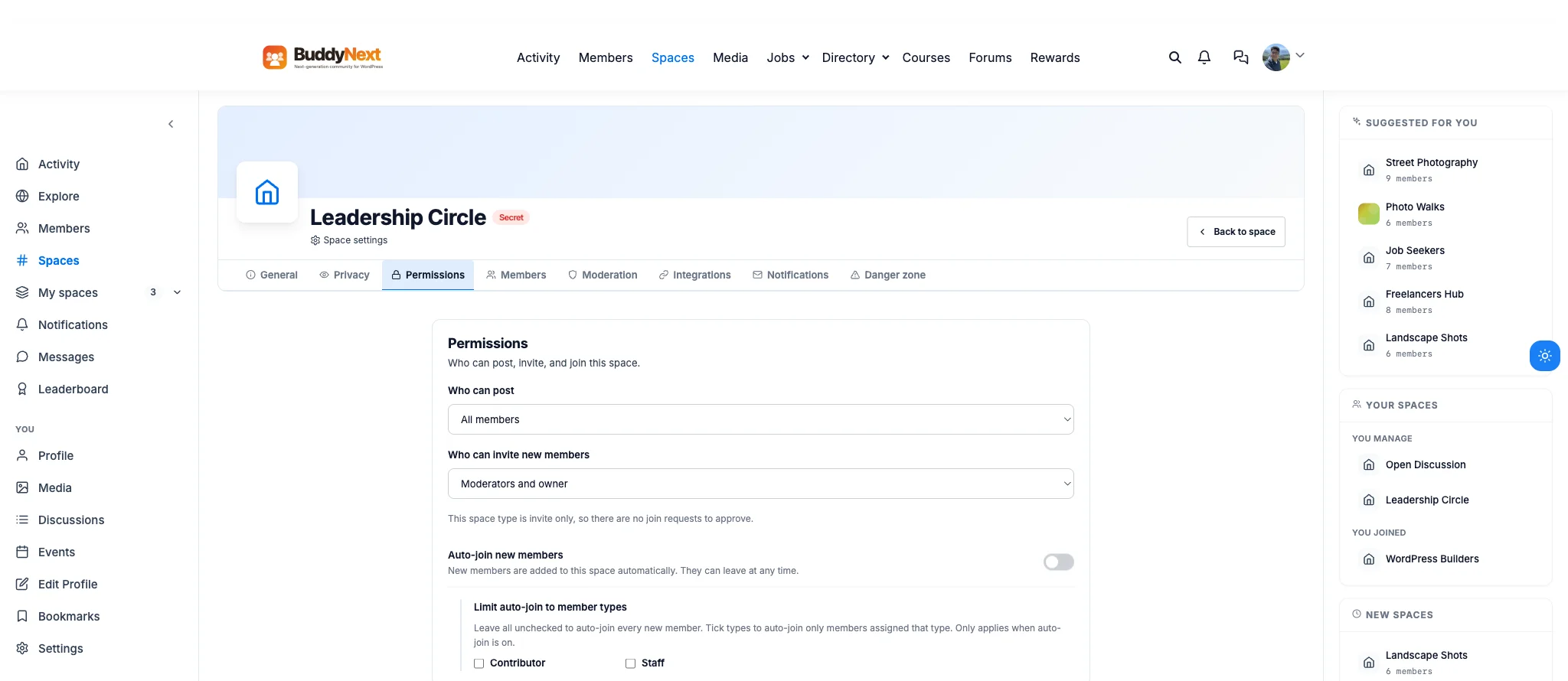
The actual Permissions tab on Leadership Circle: posting is open to all members, but inviting is restricted to moderators and the owner.
That screenshot is not a hypothetical setting, it is the live configuration on Leadership Circle, a Secret space: “Who can post” is set to All members, but “Who can invite new members” is locked to Moderators and owner. That is exactly the shape a real internal leadership space needs, every member can speak freely, but nobody can quietly add outsiders to a room meant to stay closed. A Space owner can hand moderation duties to a trusted member without handing over ownership of the whole Space, and different actions can require different levels at the same time.
Spaces that branch instead of fragment
Large communities eventually need structure underneath a single topic, and the usual workaround is spinning up unrelated groups with awkward names to fake a hierarchy. Spaces support genuine sub-spaces instead: the create-space screen has a real Parent space field, and any existing Space can become the parent of a narrower one underneath it.
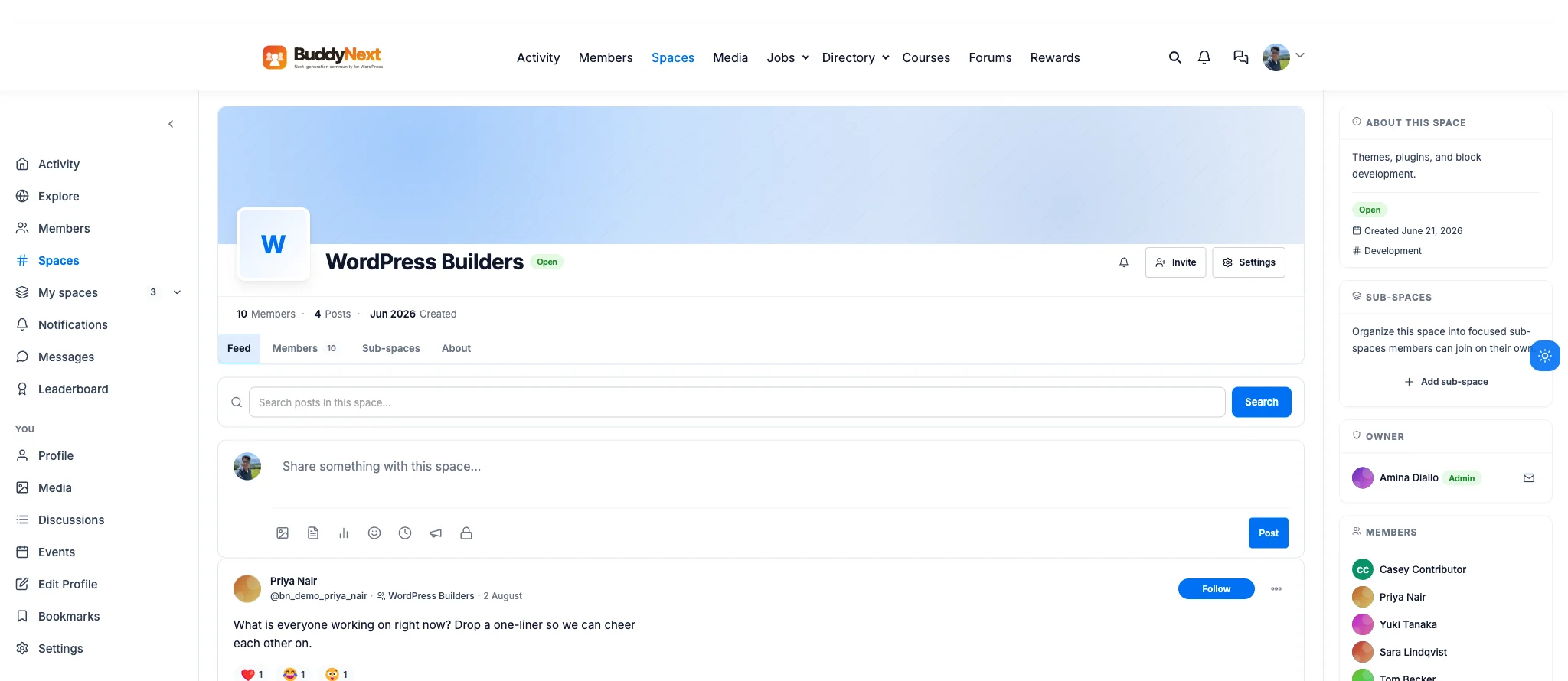
Every Space’s sidebar carries its own Sub-spaces panel with an Add sub-space action, right next to its owner and member list.
A concrete case: a company running a Secret Leadership Circle space could add a narrower sub-space under it for a specific initiative, budget planning, a product launch, without creating a second unrelated Secret space that new leadership hires would have no idea existed. Or a Development category, already home to WordPress Builders, JavaScript Devs, Frontend Guild, and DevOps & Cloud as sibling Spaces today, could restructure any one of them into a parent with focused sub-spaces as its membership grows past what one feed can comfortably hold. Members get the narrower conversation without losing the connection to the space it branched from.
Purpose-built Spaces, not one shape for everyone
A support group, a paid cohort, and a local meetup chapter are not the same kind of thing, even though most platforms force them through identical settings. This install’s real category list already proves the range: Career & Jobs, Design, Development, General, Photography, Help & Support, Off-topic, Announcements, and Introductions.
Under those categories sit Spaces built for genuinely different purposes: Street Photography and Landscape Shots for a shared craft, Job Seekers and Freelancers Hub for career support, Design Critique for structured peer feedback, Trail Runners for a shared hobby with real-world meetups, and Open Discussion as a general catch-all with no category at all. BuddyNext’s Space types are extensible, so a site can define its own type with its own default visibility and join behavior, and have new Spaces of that type start correctly configured instead of relying on whoever creates it to set every option by hand.
A community that survives its founder
Ad hoc groups have a quiet failure mode: the person who created it moves on, and the group slowly goes silent because nobody else has the authority to keep it running. Spaces handle ownership succession directly, so a Space does not become an orphaned, ownerless dead end the moment its founder leaves. On this install, WordPress Builders is owned by a named member with an explicit Admin role badge next to their name, visible right on the Space itself, not buried in a database record only a developer could find.
That continuity matters more than it sounds, because it is usually the most active Spaces, the ones with the most invested members, that are most exposed to this risk. A Space with ten engaged members and no succession plan is one resignation away from going quiet.
A home, not a folder
A basic group is often just a filtered slice of one global activity feed. A Space is closer to its own small site. On WordPress Builders, the real tab row reads Feed, Members (10), Sub-spaces, About, and the sidebar shows the actual owner, Amina Diallo, tagged Admin, alongside a live member list: Casey Contributor, Priya Nair, Yuki Tanaka, Sara Lindqvist, Tom Becker, and more, each with their own avatar color.
The feed itself is not abstract either. A real post from a member reads “What is everyone working on right now? Drop a one-liner so we can cheer each other on,” carrying three live reactions, a heart, a laugh, and a surprised face, each with a real count next to it. Members walk into a Space and land somewhere that feels self-contained and worth spending time in, rather than a tag applied to posts still competing for attention in a global feed.
Custom fields let a Space describe itself instead of relying on a bio
A generic group usually has one description box and hopes it says enough. Spaces support their own custom fields, so a mastermind Space can list its meeting cadence and time zone, a course-cohort Space can list its start date and prerequisite, and a local chapter, like Trail Runners on this install, can list its next meetup detail directly, the same way its current description already tells members “Routes, gear talk, and weekend meetups” before they ever click join. A prospective member can tell what a Space actually is and whether it fits before they request access, which cuts down on the mismatched joins that quietly drag down engagement numbers.
Spaces feed the wider community back
None of that self-containment turns Spaces into silos. The real directory sidebar on this install runs four live widgets at once: Suggested for you, Your spaces, New spaces, Popular this week, and a Community pulse counter reading 17 spaces, 13 open to join, 100 memberships. A thriving Space stays discoverable through all four of those surfaces instead of disappearing behind its own walls the moment it stops being brand new.
New members can browse what is active, join what fits them, and the energy inside individual Spaces, ten members posting and reacting inside WordPress Builders, six planning a trail run together, keeps contributing to the health of the whole community rather than draining attention away from it.
Why this is worth taking seriously before you build
None of this is a bolt-on layered onto a generic group system after the fact. The real settings screen for any Space carries eight tabs: General, Privacy, Permissions, Members, Moderation, Integrations, Notifications, and Danger zone, the last of which is where a Space actually gets transferred or retired, not silently orphaned.
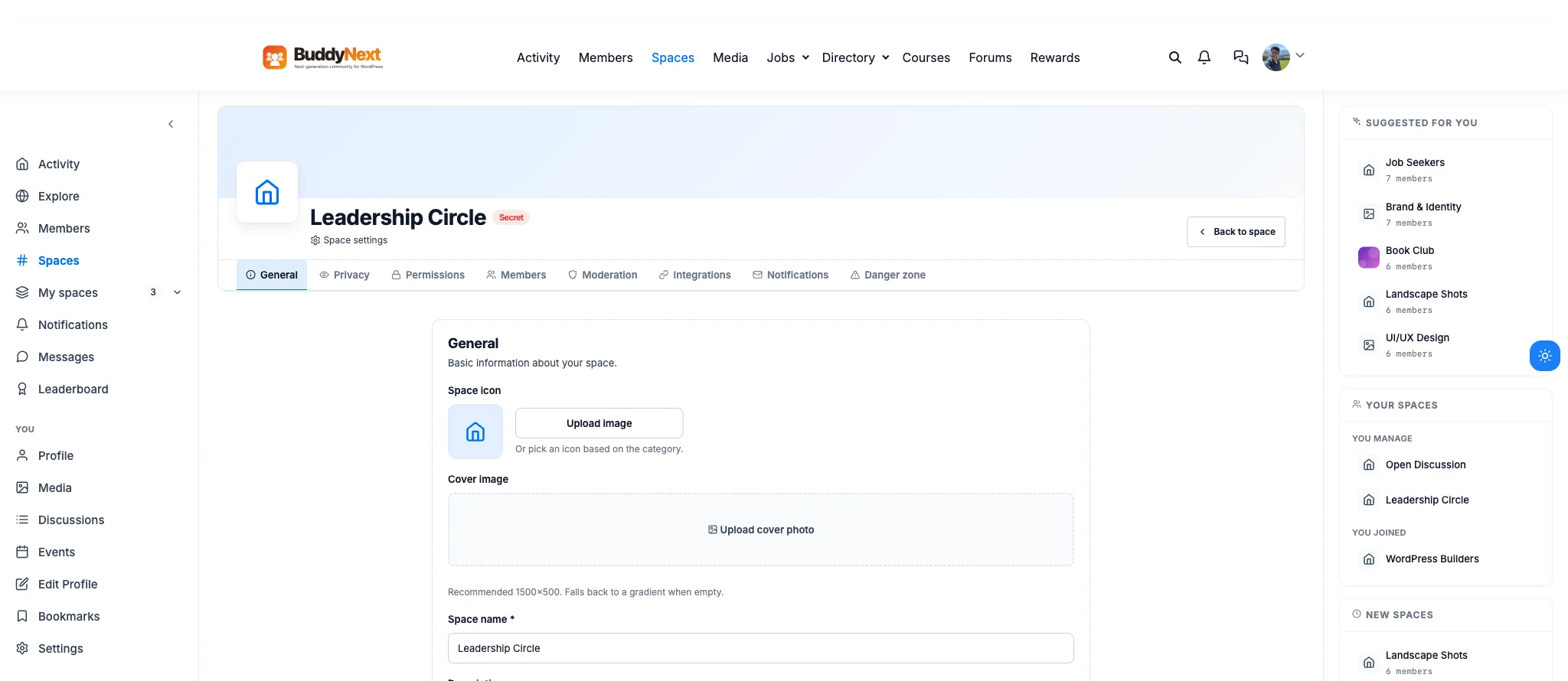
Every Space, public or Secret, gets the same eight-tab settings depth: this is Leadership Circle’s own settings screen.
Visibility, roles, sub-structure, succession, and cross-Space discovery are part of how BuddyNext, the complete community platform, was built from the ground up. If the plan is to grow past a few dozen active members, this is the layer that decides whether that growth adds structure or just adds noise. Groups get you a name and a join button. Spaces get you a place people actually want to stay in.
Get BuddyNext FreeTry the Live Sandbox Demo →
Frequently asked questions
What is the difference between a Space and a basic community group?
A basic group is usually a name, a join button, and a filtered activity feed with one flat permission level. A BuddyNext Space adds public, private, and secret visibility with matching join flows, a member, moderator, and owner role hierarchy with per-action permission gates, sub-spaces for structure at scale, custom fields, files, ownership succession, and cross-Space activity so it stays discoverable instead of becoming a silo.
Can a Space have different rules for who can post versus who can invite?
Yes. Every meaningful action inside a Space checks against its own required rank, so a Space owner can, for example, keep posting open to all members while restricting invites to moderators and above, exactly as configured on the Leadership Circle space shown above, without needing a separate plugin or a manual workaround.
What happens to a Space if the person who created it leaves the community?
Spaces handle ownership succession directly, so a Space does not become an ownerless, orphaned dead end the moment its founder steps away. That is a common failure point for basic groups, where activity quietly dies off once the original creator disappears.
Do sub-spaces work like nested groups?
Yes. A parent Space can have sub-spaces underneath it, added directly from that Space’s own sidebar, so a broad topic can branch into focused sub-communities that still belong to the same parent Space rather than existing as disconnected, awkwardly named groups.
Can I try this myself before installing anything?
Yes. The live sandbox demo linked above spins up a real, throwaway BuddyNext install with full admin access, the same Spaces feature shown in every screenshot on this page, without installing anything locally first.