

JobBoardWP sits at one extreme of this category: completely free, no premium tier at all, actively maintained since 2020 with no catch. JobSearch WP sits at the other: a $79 one-time CodeCanyon plugin with the deepest search filtering of any plugin in this comparison, radius, salary range, career level, skills, industry, but a setup reputation that includes WooCommerce configuration, email template work, and custom CSS before it’s actually production-ready.
WP Career Board sits in between: a free tier that already includes separate employer and candidate dashboards, something JobBoardWP doesn’t offer at any price, with a setup that stays inside standard WordPress without a WooCommerce dependency. We compared what each actually ships against what it takes to get a working board live.
Table of Contents
- Why JobBoardWP and JobSearch WP Get Compared
- How We Evaluated These Three
- JobBoardWP: Completely Free, Genuinely Limited
- JobSearch WP: The Deepest Filtering, the Hardest Setup
- WP Career Board: Dashboards Without the WooCommerce Dependency
- A Real-World Scenario: A Recruiter Replacing a Spreadsheet
- What a Year (and Three Years) Actually Costs
- Setup Complexity: The Real Difference
- Ongoing Maintenance Once the Board Is Live
- Who Each Plugin Is Actually Built For
- Side-by-Side Comparison Table
- How to Choose
- FAQs
Cost per hire is the top HR metric for 47% of businesses with 5-19 employees, and job board advertising fees alone account for 20-25% of total hiring cost. Whether a plugin is free, one-time, or subscription-priced matters less than whether it actually gets a working, self-service board live without weeks of setup, since developer time has a cost too, even when the plugin itself doesn’t.
Why JobBoardWP and JobSearch WP Get Compared
These two represent opposite philosophies that both show up constantly in “best job board plugin” roundups. JobBoardWP’s pitch is refreshingly simple: AJAX-powered keyword and location search, filtering by job type and category, salary display, featured jobs, Gutenberg-optimized, Google structured data for search visibility, all free, forever, no upsell screen waiting at the edge of any feature.
JobSearch WP takes the maximalist approach: separate employer and candidate dashboards, the most advanced search filtering in this comparison (location radius, salary range, career level, skills, industry, publication date), Google Maps integration, social login via Facebook, Twitter, and LinkedIn, application deadlines and tracking, job alerts and suggestions, and the ability to pull jobs in from external listing sites like Indeed. On paper, it’s the most feature-complete plugin in this entire series of comparisons.
The gap between the two is enormous, and that’s exactly why they get compared: one is “free and simple,” the other is “powerful but you’ll need a developer,” and most site owners land somewhere in between those two needs, wanting real functionality without a multi-week implementation project.
How We Evaluated These Three
We looked at what each plugin ships versus what it costs in money and setup time to reach a genuinely usable state, how complete the employer and candidate self-service experience is without extra configuration, and how each plugin’s architecture holds up against modern WordPress, since JobSearch WP’s WooCommerce dependency is a meaningfully different technical commitment than a plugin that works standalone.
We also weighed real-world setup reports from other site owners against our own installs, since a plugin’s feature list on paper and its actual time-to-launch are often two different numbers, and that gap is exactly where a lot of real-world job board projects go over budget.
JobBoardWP: Completely Free, Genuinely Limited
JobBoardWP does exactly what it says: a clean, permanent, free job board with AJAX search, type and category filters, salary display, and featured job slots. It’s Gutenberg-optimized, compatible with Ultimate Member for user accounts, and has been actively maintained with updates as recent as May 2026.
Key strengths:
- Genuinely free with no premium tier to eventually hit a paywall on
- Clean, modern admin that works well inside the block editor
- Google structured data support helps listings appear in Google’s job search results
Where it falls short:
- No native employer or candidate dashboard, self-service requires pairing it with Ultimate Member and configuring that integration yourself
- No company directory, resume database, or applicant tracking of any kind
- Limited advanced features compared to every other plugin in this series, a deliberate trade-off for staying free and simple
JobSearch WP: The Deepest Filtering, the Hardest Setup
JobSearch WP’s feature list is the longest in this comparison series: radius-based location search, salary range filtering, career level and skills matching, industry categorization, Google Maps-based geographic search, social login, application deadlines with tracking, job alerts, job suggestions, and the ability to import listings from external job sites like Indeed. With 2,632 sales and a 4.54/5 rating from 259 reviews, it has real production use behind it.
Key strengths:
- The deepest, most granular search and filtering of any plugin in this entire comparison series
- Separate, full-featured employer and candidate dashboards built in
- Pulls external listings from sites like Indeed, a genuine differentiator none of the others offer
Where it falls short:
- Requires WooCommerce configuration to handle payments and listing packages, a dependency most job board buyers don’t expect to need
- Real-world setup commonly needs email template customization and custom CSS before the site looks production-ready
- $79 one-time via CodeCanyon/Envato licensing, with only 6 months of support included by default, renewal required to keep getting help beyond that window
WP Career Board: Dashboards Without the WooCommerce Dependency
WP Career Board’s free tier includes exactly what JobBoardWP lacks, native employer and candidate dashboards, without requiring what JobSearch WP demands, a WooCommerce installation just to get payments and listing management working. A single job listing page shows employer branding, salary, location, work mode, and an application deadline, with a direct path for the employer to review applications from the same screen.
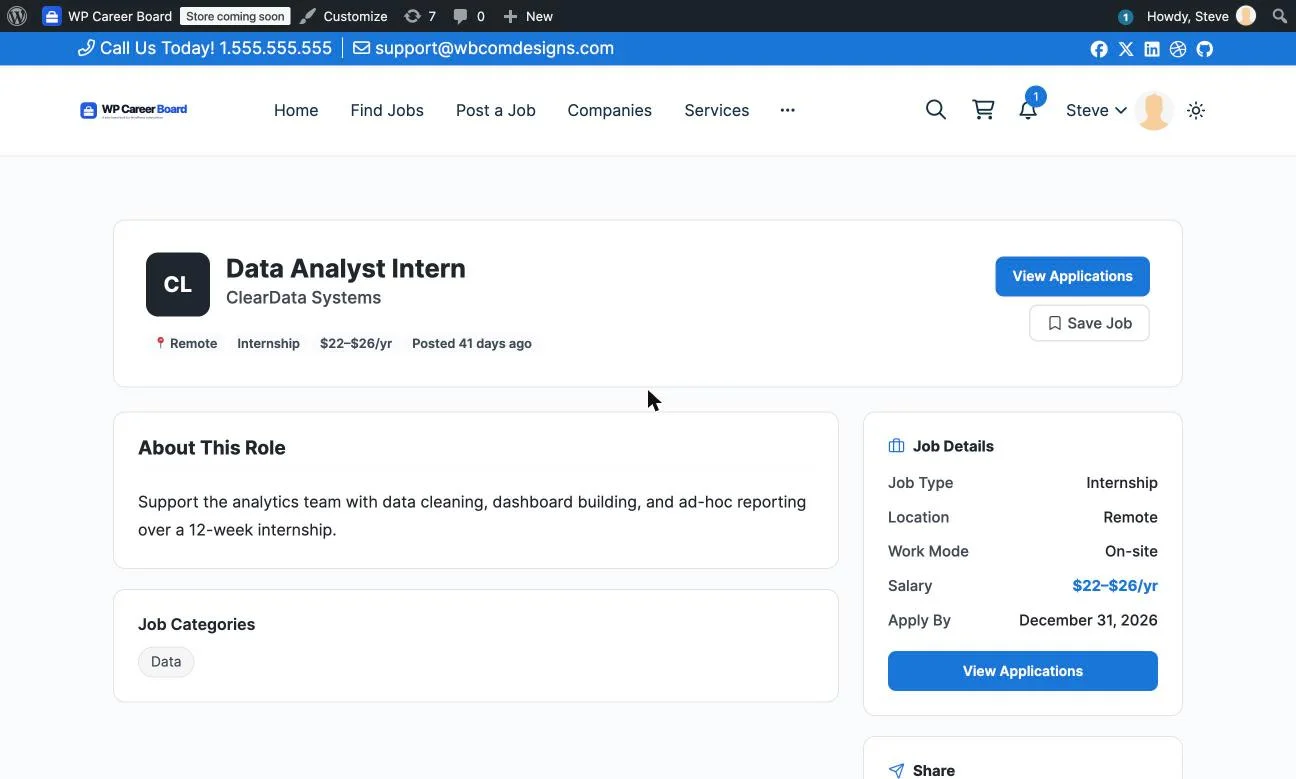
Pro adds the features JobSearch WP ships by default, the Kanban applicant pipeline, resume search, AI-assisted job writing, and paid listings through Stripe, PayPal, or WooCommerce if you specifically want that integration, but as an option rather than a requirement from day one.

Key strengths:
- Employer and candidate dashboards ship free, closing JobBoardWP’s biggest gap without JobSearch WP’s setup complexity
- No WooCommerce dependency for core functionality, only needed if you specifically choose it as a payment option
- Free company directory with filters, which neither competitor offers at any price
Worth knowing:
- No native import from external job sites like Indeed, the way JobSearch WP offers
- Search filtering, while solid, doesn’t yet match JobSearch WP’s radius-and-skills-matching depth
- Newer product, so fewer long-running production case studies than JobSearch WP’s multi-year sales history
A Real-World Scenario: A Recruiter Replacing a Spreadsheet
Picture an internal recruiter at a growing company who’s been tracking candidates in a shared spreadsheet, emailing hiring managers PDF resumes, and manually posting the same job to three different places. They want one place where a job goes live once, candidates apply through a real form, and hiring managers can log in and see status without pinging the recruiter for an update.
JobBoardWP alone doesn’t solve this, there’s no dashboard for hiring managers to check without pairing it with a separate user-management plugin and building that integration themselves, work that quickly erodes the “it’s free” appeal once a developer’s time enters the equation.
JobSearch WP solves it comprehensively but asks for WooCommerce setup and template customization first, a reasonable ask for an agency with implementation time budgeted, a much harder ask for a recruiter who wants this running by Friday.
WP Career Board gets the recruiter’s actual requirement, hiring managers logging in to see real status, running on day one for free, with the Kanban pipeline available as a straightforward $69/year upgrade once the team wants staged screening rather than a flat applicant list, no WooCommerce setup required at any point in that path.
A year later, the company has grown from one recruiter to a small talent acquisition team spread across two offices, and they want each hiring manager to see only their own department’s applicants rather than everyone’s. This is where the three plugins diverge furthest: JobBoardWP’s lack of native role management means building this from scratch inside the Ultimate Member integration, a real development project rather than a settings change. JobSearch WP’s dashboards are built for exactly this kind of multi-employer segmentation, but it’s configuration work layered on top of an already WooCommerce-dependent setup, more moving parts to get right. WP Career Board’s dashboards are employer-scoped by design from the free tier onward, so each hiring manager already sees only their own company’s listings and applicants without any additional setup, the practical payoff of a system built around separate employer accounts from day one rather than retrofitted onto a general-purpose membership plugin.
What a Year (and Three Years) Actually Costs
JobBoardWP is $0, permanently, though reaching dashboard functionality means pairing it with Ultimate Member and your own integration time, a real but non-monetary cost. JobSearch WP is $79 one-time through CodeCanyon, with 6 months of support included; extending support beyond that typically requires a renewal fee, and WooCommerce itself (free, but another plugin to maintain) is a prerequisite. WP Career Board’s free tier covers dashboards and the company directory at $0; Pro for the pipeline and resume tools is $69/year single-site.
| 3-year total (working dashboards, single site) | Cost |
|---|---|
| JobBoardWP + Ultimate Member integration | $0 plugin cost, variable developer/integration time |
| JobSearch WP | ~$79 plugin + setup/customization time + WooCommerce maintenance |
| WP Career Board (free tier) | $0, dashboards and directory included, no extra setup |
Figures are approximate, based on publicly listed pricing as of October 2026. JobBoardWP and JobSearch WP’s real costs depend heavily on implementation time, which varies by site owner skill level and isn’t captured in the plugin price alone.
Setup Complexity: The Real Difference
This comparison is unusual in how much the real cost lives in setup time rather than the plugin’s sticker price. JobBoardWP’s own documentation and community reports are consistent: it’s a fast install for a basic board, but the moment you need self-service dashboards, you’re integrating a second plugin (Ultimate Member) and configuring that relationship yourself, with no official guided path for it.
JobSearch WP’s setup complexity is well-documented by its own user base: getting a production-ready site running takes meaningfully longer than simpler alternatives specifically because of the WooCommerce configuration, email template work, and custom CSS most real deployments end up needing. That’s not a knock on the plugin’s capability, it genuinely does more, but “does more” and “takes longer to configure” are the same coin’s two sides here.
WP Career Board’s free tier is built to reach working dashboards without a second plugin or a WooCommerce dependency, the core trade-off this entire comparison is really about: JobBoardWP skips complexity by skipping capability, JobSearch WP keeps capability but accepts complexity, and WP Career Board tries to hold both, complete dashboards, no required dependency, at the cost of not yet matching JobSearch WP’s most advanced filtering options.
Ongoing Maintenance Once the Board Is Live
JobBoardWP’s maintenance picture is simple by design: one plugin, no required dependencies, standard WordPress update cycle. If you’ve paired it with Ultimate Member for dashboards, that’s a second plugin to track, but the combination is stable and well-understood since both are established, independently maintained products with long track records.
JobSearch WP’s maintenance surface is larger: the plugin itself, WooCommerce as a required dependency, and any WooCommerce extensions the payment setup depends on. WooCommerce updates relatively frequently and occasionally introduces breaking changes for dependent plugins, so a JobSearch WP site owner is effectively committing to monitoring two ecosystems rather than one. The 6-month support window on the $79 purchase also means ongoing troubleshooting help isn’t guaranteed indefinitely without a renewal.
WP Career Board keeps the core experience, dashboards, listings, and the company directory, inside one plugin with no required dependency, so the maintenance surface stays closer to JobBoardWP’s simplicity while still delivering JobSearch WP’s dashboard functionality. Choosing WooCommerce as a Pro payment option is opt-in rather than foundational, so a site that doesn’t need it never has to maintain it.
For any of the three, the practical maintenance task that matters most is the same: test the application and notification flow again after any major WordPress core update, since job board plugins touch forms, email, and custom post types, three areas that occasionally shift behavior across WordPress releases.
Who Each Plugin Is Actually Built For
JobBoardWP fits a site owner who wants a genuinely free, simple listings page and either doesn’t need self-service dashboards or is comfortable building that integration themselves with Ultimate Member. JobSearch WP fits an agency or a buyer with implementation budget who wants the deepest search and filtering available and is prepared for a real setup project, WooCommerce and all, to get there.
WP Career Board fits someone who wants working employer and candidate dashboards without either extreme, no second plugin to integrate, no WooCommerce dependency to configure, with search filtering that covers the common cases even if it doesn’t yet match JobSearch WP’s deepest options.
JobBoardWP vs JobSearch WP vs WP Career Board: Side by Side
| JobBoardWP | JobSearch WP | WP Career Board | |
|---|---|---|---|
| Employer/candidate dashboards | No, needs Ultimate Member integration | Yes, built in | Yes, free, no dependency |
| WooCommerce required | No | Yes, for payments/packages | No, optional for Pro paid listings |
| Advanced search (radius, skills, etc.) | Basic filters only | Most advanced in category | Solid, not yet as deep |
| External job import (Indeed, etc.) | No | Yes | No |
| Company directory | Not available | Not available | Yes, free with filters |
| Setup complexity | Low for basics, high for self-service | High across the board | Low, dashboards work out of the box |
How to Choose
If you want a genuinely free, simple board and either don’t need self-service or have development time to build that integration yourself, JobBoardWP is hard to beat on pure cost. If you need the deepest search filtering and external job-site imports available and have implementation time budgeted, JobSearch WP’s capability ceiling is the highest in this comparison, once you’re through setup.
If you want working employer and candidate dashboards plus a company directory, without a second plugin to integrate or a WooCommerce project to complete first, WP Career Board is built for exactly that middle ground, worth testing before committing implementation time to either of the other two.
FAQs
1. Is JobBoardWP really free with no hidden premium tier?
Yes, as of October 2026 JobBoardWP has no paid upgrade tier at all. Its limitations are architectural (no built-in dashboards), not a pricing gate waiting to appear later.
2. Does JobSearch WP really require WooCommerce even if I don’t want to charge for listings?
Based on documented setup guidance, yes, WooCommerce configuration is part of a standard JobSearch WP deployment even when monetization isn’t the primary goal, since the plugin’s payment and listing-package infrastructure is built on it.
3. Can I add employer dashboards to JobBoardWP without Ultimate Member?
JobBoardWP’s documented compatibility path is specifically with Ultimate Member; other user-management plugins aren’t officially supported for this purpose, so expect custom work if you choose a different route.
4. How long does a realistic JobSearch WP setup actually take?
Based on common setup reports, expect measurably longer than a simple plugin install, often spanning WooCommerce configuration, email template customization, and CSS adjustments, realistically days rather than hours for a production-ready result.
5. Does WP Career Board support importing jobs from Indeed or similar external sites?
Not natively as of October 2026. JobSearch WP is the only one of the three in this comparison with that capability built in.
6. Which of these three is best for a non-technical site owner with no developer help?
WP Career Board’s free tier is the most likely to reach a working result without developer help, since dashboards and the company directory work immediately after activation. JobBoardWP works for basics alone, and JobSearch WP’s setup complexity generally benefits from developer involvement.
7. Can I migrate from JobBoardWP or JobSearch WP to WP Career Board later?
There’s no automatic one-click migration between these specific plugins. Switching means exporting listing data and recreating postings on the new platform, a half-day to full-day task depending on volume, worth testing in staging first.
8. Does Google show job listings from all three of these plugins in its job search results?
JobBoardWP explicitly supports Google’s structured data for job postings. JobSearch WP and WP Career Board both support standard SEO practices that are compatible with Google’s job posting schema, though implementation specifics vary and are worth verifying with Google’s Rich Results Test after setup.
9. Is a $79 one-time plugin actually cheaper than a subscription over three years?
On pure license cost, yes, JobSearch WP’s $79 is well below three years of most subscription plugins. Once implementation and ongoing WooCommerce maintenance time are factored in, the real three-year cost depends heavily on whether that time is billed or done in-house, which the license price alone doesn’t capture.
10. Do any of these three plugins work well on a multisite WordPress network?
All three can technically run on WordPress multisite, but none of the three in this comparison specifically document multisite as a primary supported use case, so test thoroughly on a staging network before deploying to production across multiple sites.
Summary
JobBoardWP earns its place as the genuinely free, no-catch option, right up until self-service dashboards become a requirement. JobSearch WP has the deepest feature set and the hardest road to actually using it, a fair trade for an agency with implementation time, a hard sell for anyone without it. WP Career Board targets the gap between them directly: working dashboards and a company directory, free, without a WooCommerce project standing between activation and a usable board, worth testing before budgeting developer time for either of the other two.
Before committing to any of the three, spend thirty minutes actually posting a test job and applying to it yourself from a second browser or incognito window. The gap between a plugin’s feature list and its real day-to-day usability shows up fastest in that simple round trip, long before you’ve invested real setup time either way.