

Learnomy vs LifterLMS vs LearnDash is one of the first real decisions you face once you decide to stop renting a course platform and build a school on WordPress you actually own. All three names come up fast in any search: LearnDash, the longest-established option with the biggest add-on catalog; LifterLMS, known for its student-engagement and community angle; and Learnomy, the newer complete learning platform that treats selling, grading, certifying, and paying instructors as one connected system instead of a plugin plus a stack of bolt-ons.
Updated September 2026. This comparison focuses on what each platform actually does out of the box, not on sticker prices that shift from month to month. Check each vendor’s own pricing page for current numbers before you buy. What we can compare honestly here is capability: what ships built in, what needs a separate add-on, and how far each option actually gets you toward running a real online school rather than just publishing a few lessons.
In This Guide
- What “Complete Learning Platform” Actually Means
- Course Building and Assessment That Holds Up
- Certificates Worth Showing
- Checkout, Memberships, and Paying Your Teachers
- Grading at Scale
- Beyond Courses: The Platform Around Your School
- AI Course Creation
- Switching From LearnDash, LifterLMS, or Tutor LMS
- If You Are Selling on a Marketplace Today
- Setup, Onboarding, and the First Sale
- Built for Which Kind of School
- Community and Ecosystem
- Where LearnDash and LifterLMS Still Have an Edge
- A Realistic Scenario: One School, Three Platforms
- Support, Documentation, and Long-Term Maintenance
- Ownership: Who Actually Controls Your School
- Who Should Use Each Platform
- Which Should You Choose?
- Frequently Asked Questions
- Bottom Line
Key Takeaways
- Learnomy, LifterLMS, and LearnDash all handle core course delivery well, the real differences show up in checkout, certificates, and instructor payouts.
- Learnomy connects checkout, memberships, and instructor revenue sharing in the core product, with no separate add-on purchase required.
- Only Learnomy ships certificates that are cryptographically signed and verifiable on a public page via QR code.
- LearnDash still has the deepest third-party add-on catalog; LifterLMS still leads on built-in community and engagement features.
- A built-in migration wizard moves courses, enrollments, and progress from LearnDash, LifterLMS, or Tutor LMS without a manual rebuild.

What “Complete Learning Platform” Actually Means
LearnDash and LifterLMS are, at their core, learning management plugins. They handle courses, lessons, and quizzes well, and they lean on their respective add-on ecosystems to fill in everything else a real school needs: selling access, running memberships, paying instructors, building a community around the courses. Learnomy starts from a different premise. It is built as a complete learning platform, the online school you own, with course delivery, anti-cheat quizzes, verifiable certificates, checkout, memberships, and instructor revenue sharing already connected in one system from the first install.
None of that requires a marketplace subscription, a rented subdomain, or a second company holding your student records.
That distinction changes what “switching plugins” actually costs you later. Bolt a payments add-on onto an LMS plugin and you inherit a second update cycle, a second support channel, and a seam where things can quietly break during a WordPress core update. Learnomy keeps a school’s core business functions, selling, grading, certifying, paying teachers, inside one team’s codebase, which means fewer places for the pieces to drift out of sync with each other.
| Capability | Learnomy | LifterLMS | LearnDash |
|---|---|---|---|
| Course delivery, drag-and-drop builder | Built in | Built in | Built in |
| Quiz engine with anti-cheat tracking | Built in, tab-switch tracking plus an essay grading inbox | Core quiz builder | Core quiz builder, deeper reporting via a separate add-on |
| Verifiable certificates (QR code, public verify page) | Built in, cryptographically signed | Certificate builder, no native public verification | Certificate builder, no native public verification |
| Checkout (Stripe and PayPal) in the core product | Yes, no separate add-on required | Ships as a separate add-on | Ships as a separate add-on or a WooCommerce bridge |
| Memberships with trials in the core product | Yes | Separate add-on | Separate add-on |
| Instructor revenue sharing | Built in, with instructor applications and dashboards | Not a core feature | Not a core feature |
| Platform fees on what students pay you | None, checkout runs directly to your own Stripe or PayPal account | Depends on the payment add-on chosen | Depends on the integration chosen |
| Migration wizard from a named competitor | Yes, from LearnDash, Tutor LMS, and LifterLMS | Not built in | Not built in |
| Community layer around courses | Grows into a full learning community, same team | Discussion features built into core | Via third-party add-ons |
| Add-on ecosystem size | Smaller, newer platform | Established | Largest of the three |
Course Building and Assessment That Holds Up
All three give you a course, section, and lesson structure with a drag-and-drop builder, so day-to-day course authoring feels broadly similar across them: video, audio, PDF, and reading lessons, reorderable sections, and templates that override cleanly like any well-behaved WordPress plugin. The real differences show up once you get to testing what students actually learned.

Learnomy’s assessment engine covers six quiz types with partial credit, a reusable question bank, and exam layouts built for different situations: timed exams, sectioned SAT and GRE-style tests, and long certification exams with a question map and the ability to resume at the exact question a student left off on. It also includes tab-switch tracking that flags when a student navigates away mid-exam, and an essay grading inbox for instructors handling long-form answers by hand.
LifterLMS and LearnDash both ship solid quiz builders in their core plugins, but the anti-cheat tracking and the deeper exam-format variety that Learnomy treats as standard tend to live behind add-ons or higher tiers on the other two. If you want to see how exam-grade quizzes hold up under pressure, our deeper look at anti-cheat testing walks through what separates a real exam from a basic quiz.
Course discoverability is part of the same story. Learnomy ships full-text course search, Course structured data so Google can understand and surface your catalog properly, and a progressive web app experience that keeps a learner’s progress saved even when their connection drops. A student on a train with spotty signal does not lose their place in a lesson. Neither LearnDash nor LifterLMS treats offline progress tracking as a core, out-of-the-box concern in the same way.
Certificates Worth Showing
A certificate that nobody can verify is just a PDF. Learnomy issues certificates that are cryptographically signed and verifiable on a public verify page through a QR code, with LinkedIn sharing and a visual certificate designer for building the look of the credential itself. That matters more than it sounds: an employer, a licensing board, or a hiring manager can confirm a credential is genuine without emailing your support inbox to ask.
LifterLMS and LearnDash both include certificate builders capable of producing a nice-looking PDF, but neither ships that kind of native, publicly verifiable check by default, so the credential’s authority rests more on trust in your brand than on the certificate itself.
Think about what that means for a corporate training program or a continuing-education course tied to a license renewal. A compliance officer checking whether an employee actually completed the required training does not want to take your word for it. A QR code that resolves to a public, tamper-evident record settles the question in seconds. That single design choice, built into the base product rather than an upsell, is part of what lets Learnomy describe itself as a school rather than a lesson-delivery tool.
Checkout, Memberships, and Paying Your Teachers
This is where Learnomy’s “complete platform” framing earns its keep. Direct Stripe and PayPal checkout, unlimited membership plans with trial periods, an automatic pricing page, coupons, and Udemy-style instructor revenue sharing with instructor applications and payout dashboards are all part of the base product. No platform fee sits between a sale and your bank account: what a student pays is yours. A school with more than one teacher can scale past the founder without hand-rolling a spreadsheet for who earns what.

LifterLMS and LearnDash can absolutely handle payments and memberships, but typically through a separate add-on or a WooCommerce integration layered on top of the base plugin. That is not a dealbreaker for either platform, but it does mean a second piece of software to configure, update, and keep compatible every time WordPress or PHP moves forward, and it usually means a separate license for the privilege.
Grading at Scale
Multiple-choice quizzes grade themselves. Essays and long-form answers do not, and that is usually where a growing school starts to feel the strain. Learnomy’s essay grading inbox gives instructors a single queue of submissions waiting for review, rather than a scattered pile of email attachments or a separate spreadsheet tracking who has been graded and who has not. Paired with a reusable question bank, an instructor building a new exam can pull from questions already written for a previous cohort instead of starting from a blank page every term.
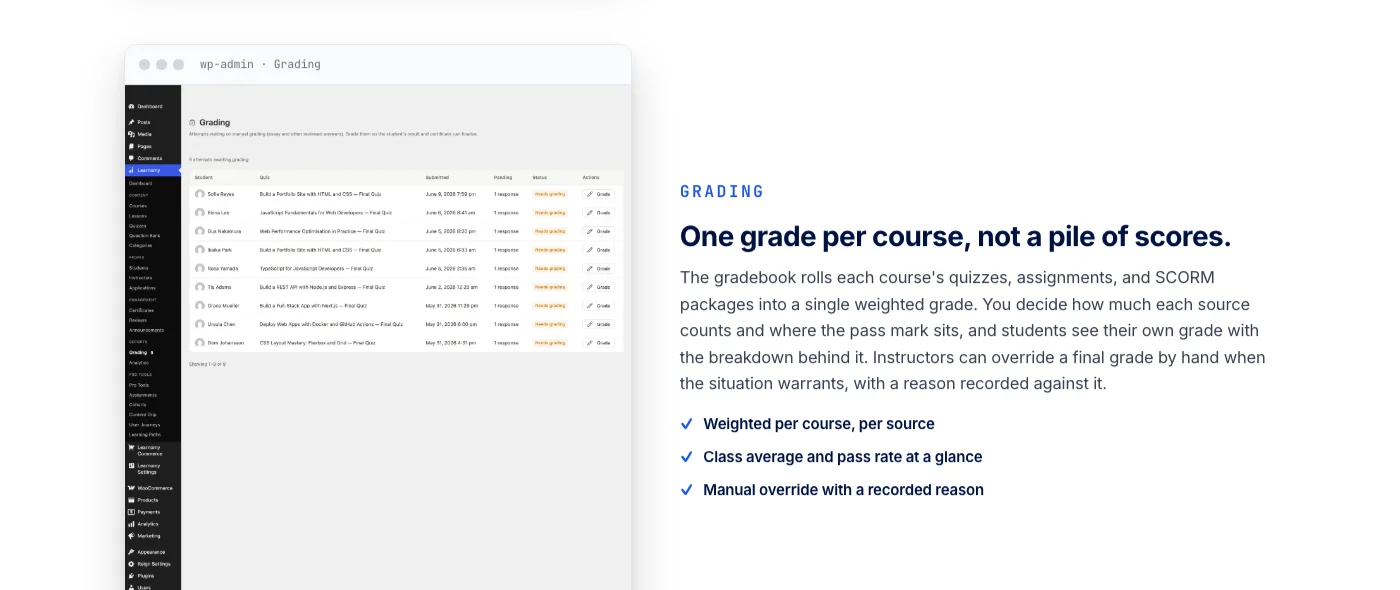
LearnDash and LifterLMS both support manual grading workflows, but neither centralizes the queue in quite the same way inside the base product, so a school running long-form assessment at any real volume tends to feel the difference first in the instructor’s day-to-day workload rather than in a feature comparison chart.
Beyond Courses: The Platform Around Your School
A course platform that only sells courses eventually runs into a ceiling. Learners want somewhere to talk to each other. Instructors want a way to answer questions without an inbox pile-up. Schools want to keep graduates engaged after the last lesson. Learnomy is built to grow past “just an LMS” into a fuller school experience, without asking you to bolt on a separate vendor’s plugin for each piece.
That growth path includes a learning community around your school, so learners get feeds, profiles, and shared spaces for each class rather than a lonely course dashboard. It includes discussion boards and Q&A alongside your courses, so questions about a lesson get answered in public where the next student can find the answer too. It includes gamified learning: points, badges, and streaks that give learners a reason to come back and finish what they started.
Graduates get a job board built for their next step, so finishing the program can turn into landing the role. And your course videos get protection from casual downloading and sharing, so the content you spent months building stays yours. None of this requires stitching together several separate vendors, because it comes from the same team building the core platform.
AI Course Creation
Learnomy’s AI course-builder wizard lets you describe a topic and an audience, review a proposed section and lesson outline, edit it, and then generate draft lesson content and quiz questions from that outline. Everything lands as a draft you approve before it goes live, and it runs on WordPress’s own AI Connector layer, so you bring your own AI provider key instead of being locked to a single vendor. For a full walkthrough of that workflow from a blank topic to a published lesson, see our guide on how to create a course using AI.
LearnDash has been adding AI capabilities across some of its tiers, though depth varies by plan, so check LearnDash’s own pricing page for the current tier breakdown. AI course generation is not a core, advertised feature of LifterLMS at the time of writing.
Switching From LearnDash, LifterLMS, or Tutor LMS
If you are already running LearnDash, LifterLMS, or Tutor LMS and thinking about a switch, Learnomy ships a built-in migration wizard that imports your existing courses, and can bring enrollments and student progress along with them rather than starting from a blank course list. Neither LearnDash nor LifterLMS ships a comparable one-click import from the other, so moving between those two typically means a manual rebuild. For a closer look at moving an existing course library across without losing progress data, see our dedicated guide on switching platforms.
If You Are Selling on a Marketplace Today
Course creators who built an audience on Udemy or Skillshare face a different version of the same ownership problem. A marketplace controls the price of your course, races that price toward the bottom during its own sales events, and takes a cut of every enrollment. It also owns the student relationship: a marketplace learner is the platform’s user first and your student second, which makes it nearly impossible to email them directly, offer a follow-up course, or build a mailing list.
Moving that catalog to a self-hosted platform means keeping the content but rebuilding the storefront, the checkout, and the certificate around it. Learnomy’s checkout and membership tools exist specifically to make that move practical: a creator can bring existing video lessons into a course structure, connect their own Stripe account, and start selling on their own domain without a marketplace’s cut sitting between a sale and their bank account.
Setup, Onboarding, and the First Sale
Installation on all three follows a familiar path: install the plugin, run a setup wizard, and start building your first course. Where they diverge is how much configuration stands between “installed” and “able to sell something.” Because Learnomy bundles payments and memberships into the base product, its setup wizard walks you through connecting Stripe or PayPal in the same flow as building your first course, and you can create a membership plan at the same time.
A new site can go from install to a sellable course in a single sitting. LifterLMS and LearnDash both get you to a published course quickly too, but selling access typically means a second setup pass once you install and configure the payments or membership add-on, an extra step first-time users don’t always expect.
Built for Which Kind of School
The right platform often depends less on feature checklists and more on who is actually sitting in the seats. An independent coach selling a handful of courses needs checkout and certificates that work on day one, and does not want to spend a weekend wiring together a payments add-on before the first sale. A growing academy with several instructors needs revenue sharing and instructor dashboards so it can bring on new teachers without a manual payout process.
A corporate training team needs a way for a company to buy seats and manage its own roster, with learning paths and cohorts that keep new hires on a schedule. A university or continuing-education provider needs certificates that hold up to a compliance check. A nonprofit needs all of the above on a budget that does not assume a large annual software line item.
Learnomy’s core covers the first four of those cases directly, with course selling, certificates, and instructor tools already connected, and team-based training available for organizations that need to manage a company roster rather than individual signups. LifterLMS tends to suit the coach or small academy that wants community features baked in from day one. LearnDash tends to suit an established training operation that already has a specific third-party tool it depends on and a team comfortable managing several connected plugins.
Community and Ecosystem
LifterLMS builds discussion and student-interaction features into its core positioning, which suits course creators who want conversation baked in without adding a separate community plugin. LearnDash has the largest and most mature third-party add-on catalog of the three, built up over many years, which is useful if you are chasing a specific niche integration someone else has already built. Learnomy is newer and carries a smaller catalog of third-party extensions, but it answers the community question at the platform level: a learning community around your school, course discussions and Q&A, and gamified progress all grow from the same team’s roadmap rather than a marketplace of unrelated plugins.
It also pairs naturally with a community-minded theme like BuddyX if you want profiles, groups, and discussions to carry your school’s branding down to the pixel.
Where LearnDash and LifterLMS Still Have an Edge
Fairness matters in a comparison like this. LearnDash’s add-on catalog really is the deepest of the three, and if your school depends on a specific niche integration, a specialty gradebook, or a particular reporting tool, there is a real chance someone has already built it for LearnDash and nobody has built it for Learnomy yet. LifterLMS’s community and engagement features are genuinely built into its core rather than bolted on, and a course creator whose whole model revolves around cohort discussion may find that head start valuable.
Both platforms also carry years of accumulated documentation, video tutorials, and forum threads that a newer platform simply has not had time to build up yet. None of that erases what Learnomy connects out of the box, but it is worth weighing honestly rather than pretending the older platforms have nothing left to offer.
A Realistic Scenario: One School, Three Platforms
Picture the same small school built three different ways. On LearnDash, the founder installs the base plugin, then adds a payments integration, then later a certificate add-on once a client asks for proof of completion, then a reporting add-on once the school has enough students that manual tracking stops working. Each addition is a separate decision, a separate update cycle, and a separate place support tickets can point to when something breaks after a WordPress update. On LifterLMS, the path looks similar, with community and engagement features already in place but checkout and memberships still requiring a similar sequence of add-ons layered on afterward.
On Learnomy, the founder installs one platform, connects Stripe or PayPal during the same setup wizard used to build the first course, and the certificate, the membership plan, and the instructor payout structure are already sitting there waiting to be configured rather than purchased separately. None of the three paths is impossible. The difference is how many decisions and how many vendors stand between the founder and a finished school.
Support, Documentation, and Long-Term Maintenance
LearnDash and LifterLMS both benefit from years of documentation, tutorials, and third-party guides built up by large user bases, which helps if you like solving problems by searching first and asking second. Learnomy’s documentation is newer and growing alongside the platform, but its narrower scope also means fewer conflicting or outdated guides to sift through, and support tends to be more direct since there is less surface area to search.
Whichever platform you choose, plan on a periodic review of your setup: any LMS gets regular updates for WordPress and PHP compatibility, and add-on-heavy setups, more common once payments and memberships get layered onto LifterLMS or LearnDash, have more moving parts to keep in sync during major WordPress updates.
Ownership: Who Actually Controls Your School
Step back from feature checklists for a moment and look at who holds the pieces of your school. Hosted platforms like Kajabi, Teachable, and Thinkific rent you a logo slot on their design system, keep your student records in their database, and take a cut of every sale on top of a recurring subscription. Cancel, and the school, its content, its students, its reviews, disappears with the subscription.
The traditional WordPress answer solves the ownership problem but trades it for a different one: an LMS plugin plus a membership plugin plus a certificates add-on plus a payments bridge plus a community plugin, each from a different vendor, each on its own update cycle, with integration gaps at every seam. Owning your school this way means becoming its systems integrator.
Data portability is the part of this argument that is easy to skip past and expensive to ignore. If your student records, progress data, and certificates live inside a hosted platform’s proprietary database, moving them out later means an export process that platform controls, not you. A WordPress-based school, whatever plugin runs it, keeps that data in a database you can back up, query, and migrate on your own terms. Learnomy’s built-in migration wizard exists precisely because that portability only matters if moving the data in and out is actually straightforward.
| Hosted platforms (Kajabi, Teachable, Thinkific) | Legacy WordPress LMS stack | Learnomy platform | |
|---|---|---|---|
| The deal | Recurring subscription plus a cut of every sale, forever | Licenses scattered across several vendors | One platform you own |
| Your students | Their user records | Yours, but scattered across plugins | Yours, in one coherent schema |
| Platform fees on sales | Yes | Depends on the stack | None, what students pay is yours |
| Courses, selling, certificates, community, gamification, job board | Bundled in part, on their terms | Bolted together from several plugins | One platform, one team |
| Branding and design | Logo slot plus their template themes | Theme hunting, mismatched styles | Full design layer, your brand, dark mode, layouts |
| If you stop paying | The school is gone | The stack slowly rots | Your school keeps running |
Who Should Use Each Platform
Course creators launching their first paid course tend to get the most out of Learnomy, since checkout, memberships, and a working assessment engine are already in place by the time you finish the setup wizard. Creators who lean heavily on live discussion, cohort chat, or built-in forums as part of the learning experience often prefer LifterLMS’s community-first approach. Schools running a mature course business that already depend on a specific third-party integration are usually best served by LearnDash, and the same holds for anyone who values having the largest available add-on catalog to pull from.
If you are picking a platform specifically to run training for a cause-driven organization, that decision deserves its own deeper look; our breakdown of the best LMS options for nonprofits covers volunteer training and donor-facing course needs in more depth than a general comparison like this one can.
Which Should You Choose?
- Choose Learnomy if you want checkout, memberships, and a real assessment engine already connected, you are switching from another platform and want a built-in migration path, or you want your school to grow into a community, discussions, and gamified progress without adopting a separate vendor for each piece.
- Choose LifterLMS if built-in community and student-engagement features matter more to you than having payments and memberships already connected out of the box.
- Choose LearnDash if you want the largest available library of third-party add-ons and integrations, and you are comfortable configuring separate pieces for payments, memberships, and reporting.
Frequently Asked Questions
Does Learnomy charge a platform fee on what I sell?
No. Learnomy connects directly to your own Stripe and PayPal accounts, so what a student pays goes straight to you with no cut taken by the platform in between.
Can I move my existing LearnDash or LifterLMS courses to Learnomy?
Yes. Learnomy includes a built-in migration wizard for importing courses from LearnDash, LifterLMS, and Tutor LMS, with the option to bring enrollments and progress data along.
Do LifterLMS and LearnDash include payments and memberships out of the box?
LifterLMS ships a usable core plugin, but ecommerce and memberships live in separate add-ons. LearnDash’s base license covers unlimited courses and learners, with payments typically handled through a separate add-on or a WooCommerce integration.
Which one is best for selling courses with memberships?
Learnomy is the most complete out of the box for this specifically, since checkout and unlimited membership plans are already connected in the core product. With LifterLMS or LearnDash, plan on configuring a payments or membership add-on separately.
Does switching platforms mean losing my existing students’ progress?
Not necessarily. Learnomy’s migration wizard is built to bring over enrollments and progress data along with the course content itself, rather than just the lessons. If you are moving away from LearnDash or LifterLMS without a matching import tool, plan on exporting your student and progress data manually before you cut over.
Can more than one instructor teach on the same site?
Yes on all three, though the depth differs. Learnomy builds instructor applications, dashboards, and revenue sharing into the core platform so a multi-teacher school can run without custom development. LifterLMS and LearnDash can support multiple instructors too, generally with more manual setup around who gets paid what.
What happens to my certificates if I ever change platforms?
Because Learnomy’s certificates are tied to a public verify page rather than locked inside a single vendor’s closed system, a previously issued certificate keeps resolving as long as the verify page stays live, which matters if a graduate needs to prove a credential years after you have moved on to a different tool.
Do I need a special theme for any of these platforms?
No. All three are built to work with standard WordPress themes. A theme designed with course and community layouts in mind, such as BuddyX, tends to need less custom CSS to get course pages, student dashboards, and instructor profiles looking finished from day one.
One more thing worth saying plainly: none of these three platforms is a bad choice on its own terms. LearnDash and LifterLMS have each supported thousands of real schools for years, and a lot of successful course businesses run on both today. The question this guide answers is narrower and more practical: which one gets you from a blank WordPress install to a school that can actually take payment, grade a quiz, and hand out a credential someone can verify, with the fewest separate pieces to manage along the way.
Bottom Line
Weighing Learnomy vs LifterLMS vs LearnDash comes down to one real question: how much of your school do you want already connected on day one, versus how much are you willing to assemble yourself? LearnDash trades a bigger setup for the widest add-on library. LifterLMS leads with community features but asks you to add payments and memberships separately. Learnomy starts from the opposite direction: checkout, memberships, assessment, and certificates are already one system, and the platform is built to keep growing into a community, discussions, gamified learning, and a job board for your graduates without handing any of that off to a different vendor.
If you are starting from zero or migrating off another platform, that is the shorter, more connected path to a school you actually own.
If checkout, certificates, grading, and instructor payouts already connected on day one sounds better than assembling them from separate add-ons, Learnomy is built to get a school selling faster than either alternative. See what a complete learning platform looks like when it comes from one team instead of a stack of plugins.