
A community where every member is just a username and a join date is not a community, it is a mailing list with extra steps. Members join to be seen by other members, and that only works if there is something real to see: a face, a bio, a way to tell a fellow photographer from a fellow developer at a glance, and a directory that actually helps someone find either.
BuddyNext treats the member profile and the member directory as one connected system, not a username field bolted onto WordPress and a plugin-generated list underneath it. Everything below is shown on a real, populated install, not a mockup.
Key takeaways
- The directory is genuinely filterable: search, member type, online-only, and sort, not just a paginated list of everyone.
- Profiles carry real structure, headline, bio, location, verified social links, joined date, not one open text box.
- Follow and Connect are two different real relationships, with a visible connection-degree badge, not one generic “friend” button.
- Privacy is set per field, five real levels from Public down to Only me, not one site-wide profile visibility toggle.
- Achievements, points, rank, level, and streak, live directly on the profile, tying member identity to real activity.
In this article
- A directory that’s actually searchable
- Real people, not placeholder usernames
- Two real relationships, not one generic friend button
- Per-field privacy, not all-or-nothing
- Achievements live on the profile too
- Ten tabs, not one flat page
- Frequently asked questions
Get BuddyNext FreeTry the Live Sandbox Demo →
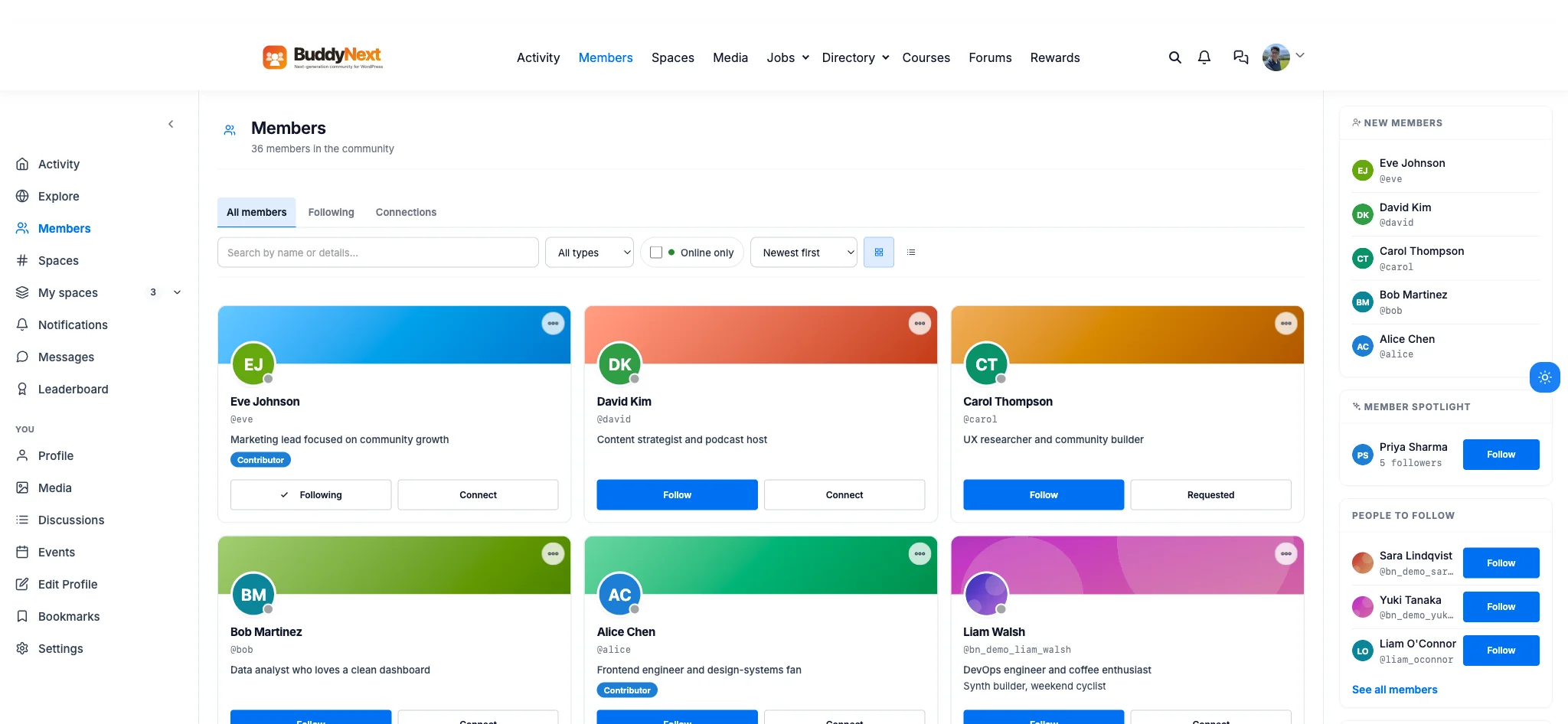
The real member directory on this install: 36 members, filterable by type and online status, sortable, with real Follow and Connect states.
A directory that’s actually searchable
A directory that only paginates every member in join order is barely a directory, it is a phone book with photos. The real directory on this install runs a search box, “Search by name or details,” an “All types” filter for member types like Contributor, an “Online only” checkbox tied to live presence, and a “Newest first” sort with a grid or list view toggle. Underneath it, tabs split “All members,” “Following,” and “Connections” so a member can browse the whole community or just the people they already follow.
That matters at scale in a way it does not at ten members. A community with a few hundred people and no filtering forces every new member to scroll past everyone to find anyone relevant. A searchable, typed, presence-aware directory turns “who else is here” into an answerable question instead of a scrolling chore.
Real people, not placeholder usernames
A member card that shows only a username and a join date gives a visitor nothing to connect with. The real profile header on this install carries a cover photo, an avatar, a headline, “Frontend engineer and design-systems fan,” a fuller bio underneath it, a location, “Berlin, DE,” a personal website link, a joined date, and verified social links to Twitter/X, LinkedIn, and GitHub, each rendered as its own clickable badge.

A real profile on this install: headline, bio, location, three verified social links, and follower, following, and connection counts, all in one header.
None of that is decorative. A headline and bio that actually say what someone does is what lets a prospective collaborator decide to click Follow before reading a single post. A profile that stops at “member since June” gives a visitor no reason to do anything at all.
Two real relationships, not one generic friend button
Most community platforms flatten every relationship into one button: friend, connect, follow, pick one word and force every use case through it. This install’s real profile header shows Follow and Connect as two separate actions, next to a follower, following, and connection count, 5 Followers, 5 Following, 6 Connections, that are visibly three different numbers. A member can follow someone’s posts without a mutual connection, or send a connect request that the other person has to accept, the same distinction LinkedIn members already understand instinctively.
The header goes one step further with a real connection-degree badge, “3rd+,” sitting right next to the member’s name. That single badge answers “how do I know this person” before a visitor reads a word of the bio, the same signal that makes a professional network feel like a web of real relationships instead of a flat list of strangers who all joined the same site.
Per-field privacy, not all-or-nothing
Most profile systems offer one privacy switch for the whole profile: public or private, nothing in between. The real Edit Profile screen on this install shows something considerably more granular, a “Field visibility” legend with five real levels: Public, visible to everyone, Members, any logged-in member, Followers, logged-in followers only, Connections, accepted connections only, and Only me. Each field on the form carries its own lock icon to set that field’s level individually, and it cannot be made more open than the site default, only more private.
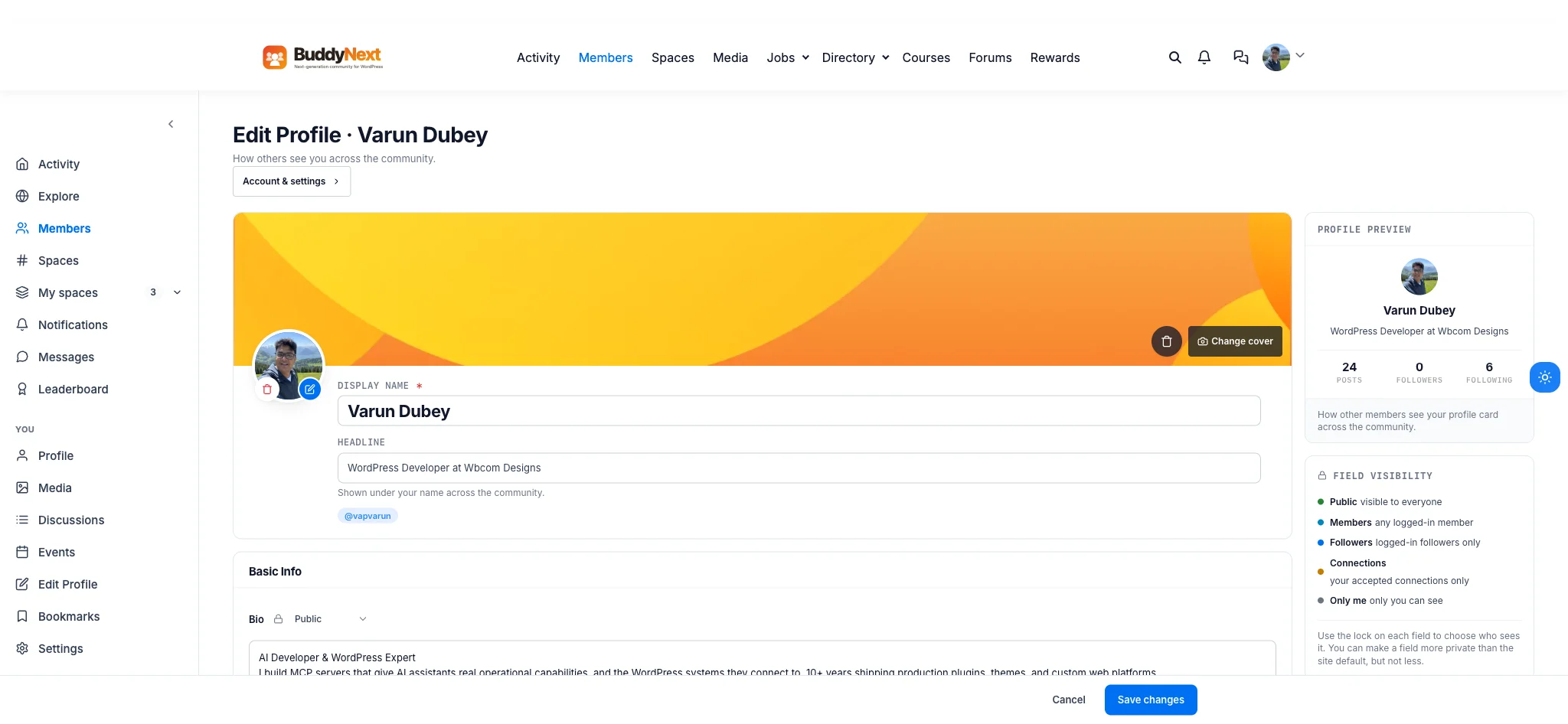
Five real visibility levels, set per field, on this install’s own Edit Profile screen, with a live Profile Preview card alongside it.
That means a member can keep a headline and bio fully public for discovery while locking a phone number or a private note down to Connections only, on the same profile, without a plugin, a workaround, or an all-or-nothing tradeoff. A live “Profile Preview” panel sits next to the form the whole time, showing exactly how the card looks to other members as changes are made, not a guess members have to save and check separately.
Achievements live on the profile too
A profile that only shows static fields misses half the story: what has this member actually done here. The real Achievements tab on this install shows 189 Points, a #26 Rank, a Member level, and a 1-day streak, the same streak mechanic that drives daily return on the activity side, plus a Badges panel reading 4 of 37 earned with a visible progress bar.

Real points, rank, level, streak, and badge progress, tied to the same member whose bio and social links sit one tab over.
That tab only appears once a member has earned a badge or any points, so a brand-new member never lands on an empty Achievements page that makes the community look quiet. Tying credentials directly to the profile, instead of hiding them in a separate leaderboard page, is what turns “this member has been here a while” from a guess into something visible.
Ten tabs, not one flat page
A basic profile is one scrolling page: some fields, then a feed. The real profile on this install runs ten separate tabs, Posts, About, Replies, Media, Likes, Network, Discussions, Articles, Achievements, and Events, each one a genuinely different slice of what that member has done, not the same feed re-filtered six different ways. The “Network” tab surfaces followers, following, and connections directly, and the sidebar’s “Member of” panel shows which Spaces a member owns or belongs to, UI/UX Design, tagged Owner, on this profile specifically, linking the profile system straight back to the Spaces feature covered separately.
Why this is worth taking seriously before you build
None of this is a generic WordPress user-list dressed up with a template. Search and typed filtering, structured profile fields, a real Follow-versus-Connect graph with visible degree badges, five-level per-field privacy, and activity credentials that live on the profile itself are part of how BuddyNext, the complete community platform, treats identity as core infrastructure. A community where members cannot find each other, read each other, or trust what they are looking at is a community that never gets past its first hundred members.
Get BuddyNext FreeTry the Live Sandbox Demo →
Frequently asked questions
Is the member directory just a list, or can it actually be filtered?
It is genuinely filterable. The real directory supports search by name or details, a member type filter, an online-only toggle tied to live presence, and a newest-first sort, with grid and list view options, not just a paginated alphabetical list.
What is the difference between following someone and connecting with them?
Follow is one-directional, a member can follow someone’s posts without approval. Connect requires the other member to accept the request, the same asymmetric-versus-mutual distinction that makes a professional network feel different from a simple follower count.
Can a member make one profile field public while keeping another private?
Yes. Profile fields support five real visibility levels, Public, Members, Followers, Connections, and Only me, set individually per field, not one all-or-nothing profile privacy switch.
Do achievements and points actually show up on a member’s public profile?
Yes. A dedicated Achievements tab shows points, rank, level, and streak, plus badge progress, directly on the profile, and it only appears once a member has actually earned something, so new members never see an empty credentials tab.
Can I try this myself before installing anything?
Yes. The live sandbox demo linked above spins up a real, throwaway BuddyNext install with full admin access, the same directory, profile, and privacy controls shown in every screenshot on this page.