

Most community platforms treat privacy as one setting: the whole site is public, or the whole site is private, pick one. Real privacy needs is rarely that binary. A site owner might want the whole community gated behind a login while a single member still wants their headline public and their phone number locked to close connections only. One toggle cannot do both jobs.
BuddyNext treats privacy as several real, independent controls, whole-site, per-field, search-visibility, and legal-compliance, rather than one on/off switch standing in for all of them. Everything below is shown on a real, populated install, not a mockup.
Key takeaways
- A real “Require login to view the community” switch can gate the entire site, feed, profiles, spaces, search, behind a login wall when a community needs to be fully private.
- Search-engine indexing is controllable separately from login-gating, down to “public posts only,” while profiles and Spaces still respect their own individual privacy settings regardless.
- Every profile field carries its own visibility level, Public down to Only me, independent of any site-wide setting.
- GDPR and CCPA data export and erasure requests are wired directly into WordPress core’s own Privacy Tools, covering ten real data tables, not a manual process.
- The cookie consent banner is honest about its own footprint: BuddyNext itself sets only functional cookies.
In this article
- A real private-community mode, not just a suggestion
- Search-engine visibility is its own, separate control
- Per-field privacy still applies underneath it all
- GDPR and CCPA requests, handled by WordPress’s own tools
- A cookie banner that’s honest about what it covers
- Frequently asked questions
Get BuddyNext FreeTry the Live Sandbox Demo →
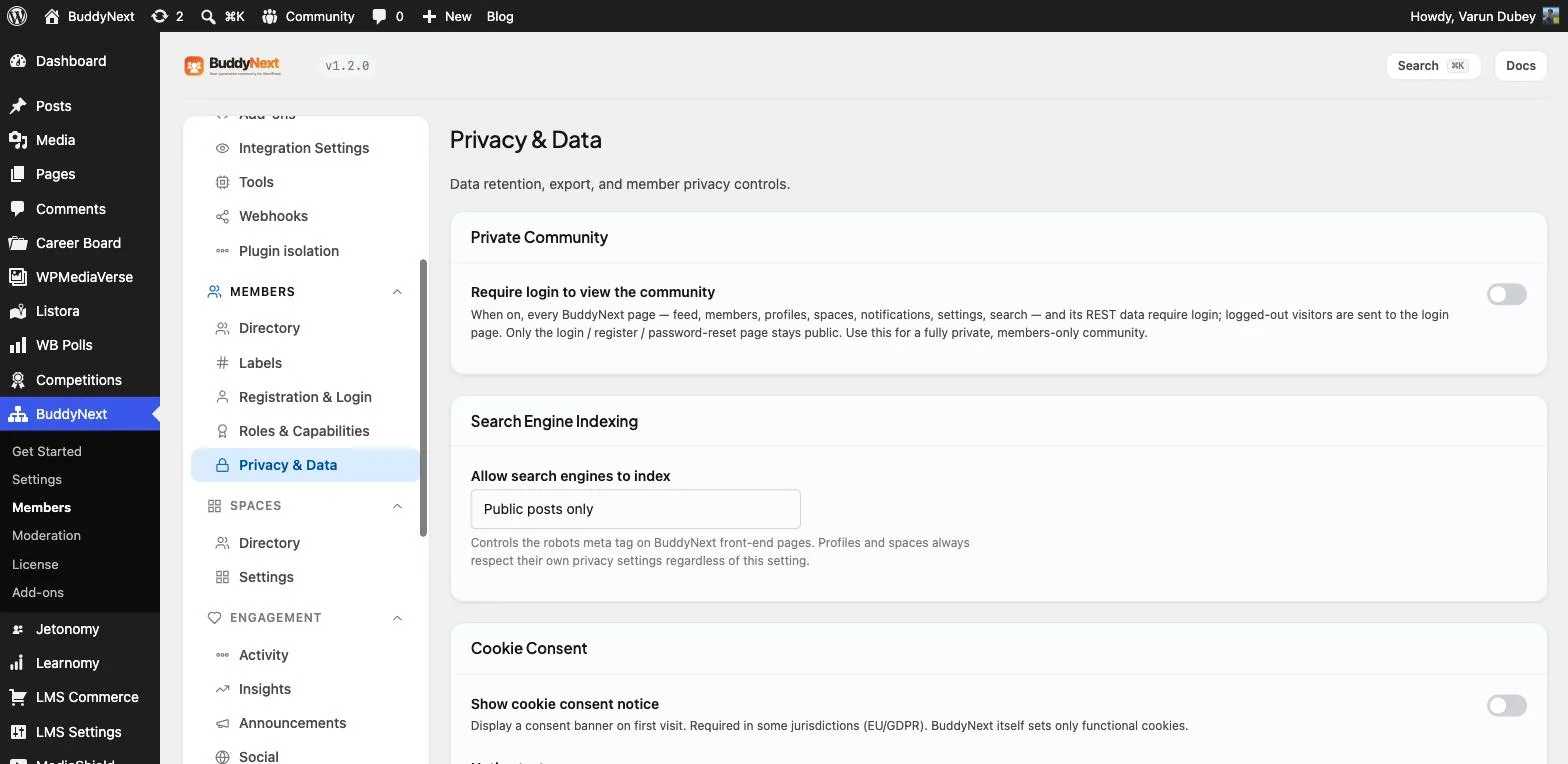
The real Privacy & Data admin screen on this install: private-community mode, indexing control, and cookie consent, three separate switches.
A real private-community mode, not just a suggestion
Some communities are not meant to be discoverable at all, an internal company space, a paid mastermind, a support group that needs to stay off the open internet entirely. The real “Require login to view the community” switch on this install’s admin does exactly that: once enabled, every page, the feed, members, profiles, Spaces, notifications, settings, and search, along with the REST data behind them, requires login. Logged-out visitors are sent straight to the login page, and only login, register, and password-reset stay reachable without an account.
Search-engine visibility is its own, separate control
Login-gating and search-engine visibility are two different questions, and collapsing them into one setting gets one of them wrong for most sites. The real “Allow search engines to index” control on this install is set independently, to “Public posts only” here, governing the robots meta tag across BuddyNext’s front-end pages. Profiles and Spaces still respect their own individual privacy settings regardless of this site-wide value, so a member’s private profile does not become indexable just because the site allows public posts to be crawled.
Per-field privacy still applies underneath it all
None of the site-wide controls above override what a member has chosen for their own profile. Every profile field on this install still carries its own visibility level, Public, Members, Followers, Connections, or Only me, set individually, the same granular system covered in depth on this site’s member profile feature post. A community can be fully open at the site level while individual members still keep specific fields locked down to their own connections only.
GDPR and CCPA requests, handled by WordPress’s own tools
A platform that stores social data in its own custom tables but leaves GDPR and CCPA requests as a manual, ad hoc process is a platform that turns every data request into a support ticket nobody enjoys. BuddyNext plugs directly into WordPress core’s own Tools → Export and Erase Personal Data screens, registering a real exporter and eraser that cover ten actual data tables: authored posts and comments, the follow graph, connection requests, blocks and mutes, space memberships, notifications and their preferences, followed hashtags, and extended profile field values, plus every BuddyNext-specific usermeta key discovered automatically so the coverage never drifts as new features are added.
That matters because it means a real data-subject request gets fulfilled through the same admin workflow every other WordPress plugin’s data already goes through, not a separate, undocumented process a site owner has to invent themselves under deadline pressure.
A cookie banner that’s honest about what it covers
A cookie banner that appears on every site regardless of what that site’s plugins actually do trains visitors to click through it without reading a word. The real cookie consent banner on this install is a genuine toggle, off by default, and its own help text states plainly that BuddyNext itself sets only functional cookies, not tracking or advertising cookies dressed up as something else. A site owner running other tools that do set tracking cookies still needs the banner for those, but BuddyNext’s own footprint is disclosed honestly rather than padded to look more comprehensive than it is.
Why this is worth taking seriously before you build
None of these are one setting standing in for every privacy question a community actually has. Whole-site gating, independent search visibility, per-field profile privacy, core-integrated GDPR tooling, and an honest cookie disclosure are part of how BuddyNext, the complete community platform, treats privacy as several real decisions instead of one. A community that gets any one of these wrong either locks out the members it wants to reach or exposes the ones it was supposed to protect.
Get BuddyNext FreeTry the Live Sandbox Demo →
Frequently asked questions
Can an entire community be hidden from logged-out visitors?
Yes. A real admin switch requires login to view every BuddyNext page and its underlying REST data, sending logged-out visitors to the login page, with only login, register, and password-reset staying reachable without an account.
If search engines are allowed to index the site, does that expose private profiles too?
No. Search-engine indexing is controlled separately from login-gating, and profiles and Spaces always respect their own individual privacy settings regardless of the site-wide indexing value.
Can members fulfil a GDPR data export or deletion request without a developer?
Yes. BuddyNext registers its data with WordPress core’s own Export and Erase Personal Data tools, covering ten real data tables plus all BuddyNext usermeta, so a site admin runs the request through the same standard WordPress workflow used for every other plugin’s data.
Does BuddyNext itself set tracking or advertising cookies?
No. Its own cookie consent banner states plainly that BuddyNext sets only functional cookies. A site running other tools that do set tracking cookies would still need consent for those separately.
Can I try this myself before installing anything?
Yes. The live sandbox demo linked above spins up a real, throwaway BuddyNext install with full admin access, the same privacy, indexing, and cookie controls shown in every screenshot on this page.