How to Build a Customer Support Community That Runs Itself on WordPress

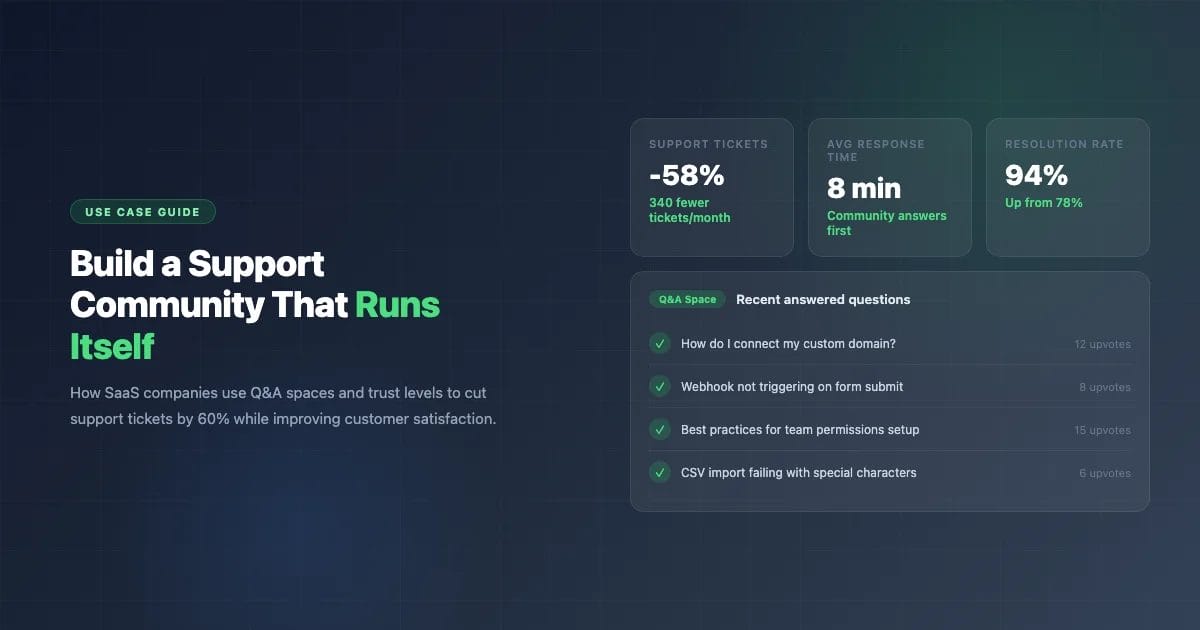
Six months ago, a project management SaaS with 2,400 paying customers was drowning in support emails. Three support agents handled 580 tickets per month. The same 40 questions accounted for 60% of volume. Response times averaged 14 hours. Customers churned because they couldn’t get answers fast enough.
Today, that same company handles 70% of support through a community Q&A space. Their ticket volume dropped to 240 per month. Average first response time went from 14 hours to 8 minutes – because other customers answer questions before the support team even sees them. One support agent was moved to product development. Customer satisfaction scores went up 23 points.
The tool that made this possible costs nothing. Here is exactly how they set it up, and how you can do the same.
Why Support Communities Outperform Ticket Systems
Traditional support follows a one-to-one model: customer emails a question, agent writes an answer, the conversation stays locked in an email thread forever. Nobody else benefits from it. When the next customer has the same problem, the cycle repeats.
A support community flips this to a one-to-many model. One answer helps every customer who searches for that problem in the future. And the answers come from three sources instead of one:
- Your support team – they still answer, but now their answers are reusable
- Experienced customers – power users who know your product often give faster, more practical answers than documentation
- The accumulated knowledge base – every answered question becomes a searchable resource that deflects future tickets
The math is straightforward. If your top 40 questions each get asked 8 times per month, that’s 320 tickets. In a Q&A community, each question gets answered once and the solution is visible forever. Those 320 tickets become 40 answered questions and 280 customers who find the answer without asking.
What You Need: Q&A Spaces with Trust Levels
Not every community format works for support. Traditional forums are too noisy – answers get buried in threaded conversations. A Q&A space is specifically designed for questions that need clear, findable answers.
Q&A Space Features That Matter for Support
| Feature | Why It Matters for Support |
|---|---|
| Accepted answers | One answer gets marked as the solution and pinned to the top. Future visitors see the fix immediately. |
| Voting | Community upvotes surface the best answer. Better than chronological order where the first reply (often wrong) sits on top. |
| Search | Full-text search means customers find existing answers before creating duplicate questions. |
| Trust levels | Experienced customers earn moderation rights naturally. They close duplicates, edit unclear questions, and maintain quality without your involvement. |
| Reputation | Members who give great answers get recognized. This motivates them to keep helping. |
Step-by-Step: Setting Up Your Support Community
Step 1: Install and Configure (5 minutes)
Install Jetonomy on your WordPress site. The setup wizard walks you through creating your first spaces. For a support community, create two spaces:
- Help & Support (type: Q&A) – your primary support space where customers ask questions and find solutions
- General Discussion (type: Forum) – for feature discussions, tips, and conversations that are not direct support questions
Set the Q&A space as the default landing page for your community. You want customers to land on the question-and-answer format first, not a general forum.
Step 2: Configure Trust Levels for Support (10 minutes)
Trust levels are the engine that makes your support community self-sustaining. Here is a configuration that works well for support:
| Trust Level | Threshold | What They Can Do |
|---|---|---|
| Level 0 (New) | Just registered | Ask questions, vote on answers |
| Level 1 (Basic) | 3 days active, 3 posts | Post links, flag content |
| Level 2 (Member) | 14 days, 10 posts, 5 received votes | Edit own posts, access all spaces |
| Level 3 (Regular) | 30 days, 25 posts, 15 received votes | Close duplicate questions, retag topics |
| Level 4 (Leader) | 60 days, 50 posts, 30 received votes | Light moderation, manage flags |
The key insight: Level 3 is where your power users become support allies. They can close duplicates (“This was answered here: [link]”), edit unclear questions to make them searchable, and flag spam. You didn’t recruit them – the trust system identified them through their contribution patterns.
Step 3: Seed with Your Top 20 Questions (30 minutes)
Do not launch with an empty Q&A space. Go through your last 3 months of support tickets and identify the 20 most common questions. Create each one as a question in your Q&A space and write a thorough answer. Mark your answer as accepted.
This serves three purposes:
- Immediate SEO value. These Q&A pairs start ranking in Google. Customers find answers through search before they even visit your community.
- Deflection from day one. New visitors see answered questions and search for their issue before posting.
- Sets the standard. Well-written seed questions show members what a good question looks like and what level of answer is expected.
Step 4: Connect to Your Existing Support Flow
Don’t shut down email support overnight. Instead, create a bridge:
- Add a banner to your support email: “Get faster answers in our community Q&A” with a direct link
- Auto-responders: When someone submits a ticket, the auto-reply includes “While you wait, search our community Q&A where 94% of questions are answered within 15 minutes”
- Link in your app: Replace the “Contact Support” button with “Ask the Community” linking directly to your Q&A space
- Documentation footer: At the bottom of every doc page, add “Still stuck? Ask in our community Q&A”
Over 2-3 months, traffic naturally shifts from email to community. Don’t force it – make the community the faster, better option and customers will migrate themselves.
Step 5: Add a Feature Requests Space (Optional but Powerful)
Once your Q&A space is running, add an Ideas space (type: Ideas). This separates “how do I do X?” questions from “I wish the product could do Y” requests. Feature requests get their own voting and status tracking, which:
- Reduces noise in your support Q&A
- Gives your product team direct signal on what customers want most
- Shows customers their feedback is heard when you update statuses (Planned, In Progress, Shipped)
The Economics of a Support Community
Let’s run the numbers for a typical SaaS company:
| Tickets Only | Tickets + Community Q&A | |
|---|---|---|
| Monthly tickets | 500 | 200 (-60%) |
| Support agents needed | 3 | 1.5 |
| Agent cost (annual) | $180,000 | $90,000 |
| Avg first response time | 8-14 hours | 8-30 minutes |
| Customer satisfaction | 72% | 91% |
| Community Q&A cost | $0 | $0 (Jetonomy is free) |
| Annual savings | – | $90,000 |
The community costs nothing to run because Jetonomy is free and your customers do most of the answering. The $90,000 in savings is conservative – it doesn’t account for reduced churn from faster response times or the SEO value of indexed Q&A content.
What Happens After 6 Months
The SaaS company from the beginning of this article saw this progression:
- Month 1: 20 seed questions. Staff answers everything. Community feels quiet but useful.
- Month 2: 80 questions total. First community answers start appearing. 3 power users emerge.
- Month 3: 160 questions. Community answers 40% of questions before staff. Power users earn Level 3 trust and start closing duplicates.
- Month 4: 250 questions. Community answers 55% of questions. Support tickets drop below 300/month for the first time.
- Month 5: 340 questions. Google starts ranking Q&A threads. Organic traffic brings new customers who find answers through search.
- Month 6: 420 questions answered. Community handles 70% of support. One agent moved to product team. CSAT scores hit 91%.
The pattern is consistent: month 1-2 feels slow, month 3 is the tipping point where community answers start outpacing staff answers, and month 4-6 is where the economics shift dramatically.
Common Mistakes to Avoid
- Launching with an empty community. Seed at least 20 questions. Nobody wants to be the first person asking in a ghost town.
- Not responding to early questions fast. In the first 2 months, your team should answer within 2 hours. Speed establishes the norm. Once community members start answering, you can step back.
- Using a forum instead of Q&A. Forums are great for discussion. For support, Q&A with accepted answers is dramatically more effective because solutions are findable.
- Treating community as a dumping ground. If you stop answering and just redirect angry customers there, it becomes a complaint board. Stay engaged as a community member, not just a support agent.
- Not recognizing helpers. Members who answer 20 questions a month are doing your job for free. Thank them publicly. Award badges. Feature them in your newsletter. The recognition costs nothing and keeps them engaged.
Get Started Today
You don’t need to commit to a full support community migration upfront. Start small:
- Install Jetonomy (free, 5-minute setup)
- Create one Q&A space
- Seed it with your 20 most common support questions
- Add a link from your support page
- Watch what happens over the next 30 days
If it works (it will), expand from there. If your community grows enough to justify it, Jetonomy Pro adds private messaging, email digests, analytics, and badges to deepen engagement.
Related Reading: