

Every “self-hosted vs SaaS” question gets asked as “which one is cheaper,” and that’s the wrong question. The right one is: what does each actually buy, and does your organization need that specific thing badly enough to pay for it. A $400/month job board subscription and a $69/year WordPress plugin aren’t really competing on price, they’re built on entirely different assumptions about who does the work of running the thing.
We already ran the numbers on two specific SaaS platforms against WP Career Board in SmartJobBoard vs Niceboard vs WP Career Board. This post is the broader framework behind that comparison: the real cost categories most buyers skip past, a decision checklist you can actually use, and an honest accounting of what you’re trading away in either direction.
Table of Contents
- The Real Numbers Behind This Decision
- The Cost Categories Most Buyers Skip
- What a SaaS Subscription Actually Buys
- What Self-Hosting Actually Buys
- A Decision Checklist
- Two Real-World Scenarios
- Cost Over Time, Honestly
- How Implementation Time Actually Breaks Down
- The Costs Neither Side Advertises
- FAQs
The average company now leaves 36% of its purchased SaaS licenses unused, a waste figure that costs large organizations tens of millions of dollars a year in aggregate. Industry-wide, the cost per SaaS application keeps climbing too, driven by vendor price increases, AI feature surcharges, and usage-based billing that fluctuates outside normal budget cycles, not by organizations buying more tools. The lesson generalizes well below enterprise scale: a subscription’s sticker price is rarely the full story, in either direction.
The Cost Categories Most Buyers Skip
Most “SaaS vs self-hosted” comparisons stop at the license price, which is exactly how a $69/year plugin and a $4,800/year platform end up looking like they’re competing on the same axis when they’re not. A complete comparison has to walk through at least six categories: the license or subscription fee itself, hosting and infrastructure, implementation and setup time, ongoing maintenance, support when something breaks, and what happens to your data and URLs if you ever need to leave.
Sticker price is the easiest number to find and the least complete one. A platform’s monthly fee bundles hosting, support, and feature development into one line; a self-hosted plugin’s low license price excludes all three, which doesn’t make them free, it makes them separately accounted for, usually inside costs you’re already paying for your website regardless.
Treat each category as its own line item before totaling anything up:
- License/subscription, the number on the pricing page
- Hosting and infrastructure, bundled into a SaaS fee, or already covered by your existing WordPress hosting plan
- Implementation time, the hours spent getting from zero to a working board
- Ongoing maintenance, the recurring hours, weekly or monthly, spent keeping the thing running and current
- Support, what happens when something breaks and how fast you get an answer
- Migration risk, the cost, in money and disruption, of ever needing to move to a different platform later
A comparison that only fills in the first of these six boxes isn’t really a comparison yet.
What a SaaS Subscription Actually Buys
A hosted job board platform’s monthly fee is paying for several things bundled together, and it’s worth naming them honestly rather than treating the whole fee as one undifferentiated cost. Fully managed hosting and uptime means nobody on your team thinks about server capacity, security patching, or what happens during a traffic spike. A support team you can actually call, rather than a plugin changelog to read and a forum thread to search, matters more than it sounds like until the day something breaks during a hiring push.
Beyond infrastructure, some platforms bundle genuinely hard-to-replicate capability into the fee: SmartJobBoard’s AI-driven candidate matching is a real example, a feature that would otherwise mean building or buying a separate machine-learning tool. Niceboard’s polish and associations-specific reputation is itself worth something to an organization that wants a career site that looks professionally designed without a design budget. Published SaaS pricing in this category runs widely, from Job Boardly’s roughly $60/month entry point up through JobBoard.io’s $449-649/month tiers, so “SaaS” isn’t one price point, it’s a range that correlates loosely with how much of the above bundle each platform actually delivers.
What Self-Hosting Actually Buys
WP Career Board’s free tier and $69-199/year Pro buy something categorically different: ownership. Your job board’s data, URLs, and accumulated SEO equity live on infrastructure you control, not a vendor’s platform you’d need to migrate away from if pricing changes, the company gets acquired, or the product gets sunset, all things that happen to SaaS vendors with some regularity.

It also buys configurability most SaaS platforms don’t offer at any price: direct access to the WordPress database, the ability to extend the plugin with custom code if a specific workflow doesn’t exist natively, and no vendor lock-in on your domain or URL structure. The admin settings alone show the depth available without a developer: auto-publish rules, job expiry windows, deadline auto-close, withdrawal permissions, and a full notifications and email configuration layer, all included in a single plugin.
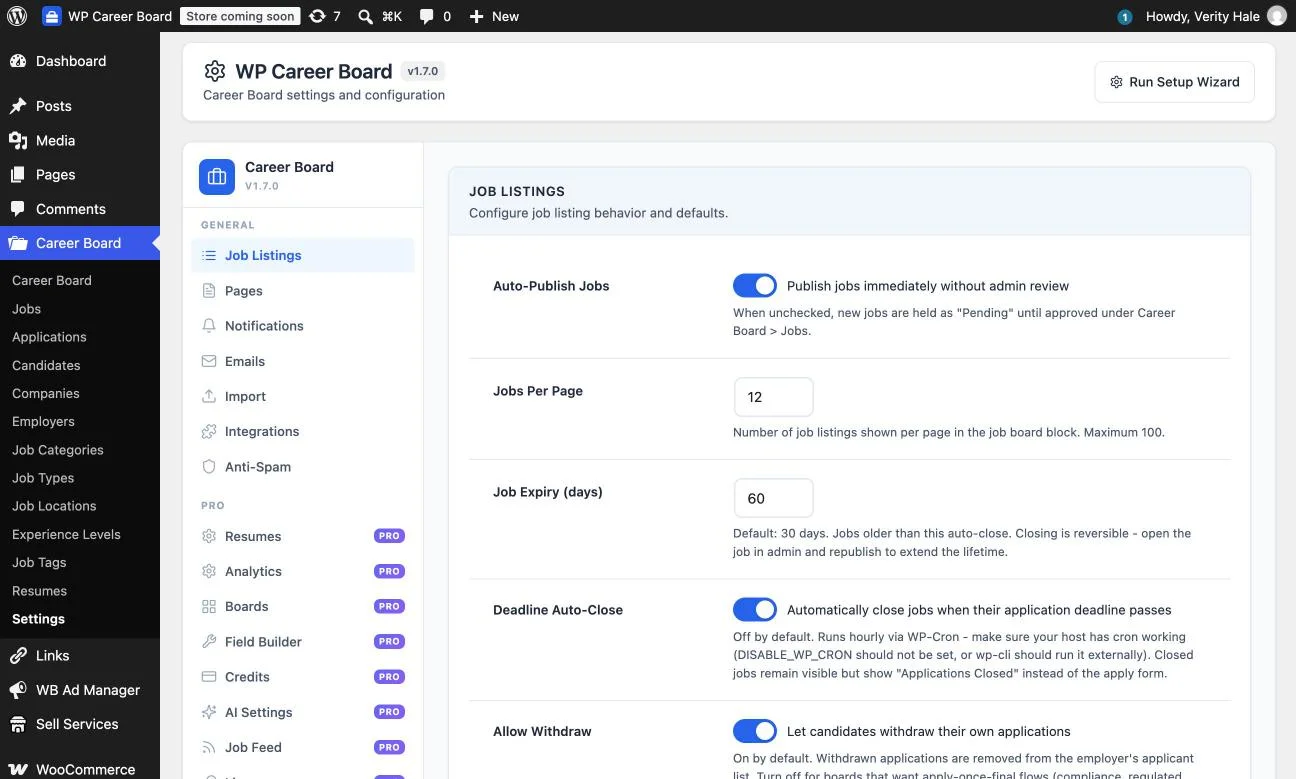
What it doesn’t buy: a support team on standby, guaranteed uptime SLAs, or AI-driven candidate matching. Self-hosting trades a monthly bill for self-reliance, and whether that trade is favorable depends entirely on whether your organization already has the WordPress capability to make self-reliance cheap.
A Decision Checklist
Choose a SaaS platform if:
- You have zero in-house WordPress capability and no interest in acquiring it
- You specifically need AI-driven candidate matching, resume parsing at scale, or multi-aggregator distribution to Indeed, LinkedIn, and similar external boards
- Your budget genuinely supports $3,000-10,000+/year as a line item, not a stretch
- You want zero responsibility for uptime, security patching, or server capacity planning
- The job board is a standalone revenue product, not a feature of an existing site
Choose self-hosted if:
- You already run WordPress for your main site and have hosting in place
- You or a contractor can handle routine WordPress maintenance, the same work your site already needs regardless of the job board
- You don’t specifically need AI matching or external job-board syndication
- Owning your data and avoiding vendor lock-in matters more than fully managed convenience
- The budget realistically tops out in the hundreds, not thousands, per year
Two Real-World Scenarios
A bootstrapped two-person startup building a niche job board as a side project has no spare cash for a $4,800/year subscription and no outside funding runway to justify it. One of the founders is comfortable installing and configuring a WordPress plugin. WP Career Board’s free tier gets a working board live the same weekend, and the $69/year Pro upgrade, once the first few paying employer listings come in, is a rounding error against any realistic revenue the board generates. The self-hosted path isn’t a compromise here, it’s the only path that makes the project’s unit economics work at all before it has any revenue to speak of.
A funded recruiting agency with a dozen staff, an in-house ops team, and no WordPress developer on payroll faces a different calculation. The agency’s time is worth more spent on client relationships and placements than on learning WordPress plugin administration, and a $600/month Niceboard or SmartJobBoard subscription is genuinely trivial against the agency’s revenue per placement. Here, the SaaS platform’s managed hosting, support, and AI matching are worth paying for specifically because the agency’s alternative use of that implementation time has a much higher opportunity cost than the subscription fee itself.
Same decision, same general cost categories, opposite conclusions, because the variable that actually decides it isn’t the price list, it’s what each organization’s time and existing capability are worth.
A third scenario sits between these two and is worth naming because it’s common: a mid-sized company, 50 to 200 employees, that already runs a WordPress corporate site and wants a careers section added to it, not launched as a separate product. This buyer often defaults toward evaluating SaaS platforms first, simply because “job board software” searches surface SaaS results more prominently than WordPress plugin options. But this buyer’s actual requirements, usually, line up closely with the bootstrapped-startup case: existing WordPress infrastructure, existing admin familiarity on the marketing or IT team, and a careers page that’s meant to support hiring rather than generate standalone revenue. For this specific, very common profile, the self-hosted path tends to be under-evaluated relative to how well it actually fits, mostly because it’s less aggressively marketed than the SaaS alternatives that dominate search results for this category.
Cost Over Time, Honestly
Over three years, a SaaS job board platform’s entry tier typically lands between $11,000 and $29,000 depending on the specific vendor and tier, numbers we broke down vendor-by-vendor in the SmartJobBoard and Niceboard comparison. WP Career Board’s three-year Pro cost lands around $207 for the single-site tier, plus whatever your existing WordPress hosting already costs, typically $10-50/month that you’re likely paying regardless of the job board.
That gap, often a factor of 50 to 100 times, only tells the real story once it’s weighed against the implementation and maintenance time each path actually requires. A SaaS platform’s higher price includes labor your organization would otherwise have to supply itself, hosting, security, feature updates, support, so the honest per-hour comparison isn’t “$4,800 vs $69,” it’s “$4,800 vs $69 plus however many hours of in-house or contracted WordPress time the self-hosted path requires across the year.” For most organizations already running WordPress, that remaining gap is still enormous. For an organization with zero WordPress familiarity starting from nothing, it narrows considerably, sometimes enough to flip the conclusion.
| Cost category | SaaS (entry tier) | Self-hosted (WP Career Board) |
|---|---|---|
| License/subscription, 3 years | ~$11,000-29,000 | $0-207 |
| Hosting | Included in fee | Usually already paid for your main site |
| Setup time | Days, vendor-guided | Hours to a day, self-directed |
| Ongoing maintenance | None, vendor-managed | Routine WordPress updates |
| Support | Dedicated team/account | Community forum or ticketed Pro support |
| Data ownership | Vendor-hosted, migration risk | Fully owned, no lock-in |
Figures are approximate and directional, based on publicly listed pricing as of October 2026; see the SmartJobBoard and Niceboard comparison for the specific vendor-by-vendor breakdown behind the SaaS range above.
How Implementation Time Actually Breaks Down
“Implementation time” sounds abstract until it’s broken into the actual tasks, so it’s worth naming them specifically for both paths. On the SaaS side, implementation typically means: choosing a plan, configuring branding and a custom domain, setting up employer onboarding and payment collection, and testing the application flow end to end, usually a process the vendor’s onboarding team walks you through directly, often completed within a few days to two weeks depending on how much customization is requested.
On the self-hosted side, implementation means: installing and activating the plugin, configuring the settings shown above (auto-publish rules, job expiry, notifications, email templates), setting up categories and job types that match your audience, customizing the theme styling to match your site’s branding, and the same end-to-end application testing. For a site owner already comfortable in WordPress, this is genuinely an afternoon’s work. For someone who has never touched a WordPress admin screen before, budget closer to a full day or two, plus whatever learning curve comes with a first WordPress project.
The gap between these two implementation paths is smaller than most people assume going in, and smaller still if the site already runs WordPress for its main presence, since the job board then slots into infrastructure and admin familiarity that already exists rather than starting from zero.
The Costs Neither Side Advertises
SaaS vendors rarely lead with what happens when you want to leave: data export limitations, URL structures tied to their domain or subdomain, and migration projects that can take weeks once a contract ends. Self-hosted plugin vendors rarely lead with the maintenance burden: WordPress core updates, plugin compatibility issues after a major release, and the reality that “free” software still needs someone paying attention to it indefinitely, even if no invoice arrives.
Both of these are real costs that simply don’t show up on a pricing page, because neither vendor’s pricing page is incentivized to mention them.
The practical fix is the same one that applies to any software purchase: ask directly about data portability and export tooling before signing a SaaS contract, and budget realistic maintenance hours, even if unbilled, before assuming a free plugin is actually free. Total cost of ownership, not license price, is the number that should drive the decision. FinOps-style discipline around exactly this gap has been shown to cut total software costs by roughly a quarter for organizations that apply it rigorously, a principle that scales down to a single job board plugin decision as cleanly as it scales up to enterprise software portfolios.
FAQs
1. Is self-hosting always cheaper than SaaS?
On license price alone, almost always, yes. On total cost once implementation and maintenance time are priced in, it depends entirely on whether your organization already has WordPress capability in-house. For a team with zero WordPress familiarity, the real gap narrows.
2. What’s the single biggest hidden cost in a SaaS subscription?
Migration risk if you ever need to leave. Exporting data and rebuilding on a new platform, including handling the URL and SEO transition, is routinely a multi-week project that doesn’t show up anywhere on the vendor’s pricing page.
3. What’s the single biggest hidden cost in self-hosting?
Ongoing maintenance time that never generates an invoice but still has to happen: WordPress core updates, plugin compatibility checks after major releases, and routine security hygiene, the same work your site already needs regardless of the job board.
4. Can I start self-hosted and move to SaaS later if I outgrow it?
Yes, that direction is generally more standardized since SaaS vendors build import tooling to win new customers as a routine part of their sales process. Moving the other direction, SaaS to self-hosted, typically requires more manual rebuilding.
5. Does company size determine which option is right?
It correlates but doesn’t determine it outright. The real variable is WordPress capability and what your team’s time is worth doing instead, which is why a two-person startup and a 12-person agency in this post land on opposite conclusions despite both being small organizations.
6. Are there SaaS job board platforms cheaper than SmartJobBoard or Niceboard?
Yes, pricing in this category varies widely; Job Boardly starts around $60/month and JBoard around $249/month, both well below SmartJobBoard’s and Niceboard’s entry tiers, though feature depth varies accordingly and is worth verifying directly with each vendor.
7. Does self-hosting mean I’m on my own if something breaks?
Largely, yes, beyond whatever support channel the plugin vendor offers (community forums for free tiers, ticketed support for Pro licenses). That’s a meaningfully different support experience than a SaaS platform’s dedicated account or support team, and worth weighing honestly against your team’s comfort with that.
8. Is there a middle ground between fully self-hosted and fully SaaS?
Managed WordPress hosting is the closest middle ground, it removes server and security maintenance from your plate while keeping you on self-hosted software and your own domain, often for less than a job board SaaS platform’s monthly fee on its own.
9. How do I estimate the real implementation time for a self-hosted option before committing?
Install the free tier on a staging site and time how long it actually takes to configure the settings, post a test job, and apply to it yourself. That hands-on hour or two is a far more reliable estimate than any vendor’s marketing copy about ease of setup, in either direction.
10. Should the decision be revisited after the board launches?
Yes. A self-hosted board that’s outgrown its original scope, or a SaaS subscription whose AI-matching or advanced features are going unused, are both signals worth re-evaluating against, the same license-waste pattern that costs larger organizations real money applies at any scale if a tool stops matching actual use.
11. Does a board’s expected traffic or hiring volume change this decision?
At genuinely high volume, a managed SaaS platform’s infrastructure removes a real scaling concern a self-hosted site’s own hosting plan would otherwise need to account for. For most small-to-mid-size job boards, standard WordPress hosting handles the traffic without issue, so this mostly matters at the high end of the range.
12. Is it reasonable to run a trial of a SaaS platform while also testing a self-hosted plugin in parallel?
Yes, and it’s the most reliable way to make this decision concretely rather than theoretically. Most SaaS platforms offer trial periods, and installing a free self-hosted plugin on a staging site costs nothing but time, so running both side by side with the same test job and real application flow gives a direct comparison neither pricing page can replace.
Summary
The real question was never which option is cheaper on paper, it’s which bundle of trade-offs your organization is actually positioned to make good use of. A SaaS platform’s fee buys managed infrastructure, support, and sometimes genuinely hard-to-replicate capability like AI matching. Self-hosting buys ownership, configurability, and a dramatically lower price, at the cost of self-reliance for maintenance and support. Price out both honestly against your organization’s real WordPress capability and real time constraints, not just the sticker price, before deciding, and revisit that decision once a year as your needs change.
Whichever direction this lands, don’t make the decision from a pricing page alone. Run the free self-hosted tier and a SaaS trial side by side for a week, post the same test job on both, and see which one your team actually reaches for without being told to. That single week of hands-on comparison will tell you more than any cost spreadsheet, including this one.