
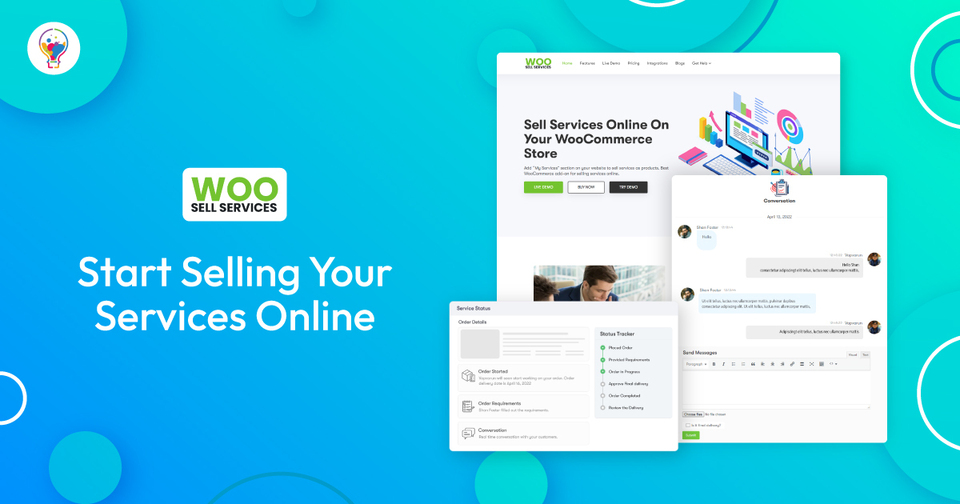
Selling services through WooCommerce isn’t the same problem as selling physical products. A physical product order goes: pay, pack, ship, done. A service order needs requirement-gathering, back-and-forth communication before work even starts, a delivery step, and a customer approval step before the order can honestly be marked complete, none of which a standard WooCommerce product page handles out of the box. Woo Sell Services (WBCOM Designs, v5.8.6, $59-499/yr or lifetime license) builds that entire workflow directly into WooCommerce rather than forcing you to bolt it on with generic form and messaging plugins that weren’t designed for the job.
Key Features
1. Service Bundling With WooCommerce Add-Ons
Pairs with the official WooCommerce Product Add-Ons plugin to bundle multiple services together under one purchase, a straightforward way to upsell complementary work (a base logo design plus a brand style guide, for instance) instead of forcing customers to check out separately for each related service.
2. Multi-Vendor Compatibility
Works in a marketplace setup where each vendor lists and manages their own services independently, useful if you’re running something closer to a freelancer marketplace (think a niche, curated alternative to a broad platform like Fiverr or Upwork) than a single-provider store. Pair it with a multi-vendor plugin like Dokan or WC Vendors and each vendor gets their own service catalog, order queue, and chat threads without stepping on each other’s data.
3. Integrated Chat System
Once an order’s placed, a chat widget opens between vendor and customer so requirements get gathered directly on the order rather than scattered across email threads that are easy to lose track of. Vendors can ask default questions (set once, reused on every order for that service) or custom questions specific to a particular customer’s request, and the entire conversation stays attached to the order for reference if a dispute or clarification comes up later.
4. Delivery Workflow
After requirements are gathered, the order moves into a delivery stage with its own status and an expected delivery date, rather than treating a service order like a shipped physical product with a tracking number that means nothing for creative or consulting work. Vendors upload deliverables directly to the order, and the customer sees a clear “delivered, awaiting your review” state rather than guessing whether the work is actually done.
5. WooCommerce Payment Gateway Support
Since it’s built on WooCommerce core rather than a separate checkout system, every payment gateway you already have configured, Stripe, PayPal, Square, whatever else, works without any extra setup specific to services. That matters because it means you’re not maintaining two separate payment configurations for products versus services on the same store.
6. Familiar WooCommerce Workflow
Customers place service orders the same way they’d buy a product, add to cart, checkout, pay, so there’s no separate purchase flow to learn or explain. The service-specific steps (chat, delivery, approval) kick in automatically after the order’s placed, which keeps the customer-facing experience consistent with the rest of your store even though a lot more is happening behind the scenes than a normal product order.
How the Order Workflow Actually Works
1. Order Placed
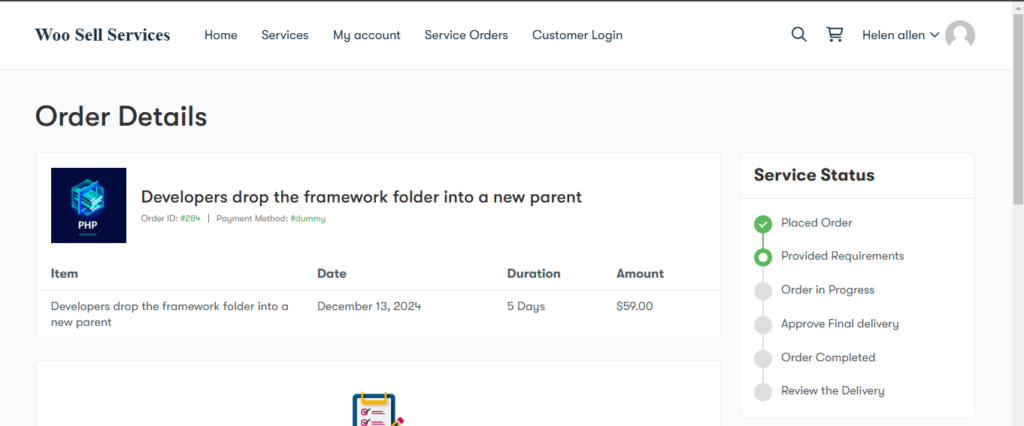
Customer places the order like any WooCommerce purchase; the plugin automatically switches it into the service-specific workflow rather than the standard physical-product flow, no manual step required on the store owner’s end.
2. Requirements Gathered


The chat widget activates and the vendor collects whatever’s needed before starting, brand assets for a design job, access credentials for a technical service, reference material for a writing project, whatever the service actually requires to begin.
3. Order in Progress

Status updates to “Order in Progress” once requirements are in, with the chat staying open for questions along the way, useful for services where the vendor needs a quick clarification mid-project rather than blocking on a full email round-trip.
4. Delivery and Approval
Vendor marks the work as ready, customer reviews and explicitly approves it. Nothing moves to “Order Completed” without that approval step, which is a deliberate design choice: it keeps a vendor from unilaterally marking their own work done and closing out payment before the customer’s actually satisfied, a real protection for buyers on a marketplace-style store where vendor quality varies.
5. Review
Once approved, the plugin prompts the customer for a review, feeding directly back into the vendor’s visible credibility for future buyers browsing the same service listing. On a multi-vendor setup, this review history is often the single biggest factor in whether a new customer picks one vendor over another.
Where This Fits Compared to Generic Service Marketplaces
It’s worth being honest about the tradeoff here rather than pretending WooCommerce is always the right call. A generic marketplace like Fiverr or Upwork gives you instant access to a massive existing buyer pool, you don’t have to drive your own traffic. What you give up is control: you don’t own the customer relationship, the platform takes a meaningful cut (Fiverr’s seller fee has historically run around 20%), and you’re competing directly against thousands of other listings in the same category with no way to differentiate beyond price and reviews.
Woo Sell Services makes sense specifically when you already have, or are actively building, your own audience, an existing customer base, an email list, organic search traffic, or a brand people seek out directly, and want to own that relationship and the transaction data rather than renting it from a third-party marketplace. It’s the wrong tool if you’re starting from zero audience and need the marketplace’s built-in discovery to get your first customers; in that case, building an initial reputation on an established marketplace first, then migrating high-value clients to your own WooCommerce store over time, is often the more realistic sequencing.
Use Cases Where This Genuinely Fits
A few patterns show up repeatedly among stores actually running this plugin in production: Agency and freelancer stores selling defined-scope services (a logo package, a website audit, a set number of blog posts) where the requirement-gathering chat replaces what used to be a scattered intake form and email chain. Local service businesses (photography, consulting, tutoring) that want online booking and payment without handing a cut to a generic local-services marketplace. Niche multi-vendor marketplaces built around a specific skill category, a design-only marketplace, a technical-writing marketplace, where Woo Sell Services plus a vendor plugin recreates the core Fiverr-style mechanics inside a WooCommerce install you fully control.
Pricing and Licensing
Woo Sell Services runs on a standard annual or lifetime license model, currently $59-499/year depending on the tier and site count, with a lifetime option for stores that want to avoid the recurring renewal. As with most WooCommerce extensions in this price range, budget separately for the extras you’ll likely need alongside it: WooCommerce Product Add-Ons for bundling (if you don’t already have it), and a multi-vendor plugin like Dokan or WC Vendors if you’re building a marketplace rather than a single-provider store, since Woo Sell Services handles the service-order workflow but doesn’t replace the multi-vendor infrastructure itself. Always check the current pricing page directly before budgeting, extension pricing on WooCommerce.com-style marketplaces shifts periodically. Factor in payment processor fees separately too, they apply the same way to a service order as to a physical product, and on higher-ticket services (a $2,000 brand identity package, say) those percentage-based fees add up to a real line item worth accounting for in your pricing.
What You’d Otherwise Have to Cobble Together Manually
It’s worth spelling out what running services through vanilla WooCommerce actually looks like without this plugin, since the gap is easy to underestimate until you’ve tried it. Without a dedicated service workflow, most stores end up stitching together a contact form plugin for requirement intake, a separate email thread for back-and-forth communication that’s disconnected from the order record, a manual order-status note to track delivery progress, and no structured approval step, meaning payment gets captured before the customer has actually confirmed satisfaction, a real dispute risk on higher-ticket services.
Woo Sell Services consolidates all of that into the order itself: the requirement questions, the chat history, the delivery files, and the approval status all live in one place tied to the WooCommerce order ID. That matters practically when a dispute does come up months later, you have a complete, timestamped record rather than reconstructing what happened across three different tools.
Handling Disputes and Partial Deliveries
Because the approval step is explicit and customer-controlled, disputes are easier to resolve fairly than on a workflow where payment is captured the moment an order’s placed. If a customer isn’t satisfied with a delivery, they can decline approval and continue the conversation in the same chat thread rather than opening a separate support ticket disconnected from the actual work context. Store owners running a multi-vendor setup should still have a clear, published policy for what happens if a vendor and customer can’t reach agreement, the plugin gives you the structured data to make that judgment call, but it doesn’t replace having an actual dispute-resolution policy written down and visible to both sides before an order is placed.
Getting Started
- Install Woo Sell Services from WBCOM Designs on your WooCommerce site, requires an active WooCommerce install as a prerequisite.
- Set up your service listings, using WooCommerce Product Add-Ons if you want bundled service offerings or optional extras attached to a base service.
- Configure the default intake questions for each service so the chat opens with the right requirement-gathering prompts automatically rather than starting from a blank conversation every time.
- If you’re running multi-vendor, walk vendors through the chat and delivery workflow before launch, it’s a genuinely different process than a standard product sale, and vendors coming from a normal WooCommerce store or a different marketplace won’t intuit it automatically without a short onboarding walkthrough.
- Track completed orders, delivery times, and reviews over the first few weeks to see what’s actually working and where customers are dropping off in the requirement-gathering step specifically, that’s usually where friction shows up first.
Example Setup: A Small Design Agency
A concrete walkthrough helps make the abstract workflow tangible. Take a three-person design agency selling logo design, brand style guides, and website mockups directly off their own WordPress site rather than through a marketplace. Each service is listed as a WooCommerce product with tiered pricing (a basic logo package versus a full brand identity package), using Product Add-Ons to let customers add a style guide on top of a base logo order.
When a customer checks out, Woo Sell Services immediately opens the intake chat with the agency’s pre-set default questions: brand name, color preferences, three reference examples of styles they like, and typical turnaround expectations. The agency assigns the order to whichever designer has capacity, work happens over the following days with clarifying questions handled in the same chat thread rather than a separate email chain, and the designer uploads final files through the delivery stage when done. The customer reviews, approves (or requests a revision within whatever the agency’s stated revision policy allows), and the order closes with a review request. The entire lifecycle, intake through review, stays on one order record the agency can reference if a similar request comes in later or if a dispute needs resolving.
Compatibility Notes
Woo Sell Services requires an active WooCommerce installation as a base dependency, and works alongside most standard WooCommerce-compatible themes, including BuddyX and Reign for stores that also want a community layer around their service marketplace (a genuinely natural pairing for a freelancer or agency marketplace where buyers and vendors might also want profiles, messaging, or a review-driven directory beyond what the plugin itself provides). Before adding a multi-vendor plugin on top, check that specific plugin’s own compatibility notes with Woo Sell Services, since combining multiple WooCommerce extensions that each touch the order workflow is exactly the kind of setup worth testing on staging before going live, standard practice for any multi-plugin WooCommerce stack rather than a concern specific to this plugin.
On mobile, the chat and order-status views inherit whatever responsive behavior your active theme provides for standard WooCommerce order pages, so it’s worth checking the intake chat specifically at a phone-width viewport before launch, a surprising share of service-order customers manage the back-and-forth from their phone rather than sitting down at a desktop, particularly for quick clarifying questions mid-project.
FAQ
1. What does Woo Sell Services actually add to WooCommerce?
A service-specific order workflow: requirement-gathering chat, a delivery/approval stage, and multi-vendor support, none of which exist in a standard WooCommerce product purchase built for shipping physical goods.
2. Do I need another plugin for service bundling?
Yes, WooCommerce Product Add-Ons (or a comparable add-ons plugin) handles the bundling mechanics; Woo Sell Services builds the service-order workflow on top of it.
3. Does it work for multi-vendor marketplaces?
Yes, vendors can list and manage services independently through a compatible multi-vendor plugin (Dokan, WC Vendors, or similar) while customers get one consistent chat-and-delivery workflow regardless of which vendor they’re buying from.
4. How does the chat system work?
It activates automatically when an order is placed, letting the vendor gather requirements and confirm delivery details directly on the order rather than over separate email threads that are easy to lose track of.
5. What payment gateways does it support?
Whatever you already have set up in WooCommerce, Stripe, PayPal, and the rest, since the plugin builds on WooCommerce’s existing checkout and payment infrastructure rather than replacing it.
6. Can I track delivery and feedback?
Yes, the status workflow (placed, requirements gathered, in progress, delivered, approved) and the post-delivery review prompt are both built in, giving you a clear operational view without needing a separate project-tracking tool bolted on.
7. Is this a good fit for a single-freelancer store, or only multi-vendor marketplaces?
Both. A solo freelancer or small agency gets real value from just the chat-and-delivery workflow on its own, the multi-vendor piece is optional and only matters if you’re building a marketplace with multiple independent service providers rather than selling your own services directly.
8. What happens if a customer never responds to the intake chat after paying?
The order stays in the requirements-gathering status until the customer responds, giving the vendor a clear signal that work hasn’t started and shouldn’t be assumed to have. It’s worth pairing this with your own follow-up process, an automated reminder email a day or two after purchase, since the plugin surfaces the stalled state but doesn’t chase the customer on your behalf.
9. Can customers request revisions after delivery?
Yes, declining approval keeps the order open and the chat active for further back-and-forth rather than forcing a binary accept-or-dispute outcome. How many revision rounds are included is a policy you set per service, not something the plugin enforces automatically, so state your revision limits clearly in the service description to avoid open-ended scope creep on fixed-price work.
10. Can I offer both physical products and services on the same WooCommerce store?
Yes, Woo Sell Services adds the service-order workflow alongside your existing product catalog rather than replacing it, a shop can sell physical goods through the standard WooCommerce flow and services through the plugin’s workflow side by side, with customers checking out through the same cart regardless of which type of item they’re buying.